> ## Documentation Index
> Fetch the complete documentation index at: https://docs.comfy.org/llms.txt
> Use this file to discover all available pages before exploring further.
# Luma Reference - ComfyUI Built-in Node Documentation
> Helper node providing reference images for Luma image generation
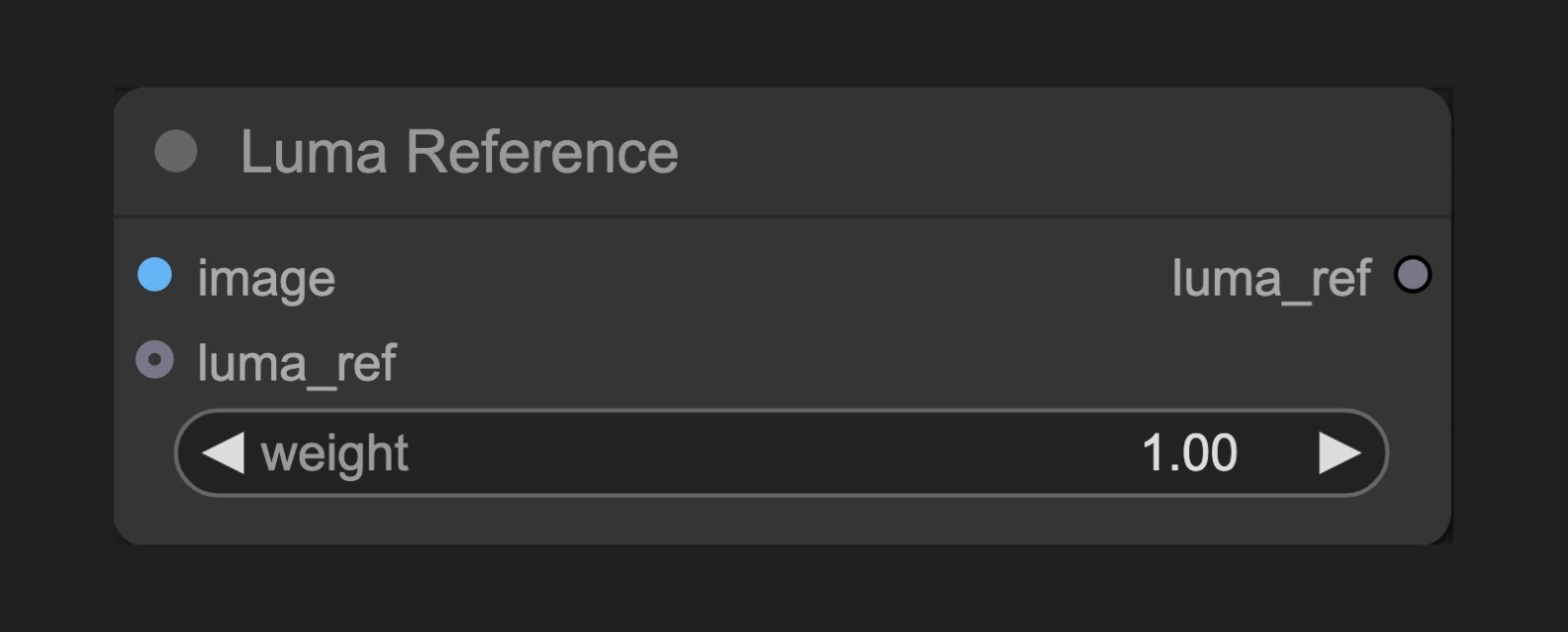 The Luma Reference node allows you to set reference images and weights to guide the creation process of Luma image generation nodes, making the generated images closer to specific features of the reference images.
## Node Function
This node works as a helper tool for Luma generation nodes, allowing users to provide reference images to influence generation results. It enables users to set the weight of reference images to control how much they affect the final result.
Multiple Luma Reference nodes can be chained together, with a maximum of 4 working simultaneously according to API requirements.
## Parameters
### Basic Parameters
| Parameter | Type | Default | Description |
| --------- | ----- | ------- | -------------------------------------------------------------- |
| image | Image | - | Input image used as reference |
| weight | Float | 1.0 | Controls the strength of the reference image's influence (0-1) |
### Output
| Output | Type | Description |
| --------- | --------- | -------------------------------------------- |
| luma\_ref | LUMA\_REF | Reference object containing image and weight |
## Usage Example
Luma Text to Image Workflow Example
## How It Works
The Luma Reference node receives image input and allows setting a weight value. The node doesn't directly generate or modify images but creates a reference object containing image data and weight information, which is then passed to Luma generation nodes.
During the generation process, Luma AI analyzes the features of the reference image and incorporates these features into the generation results based on the set weight. Higher weight values mean the generated image will be closer to the reference image's features, while lower weight values indicate the reference image will only slightly influence the final result.
## Source Code
\[Node Source Code (Updated on 2025-05-03)]
```python theme={null}
class LumaReferenceNode(ComfyNodeABC):
"""
Holds an image and weight for use with Luma Generate Image node.
"""
RETURN_TYPES = (LumaIO.LUMA_REF,)
RETURN_NAMES = ("luma_ref",)
DESCRIPTION = cleandoc(__doc__ or "") # Handle potential None value
FUNCTION = "create_luma_reference"
CATEGORY = "api node/image/Luma"
@classmethod
def INPUT_TYPES(s):
return {
"required": {
"image": (
IO.IMAGE,
{
"tooltip": "Image to use as reference.",
},
),
"weight": (
IO.FLOAT,
{
"default": 1.0,
"min": 0.0,
"max": 1.0,
"step": 0.01,
"tooltip": "Weight of image reference.",
},
),
},
"optional": {"luma_ref": (LumaIO.LUMA_REF,)},
}
def create_luma_reference(
self, image: torch.Tensor, weight: float, luma_ref: LumaReferenceChain = None
):
if luma_ref is not None:
luma_ref = luma_ref.clone()
else:
luma_ref = LumaReferenceChain()
luma_ref.add(LumaReference(image=image, weight=round(weight, 2)))
return (luma_ref,)
```
The Luma Reference node allows you to set reference images and weights to guide the creation process of Luma image generation nodes, making the generated images closer to specific features of the reference images.
## Node Function
This node works as a helper tool for Luma generation nodes, allowing users to provide reference images to influence generation results. It enables users to set the weight of reference images to control how much they affect the final result.
Multiple Luma Reference nodes can be chained together, with a maximum of 4 working simultaneously according to API requirements.
## Parameters
### Basic Parameters
| Parameter | Type | Default | Description |
| --------- | ----- | ------- | -------------------------------------------------------------- |
| image | Image | - | Input image used as reference |
| weight | Float | 1.0 | Controls the strength of the reference image's influence (0-1) |
### Output
| Output | Type | Description |
| --------- | --------- | -------------------------------------------- |
| luma\_ref | LUMA\_REF | Reference object containing image and weight |
## Usage Example
Luma Text to Image Workflow Example
## How It Works
The Luma Reference node receives image input and allows setting a weight value. The node doesn't directly generate or modify images but creates a reference object containing image data and weight information, which is then passed to Luma generation nodes.
During the generation process, Luma AI analyzes the features of the reference image and incorporates these features into the generation results based on the set weight. Higher weight values mean the generated image will be closer to the reference image's features, while lower weight values indicate the reference image will only slightly influence the final result.
## Source Code
\[Node Source Code (Updated on 2025-05-03)]
```python theme={null}
class LumaReferenceNode(ComfyNodeABC):
"""
Holds an image and weight for use with Luma Generate Image node.
"""
RETURN_TYPES = (LumaIO.LUMA_REF,)
RETURN_NAMES = ("luma_ref",)
DESCRIPTION = cleandoc(__doc__ or "") # Handle potential None value
FUNCTION = "create_luma_reference"
CATEGORY = "api node/image/Luma"
@classmethod
def INPUT_TYPES(s):
return {
"required": {
"image": (
IO.IMAGE,
{
"tooltip": "Image to use as reference.",
},
),
"weight": (
IO.FLOAT,
{
"default": 1.0,
"min": 0.0,
"max": 1.0,
"step": 0.01,
"tooltip": "Weight of image reference.",
},
),
},
"optional": {"luma_ref": (LumaIO.LUMA_REF,)},
}
def create_luma_reference(
self, image: torch.Tensor, weight: float, luma_ref: LumaReferenceChain = None
):
if luma_ref is not None:
luma_ref = luma_ref.clone()
else:
luma_ref = LumaReferenceChain()
luma_ref.add(LumaReference(image=image, weight=round(weight, 2)))
return (luma_ref,)
```