> ## Documentation Index
> Fetch the complete documentation index at: https://docs.comfy.org/llms.txt
> Use this file to discover all available pages before exploring further.
# Overview
Custom nodes allow you to implement new features and share them with the wider community.
A custom node is like any Comfy node: it takes input, does something to it, and produces an output.
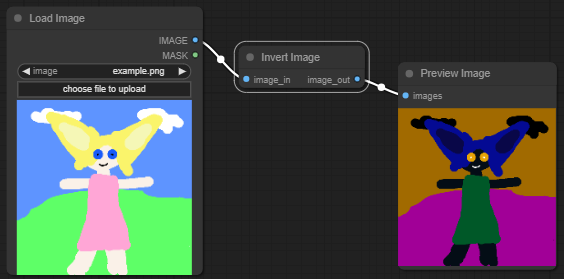
While some custom nodes perform highly complex tasks, many just do one thing. Here's an example of a
simple node that takes an image and inverts it.
 Custom node examples:
* [cookiecutter-comfy-extension](https://github.com/Comfy-Org/cookiecutter-comfy-extension)
* [ComfyUI-React-Extension-Template](https://github.com/Comfy-Org/ComfyUI-React-Extension-Template)
* [ComfyUI\_frontend\_vue\_basic](https://github.com/jtydhr88/ComfyUI_frontend_vue_basic)
If you use Claude Code for development, the [ComfyUI Custom Node Skills](https://github.com/jtydhr88/comfyui-custom-node-skills) provide Claude with comprehensive knowledge of the ComfyUI node system, covering both the V3 and V1 APIs. Install it from the Claude Code marketplace or add the repository URL to get 9 skills covering node basics, inputs, outputs, datatypes, advanced patterns, frontend extensions, and packaging.
## Client-Server Model
Comfy runs in a client-server model. The server, written in Python, handles all the real work: data-processing, models, image diffusion etc. The client, written in Javascript, handles the user interface.
Comfy can also be used in API mode, in which a workflow is sent to the server by a non-Comfy client (such as another UI, or a command line script).
Custom nodes can be placed into one of four categories:
### Server side only
The majority of Custom Nodes run purely on the server side, by defining a Python class that specifies the input and output types, and provides a function that can be called to process inputs and produce an output.
### Client side only
A few Custom Nodes provide a modification to the client UI, but do not add core functionality. Despite the name, they may not even add new nodes to the system.
### Independent Client and Server
Custom nodes may provide additional server features, and additional (related) UI features (such as a new widget to deal with a new data type). In most cases, communication between the client and server can be handled by the Comfy data flow control.
### Connected Client and Server
In a small number of cases, the UI features and the server need to interact with each other directly.
Any node that requires Client-Server communication will not be compatible with use through the API.
Custom node examples:
* [cookiecutter-comfy-extension](https://github.com/Comfy-Org/cookiecutter-comfy-extension)
* [ComfyUI-React-Extension-Template](https://github.com/Comfy-Org/ComfyUI-React-Extension-Template)
* [ComfyUI\_frontend\_vue\_basic](https://github.com/jtydhr88/ComfyUI_frontend_vue_basic)
If you use Claude Code for development, the [ComfyUI Custom Node Skills](https://github.com/jtydhr88/comfyui-custom-node-skills) provide Claude with comprehensive knowledge of the ComfyUI node system, covering both the V3 and V1 APIs. Install it from the Claude Code marketplace or add the repository URL to get 9 skills covering node basics, inputs, outputs, datatypes, advanced patterns, frontend extensions, and packaging.
## Client-Server Model
Comfy runs in a client-server model. The server, written in Python, handles all the real work: data-processing, models, image diffusion etc. The client, written in Javascript, handles the user interface.
Comfy can also be used in API mode, in which a workflow is sent to the server by a non-Comfy client (such as another UI, or a command line script).
Custom nodes can be placed into one of four categories:
### Server side only
The majority of Custom Nodes run purely on the server side, by defining a Python class that specifies the input and output types, and provides a function that can be called to process inputs and produce an output.
### Client side only
A few Custom Nodes provide a modification to the client UI, but do not add core functionality. Despite the name, they may not even add new nodes to the system.
### Independent Client and Server
Custom nodes may provide additional server features, and additional (related) UI features (such as a new widget to deal with a new data type). In most cases, communication between the client and server can be handled by the Comfy data flow control.
### Connected Client and Server
In a small number of cases, the UI features and the server need to interact with each other directly.
Any node that requires Client-Server communication will not be compatible with use through the API.