> ## Documentation Index
> Fetch the complete documentation index at: https://docs.comfy.org/llms.txt
> Use this file to discover all available pages before exploring further.
# Models
> How model files fit into ComfyUI workflows: where they go, how to load them, and common fixes.
## Models in plain terms
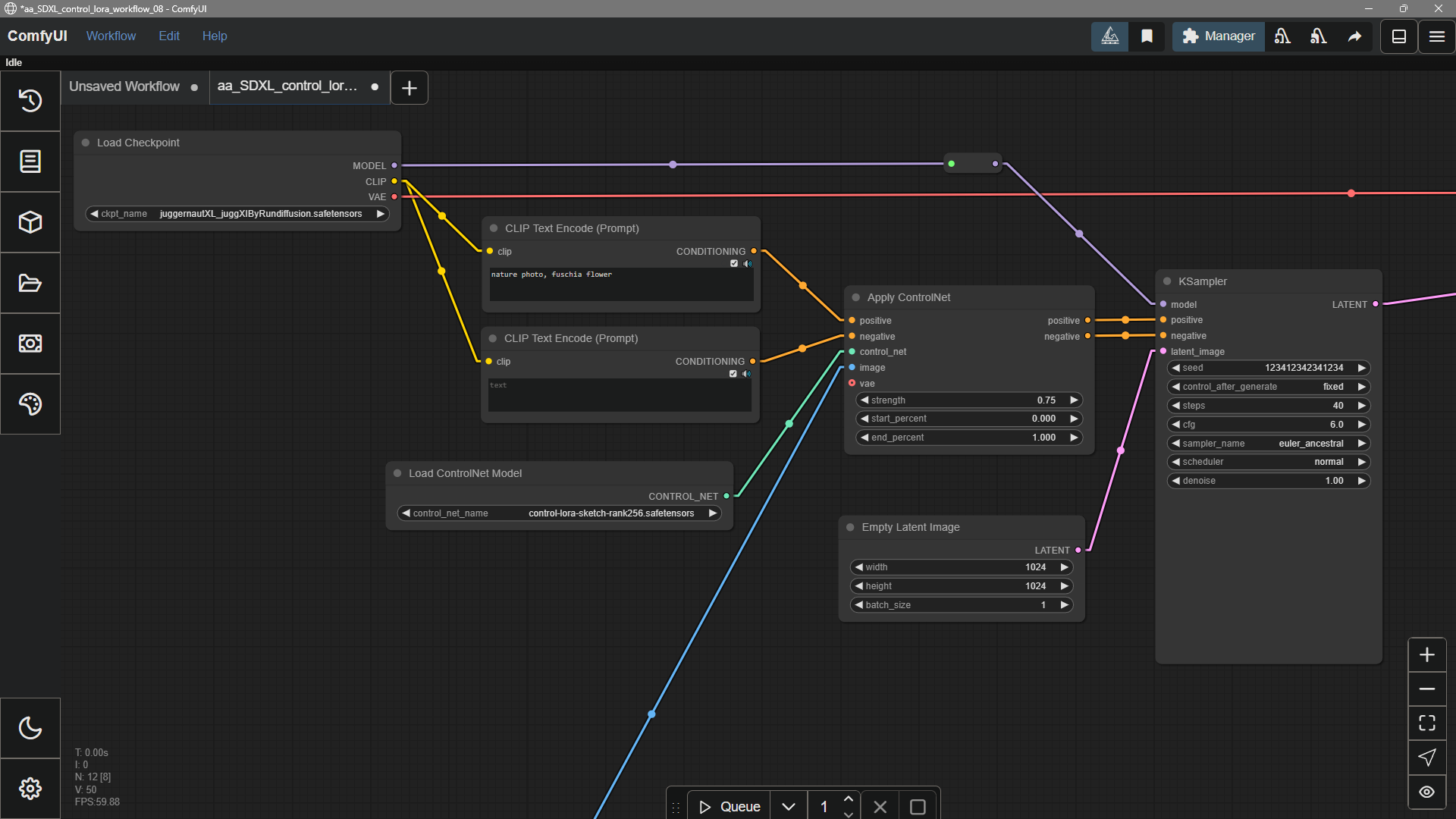
In ComfyUI, **models** are the weight files that actually run your workflow—things like **checkpoints**, **VAEs**, **LoRAs**, **ControlNets**, and upscalers. The app install is small; these files are **not** included by default. You usually **download them from the web**, place them under `ComfyUI/models/` (or follow a template’s prompts), then choose the file in the right **loader node** (on the canvas, these often appear as nodes whose names start with **Load**).
### Supported models in ComfyUI
* **Built-in / first-party coverage is intentionally limited** but grows over time as ComfyUI and the open-source ecosystem evolve. When a model gains first-class support, you will **usually see a new entry in the [workflow template library](/interface/features/template)** that shows the expected graph and model pairing.
* **Not every checkpoint or weights file works out of the box.** For **natively supported models and their common companion weights**, keep ComfyUI **[up to date](/installation/update_comfyui)** and confirm the matching workflow exists in the **[template library](/interface/features/template)** before assuming your files are in the wrong place.
* **Many other models are enabled through community custom nodes.** Paths, loader nodes, and graph layout can differ from this page’s generic `ComfyUI/models/` guidance—**always follow each project’s README or docs**. ComfyUI is highly extensible, so implementations vary by author. For installation and troubleshooting, see [How to install custom nodes](/installation/install_custom_node).
## Use models in ComfyUI
1. **Get the files into the right place** — Download from community sites such as [Hugging Face](https://huggingface.co), [Civitai](https://civitai.green), or a project’s page on [GitHub](https://github.com), then put them under `ComfyUI/models/` in the subfolder for that type (for example `checkpoints`, `loras`, `vae`).
2. **Add the matching loader node** — Pick the loader for that model type (checkpoint, LoRA, VAE, etc.); in the node list, titles often begin with **Load**.
3. **Pick the file** in that loader node’s dropdown.
4. **Wire the loader node** into the rest of the graph. If you copied files in by hand while ComfyUI was open, **restart** the app (or refresh as needed) so lists update.
### Expect large downloads
A single generative model is often **many gigabytes**. Budget disk space and time when downloading or syncing.
## Beyond the main checkpoint
The main diffusion checkpoint does a lot, but many workflows add **smaller helper models**, for example:
* **LoRA** — lightweight add-ons tuned for a style, character, or concept
* **ControlNet** — extra guidance from edges, depth, pose, etc.
* **Inpainting** — fill or replace regions inside an existing image
 ## Uninstalling models
There is no “uninstall” button in the UI yet. To remove a model, **delete its file** (or files) from the folder under `ComfyUI/models/` where you put it.
## Adding Extra Model Paths
If you want to manage your model files outside of `ComfyUI/models`, you may have the following reasons:
* You have multiple ComfyUI instances and want them to share model files to save disk space
* You have different types of GUI programs (such as WebUI) and want them to use the same model files
* Model files cannot be recognized or found
We provide a way to add extra model search paths via the `extra_model_paths.yaml` configuration file
### Open Config File
For the ComfyUI version such as [portable](/installation/comfyui_portable_windows) and [manual](/installation/manual_install), you can find an example file named `extra_model_paths.yaml.example` in the root directory of ComfyUI:
```
ComfyUI/extra_model_paths.yaml.example
```
Copy and rename it to `extra_model_paths.yaml` for use. Keep it in ComfyUI's root directory at `ComfyUI/extra_model_paths.yaml`.
You can also find the config example file [here](https://github.com/Comfy-Org/ComfyUI/blob/master/extra_model_paths.yaml.example)
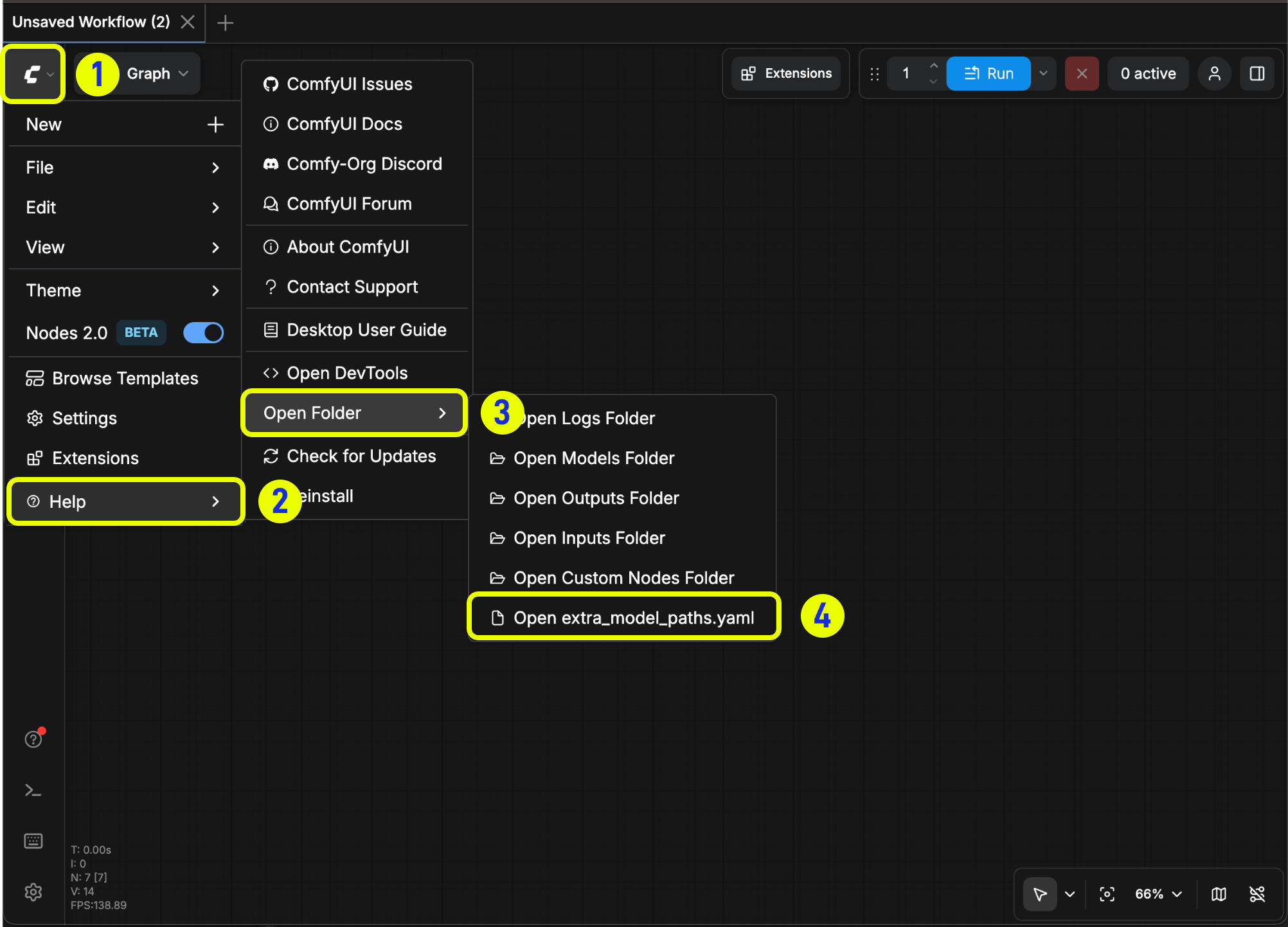
If you are using the [Comfy Desktop](/installation/desktop/windows) application, you can follow the image below to open the extra model config file:
## Uninstalling models
There is no “uninstall” button in the UI yet. To remove a model, **delete its file** (or files) from the folder under `ComfyUI/models/` where you put it.
## Adding Extra Model Paths
If you want to manage your model files outside of `ComfyUI/models`, you may have the following reasons:
* You have multiple ComfyUI instances and want them to share model files to save disk space
* You have different types of GUI programs (such as WebUI) and want them to use the same model files
* Model files cannot be recognized or found
We provide a way to add extra model search paths via the `extra_model_paths.yaml` configuration file
### Open Config File
For the ComfyUI version such as [portable](/installation/comfyui_portable_windows) and [manual](/installation/manual_install), you can find an example file named `extra_model_paths.yaml.example` in the root directory of ComfyUI:
```
ComfyUI/extra_model_paths.yaml.example
```
Copy and rename it to `extra_model_paths.yaml` for use. Keep it in ComfyUI's root directory at `ComfyUI/extra_model_paths.yaml`.
You can also find the config example file [here](https://github.com/Comfy-Org/ComfyUI/blob/master/extra_model_paths.yaml.example)
If you are using the [Comfy Desktop](/installation/desktop/windows) application, you can follow the image below to open the extra model config file:
 Or open it directly at:
```
C:\Users\YourUsername\AppData\Roaming\ComfyUI\extra_models_config.yaml
```
```
~/Library/Application Support/ComfyUI/extra_models_config.yaml
```
You should keep the file in the same directory, should not move these files to other places.
If the file does not exist, you can create it yourself with any text editor.
### Example Structure
Suppose you want to add the following model paths to ComfyUI:
```
📁 YOUR_PATH/
├── 📁models/
| ├── 📁 loras/
| │ └── xxxxx.safetensors
| ├── 📁 checkpoints/
| │ └── xxxxx.safetensors
| ├── 📁 vae/
| │ └── xxxxx.safetensors
| └── 📁 controlnet/
| └── xxxxx.safetensors
```
Then you can configure the `extra_model_paths.yaml` file like below to let ComfyUI recognize the model paths on your device:
```
my_custom_config:
base_path: YOUR_PATH
loras: models/loras/
checkpoints: models/checkpoints/
vae: models/vae/
controlnet: models/controlnet/
```
or
```
my_custom_config:
base_path: YOUR_PATH/models/
loras: loras
checkpoints: checkpoints
vae: vae
controlnet: controlnet
```
For the desktop version, please add the configuration to the existing configuration path without overwriting the path configuration generated during installation. Please back up the corresponding file before modification, so that you can restore it when you make a mistake.
Or you can refer to the default [extra\_model\_paths.yaml.example](https://github.com/Comfy-Org/ComfyUI/blob/master/extra_model_paths.yaml.example) for more configuration options. After saving, you need to **restart ComfyUI** for the changes to take effect.
Below is the original config example:
```yaml theme={null}
#Rename this to extra_model_paths.yaml and ComfyUI will load it
#config for a1111 ui
#all you have to do is change the base_path to where yours is installed
a111:
base_path: path/to/stable-diffusion-webui/
checkpoints: models/Stable-diffusion
configs: models/Stable-diffusion
vae: models/VAE
loras: |
models/Lora
models/LyCORIS
upscale_models: |
models/ESRGAN
models/RealESRGAN
models/SwinIR
embeddings: embeddings
hypernetworks: models/hypernetworks
controlnet: models/ControlNet
#config for comfyui
#your base path should be either an existing comfy install or a central folder where you store all of your models, loras, etc.
#comfyui:
# base_path: path/to/comfyui/
# # You can use is_default to mark that these folders should be listed first, and used as the default dirs for eg downloads
# #is_default: true
# checkpoints: models/checkpoints/
# clip: models/clip/
# clip_vision: models/clip_vision/
# configs: models/configs/
# controlnet: models/controlnet/
# diffusion_models: |
# models/diffusion_models
# models/unet
# embeddings: models/embeddings/
# loras: models/loras/
# upscale_models: models/upscale_models/
# vae: models/vae/
#other_ui:
# base_path: path/to/ui
# checkpoints: models/checkpoints
# gligen: models/gligen
# custom_nodes: path/custom_nodes
```
For example, if your WebUI is located at `D:\stable-diffusion-webui\`, you can modify the corresponding configuration to
```yaml theme={null}
a111:
base_path: D:\stable-diffusion-webui\
checkpoints: models/Stable-diffusion
configs: models/Stable-diffusion
vae: models/VAE
loras: |
models/Lora
models/LyCORIS
upscale_models: |
models/ESRGAN
models/RealESRGAN
models/SwinIR
embeddings: embeddings
hypernetworks: models/hypernetworks
controlnet: models/ControlNet
```
### Add Extra Custom Nodes Path
Besides adding external models, you can also add custom nodes paths that are not in the default path of ComfyUI
Please note that this will not change the default installation path of custom nodes, but will add an extra path search when starting ComfyUI. You still need to complete the installation of custom node dependencies in the corresponding environment to ensure the integrity of the running environment.
Below is a simple configuration example (MacOS), please modify it according to your actual situation and add it to the corresponding configuration file, save it and restart ComfyUI for the changes to take effect:
```yaml theme={null}
my_custom_nodes:
custom_nodes: /Users/your_username/Documents/extra_custom_nodes
```
## Common issues
ComfyUI does not natively support GGUF format models. To use GGUF models, you need to install community custom nodes such as [ComfyUI-GGUF](https://github.com/city96/ComfyUI-GGUF).
If you've installed a model but can't find it in ComfyUI, try these steps:
* Verify the model is in the correct location:
* For **Comfy Desktop**: Go to **Help** menu → **Open Folder** → **Open Model Folder** to check the model installation path
* Ensure your model file is placed in the correct subfolder (e.g., `checkpoints`, `loras`, `vae`)
* Press the `r` key to refresh node definitions so ComfyUI can detect the model
* Restart ComfyUI
* Ensure the correct model is selected in the loader node
## Want a bit more background?
Here, a **model** is a data file that encodes what a network learned—enough to turn inputs (like text and noise) into outputs (like an image). Common examples in image workflows are **diffusion** checkpoints, text/image encoders such as **CLIP**, and **upscalers** like RealESRGAN.
Large **base** models from labs and open-source projects are general-purpose. The community often **fine-tunes** or merges them into new checkpoints and LoRAs that look better for a given style, run a bit lighter, or add new behavior—same idea as picking a favorite checkpoint on Civitai or Hugging Face.
Or open it directly at:
```
C:\Users\YourUsername\AppData\Roaming\ComfyUI\extra_models_config.yaml
```
```
~/Library/Application Support/ComfyUI/extra_models_config.yaml
```
You should keep the file in the same directory, should not move these files to other places.
If the file does not exist, you can create it yourself with any text editor.
### Example Structure
Suppose you want to add the following model paths to ComfyUI:
```
📁 YOUR_PATH/
├── 📁models/
| ├── 📁 loras/
| │ └── xxxxx.safetensors
| ├── 📁 checkpoints/
| │ └── xxxxx.safetensors
| ├── 📁 vae/
| │ └── xxxxx.safetensors
| └── 📁 controlnet/
| └── xxxxx.safetensors
```
Then you can configure the `extra_model_paths.yaml` file like below to let ComfyUI recognize the model paths on your device:
```
my_custom_config:
base_path: YOUR_PATH
loras: models/loras/
checkpoints: models/checkpoints/
vae: models/vae/
controlnet: models/controlnet/
```
or
```
my_custom_config:
base_path: YOUR_PATH/models/
loras: loras
checkpoints: checkpoints
vae: vae
controlnet: controlnet
```
For the desktop version, please add the configuration to the existing configuration path without overwriting the path configuration generated during installation. Please back up the corresponding file before modification, so that you can restore it when you make a mistake.
Or you can refer to the default [extra\_model\_paths.yaml.example](https://github.com/Comfy-Org/ComfyUI/blob/master/extra_model_paths.yaml.example) for more configuration options. After saving, you need to **restart ComfyUI** for the changes to take effect.
Below is the original config example:
```yaml theme={null}
#Rename this to extra_model_paths.yaml and ComfyUI will load it
#config for a1111 ui
#all you have to do is change the base_path to where yours is installed
a111:
base_path: path/to/stable-diffusion-webui/
checkpoints: models/Stable-diffusion
configs: models/Stable-diffusion
vae: models/VAE
loras: |
models/Lora
models/LyCORIS
upscale_models: |
models/ESRGAN
models/RealESRGAN
models/SwinIR
embeddings: embeddings
hypernetworks: models/hypernetworks
controlnet: models/ControlNet
#config for comfyui
#your base path should be either an existing comfy install or a central folder where you store all of your models, loras, etc.
#comfyui:
# base_path: path/to/comfyui/
# # You can use is_default to mark that these folders should be listed first, and used as the default dirs for eg downloads
# #is_default: true
# checkpoints: models/checkpoints/
# clip: models/clip/
# clip_vision: models/clip_vision/
# configs: models/configs/
# controlnet: models/controlnet/
# diffusion_models: |
# models/diffusion_models
# models/unet
# embeddings: models/embeddings/
# loras: models/loras/
# upscale_models: models/upscale_models/
# vae: models/vae/
#other_ui:
# base_path: path/to/ui
# checkpoints: models/checkpoints
# gligen: models/gligen
# custom_nodes: path/custom_nodes
```
For example, if your WebUI is located at `D:\stable-diffusion-webui\`, you can modify the corresponding configuration to
```yaml theme={null}
a111:
base_path: D:\stable-diffusion-webui\
checkpoints: models/Stable-diffusion
configs: models/Stable-diffusion
vae: models/VAE
loras: |
models/Lora
models/LyCORIS
upscale_models: |
models/ESRGAN
models/RealESRGAN
models/SwinIR
embeddings: embeddings
hypernetworks: models/hypernetworks
controlnet: models/ControlNet
```
### Add Extra Custom Nodes Path
Besides adding external models, you can also add custom nodes paths that are not in the default path of ComfyUI
Please note that this will not change the default installation path of custom nodes, but will add an extra path search when starting ComfyUI. You still need to complete the installation of custom node dependencies in the corresponding environment to ensure the integrity of the running environment.
Below is a simple configuration example (MacOS), please modify it according to your actual situation and add it to the corresponding configuration file, save it and restart ComfyUI for the changes to take effect:
```yaml theme={null}
my_custom_nodes:
custom_nodes: /Users/your_username/Documents/extra_custom_nodes
```
## Common issues
ComfyUI does not natively support GGUF format models. To use GGUF models, you need to install community custom nodes such as [ComfyUI-GGUF](https://github.com/city96/ComfyUI-GGUF).
If you've installed a model but can't find it in ComfyUI, try these steps:
* Verify the model is in the correct location:
* For **Comfy Desktop**: Go to **Help** menu → **Open Folder** → **Open Model Folder** to check the model installation path
* Ensure your model file is placed in the correct subfolder (e.g., `checkpoints`, `loras`, `vae`)
* Press the `r` key to refresh node definitions so ComfyUI can detect the model
* Restart ComfyUI
* Ensure the correct model is selected in the loader node
## Want a bit more background?
Here, a **model** is a data file that encodes what a network learned—enough to turn inputs (like text and noise) into outputs (like an image). Common examples in image workflows are **diffusion** checkpoints, text/image encoders such as **CLIP**, and **upscalers** like RealESRGAN.
Large **base** models from labs and open-source projects are general-purpose. The community often **fine-tunes** or merges them into new checkpoints and LoRAs that look better for a given style, run a bit lighter, or add new behavior—same idea as picking a favorite checkpoint on Civitai or Hugging Face.