> ## Documentation Index
> Fetch the complete documentation index at: https://docs.comfy.org/llms.txt
> Use this file to discover all available pages before exploring further.
# Settings
> Global settings, theme, proxy/mirror configuration, and data locations
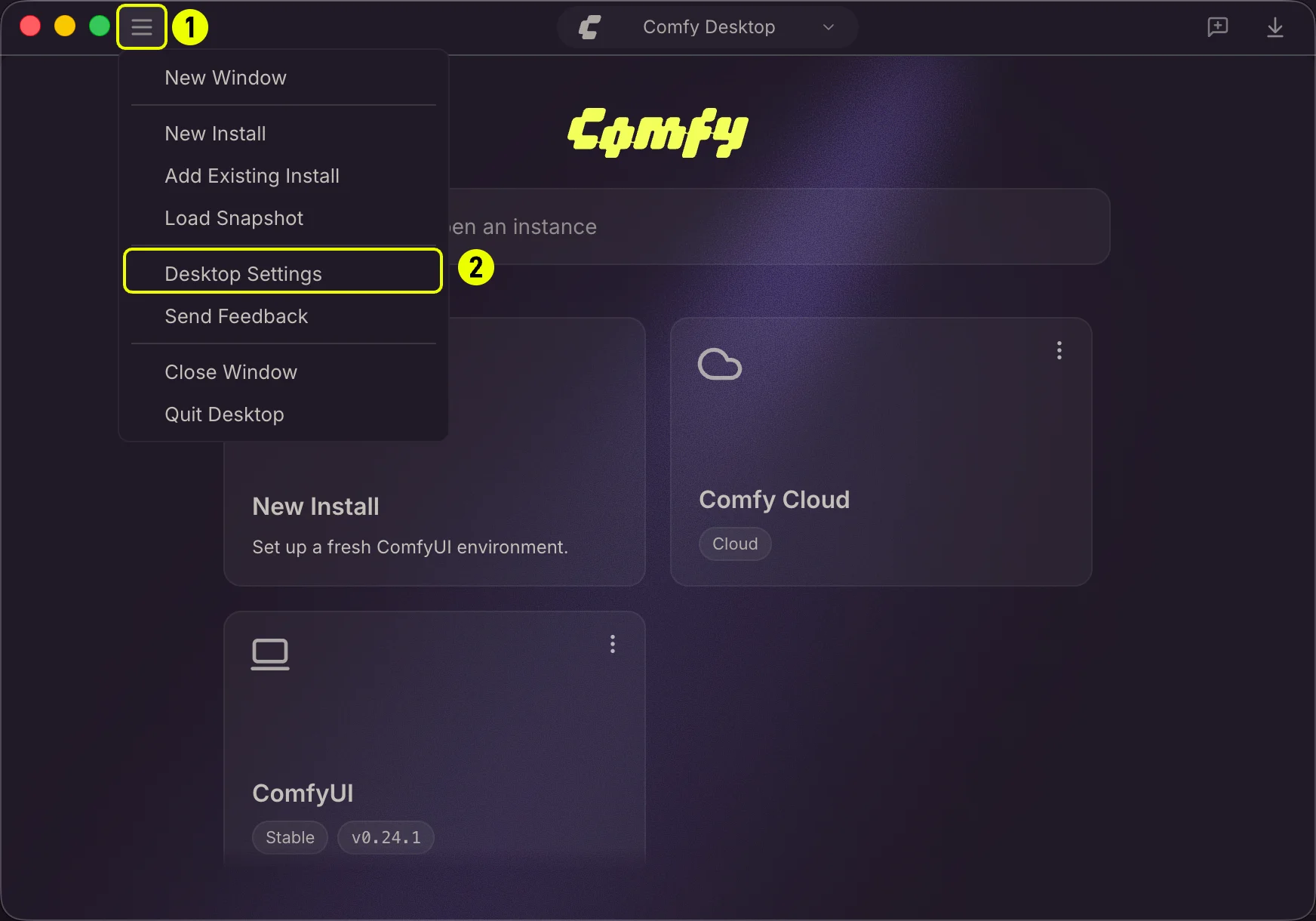
Click the ☰ menu (1) in the top-left corner and select **Desktop Settings** (2) to open the global settings panel.
 The settings panel is organized into four tabs. Click a tab in the sidebar to switch views.
## Preferences
The settings panel is organized into four tabs. Click a tab in the sidebar to switch views.
## Preferences
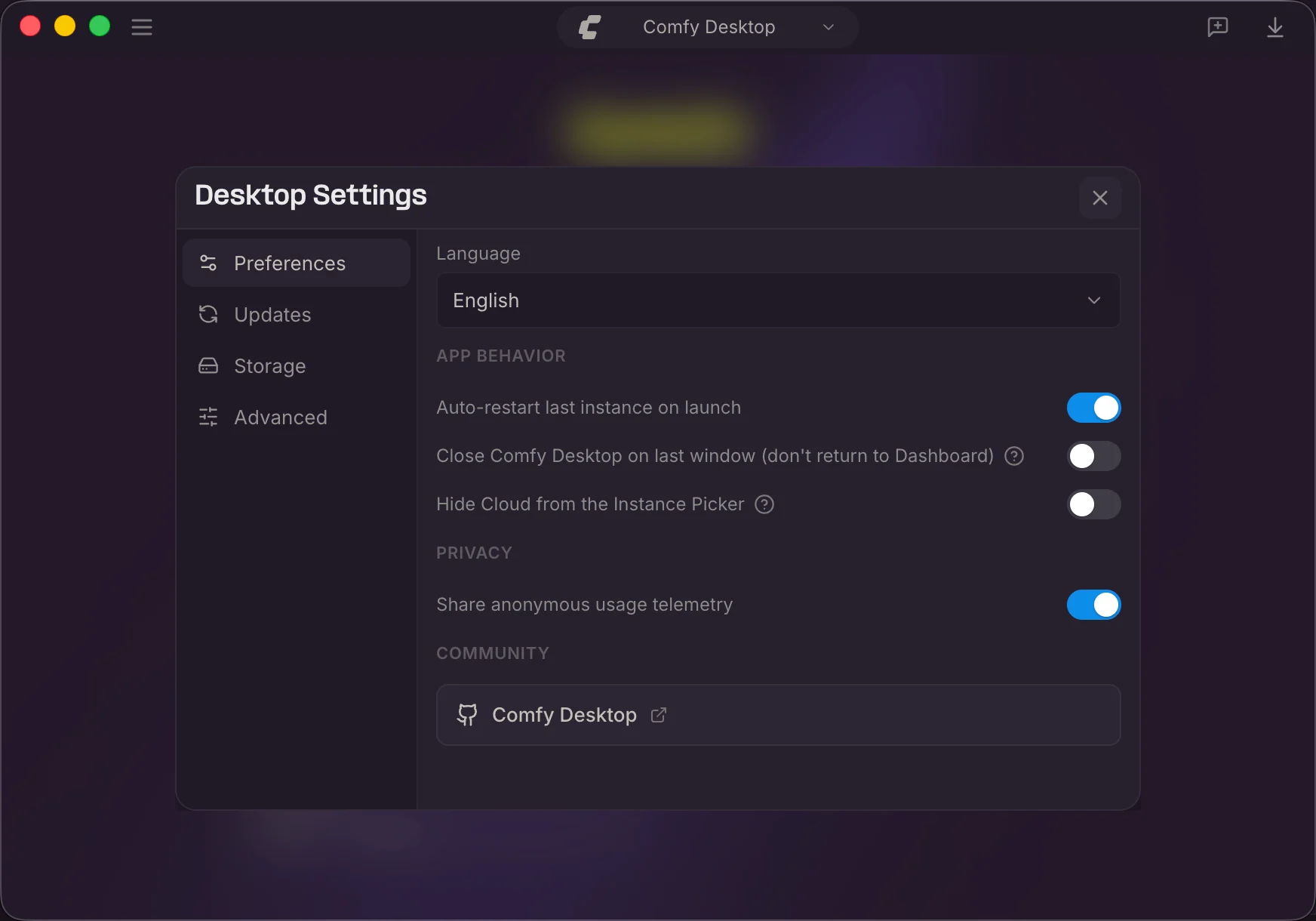 * **Language**:Choose the display language: **English** or **中文**.
* **Auto-restart last instance on launch** — Automatically start the last used instance on boot.
* **Close Comfy Desktop on last window (don't return to Dashboard)**:Fully exit instead of returning to the Dashboard when the last window closes.
* **Hide Cloud from the Instance Picker**:Hide cloud instances from the Chooser view.
* **Share anonymous usage telemetry**:Send anonymous usage data to help improve Comfy Desktop.
* **Comfy Desktop**:Link to the ComfyDesktop GitHub repository.
## Updates
* **Language**:Choose the display language: **English** or **中文**.
* **Auto-restart last instance on launch** — Automatically start the last used instance on boot.
* **Close Comfy Desktop on last window (don't return to Dashboard)**:Fully exit instead of returning to the Dashboard when the last window closes.
* **Hide Cloud from the Instance Picker**:Hide cloud instances from the Chooser view.
* **Share anonymous usage telemetry**:Send anonymous usage data to help improve Comfy Desktop.
* **Comfy Desktop**:Link to the ComfyDesktop GitHub repository.
## Updates
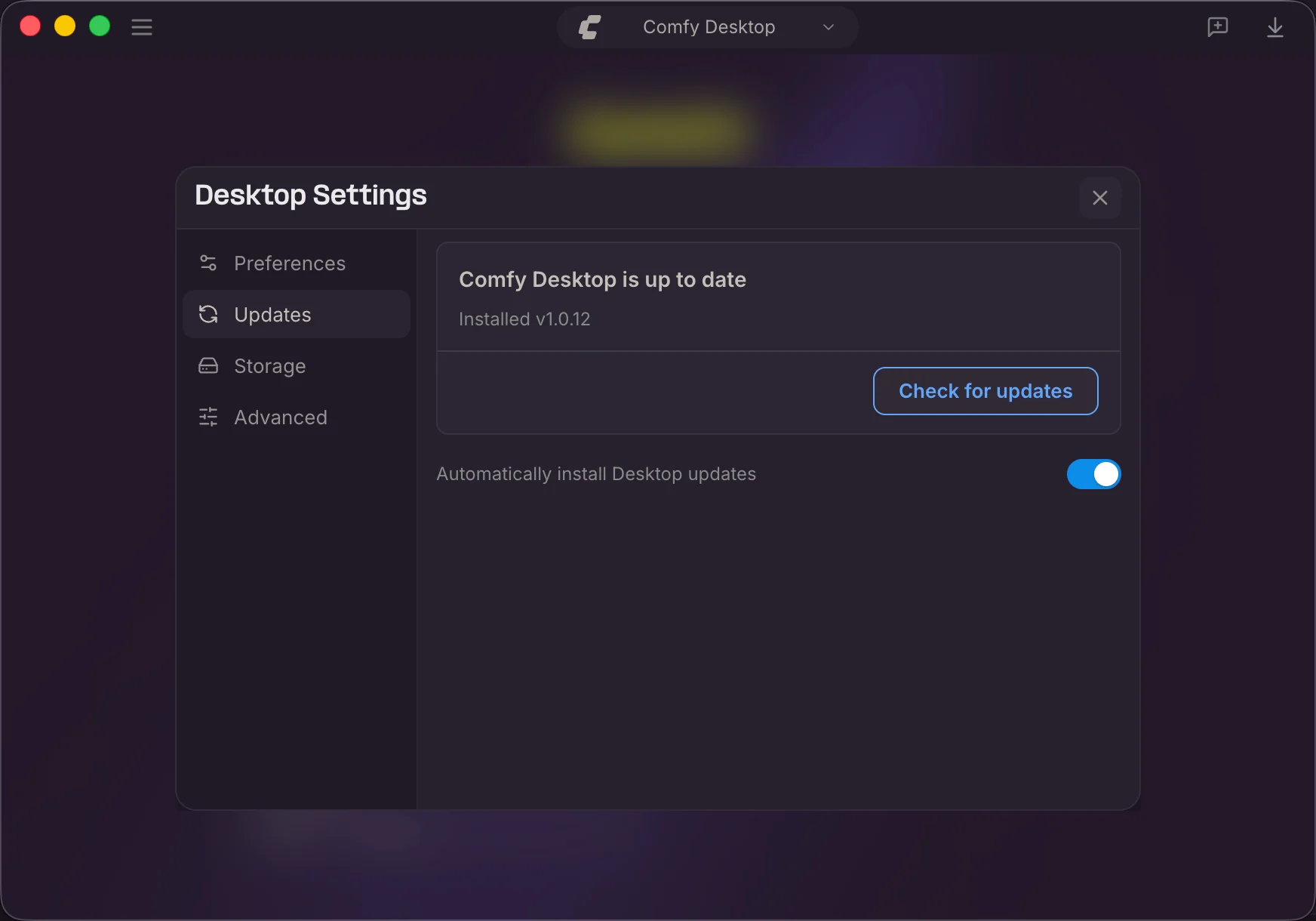 * **Status**:Shows whether Comfy Desktop is up to date, the installed version, and the last check time.
* **Check for updates**:Manually check for a new version. Button changes to **Download** → **Install** when an update is available.
* **Automatically install Desktop updates**:Auto-download and install updates in the background.
## Storage
The Storage tab is where you configure where Comfy Desktop finds and stores files. The key concept is **sharing**: instead of each instance having its own isolated models, inputs, and outputs, you set up shared directories accessible to all instances.
* **Status**:Shows whether Comfy Desktop is up to date, the installed version, and the last check time.
* **Check for updates**:Manually check for a new version. Button changes to **Download** → **Install** when an update is available.
* **Automatically install Desktop updates**:Auto-download and install updates in the background.
## Storage
The Storage tab is where you configure where Comfy Desktop finds and stores files. The key concept is **sharing**: instead of each instance having its own isolated models, inputs, and outputs, you set up shared directories accessible to all instances.
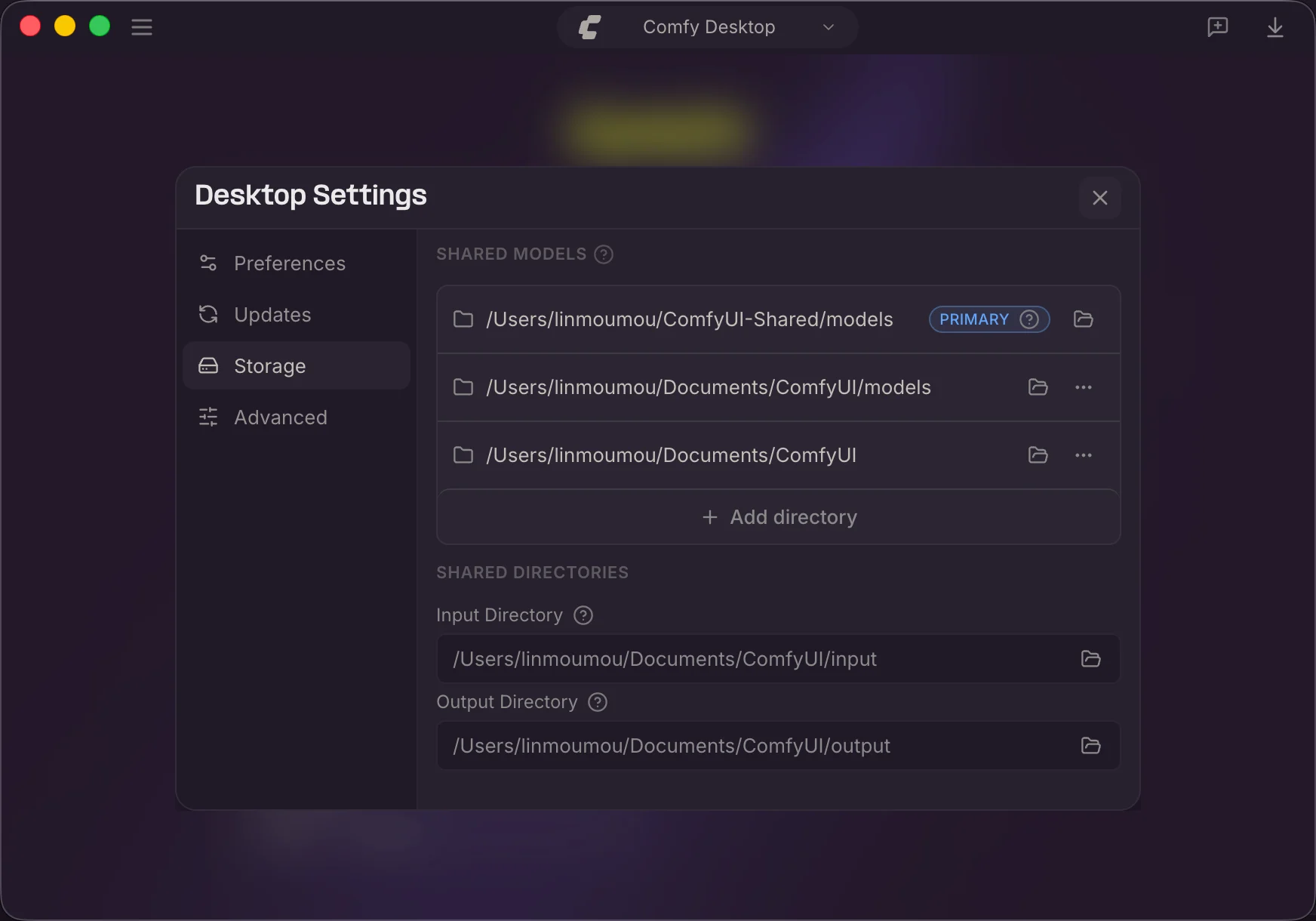 * **Shared Models**:Each directory listed here is scanned for models by every instance. The directory marked **Primary** is where new models are saved by default.
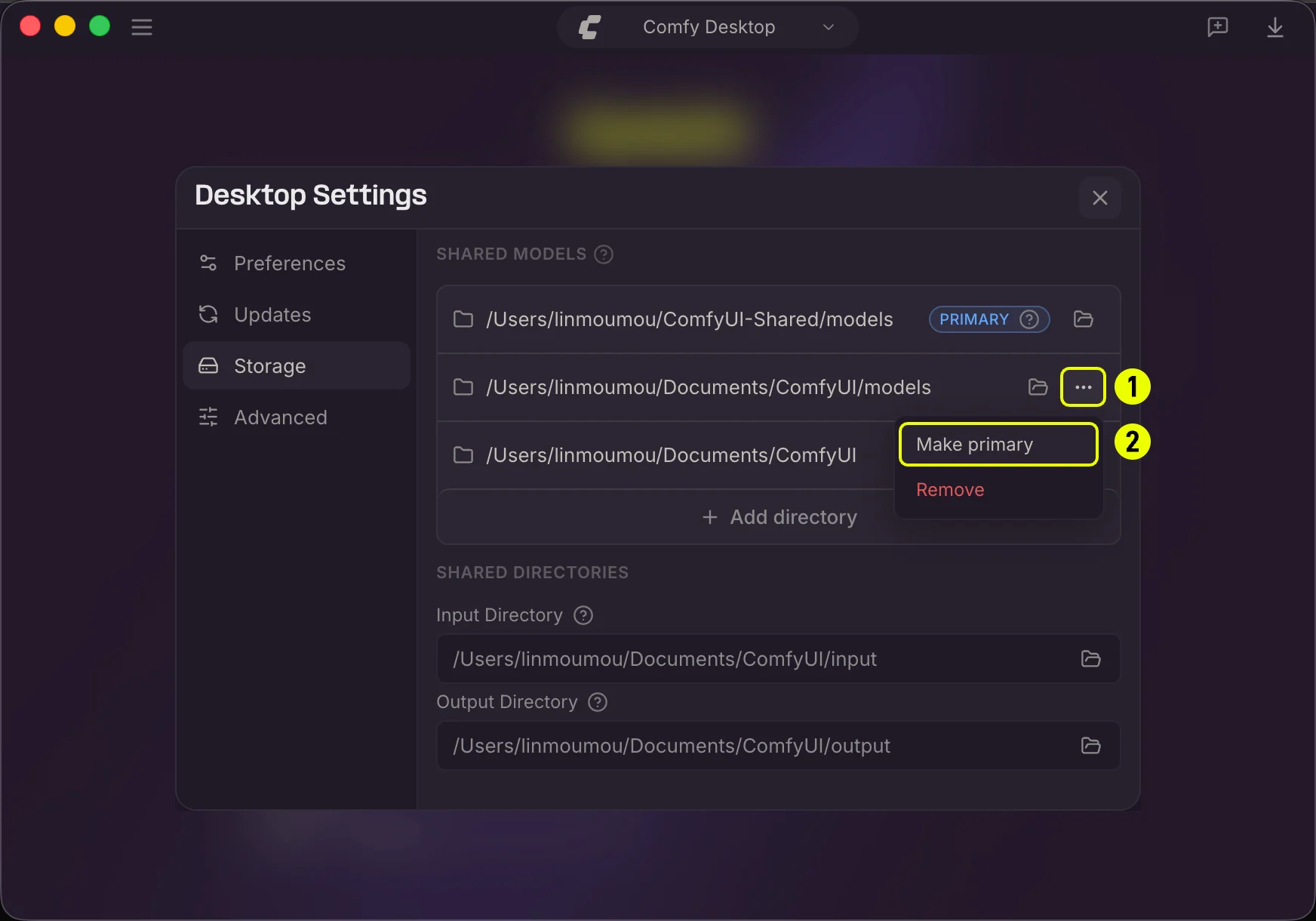 * Click the folder icon to open a directory in your file manager.
* Click the **...** menu (1) on a directory, then select **Make primary** (2) to change which directory new models save to.
* Click **+ Add directory** to add more model directories.
* **Input Directory**:A shared path where all instances look for input files (images, videos, etc.).
* **Output Directory**:A shared path where all instances save generated outputs. Customizing this lets you keep all results in one place.
* Click the folder icon to browse and select a new path. **?** tooltips provide additional details.
## Advanced
* Click the folder icon to open a directory in your file manager.
* Click the **...** menu (1) on a directory, then select **Make primary** (2) to change which directory new models save to.
* Click **+ Add directory** to add more model directories.
* **Input Directory**:A shared path where all instances look for input files (images, videos, etc.).
* **Output Directory**:A shared path where all instances save generated outputs. Customizing this lets you keep all results in one place.
* Click the folder icon to browse and select a new path. **?** tooltips provide additional details.
## Advanced
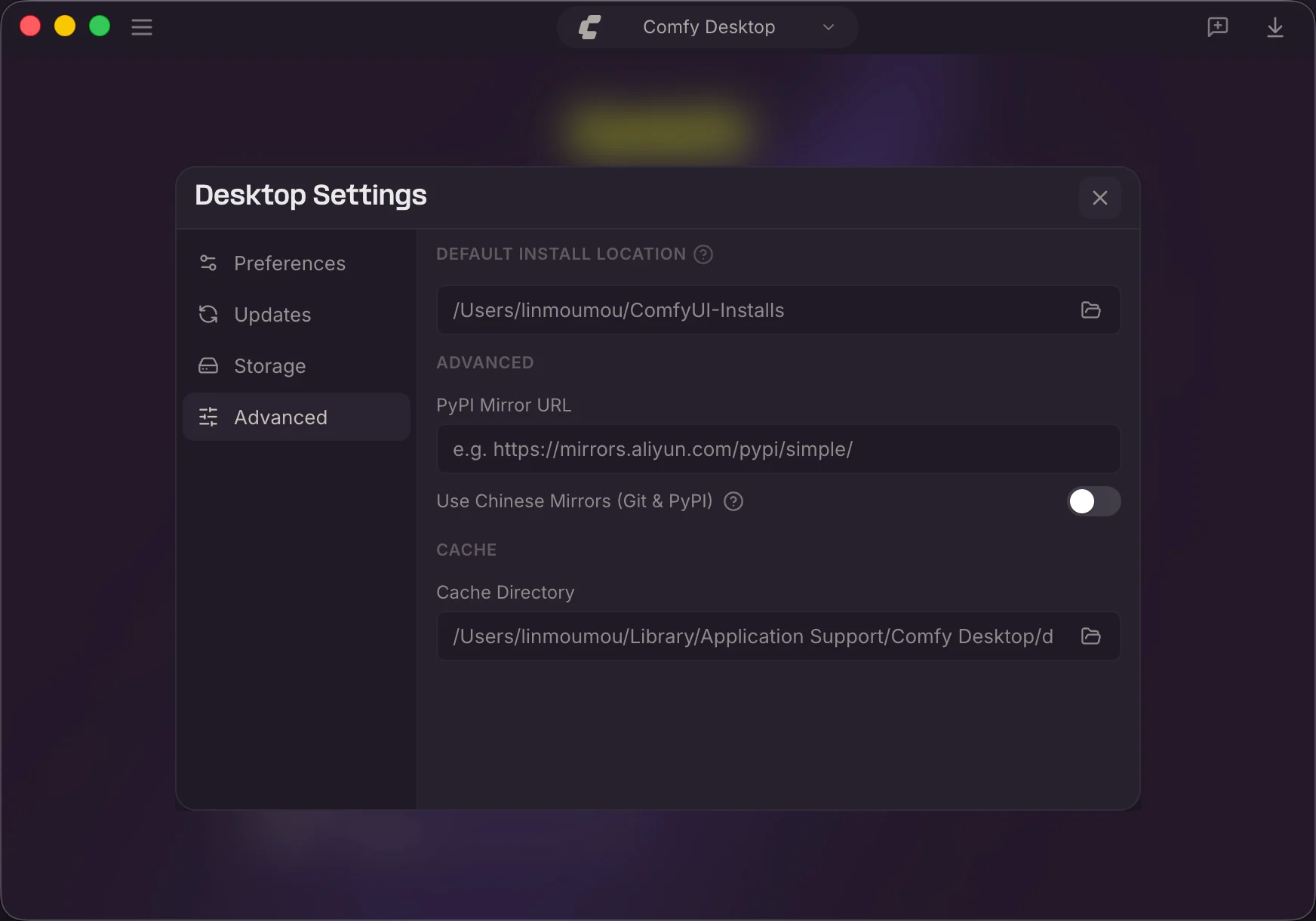 * **Default Install Location**:Where new standalone instances are created. Click the folder icon to change it.
* **PyPI Mirror URL**:Custom pip mirror (e.g., `https://mirrors.aliyun.com/pypi/simple/`).
* **Use Chinese Mirrors (Git & PyPI)**:Use Chinese mirror servers for Git and PyPI. Helpful in mainland China.
* **Cache Directory**:Where Comfy Desktop stores temporary and cached data. Click the folder icon to change it.
## Data Locations
Comfy Desktop stores data in platform-specific directories.
```
App data: %APPDATA%\Comfy Desktop
Logs: %APPDATA%\Comfy Desktop\logs
```
```
App data: ~/Library/Application Support/Comfy Desktop
Logs: ~/Library/Application Support/Comfy Desktop/logs
```
```
Config: ~/.config/Comfy Desktop
Data: ~/.local/share/Comfy Desktop
Cache: ~/.cache/Comfy Desktop
State: ~/.local/state/Comfy Desktop
```
## Keyboard Shortcuts
| Shortcut | Action |
| ------------------ | ----------------------------------- |
| `Ctrl+R` / `Cmd+R` | Reload the current ComfyUI instance |
| `Ctrl+W` / `Cmd+W` | Close the current window |
| `Escape` | Close a dialog or popup |
| `Ctrl+,` / `Cmd+,` | Open Comfy Desktop Settings |
## Feedback and Issues
Found a bug or have a suggestion? Comfy Desktop is open source. You can report issues and check planned features here:
* **Comfy Desktop issues** — [github.com/Comfy-Org/Comfy-Desktop/issues](https://github.com/Comfy-Org/Comfy-Desktop/issues)
* **Documentation issues** — [github.com/Comfy-Org/docs/issues](https://github.com/Comfy-Org/docs/issues)
For general questions about ComfyUI, visit the [ComfyUI GitHub Discussions](https://github.com/Comfy-Org/ComfyUI/discussions) or join the [ComfyUI Discord](https://www.comfy.org/discord).
* **Default Install Location**:Where new standalone instances are created. Click the folder icon to change it.
* **PyPI Mirror URL**:Custom pip mirror (e.g., `https://mirrors.aliyun.com/pypi/simple/`).
* **Use Chinese Mirrors (Git & PyPI)**:Use Chinese mirror servers for Git and PyPI. Helpful in mainland China.
* **Cache Directory**:Where Comfy Desktop stores temporary and cached data. Click the folder icon to change it.
## Data Locations
Comfy Desktop stores data in platform-specific directories.
```
App data: %APPDATA%\Comfy Desktop
Logs: %APPDATA%\Comfy Desktop\logs
```
```
App data: ~/Library/Application Support/Comfy Desktop
Logs: ~/Library/Application Support/Comfy Desktop/logs
```
```
Config: ~/.config/Comfy Desktop
Data: ~/.local/share/Comfy Desktop
Cache: ~/.cache/Comfy Desktop
State: ~/.local/state/Comfy Desktop
```
## Keyboard Shortcuts
| Shortcut | Action |
| ------------------ | ----------------------------------- |
| `Ctrl+R` / `Cmd+R` | Reload the current ComfyUI instance |
| `Ctrl+W` / `Cmd+W` | Close the current window |
| `Escape` | Close a dialog or popup |
| `Ctrl+,` / `Cmd+,` | Open Comfy Desktop Settings |
## Feedback and Issues
Found a bug or have a suggestion? Comfy Desktop is open source. You can report issues and check planned features here:
* **Comfy Desktop issues** — [github.com/Comfy-Org/Comfy-Desktop/issues](https://github.com/Comfy-Org/Comfy-Desktop/issues)
* **Documentation issues** — [github.com/Comfy-Org/docs/issues](https://github.com/Comfy-Org/docs/issues)
For general questions about ComfyUI, visit the [ComfyUI GitHub Discussions](https://github.com/Comfy-Org/ComfyUI/discussions) or join the [ComfyUI Discord](https://www.comfy.org/discord).