> ## Documentation Index
> Fetch the complete documentation index at: https://docs.comfy.org/llms.txt
> Use this file to discover all available pages before exploring further.
# Mask Editor - Create and Edit Masks in ComfyUI
> Learn how to use the Mask Editor in ComfyUI, including tools, layers, settings, and shortcuts
The Mask Editor is a built-in tool in ComfyUI that lets you create and edit masks directly on your images — no external image editor needed. It supports multiple drawing tools, layer management, undo/redo, canvas transformations, and GPU-accelerated brush rendering.
***
## How to Open
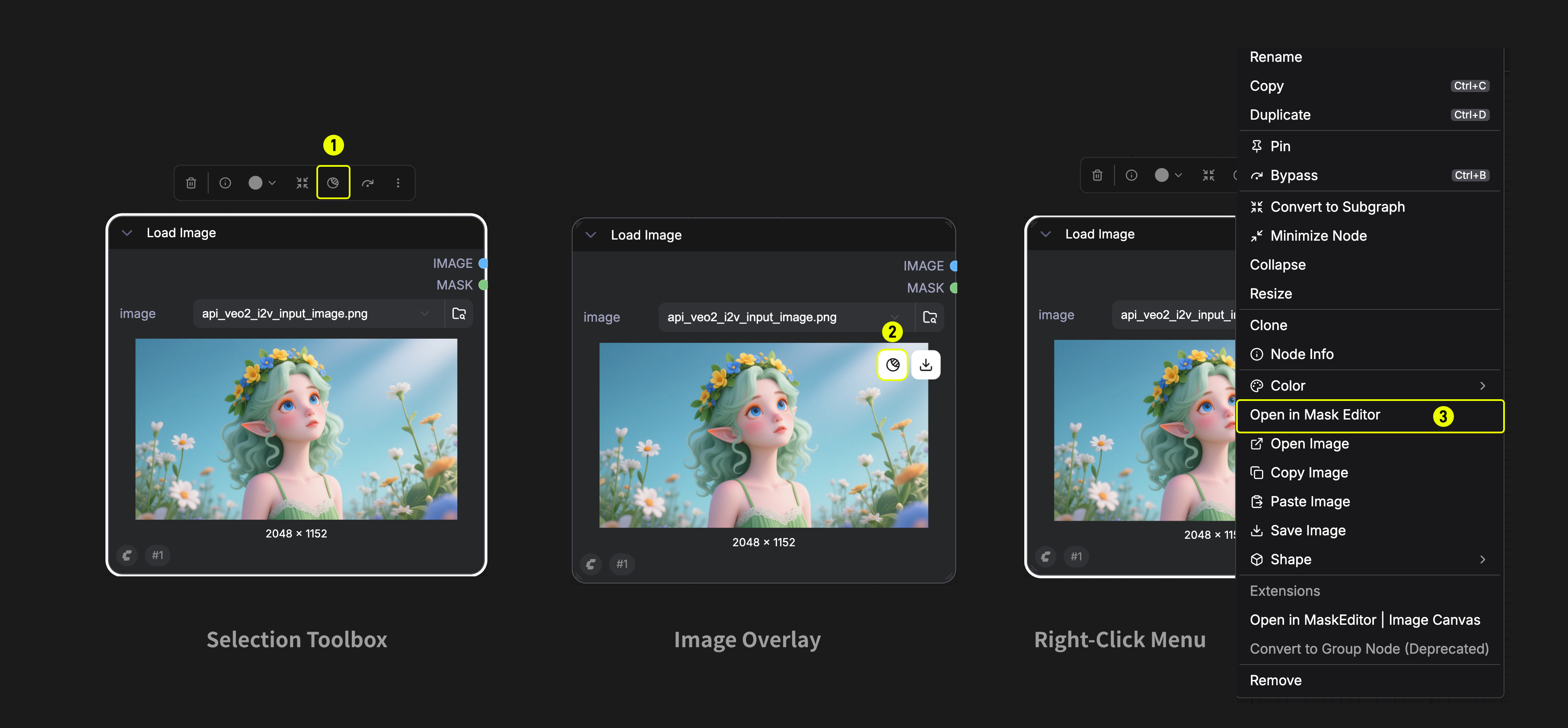
There are three ways to open the Mask Editor:
1. **Selection Toolbox** — Select a Load Image node, then click the Mask icon button in the selection toolbar above the node.
2. **Image Overlay** — Hover over the image preview (gallery mode), then click the **Edit or mask image** button (mask icon) that appears in the top-left corner.
3. **Right-Click Menu** — Right-click a Load Image node and select `Open in Mask Editor` from the context menu.
> The Mask Editor is available in both **Graph Mode** and **App Mode**.
***
## Interface Overview
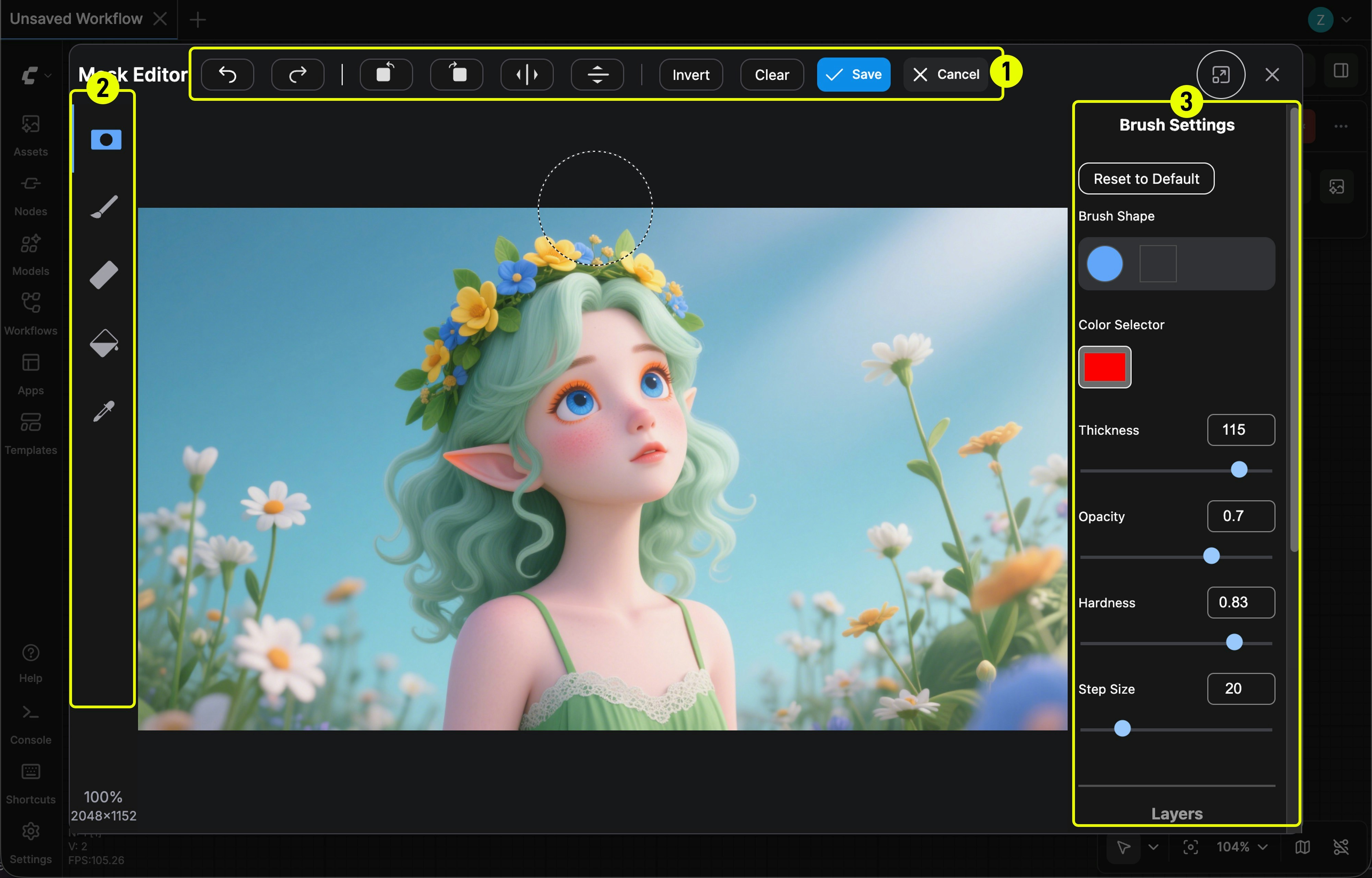
The Mask Editor opens as a modal dialog with four main areas:
| # | Area | Location | Description |
| - | ---------------- | -------- | ------------------------------------------------------------------- |
| 1 | **Top Bar** | Top | Header with undo/redo, canvas transforms, invert/clear, save/cancel |
| 2 | **Tool Panel** | Left | Tool selection and zoom info |
| — | **Pointer Zone** | Center | The main canvas area for drawing and editing |
| 3 | **Side Panel** | Right | Tool-specific settings and layer controls |
***
## Tools
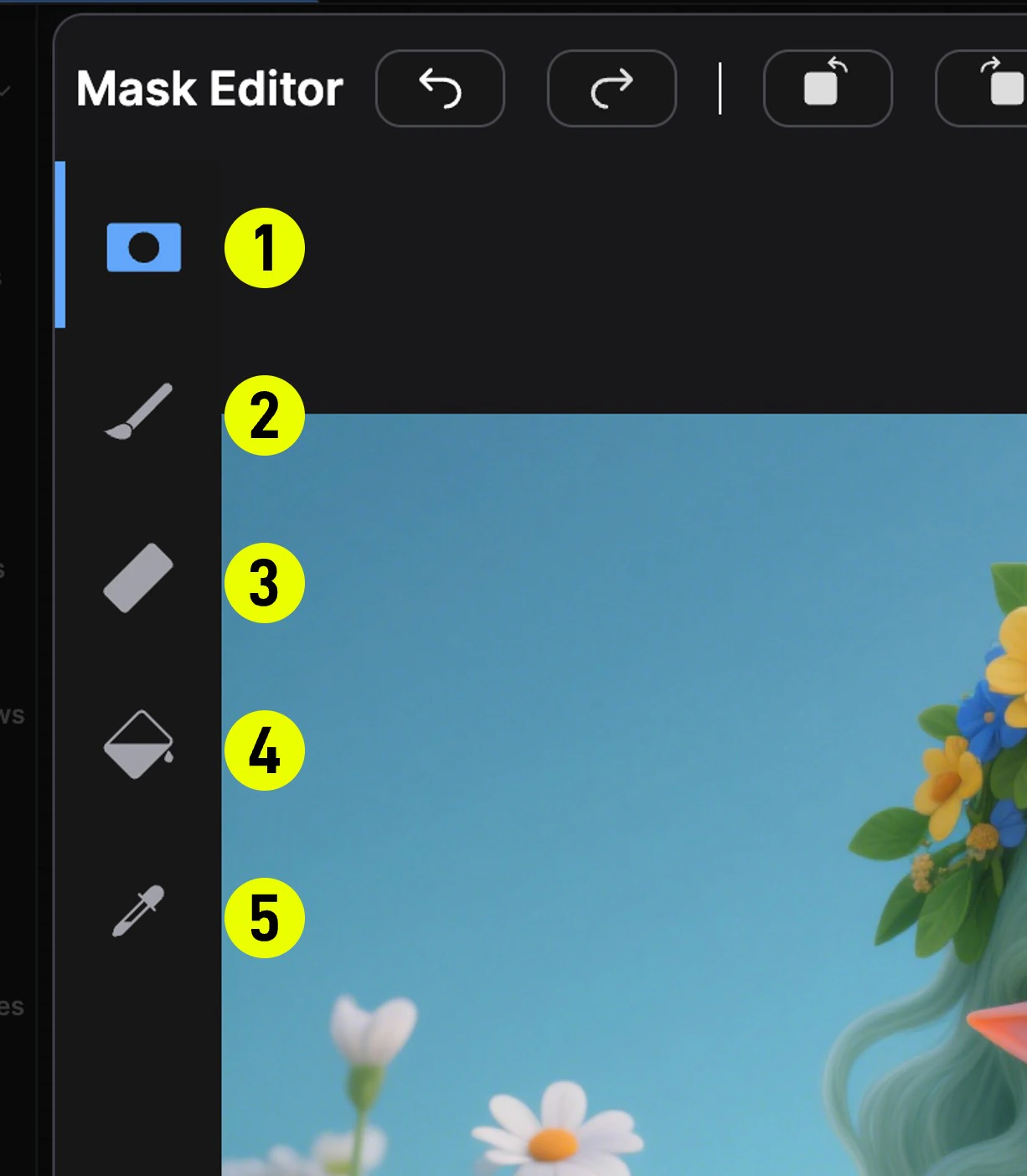
The tool panel on the left side offers five tools. Select a tool to activate it, and the right panel will show its settings.
| # | Tool | Layer | Description |
| - | ---------------- | ----------- | -------------------------------------------------------------------------------------------------------------------------------------------------------------------------------------------------------- |
| 1 | **Mask Pen** | Mask | Primary tool for drawing mask regions. Left-click and drag to paint mask on the image. |
| 2 | **Paint Pen** | RGB (Paint) | Paint directly onto the image's RGB layer. Useful for inpainting or touching up the base image. |
| 3 | **Eraser** | Mask / RGB | Erase parts of an existing mask or paint layer. |
| 4 | **Paint Bucket** | Mask | Flood-fill tool based on color similarity. Click a pixel to fill the connected region with a mask; click an already-masked area to erase from the mask. Tolerance controls how broadly the fill spreads. |
| 5 | **Color Select** | Mask | Selectively mask all pixels matching a target color, with advanced matching algorithms (Simple HSL / LAB). |
***
## TopBar Actions
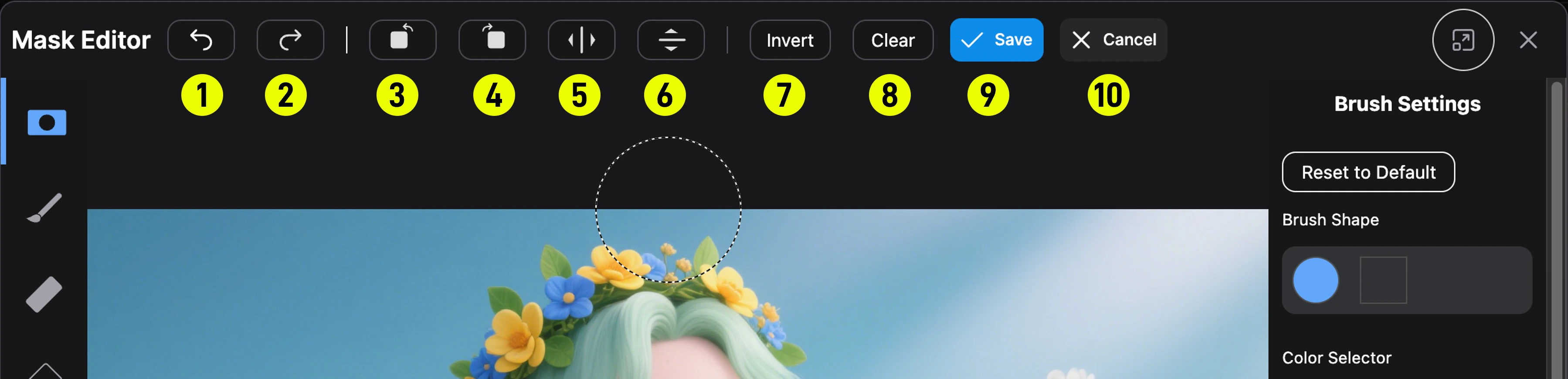
The top bar provides canvas-wide operations:
| # | Action | Description |
| -- | -------------------------------- | --------------------------------------- |
| 1 | **Undo** (Ctrl+Z) | Revert the last action |
| 2 | **Redo** (Ctrl+Shift+Z / Ctrl+Y) | Reapply a reverted action |
| 3 | **Rotate Left** | Rotate all layers 90° counter-clockwise |
| 4 | **Rotate Right** | Rotate all layers 90° clockwise |
| 5 | **Mirror Horizontal** | Flip all layers horizontally |
| 6 | **Mirror Vertical** | Flip all layers vertically |
| 7 | **Invert** | Invert the mask (black ↔ white) |
| 8 | **Clear** | Clear the entire mask |
| 9 | **Save** | Save the mask and close the editor |
| 10 | **Cancel** | Close without saving |
> **Note**: Rotate and mirror operations affect all three layers (mask, paint, and base image) simultaneously. GPU-accelerated textures are recreated after transforms.
***
## Layers
The right panel includes a **Layers** section where you can toggle visibility of each layer independently:
* **Mask Layer**: The mask overlay. You can adjust its **opacity** and **blending mode**:
* `Black` — Mask renders as black overlay
* `White` — Mask renders as white overlay
* `Negative` — Inverted mask rendering
* **Paint Layer**: The RGB paint layer (visible when using Paint Pen)
* **Base Image Layer**: The original source image
Click **Activate Layer** on a layer to switch drawing focus to it.
Refer to the main editor screenshot above — the right panel includes brush settings and the Layers section at the bottom.
***
## Brush Settings
When a brush-based tool (Mask Pen, Paint Pen, or Eraser) is active, the side panel shows brush settings:
| Setting | Range | Description |
| ------------- | ------------- | -------------------------------------------------------------- |
| **Shape** | Arc / Rect | Round brush or square brush |
| **Color** | Any hex color | The paint color (for Paint Pen) or mask color |
| **Thickness** | 1–250 | Brush diameter in pixels |
| **Opacity** | 0–1 | Brush stroke transparency |
| **Hardness** | 0–1 | Edge softness. 1 = hard edge, 0 = very soft |
| **Step Size** | 1–100 | Spacing between brush dabs. Lower values give smoother strokes |
Use **Reset to Default** to restore the default brush parameters.
***
## Canvas Navigation & Shortcuts
| Shortcut | Action |
| ------------------------------------ | ----------------------------------------------------------------------- |
| **Space + Drag** | Pan the canvas |
| **Ctrl + Scroll** | Zoom in/out |
| **Click zoom %** | Reset zoom to 100% |
| **Ctrl + Z** | Undo |
| **Ctrl + Shift + Z** or **Ctrl + Y** | Redo |
| **Alt + Right-click + Drag** | Adjust brush: left/right changes **size**, up/down changes **hardness** |
***
## Settings
In the ComfyUI Settings panel, you can configure the following Mask Editor options:
| Setting | Category | Default | Description |
| ------------------------------------------ | -------------------------------------------------- | ------------- | ---------------------------------------------------------------------------------------------------- |
| **Brush adjustment speed multiplier** | Mask Editor → Brush Adjustment → Sensitivity | 1.0 (0.1–2.0) | How quickly the brush size and hardness change when using Alt+Right-click drag |
| **Lock brush adjustment to dominant axis** | Mask Editor → Brush Adjustment → Use Dominant Axis | On | When enabled, the adjustment affects only size OR hardness based on your dominant movement direction |
***
## Video Tutorial
> **Note**: This video demonstrates an older version of the Mask Editor (Nodes 1.0 UI) showing brush size adjustment and mask preview creation. The overall workflow remains the same in the current version.
 ***
## Interface Overview
***
## Interface Overview
 The Mask Editor opens as a modal dialog with four main areas:
| # | Area | Location | Description |
| - | ---------------- | -------- | ------------------------------------------------------------------- |
| 1 | **Top Bar** | Top | Header with undo/redo, canvas transforms, invert/clear, save/cancel |
| 2 | **Tool Panel** | Left | Tool selection and zoom info |
| — | **Pointer Zone** | Center | The main canvas area for drawing and editing |
| 3 | **Side Panel** | Right | Tool-specific settings and layer controls |
***
## Tools
The tool panel on the left side offers five tools. Select a tool to activate it, and the right panel will show its settings.
The Mask Editor opens as a modal dialog with four main areas:
| # | Area | Location | Description |
| - | ---------------- | -------- | ------------------------------------------------------------------- |
| 1 | **Top Bar** | Top | Header with undo/redo, canvas transforms, invert/clear, save/cancel |
| 2 | **Tool Panel** | Left | Tool selection and zoom info |
| — | **Pointer Zone** | Center | The main canvas area for drawing and editing |
| 3 | **Side Panel** | Right | Tool-specific settings and layer controls |
***
## Tools
The tool panel on the left side offers five tools. Select a tool to activate it, and the right panel will show its settings.
 | # | Tool | Layer | Description |
| - | ---------------- | ----------- | -------------------------------------------------------------------------------------------------------------------------------------------------------------------------------------------------------- |
| 1 | **Mask Pen** | Mask | Primary tool for drawing mask regions. Left-click and drag to paint mask on the image. |
| 2 | **Paint Pen** | RGB (Paint) | Paint directly onto the image's RGB layer. Useful for inpainting or touching up the base image. |
| 3 | **Eraser** | Mask / RGB | Erase parts of an existing mask or paint layer. |
| 4 | **Paint Bucket** | Mask | Flood-fill tool based on color similarity. Click a pixel to fill the connected region with a mask; click an already-masked area to erase from the mask. Tolerance controls how broadly the fill spreads. |
| 5 | **Color Select** | Mask | Selectively mask all pixels matching a target color, with advanced matching algorithms (Simple HSL / LAB). |
***
## TopBar Actions
| # | Tool | Layer | Description |
| - | ---------------- | ----------- | -------------------------------------------------------------------------------------------------------------------------------------------------------------------------------------------------------- |
| 1 | **Mask Pen** | Mask | Primary tool for drawing mask regions. Left-click and drag to paint mask on the image. |
| 2 | **Paint Pen** | RGB (Paint) | Paint directly onto the image's RGB layer. Useful for inpainting or touching up the base image. |
| 3 | **Eraser** | Mask / RGB | Erase parts of an existing mask or paint layer. |
| 4 | **Paint Bucket** | Mask | Flood-fill tool based on color similarity. Click a pixel to fill the connected region with a mask; click an already-masked area to erase from the mask. Tolerance controls how broadly the fill spreads. |
| 5 | **Color Select** | Mask | Selectively mask all pixels matching a target color, with advanced matching algorithms (Simple HSL / LAB). |
***
## TopBar Actions
 The top bar provides canvas-wide operations:
| # | Action | Description |
| -- | -------------------------------- | --------------------------------------- |
| 1 | **Undo** (Ctrl+Z) | Revert the last action |
| 2 | **Redo** (Ctrl+Shift+Z / Ctrl+Y) | Reapply a reverted action |
| 3 | **Rotate Left** | Rotate all layers 90° counter-clockwise |
| 4 | **Rotate Right** | Rotate all layers 90° clockwise |
| 5 | **Mirror Horizontal** | Flip all layers horizontally |
| 6 | **Mirror Vertical** | Flip all layers vertically |
| 7 | **Invert** | Invert the mask (black ↔ white) |
| 8 | **Clear** | Clear the entire mask |
| 9 | **Save** | Save the mask and close the editor |
| 10 | **Cancel** | Close without saving |
> **Note**: Rotate and mirror operations affect all three layers (mask, paint, and base image) simultaneously. GPU-accelerated textures are recreated after transforms.
***
## Layers
The right panel includes a **Layers** section where you can toggle visibility of each layer independently:
* **Mask Layer**: The mask overlay. You can adjust its **opacity** and **blending mode**:
* `Black` — Mask renders as black overlay
* `White` — Mask renders as white overlay
* `Negative` — Inverted mask rendering
* **Paint Layer**: The RGB paint layer (visible when using Paint Pen)
* **Base Image Layer**: The original source image
Click **Activate Layer** on a layer to switch drawing focus to it.
Refer to the main editor screenshot above — the right panel includes brush settings and the Layers section at the bottom.
***
## Brush Settings
When a brush-based tool (Mask Pen, Paint Pen, or Eraser) is active, the side panel shows brush settings:
| Setting | Range | Description |
| ------------- | ------------- | -------------------------------------------------------------- |
| **Shape** | Arc / Rect | Round brush or square brush |
| **Color** | Any hex color | The paint color (for Paint Pen) or mask color |
| **Thickness** | 1–250 | Brush diameter in pixels |
| **Opacity** | 0–1 | Brush stroke transparency |
| **Hardness** | 0–1 | Edge softness. 1 = hard edge, 0 = very soft |
| **Step Size** | 1–100 | Spacing between brush dabs. Lower values give smoother strokes |
Use **Reset to Default** to restore the default brush parameters.
***
## Canvas Navigation & Shortcuts
| Shortcut | Action |
| ------------------------------------ | ----------------------------------------------------------------------- |
| **Space + Drag** | Pan the canvas |
| **Ctrl + Scroll** | Zoom in/out |
| **Click zoom %** | Reset zoom to 100% |
| **Ctrl + Z** | Undo |
| **Ctrl + Shift + Z** or **Ctrl + Y** | Redo |
| **Alt + Right-click + Drag** | Adjust brush: left/right changes **size**, up/down changes **hardness** |
***
## Settings
In the ComfyUI Settings panel, you can configure the following Mask Editor options:
| Setting | Category | Default | Description |
| ------------------------------------------ | -------------------------------------------------- | ------------- | ---------------------------------------------------------------------------------------------------- |
| **Brush adjustment speed multiplier** | Mask Editor → Brush Adjustment → Sensitivity | 1.0 (0.1–2.0) | How quickly the brush size and hardness change when using Alt+Right-click drag |
| **Lock brush adjustment to dominant axis** | Mask Editor → Brush Adjustment → Use Dominant Axis | On | When enabled, the adjustment affects only size OR hardness based on your dominant movement direction |
***
## Video Tutorial
> **Note**: This video demonstrates an older version of the Mask Editor (Nodes 1.0 UI) showing brush size adjustment and mask preview creation. The overall workflow remains the same in the current version.
The top bar provides canvas-wide operations:
| # | Action | Description |
| -- | -------------------------------- | --------------------------------------- |
| 1 | **Undo** (Ctrl+Z) | Revert the last action |
| 2 | **Redo** (Ctrl+Shift+Z / Ctrl+Y) | Reapply a reverted action |
| 3 | **Rotate Left** | Rotate all layers 90° counter-clockwise |
| 4 | **Rotate Right** | Rotate all layers 90° clockwise |
| 5 | **Mirror Horizontal** | Flip all layers horizontally |
| 6 | **Mirror Vertical** | Flip all layers vertically |
| 7 | **Invert** | Invert the mask (black ↔ white) |
| 8 | **Clear** | Clear the entire mask |
| 9 | **Save** | Save the mask and close the editor |
| 10 | **Cancel** | Close without saving |
> **Note**: Rotate and mirror operations affect all three layers (mask, paint, and base image) simultaneously. GPU-accelerated textures are recreated after transforms.
***
## Layers
The right panel includes a **Layers** section where you can toggle visibility of each layer independently:
* **Mask Layer**: The mask overlay. You can adjust its **opacity** and **blending mode**:
* `Black` — Mask renders as black overlay
* `White` — Mask renders as white overlay
* `Negative` — Inverted mask rendering
* **Paint Layer**: The RGB paint layer (visible when using Paint Pen)
* **Base Image Layer**: The original source image
Click **Activate Layer** on a layer to switch drawing focus to it.
Refer to the main editor screenshot above — the right panel includes brush settings and the Layers section at the bottom.
***
## Brush Settings
When a brush-based tool (Mask Pen, Paint Pen, or Eraser) is active, the side panel shows brush settings:
| Setting | Range | Description |
| ------------- | ------------- | -------------------------------------------------------------- |
| **Shape** | Arc / Rect | Round brush or square brush |
| **Color** | Any hex color | The paint color (for Paint Pen) or mask color |
| **Thickness** | 1–250 | Brush diameter in pixels |
| **Opacity** | 0–1 | Brush stroke transparency |
| **Hardness** | 0–1 | Edge softness. 1 = hard edge, 0 = very soft |
| **Step Size** | 1–100 | Spacing between brush dabs. Lower values give smoother strokes |
Use **Reset to Default** to restore the default brush parameters.
***
## Canvas Navigation & Shortcuts
| Shortcut | Action |
| ------------------------------------ | ----------------------------------------------------------------------- |
| **Space + Drag** | Pan the canvas |
| **Ctrl + Scroll** | Zoom in/out |
| **Click zoom %** | Reset zoom to 100% |
| **Ctrl + Z** | Undo |
| **Ctrl + Shift + Z** or **Ctrl + Y** | Redo |
| **Alt + Right-click + Drag** | Adjust brush: left/right changes **size**, up/down changes **hardness** |
***
## Settings
In the ComfyUI Settings panel, you can configure the following Mask Editor options:
| Setting | Category | Default | Description |
| ------------------------------------------ | -------------------------------------------------- | ------------- | ---------------------------------------------------------------------------------------------------- |
| **Brush adjustment speed multiplier** | Mask Editor → Brush Adjustment → Sensitivity | 1.0 (0.1–2.0) | How quickly the brush size and hardness change when using Alt+Right-click drag |
| **Lock brush adjustment to dominant axis** | Mask Editor → Brush Adjustment → Use Dominant Axis | On | When enabled, the adjustment affects only size OR hardness based on your dominant movement direction |
***
## Video Tutorial
> **Note**: This video demonstrates an older version of the Mask Editor (Nodes 1.0 UI) showing brush size adjustment and mask preview creation. The overall workflow remains the same in the current version.