> ## Documentation Index
> Fetch the complete documentation index at: https://docs.comfy.org/llms.txt
> Use this file to discover all available pages before exploring further.
# Nodes 2.0
> Learn about Nodes 2.0, the new Vue-based node rendering system in ComfyUI that enables faster development and richer interactions.
Nodes 2.0 is now available in Comfy Desktop, portable, and stable releases. This update transitions the node system from LiteGraph.js Canvas rendering to a Vue-based architecture, unlocking faster iteration and richer interactions.
## Why this change?
The previous Canvas rendering system had become a development bottleneck. Even small UI changes often required deep modifications and could take days to implement. This slowed the ability to respond to community feedback and made node customization difficult for developers.
The new Vue-based system enables:
* **Faster feature development** - UI changes can be implemented more quickly
* **Richer interactions** - Dynamic widgets, expandable nodes, and better components
* **A more flexible foundation** - Better support for future tools and customization
## Current status and known issues
We're actively working on improvements and want to be transparent about current limitations:
| Area | Status |
| ----------------- | ------------------------------------------------------------------------------------------- |
| **Performance** | Still optimizing toward Canvas-level performance. Certain scenarios may behave differently. |
| **Compatibility** | Some custom nodes may require updates to be fully supported. |
| **Edge cases** | At extreme zoom levels or within very large workflows, minor visual issues may appear. |
We're gathering feedback to prioritize improvements. The LiteGraph.js rendering system remains available, and you can toggle between systems at any time.
## How to try it
### Enable Nodes 2.0
1. Visit [cloud.comfy.org](https://cloud.comfy.org) or update to the latest version of Comfy Desktop, portable, or stable release
2. Click **Try it out** on the top banner when you launch ComfyUI
### What to test
Use Nodes 2.0 in your daily workflows and share feedback with us:
* **Basic interactions** - Dragging, resizing, selecting
* **Daily workflows** - Execution, parameters, custom nodes
* **Performance** - Especially with complex workflows
## How to provide feedback
Encountered issues or have suggestions for interaction improvements?
* **Support center** - [ComfyUI Help Center](https://support.comfy.org)
* **GitHub issues** - [Create an issue in ComfyUI\_frontend](https://github.com/Comfy-Org/ComfyUI_frontend/issues)
Including reproduction steps, screenshots, and system info is extremely helpful when reporting issues.
## Switching back
If you encounter issues:
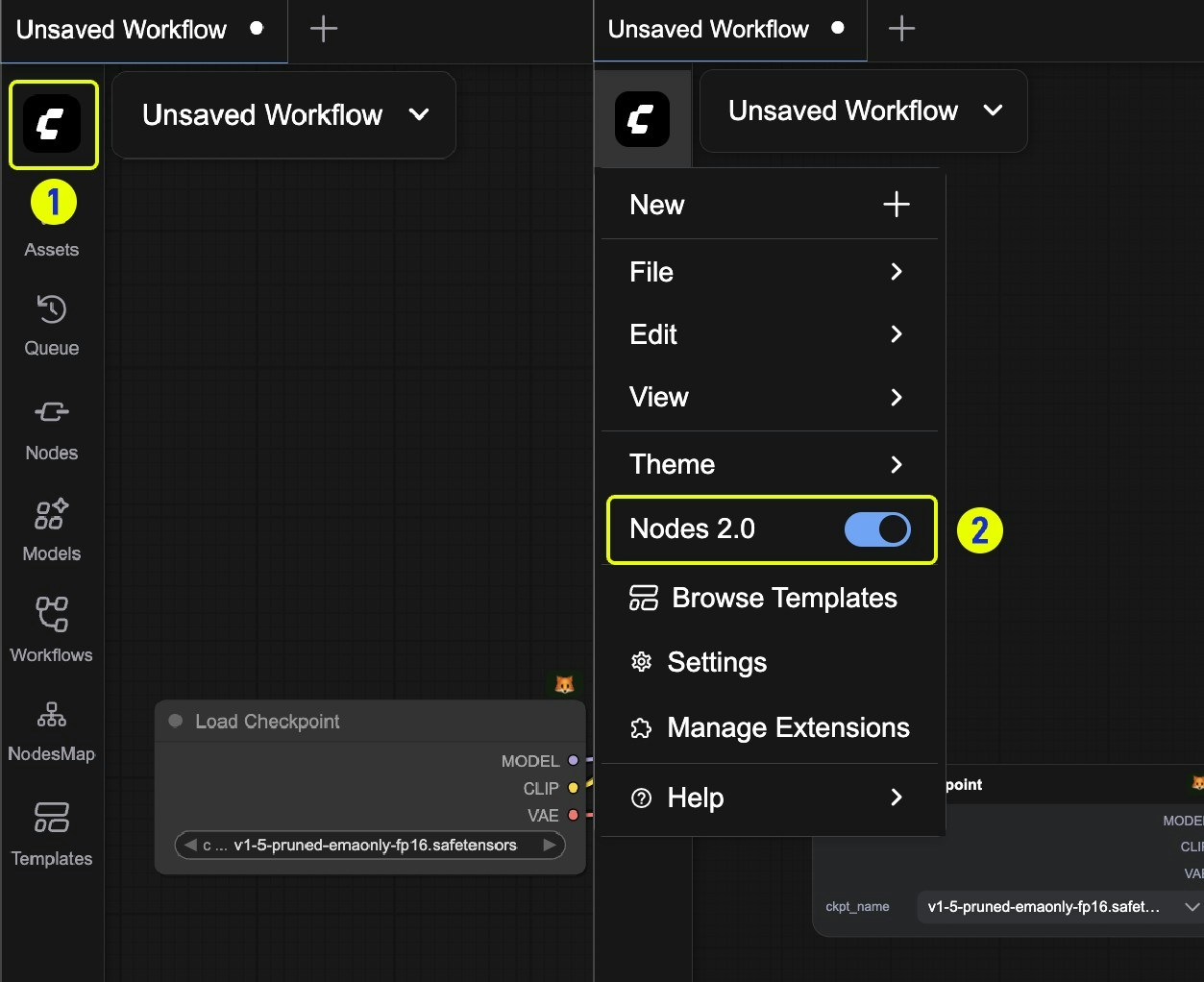
1. Click on the **ComfyUI logo** to open the menu
2. Toggle **Nodes 2.0** to switch back to the previous interface
 Your feedback helps us prioritize improvements. Enable Nodes 2.0 in settings and start exploring the new node design!