> ## Documentation Index
> Fetch the complete documentation index at: https://docs.comfy.org/llms.txt
> Use this file to discover all available pages before exploring further.
# Comfy Settings
> Detailed description of ComfyUI core setting options
The settings described on this page are located in the **ComfyUI in-app settings menu**. You can open it by navigating to **Settings** (gear icon) or using the `Ctrl + ,` keyboard shortcut, then select the corresponding category to view and configure these options.
## Partner Nodes
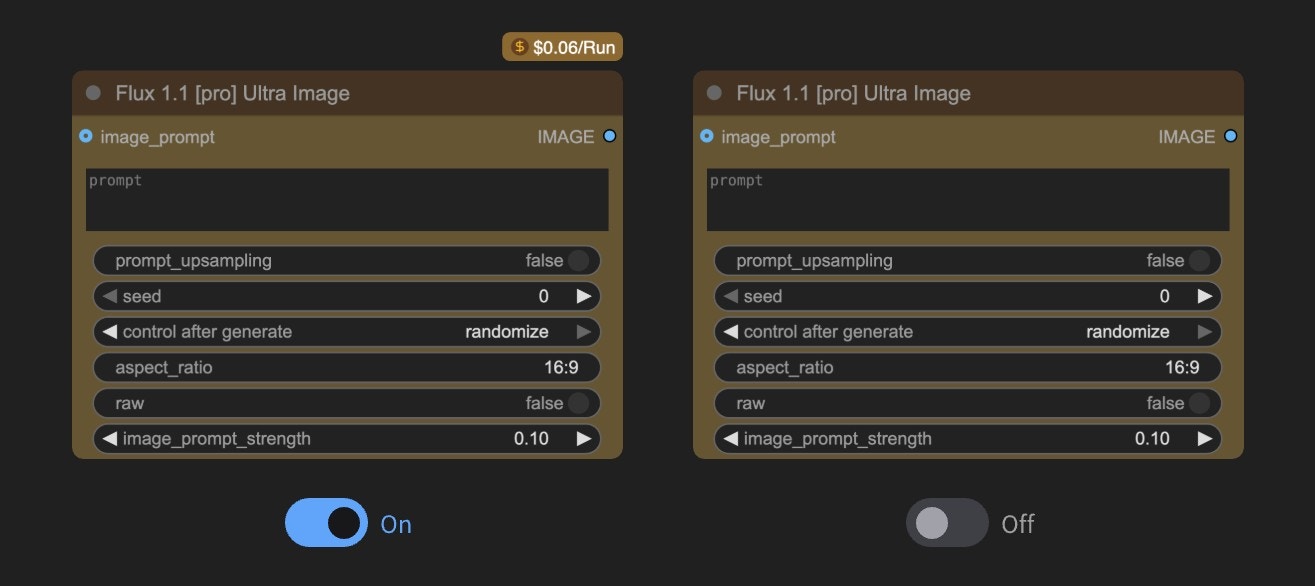
### Show Partner Node pricing badge
* **Default Value**: Enabled
* **Function**: Controls whether to display pricing badges on Partner Nodes, helping users identify the usage cost of Partner Nodes
> For more information about Partner Nodes, please refer to [Partner Nodes](/tutorials/partner-nodes/overview)
## Dev Mode
### Enable dev mode options (API save, etc.)
* **Default Value**: Disabled
* **Function**: Enables development mode options (such as API save, etc.)
## Edit Token Weight
### Ctrl+up/down precision
* **Default Value**: 0.01
* **Function**: When using CLIPTextEncode type nodes or text input node widgets, use Ctrl+up/down to quickly adjust weights. This option changes the weight value for each adjustment
## Locale
### Language
* **Options**: English, 中文 (Chinese),日本語 (Japanese), 한국어 (Korean), Русский (Russian), Español (Spanish), Français (French)
* **Default Value**: Auto-detect browser language
* **Function**: Modify the display language of ComfyUI interface
## Menu
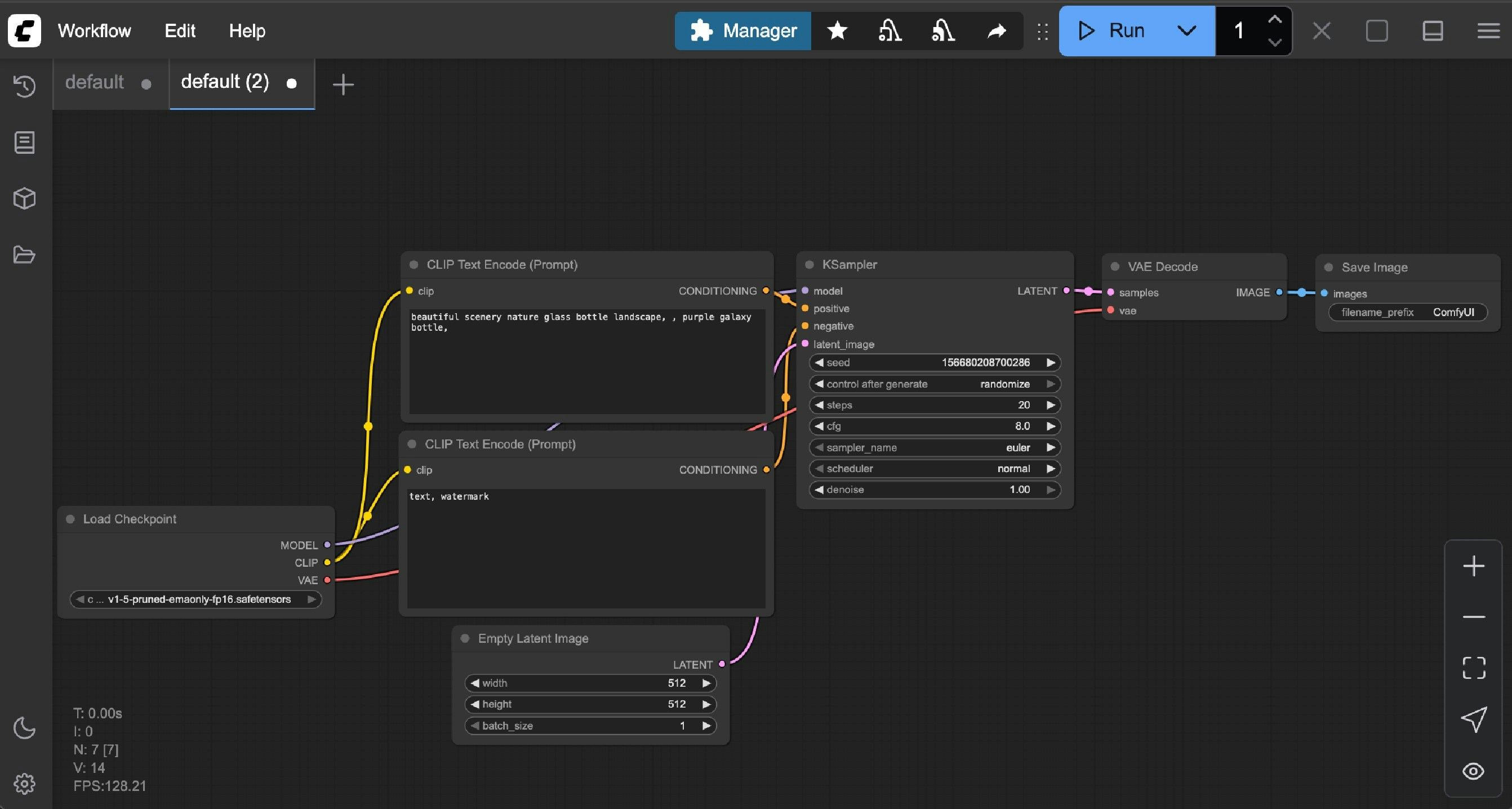
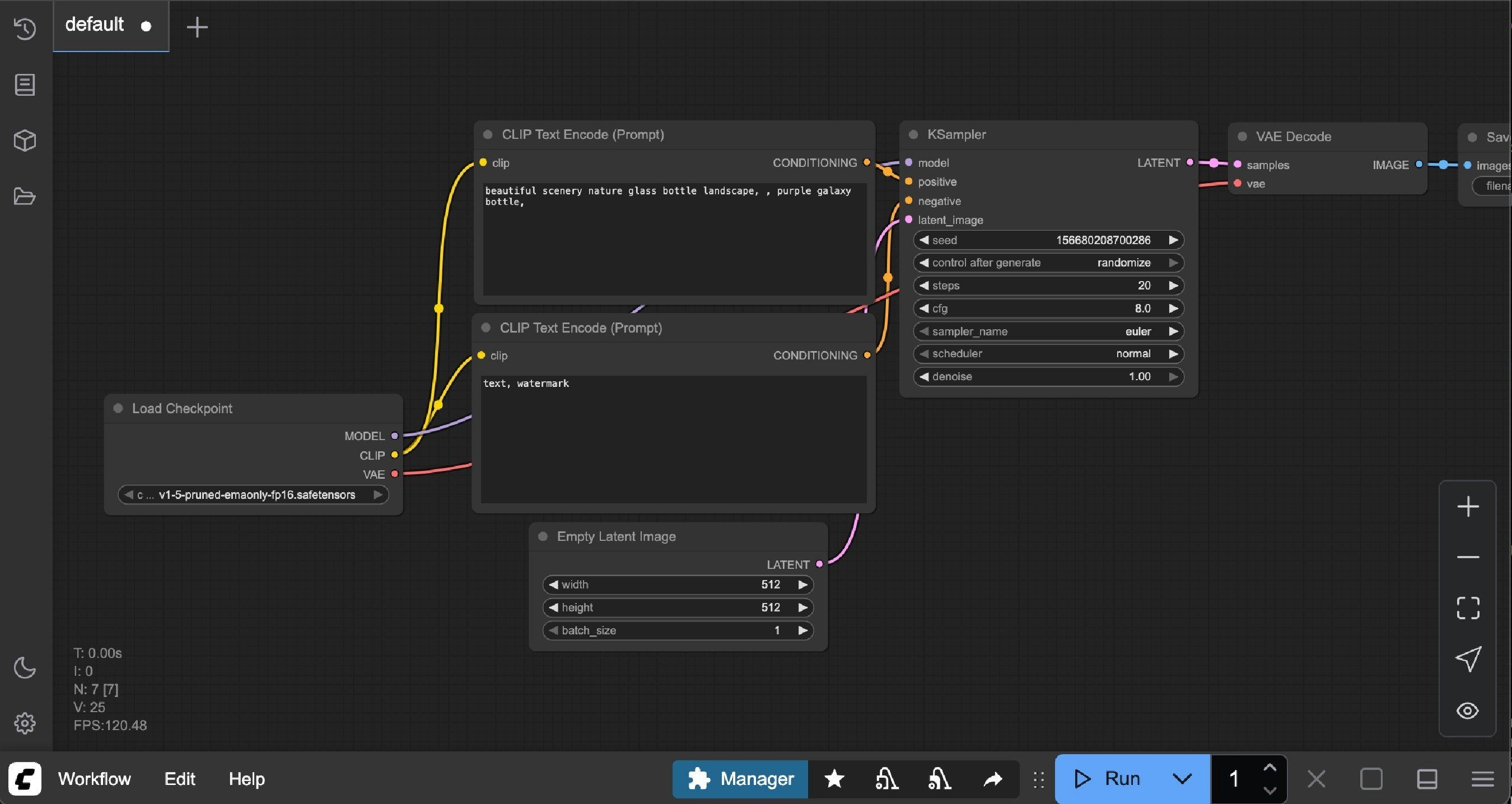
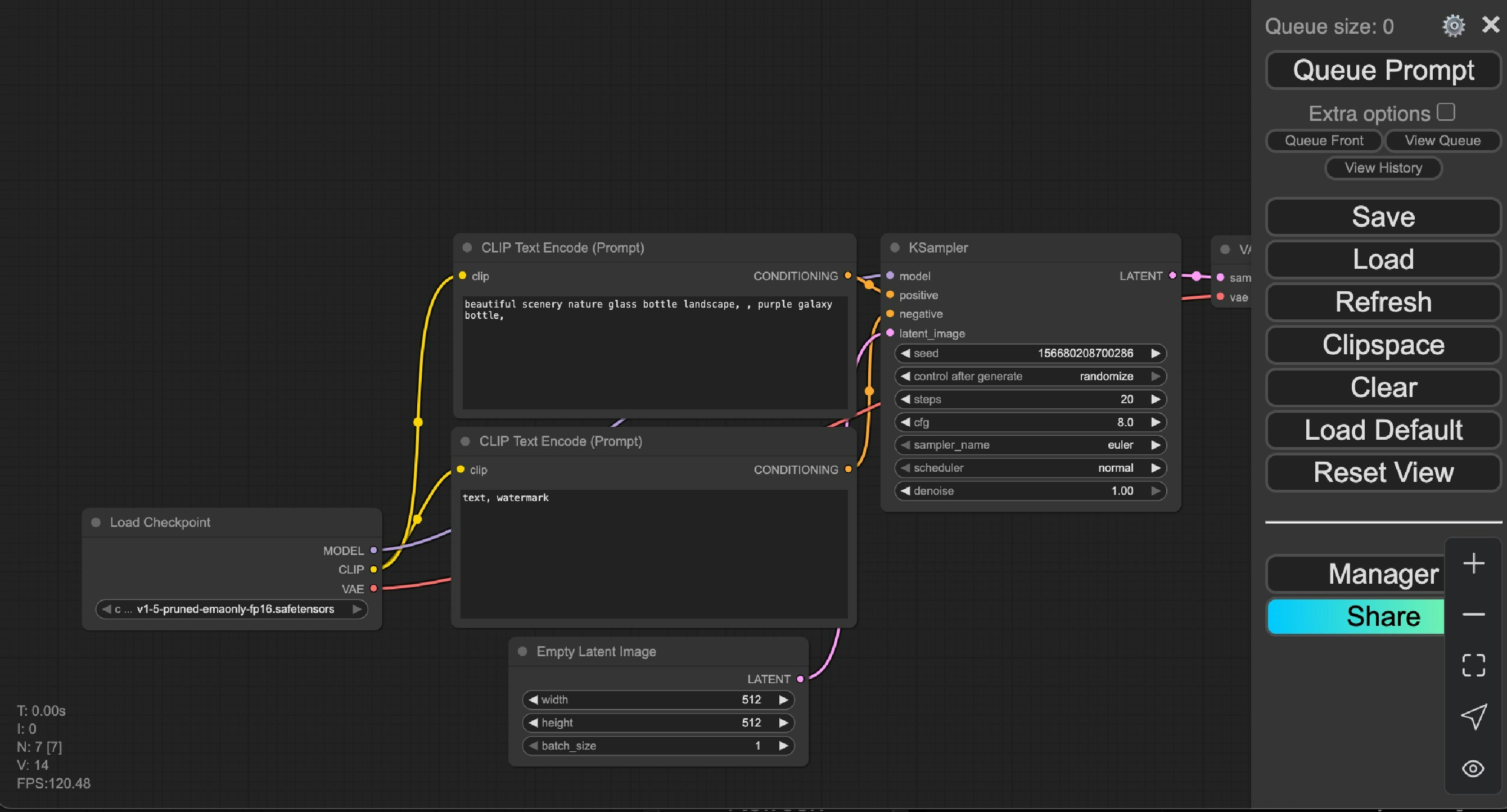
### Use new menu
* **Default Value**: Top
* **Function**: Select menu interface and position, currently only supports Top, Bottom, Disabled
The menu interface will be displayed at the top of the workspace
The menu bar interface will be displayed at the bottom of the workspace
If you prefer the early legacy menu, you can try this option.
Since we are constantly updating, some new features will not be synchronized and supported in the legacy menu.
## Model Library
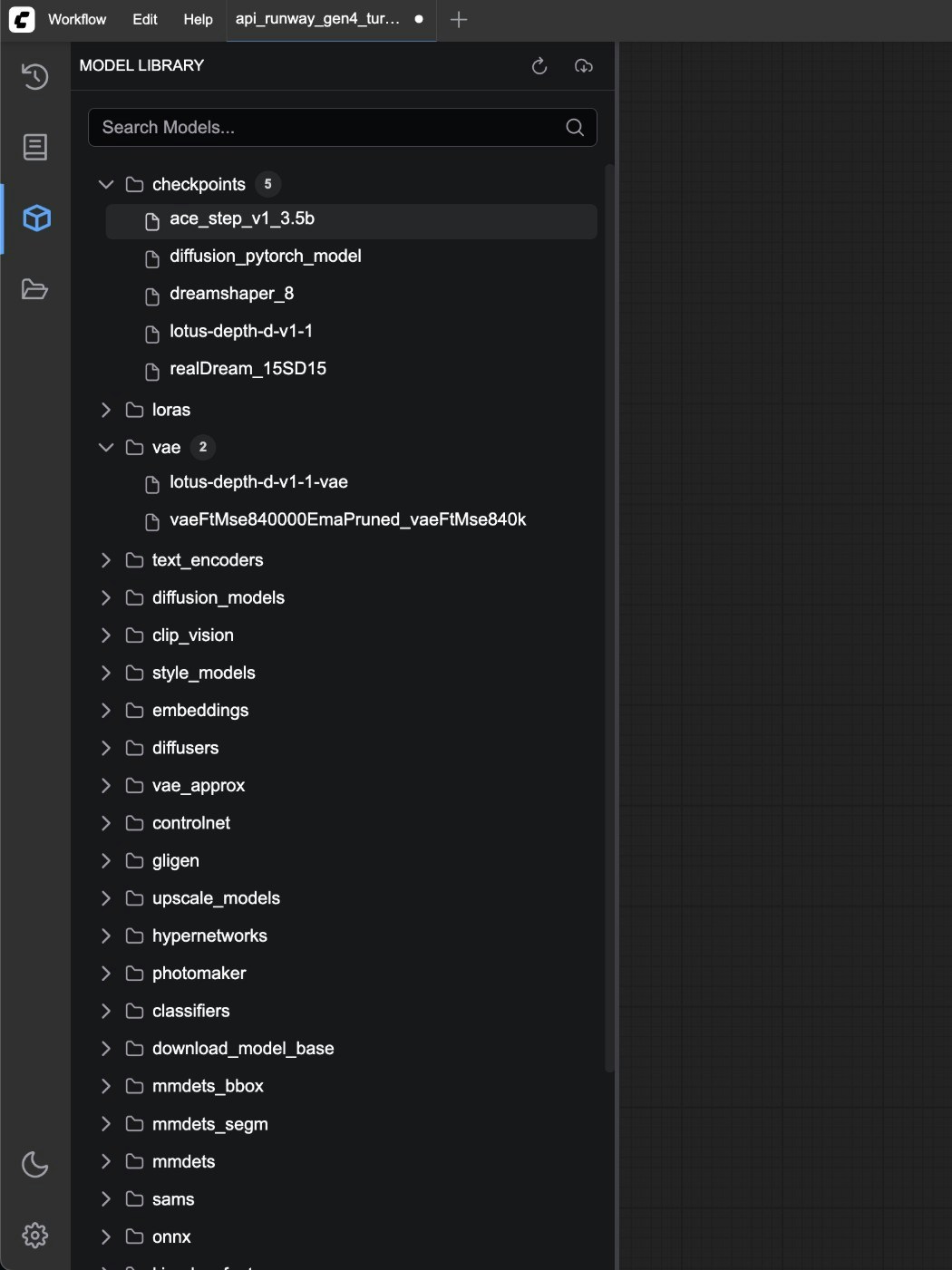
Model Library refers to the model management function in the ComfyUI sidebar menu. You can use this function to view models in your `ComfyUI/models` and additionally configured model folders.
### What name to display in the model library tree view
* **Default Value**: title
* **Function**: Select the name format to display in the model library tree view, currently only supports filename and title
### Automatically load all model folders
* **Default Value**: Disabled
* **Function**: Whether to automatically detect model files in all folders when clicking the model library. Enabling may cause loading delays (requires traversing all folders). When disabled, files in the corresponding folder will only be loaded when clicking the folder name.
## Node
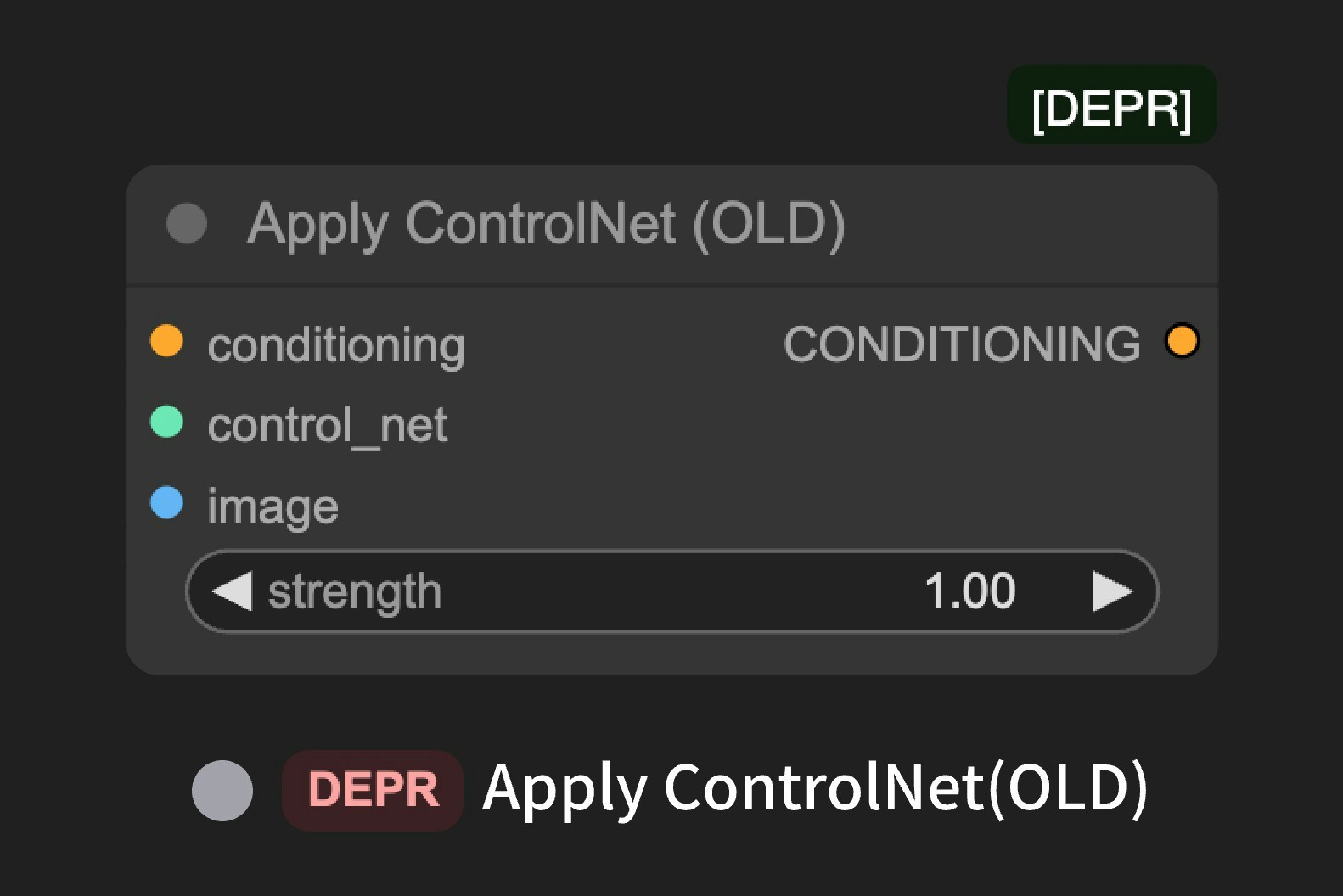
During the iteration process of ComfyUI, we will adjust some nodes and enable some nodes. These nodes may undergo major changes or be removed in future versions. However, to ensure compatibility, deprecated nodes have not been removed. You can use the settings below to enable whether to display **experimental nodes** and **deprecated nodes**.
### Show deprecated nodes in search
* **Default Value**: Disabled
* **Function**: Controls whether to display deprecated nodes in search. Deprecated nodes are hidden by default in the UI, but remain effective in existing workflows.
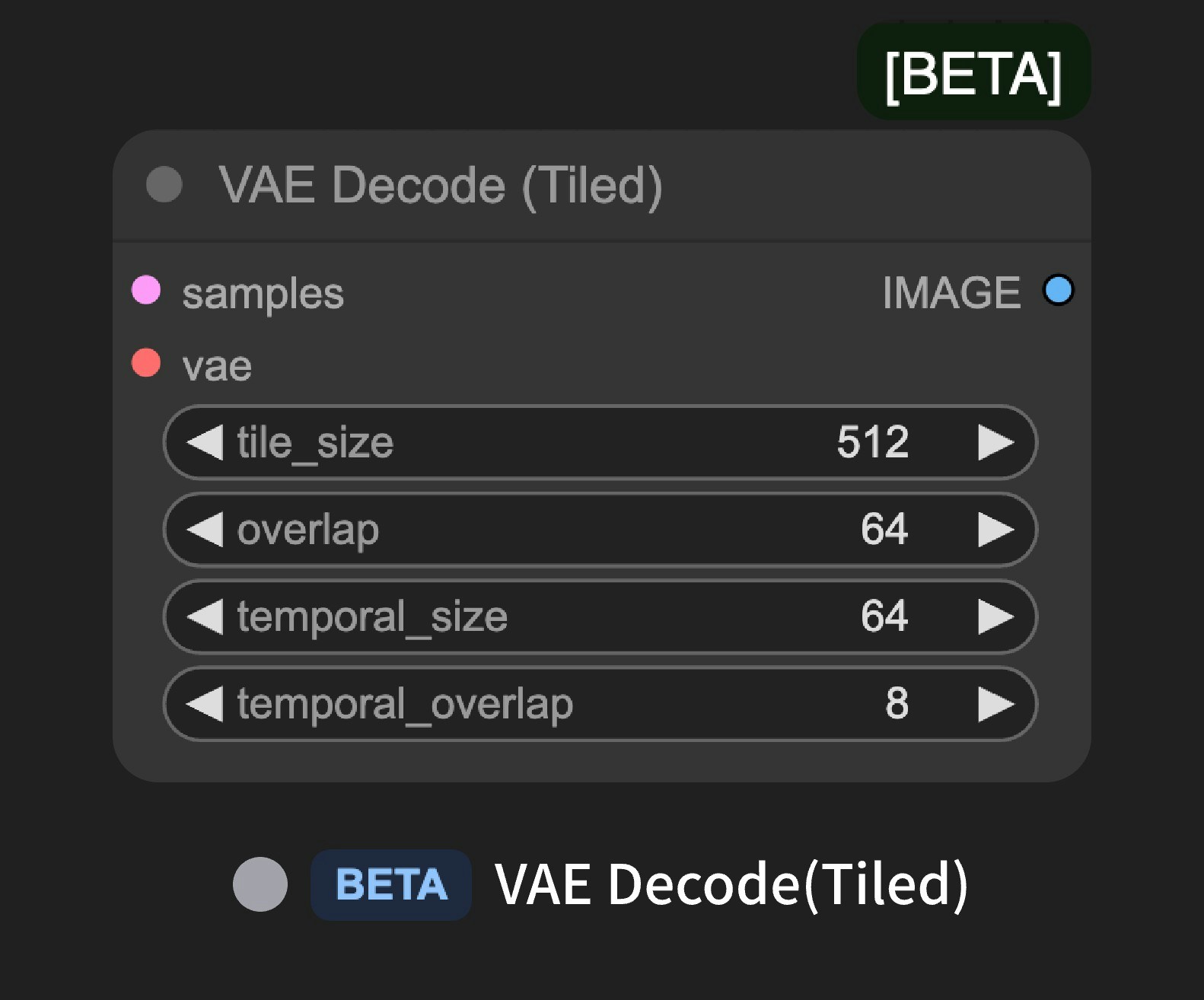
### Show experimental nodes in search
* **Default Value**: Enabled
* **Function**: Controls whether to display experimental nodes in search. Experimental nodes are some new feature support, but are not fully stable and may change or be removed in future versions.
## Node Search Box
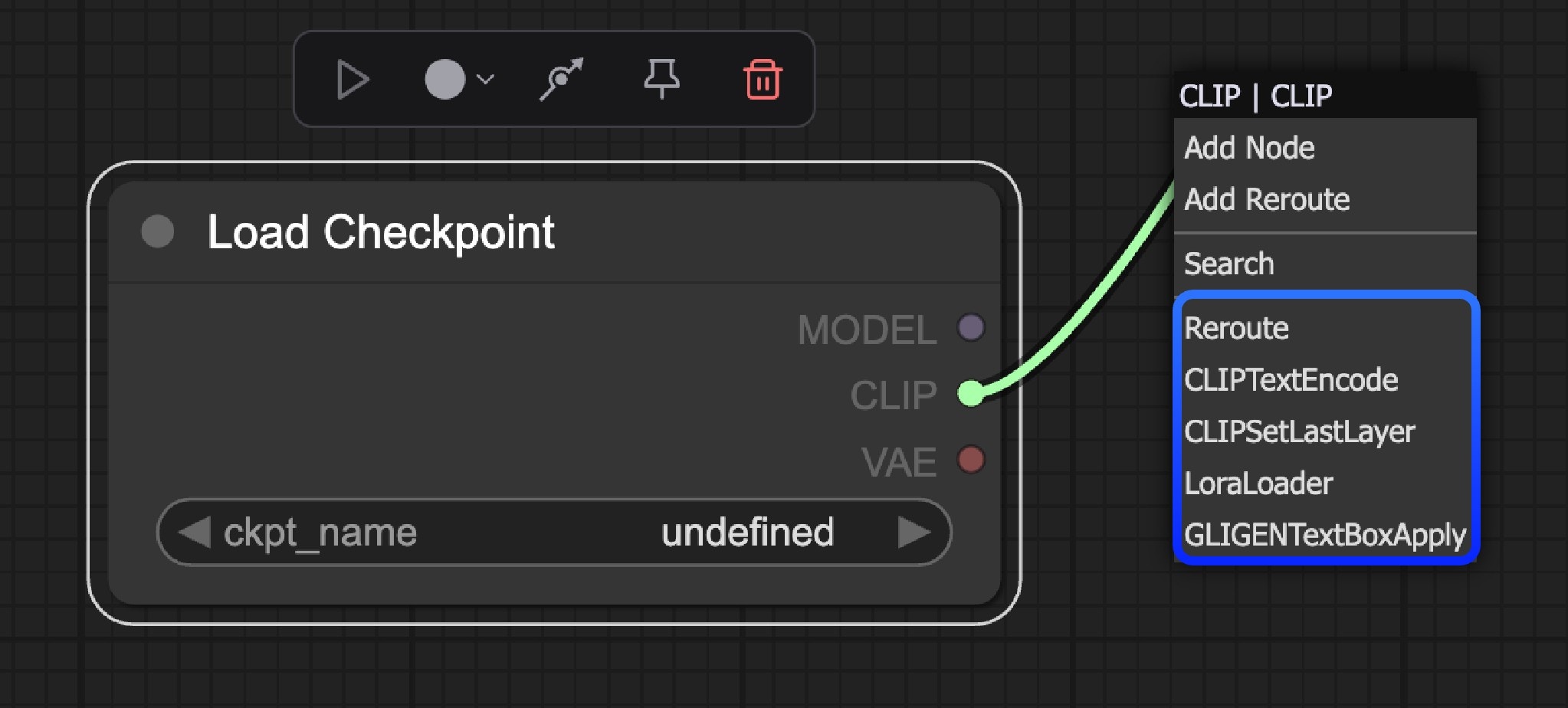
### Number of nodes suggestions
* **Default Value**: 5
* **Function**: Used to modify the number of recommended nodes in the related node context menu. The larger the value, the more related recommended nodes are displayed.
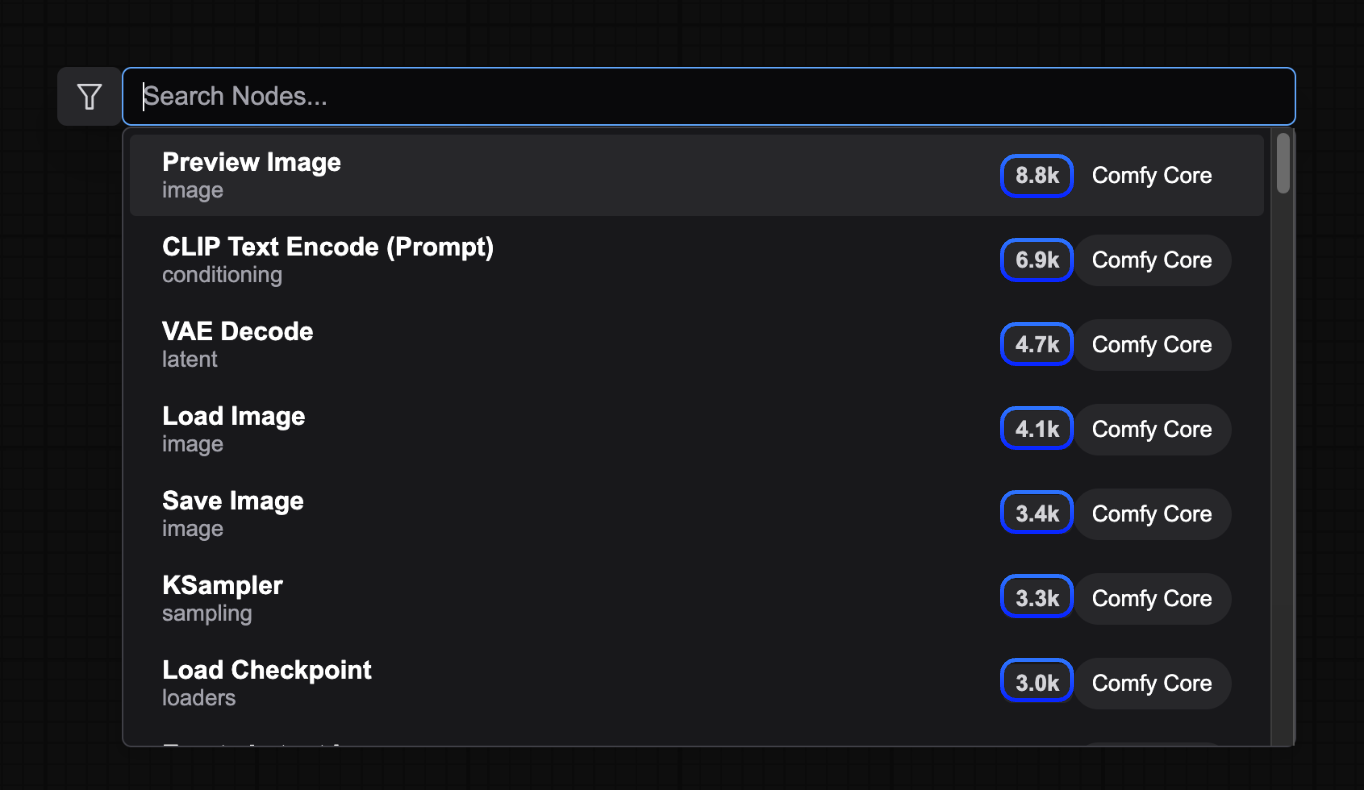
### Show node frequency in search results
* **Default Value**: Disabled
* **Function**: Controls whether to display node usage frequency in search results
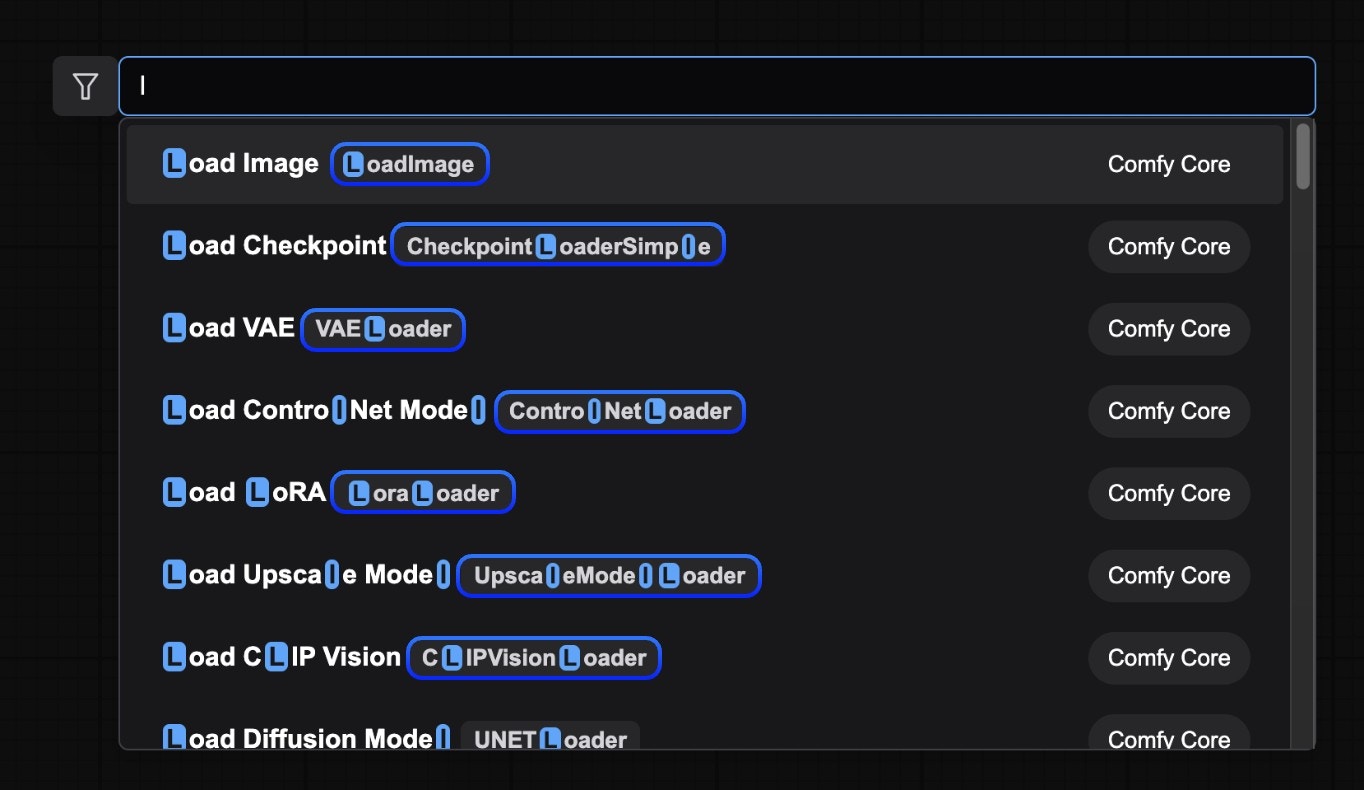
### Show node id name in search results
* **Default Value**: Disabled
* **Function**: Controls whether to display node ID names in search results
### Show node category in search results
* **Default Value**: Enabled
* **Function**: Controls whether to display node categories in search results, helping users understand node classification information
### Node preview
* **Default Value**: Enabled
* **Function**: Controls whether to display node previews in search results, making it convenient for you to quickly preview nodes
### Node search box implementation
* **Default Value**: default
* **Function**: Select the implementation method of the node search box (experimental feature). If you select `litegraph (legacy)`, it will switch to the early ComfyUI search box
## Node Widget
### Widget control mode
* **Options**: before, after
* **Function**: Controls whether the timing of node widget value updates is before or after workflow execution, such as updating seed values
### Textarea widget spellcheck
* **Default Value**: Disabled
* **Function**: Controls whether text area widgets enable spellcheck, providing spellcheck functionality during text input. This functionality is implemented through the browser's spellcheck attribute
## Queue
### Queue history size
* **Default Value**: 100
* **Function**: Controls the queue history size recorded in the sidebar queue history panel. The larger the value, the more queue history is recorded. When the number is large, loading the page will also consume more memory
## Queue Button
### Batch count limit
* **Default Value**: 100
* **Function**: Sets the maximum number of tasks added to the queue in a single click, preventing accidentally adding too many tasks to the queue
## Validation
### Validate node definitions (slow)
* **Default Value**: Disabled
* **Function**: Controls whether to validate all node definitions at startup (slow). Only recommended for node developers. When enabled, the system will use Zod schemas to strictly validate each node definition. This functionality will consume more memory and time
* **Error Handling**: Failed node definitions will be skipped and warning information will be output to the console
Since detailed schema validation needs to be performed on all node definitions, this feature will significantly increase startup time, so it is disabled by default and only recommended for node developers
### Validate workflows
* **Default Value**: Enabled
* **Function**: Ensures the structural and connection correctness of workflows. If enabled, the system will call `useWorkflowValidation().validateWorkflow()` to validate workflow data
* **Validation Process**: The validation process includes two steps:
* Schema validation: Use Zod schemas to validate workflow structure
* Link repair: Check and repair connection issues between nodes
* **Error Handling**: When validation fails, error prompts will be displayed, but workflow loading will not be blocked
## Window
### Show confirmation when closing window
* **Default Value**: Enabled
* **Function**: When there are modified but unsaved workflows, controls whether to display confirmation when closing the browser window or tab, preventing accidental window closure that leads to loss of unsaved workflows
## Workflow
### Persist workflow state and restore on page (re)load
* **Default Value**: Enabled
* **Function**: Controls whether to restore workflow state on page (re)load, maintaining workflow content after page refresh
### Auto Save
* **Default Value**: off
* **Function**: Controls the auto-save behavior of workflows, automatically saving workflow changes to avoid data loss
### Auto Save Delay (ms)
* **Default Value**: 1000
* **Function**: Sets the delay time for auto-save, only effective when auto-save is set to "after delay"
### Show confirmation when deleting workflows
* **Default Value**: Enabled
* **Function**: Controls whether to display a confirmation dialog when deleting workflows in the sidebar, preventing accidental deletion of important workflows
### Save and restore canvas position and zoom level in workflows
* **Default Value**: Enabled
* **Function**: Controls whether to save and restore canvas position and zoom level in workflows, restoring the previous view state when reopening workflows
### Opened workflows position
* **Options**: Sidebar, Topbar, Topbar (Second Row)
* **Default Value**: Topbar
* **Function**: Controls the display position of opened workflow tabs, currently only supports Sidebar, Topbar, Topbar (Second Row)
### Prompt for filename when saving workflow
* **Default Value**: Enabled
* **Function**: Controls whether to prompt for filename input when saving workflows, allowing users to customize workflow filenames
### Sort node IDs when saving workflow
* **Default Value**: Disabled
* **Function**: Determines whether to sort node IDs when saving workflows, making workflow file format more standardized and convenient for version control
### Show missing nodes warning
* **Default Value**: Enabled
* **Function**: Controls whether to display warnings for missing nodes in workflows, helping users identify unavailable nodes in workflows
### Show missing models warning
* **Default Value**: Enabled
* **Function**: We support adding model link information to widget values in workflow files for prompts when loading model files. When enabled, if you don't have the corresponding model files locally, warnings for missing models in workflows will be displayed
### Require confirmation when clearing workflow
* **Default Value**: Enabled
* **Function**: Controls whether to display a confirmation dialog when clearing workflows, preventing accidental clearing of workflow content
### Save node IDs to workflow
* **Default Value**: Enabled
* **Function**: Controls whether to save node IDs when saving workflows, making workflow file format more standardized and convenient for version control
 > For more information about Partner Nodes, please refer to [Partner Nodes](/tutorials/partner-nodes/overview)
## Dev Mode
### Enable dev mode options (API save, etc.)
* **Default Value**: Disabled
* **Function**: Enables development mode options (such as API save, etc.)
## Edit Token Weight
### Ctrl+up/down precision
* **Default Value**: 0.01
* **Function**: When using CLIPTextEncode type nodes or text input node widgets, use Ctrl+up/down to quickly adjust weights. This option changes the weight value for each adjustment
## Locale
### Language
* **Options**: English, 中文 (Chinese),日本語 (Japanese), 한국어 (Korean), Русский (Russian), Español (Spanish), Français (French)
* **Default Value**: Auto-detect browser language
* **Function**: Modify the display language of ComfyUI interface
## Menu
### Use new menu
* **Default Value**: Top
* **Function**: Select menu interface and position, currently only supports Top, Bottom, Disabled
> For more information about Partner Nodes, please refer to [Partner Nodes](/tutorials/partner-nodes/overview)
## Dev Mode
### Enable dev mode options (API save, etc.)
* **Default Value**: Disabled
* **Function**: Enables development mode options (such as API save, etc.)
## Edit Token Weight
### Ctrl+up/down precision
* **Default Value**: 0.01
* **Function**: When using CLIPTextEncode type nodes or text input node widgets, use Ctrl+up/down to quickly adjust weights. This option changes the weight value for each adjustment
## Locale
### Language
* **Options**: English, 中文 (Chinese),日本語 (Japanese), 한국어 (Korean), Русский (Russian), Español (Spanish), Français (French)
* **Default Value**: Auto-detect browser language
* **Function**: Modify the display language of ComfyUI interface
## Menu
### Use new menu
* **Default Value**: Top
* **Function**: Select menu interface and position, currently only supports Top, Bottom, Disabled
 ### What name to display in the model library tree view
* **Default Value**: title
* **Function**: Select the name format to display in the model library tree view, currently only supports filename and title
### Automatically load all model folders
* **Default Value**: Disabled
* **Function**: Whether to automatically detect model files in all folders when clicking the model library. Enabling may cause loading delays (requires traversing all folders). When disabled, files in the corresponding folder will only be loaded when clicking the folder name.
## Node
During the iteration process of ComfyUI, we will adjust some nodes and enable some nodes. These nodes may undergo major changes or be removed in future versions. However, to ensure compatibility, deprecated nodes have not been removed. You can use the settings below to enable whether to display **experimental nodes** and **deprecated nodes**.
### Show deprecated nodes in search
* **Default Value**: Disabled
* **Function**: Controls whether to display deprecated nodes in search. Deprecated nodes are hidden by default in the UI, but remain effective in existing workflows.
### What name to display in the model library tree view
* **Default Value**: title
* **Function**: Select the name format to display in the model library tree view, currently only supports filename and title
### Automatically load all model folders
* **Default Value**: Disabled
* **Function**: Whether to automatically detect model files in all folders when clicking the model library. Enabling may cause loading delays (requires traversing all folders). When disabled, files in the corresponding folder will only be loaded when clicking the folder name.
## Node
During the iteration process of ComfyUI, we will adjust some nodes and enable some nodes. These nodes may undergo major changes or be removed in future versions. However, to ensure compatibility, deprecated nodes have not been removed. You can use the settings below to enable whether to display **experimental nodes** and **deprecated nodes**.
### Show deprecated nodes in search
* **Default Value**: Disabled
* **Function**: Controls whether to display deprecated nodes in search. Deprecated nodes are hidden by default in the UI, but remain effective in existing workflows.
 ### Show experimental nodes in search
* **Default Value**: Enabled
* **Function**: Controls whether to display experimental nodes in search. Experimental nodes are some new feature support, but are not fully stable and may change or be removed in future versions.
### Show experimental nodes in search
* **Default Value**: Enabled
* **Function**: Controls whether to display experimental nodes in search. Experimental nodes are some new feature support, but are not fully stable and may change or be removed in future versions.
 ## Node Search Box
### Number of nodes suggestions
* **Default Value**: 5
* **Function**: Used to modify the number of recommended nodes in the related node context menu. The larger the value, the more related recommended nodes are displayed.
## Node Search Box
### Number of nodes suggestions
* **Default Value**: 5
* **Function**: Used to modify the number of recommended nodes in the related node context menu. The larger the value, the more related recommended nodes are displayed.
 ### Show node frequency in search results
* **Default Value**: Disabled
* **Function**: Controls whether to display node usage frequency in search results
### Show node frequency in search results
* **Default Value**: Disabled
* **Function**: Controls whether to display node usage frequency in search results
 ### Show node id name in search results
* **Default Value**: Disabled
* **Function**: Controls whether to display node ID names in search results
### Show node id name in search results
* **Default Value**: Disabled
* **Function**: Controls whether to display node ID names in search results
 ### Show node category in search results
* **Default Value**: Enabled
* **Function**: Controls whether to display node categories in search results, helping users understand node classification information
### Node preview
* **Default Value**: Enabled
* **Function**: Controls whether to display node previews in search results, making it convenient for you to quickly preview nodes
### Node search box implementation
* **Default Value**: default
* **Function**: Select the implementation method of the node search box (experimental feature). If you select `litegraph (legacy)`, it will switch to the early ComfyUI search box
## Node Widget
### Widget control mode
* **Options**: before, after
* **Function**: Controls whether the timing of node widget value updates is before or after workflow execution, such as updating seed values
### Textarea widget spellcheck
* **Default Value**: Disabled
* **Function**: Controls whether text area widgets enable spellcheck, providing spellcheck functionality during text input. This functionality is implemented through the browser's spellcheck attribute
## Queue
### Queue history size
* **Default Value**: 100
* **Function**: Controls the queue history size recorded in the sidebar queue history panel. The larger the value, the more queue history is recorded. When the number is large, loading the page will also consume more memory
## Queue Button
### Batch count limit
* **Default Value**: 100
* **Function**: Sets the maximum number of tasks added to the queue in a single click, preventing accidentally adding too many tasks to the queue
## Validation
### Validate node definitions (slow)
* **Default Value**: Disabled
* **Function**: Controls whether to validate all node definitions at startup (slow). Only recommended for node developers. When enabled, the system will use Zod schemas to strictly validate each node definition. This functionality will consume more memory and time
* **Error Handling**: Failed node definitions will be skipped and warning information will be output to the console
### Show node category in search results
* **Default Value**: Enabled
* **Function**: Controls whether to display node categories in search results, helping users understand node classification information
### Node preview
* **Default Value**: Enabled
* **Function**: Controls whether to display node previews in search results, making it convenient for you to quickly preview nodes
### Node search box implementation
* **Default Value**: default
* **Function**: Select the implementation method of the node search box (experimental feature). If you select `litegraph (legacy)`, it will switch to the early ComfyUI search box
## Node Widget
### Widget control mode
* **Options**: before, after
* **Function**: Controls whether the timing of node widget value updates is before or after workflow execution, such as updating seed values
### Textarea widget spellcheck
* **Default Value**: Disabled
* **Function**: Controls whether text area widgets enable spellcheck, providing spellcheck functionality during text input. This functionality is implemented through the browser's spellcheck attribute
## Queue
### Queue history size
* **Default Value**: 100
* **Function**: Controls the queue history size recorded in the sidebar queue history panel. The larger the value, the more queue history is recorded. When the number is large, loading the page will also consume more memory
## Queue Button
### Batch count limit
* **Default Value**: 100
* **Function**: Sets the maximum number of tasks added to the queue in a single click, preventing accidentally adding too many tasks to the queue
## Validation
### Validate node definitions (slow)
* **Default Value**: Disabled
* **Function**: Controls whether to validate all node definitions at startup (slow). Only recommended for node developers. When enabled, the system will use Zod schemas to strictly validate each node definition. This functionality will consume more memory and time
* **Error Handling**: Failed node definitions will be skipped and warning information will be output to the console