> ## Documentation Index
> Fetch the complete documentation index at: https://docs.comfy.org/llms.txt
> Use this file to discover all available pages before exploring further.

# ComfyUI Keyboard Shortcuts and Custom Settings

> Keyboard and mouse shortcuts for ComfyUI and related settings

{/* TODO(yoland): Add this back to comfyUI readme page */}

<Info>
  The settings described on this page are located in the **ComfyUI in-app settings menu**. You can open it by navigating to **Settings** (gear icon) or using the `Ctrl + ,` keyboard shortcut, then select the corresponding category to view and configure these options.
</Info>

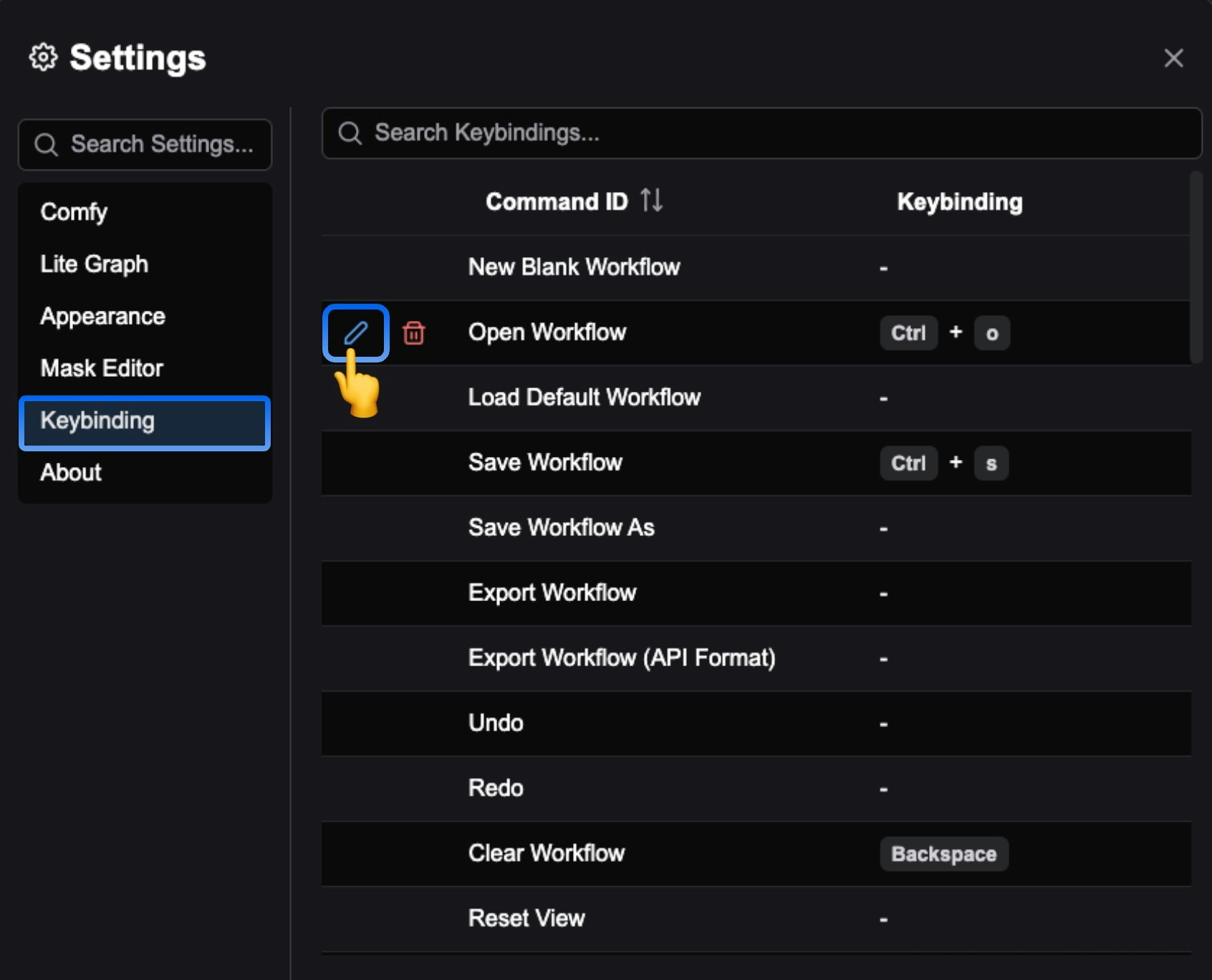
Currently, ComfyUI supports custom keyboard shortcuts. You can set the shortcuts by clicking on `Settings (gear icon)` --> `Keybinding`.
<img src="https://mintcdn.com/dripart/qYv6P0RgI3co7-eH/images/interface/setting/keybinding.jpg?fit=max&auto=format&n=qYv6P0RgI3co7-eH&q=85&s=ec261f919615b16c4b111e6370926543" alt="ComfyUI Shortcut Settings" width="1692" height="1368" data-path="images/interface/setting/keybinding.jpg" />

In the corresponding menu, you can see all the current shortcut settings for ComfyUI. Click the `edit icon` before the corresponding command to customize the shortcut.

Below is the current list of shortcuts for ComfyUI, which you can customize as needed.

<Tabs>
  <Tab title="Windows/Linux">
    | Shortcut                        | Command                                                                                                            |
    | ------------------------------- | ------------------------------------------------------------------------------------------------------------------ |
    | Ctrl + Enter                    | Queue prompt                                                                                                       |
    | Ctrl + Shift + Enter            | Queue prompt (Front)                                                                                               |
    | Ctrl + Alt + Enter              | Interrupt                                                                                                          |
    | Ctrl + Z / Ctrl + Y             | Undo/Redo                                                                                                          |
    | Ctrl + S                        | Save workflow                                                                                                      |
    | Ctrl + O                        | Load workflow                                                                                                      |
    | Ctrl + A                        | Select all nodes                                                                                                   |
    | Alt + C                         | Collapse/uncollapse selected nodes                                                                                 |
    | Ctrl + M                        | Mute/unmute selected nodes                                                                                         |
    | Ctrl + B                        | Bypass/unbypass selected nodes                                                                                     |
    | Delete<br />Backspace           | Delete selected nodes                                                                                              |
    | Backspace                       | Clear workflow                                                                                                     |
    | Space                           | Move canvas when holding and moving cursor                                                                         |
    | Ctrl + Click<br />Shift + Click | Add clicked node to selection                                                                                      |
    | Ctrl + C/Ctrl + V               | Copy and paste selected nodes (without maintaining connections to outputs of unselected nodes)                     |
    | Ctrl + C/Ctrl + Shift + V       | Copy and paste selected nodes (maintaining connections from outputs of unselected nodes to inputs of pasted nodes) |
    | Shift + Drag                    | Move multiple selected nodes at the same time                                                                      |
    | Ctrl + G                        | Add frame to selected nodes                                                                                        |
    | Ctrl + ,                        | Show settings dialog                                                                                               |
    | Alt + =                         | Zoom in (canvas)                                                                                                   |
    | Alt + -                         | Zoom out (canvas)                                                                                                  |
    | .                               | Fit view to selected nodes                                                                                         |
    | P                               | Pin/unpin selected items                                                                                           |
    | Q                               | Toggle queue sidebar                                                                                               |
    | W                               | Toggle workflow sidebar                                                                                            |
    | N                               | Toggle node library sidebar                                                                                        |
    | M                               | Toggle model library sidebar                                                                                       |
    | Ctrl + \`                       | Toggle log bottom panel                                                                                            |
    | F                               | Toggle focus mode (full screen)                                                                                    |
    | R                               | Refresh node definitions                                                                                           |
    | Double-Click LMB                | Quick search for nodes to add                                                                                      |
  </Tab>

  <Tab title="MacOS">
    | Shortcut                         | Command                                                                                                            |
    | -------------------------------- | ------------------------------------------------------------------------------------------------------------------ |
    | Cmd ⌘ + Enter                    | Queue prompt                                                                                                       |
    | Cmd ⌘ + Shift + Enter            | Queue prompt (Front)                                                                                               |
    | Cmd ⌘ + Alt + Enter              | Interrupt                                                                                                          |
    | Cmd ⌘ + Z/Cmd ⌘ + Y              | Undo/Redo                                                                                                          |
    | Cmd ⌘ + S                        | Save workflow                                                                                                      |
    | Cmd ⌘ + O                        | Load workflow                                                                                                      |
    | Cmd ⌘ + A                        | Select all nodes                                                                                                   |
    | Opt ⌥ + C                        | Collapse/uncollapse selected nodes                                                                                 |
    | Cmd ⌘ + M                        | Mute/unmute selected nodes                                                                                         |
    | Cmd ⌘ + B                        | Bypass/unbypass selected nodes                                                                                     |
    | Delete<br />Backspace            | Delete selected nodes                                                                                              |
    | Backspace                        | Clear workflow                                                                                                     |
    | Space                            | Move canvas when holding and moving cursor                                                                         |
    | Cmd ⌘ + Click<br />Shift + Click | Add clicked node to selection                                                                                      |
    | Cmd ⌘ + C / Cmd ⌘ + V            | Copy and paste selected nodes (without maintaining connections to outputs of unselected nodes)                     |
    | Cmd ⌘ + C / Cmd ⌘ + Shift + V    | Copy and paste selected nodes (maintaining connections from outputs of unselected nodes to inputs of pasted nodes) |
    | Shift + Drag                     | Move multiple selected nodes at the same time                                                                      |
    | Cmd ⌘ + G                        | Add frame to selected nodes                                                                                        |
    | Cmd ⌘ + ,                        | Show settings dialog                                                                                               |
    | Opt ⌥ + =                        | Zoom in (canvas)                                                                                                   |
    | Opt ⌥ + -                        | Zoom out (canvas)                                                                                                  |
    | .                                | Fit view to selected nodes                                                                                         |
    | P                                | Pin/unpin selected items                                                                                           |
    | Q                                | Toggle queue sidebar                                                                                               |
    | W                                | Toggle workflow sidebar                                                                                            |
    | N                                | Toggle node library sidebar                                                                                        |
    | M                                | Toggle model library sidebar                                                                                       |
    | Cmd ⌘ + \`                       | Toggle log bottom panel                                                                                            |
    | F                                | Toggle focus mode (full screen)                                                                                    |
    | R                                | Refresh node definitions                                                                                           |
    | Double-Click LMB                 | Quick search for nodes to add                                                                                      |
  </Tab>
</Tabs>
