> ## Documentation Index
> Fetch the complete documentation index at: https://docs.comfy.org/llms.txt
> Use this file to discover all available pages before exploring further.
# Luma Text to Image - ComfyUI ネイティブノードドキュメント
> Luma AI を使用してテキスト記述を高品質な画像に変換するノード
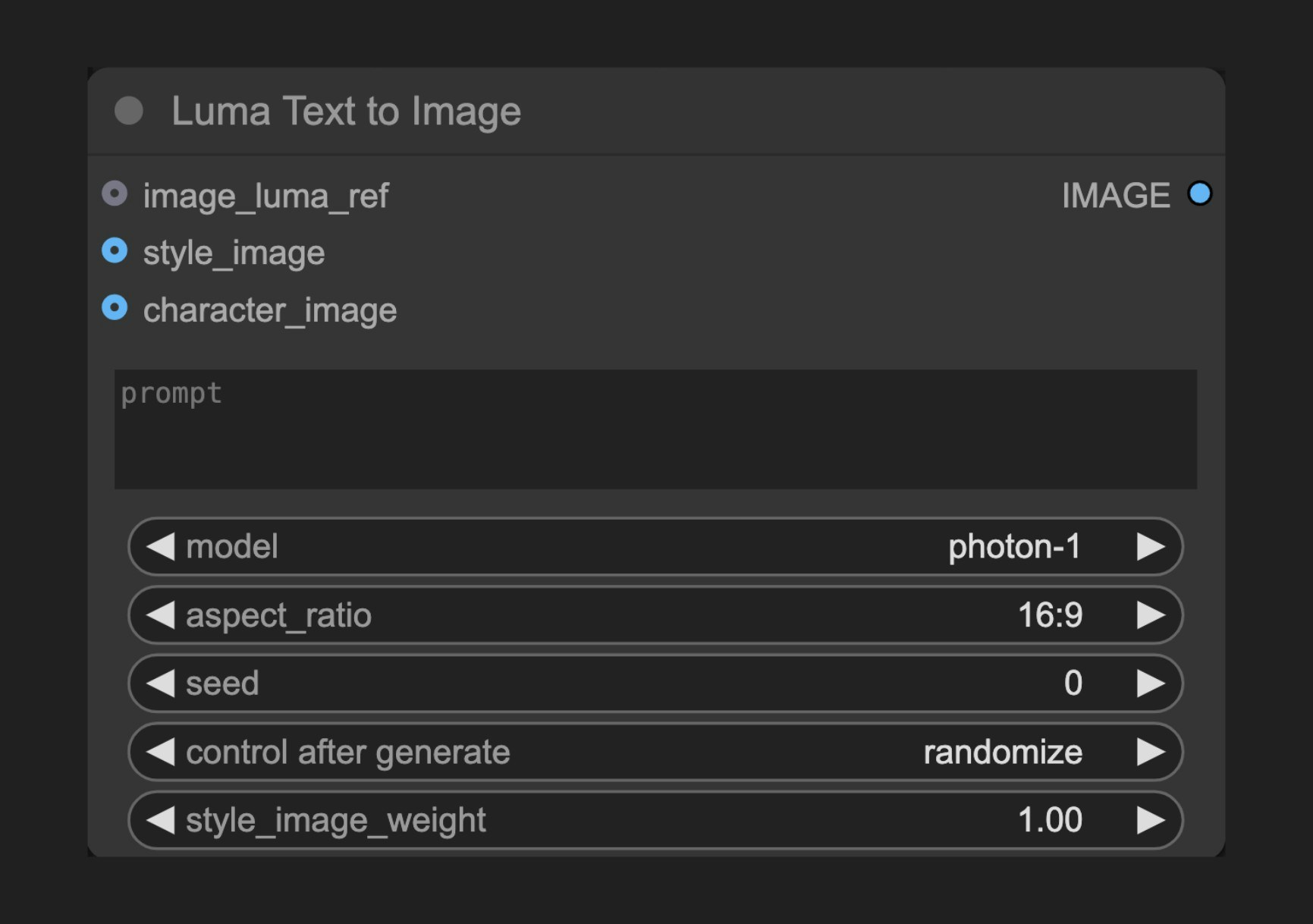 Luma Text to Image ノードは、Luma AI の高度な画像生成機能を活用して、テキスト記述から非常にリアルで芸術性の高い画像を作成できます。
## ノードの機能
このノードは Luma AI のテキスト・トゥ・イメージ API に接続し、詳細なテキストプロンプトを通じて画像を生成できるようにします。Luma AI は優れたリアリズムとディテール表現力で知られており、特に写真のようにリアルなコンテンツやアーティスティックなスタイルの画像生成に優れています。
## パラメータ
### 基本パラメータ
| パラメータ | 型 | デフォルト | 説明 |
| -------------------- | ------ | ----- | ------------------------------------------------------------------------ |
| prompt | 文字列 | "" | 生成対象のコンテンツを記述するテキストプロンプト |
| model | 選択 | - | 使用する生成モデルを選択 |
| aspect\_ratio | 選択 | 16:9 | 出力画像のアスペクト比を設定 |
| seed | 整数 | 0 | ノードを再実行するかどうかを判定するためのシード値ですが、実際の生成結果はシード値とは無関係です |
| style\_image\_weight | 浮動小数点数 | 1.0 | スタイル画像の重み(範囲:0.0–1.0)。`style_image` が指定されている場合のみ有効で、値が大きいほどスタイル参照が強くなります |
### オプションパラメータ
| パラメータ | 型 | 説明 |
| ---------------- | --------- | ---------------------------------------------- |
| image\_luma\_ref | LUMA\_REF | 入力画像を用いて生成を制御するための Luma 参照ノード接続。最大 4 枚の画像を考慮可能 |
| style\_image | 画像 | スタイル参照画像。1 枚のみ使用されます |
| character\_image | 画像 | キャラクター参照画像。複数枚のバッチとして指定可能で、最大 4 枚を考慮可能 |
### 出力
| 出力 | 型 | 説明 |
| ----- | -- | --------- |
| IMAGE | 画像 | 生成された画像結果 |
## 使用例
Luma Text to Image ワークフローの詳細ガイド
## 動作原理
Luma Text to Image ノードは、ユーザーが提供したテキストプロンプトを解析し、Luma AI の生成モデルを用いて対応する画像を生成します。このプロセスでは、深層学習技術を活用してテキスト記述を理解し、それを視覚的な表現へと変換します。ユーザーは解像度、ガイドスケール、ネガティブプロンプトなどの各種パラメータを調整することで、生成プロセスを微調整できます。
さらに、このノードは参照画像およびコンセプトガイドを用いた生成結果への影響もサポートしており、クリエイターが自身の創造的ビジョンをより正確に実現できるよう支援します。
## ソースコード
\[ノードのソースコード(2025-05-03 更新)]
```python theme={null}
class LumaImageGenerationNode(ComfyNodeABC):
"""
Generates images synchronously based on prompt and aspect ratio.
"""
RETURN_TYPES = (IO.IMAGE,)
DESCRIPTION = cleandoc(__doc__ or "") # Handle potential None value
FUNCTION = "api_call"
API_NODE = True
CATEGORY = "api node/image/Luma"
@classmethod
def INPUT_TYPES(s):
return {
"required": {
"prompt": (
IO.STRING,
{
"multiline": True,
"default": "",
"tooltip": "Prompt for the image generation",
},
),
"model": ([model.value for model in LumaImageModel],),
"aspect_ratio": (
[ratio.value for ratio in LumaAspectRatio],
{
"default": LumaAspectRatio.ratio_16_9,
},
),
"seed": (
IO.INT,
{
"default": 0,
"min": 0,
"max": 0xFFFFFFFFFFFFFFFF,
"control_after_generate": True,
"tooltip": "Seed to determine if node should re-run; actual results are nondeterministic regardless of seed.",
},
),
"style_image_weight": (
IO.FLOAT,
{
"default": 1.0,
"min": 0.0,
"max": 1.0,
"step": 0.01,
"tooltip": "Weight of style image. Ignored if no style_image provided.",
},
),
},
"optional": {
"image_luma_ref": (
LumaIO.LUMA_REF,
{
"tooltip": "Luma Reference node connection to influence generation with input images; up to 4 images can be considered."
},
),
"style_image": (
IO.IMAGE,
{"tooltip": "Style reference image; only 1 image will be used."},
),
"character_image": (
IO.IMAGE,
{
"tooltip": "Character reference images; can be a batch of multiple, up to 4 images can be considered."
},
),
},
"hidden": {
"auth_token": "AUTH_TOKEN_COMFY_ORG",
},
}
def api_call(
self,
prompt: str,
model: str,
aspect_ratio: str,
seed,
style_image_weight: float,
image_luma_ref: LumaReferenceChain = None,
style_image: torch.Tensor = None,
character_image: torch.Tensor = None,
auth_token=None,
**kwargs,
):
# handle image_luma_ref
api_image_ref = None
if image_luma_ref is not None:
api_image_ref = self._convert_luma_refs(
image_luma_ref, max_refs=4, auth_token=auth_token
)
# handle style_luma_ref
api_style_ref = None
if style_image is not None:
api_style_ref = self._convert_style_image(
style_image, weight=style_image_weight, auth_token=auth_token
)
# handle character_ref images
character_ref = None
if character_image is not None:
download_urls = upload_images_to_comfyapi(
character_image, max_images=4, auth_token=auth_token
)
character_ref = LumaCharacterRef(
identity0=LumaImageIdentity(images=download_urls)
)
operation = SynchronousOperation(
endpoint=ApiEndpoint(
path="/proxy/luma/generations/image",
method=HttpMethod.POST,
request_model=LumaImageGenerationRequest,
response_model=LumaGeneration,
),
request=LumaImageGenerationRequest(
prompt=prompt,
model=model,
aspect_ratio=aspect_ratio,
image_ref=api_image_ref,
style_ref=api_style_ref,
character_ref=character_ref,
),
auth_token=auth_token,
)
response_api: LumaGeneration = operation.execute()
operation = PollingOperation(
poll_endpoint=ApiEndpoint(
path=f"/proxy/luma/generations/{response_api.id}",
method=HttpMethod.GET,
request_model=EmptyRequest,
response_model=LumaGeneration,
),
completed_statuses=[LumaState.completed],
failed_statuses=[LumaState.failed],
status_extractor=lambda x: x.state,
auth_token=auth_token,
)
response_poll = operation.execute()
img_response = requests.get(response_poll.assets.image)
img = process_image_response(img_response)
return (img,)
def _convert_luma_refs(
self, luma_ref: LumaReferenceChain, max_refs: int, auth_token=None
):
luma_urls = []
ref_count = 0
for ref in luma_ref.refs:
download_urls = upload_images_to_comfyapi(
ref.image, max_images=1, auth_token=auth_token
)
luma_urls.append(download_urls[0])
ref_count += 1
if ref_count >= max_refs:
break
return luma_ref.create_api_model(download_urls=luma_urls, max_refs=max_refs)
def _convert_style_image(
self, style_image: torch.Tensor, weight: float, auth_token=None
):
chain = LumaReferenceChain(
first_ref=LumaReference(image=style_image, weight=weight)
)
return self._convert_luma_refs(chain, max_refs=1, auth_token=auth_token)
```
Luma Text to Image ノードは、Luma AI の高度な画像生成機能を活用して、テキスト記述から非常にリアルで芸術性の高い画像を作成できます。
## ノードの機能
このノードは Luma AI のテキスト・トゥ・イメージ API に接続し、詳細なテキストプロンプトを通じて画像を生成できるようにします。Luma AI は優れたリアリズムとディテール表現力で知られており、特に写真のようにリアルなコンテンツやアーティスティックなスタイルの画像生成に優れています。
## パラメータ
### 基本パラメータ
| パラメータ | 型 | デフォルト | 説明 |
| -------------------- | ------ | ----- | ------------------------------------------------------------------------ |
| prompt | 文字列 | "" | 生成対象のコンテンツを記述するテキストプロンプト |
| model | 選択 | - | 使用する生成モデルを選択 |
| aspect\_ratio | 選択 | 16:9 | 出力画像のアスペクト比を設定 |
| seed | 整数 | 0 | ノードを再実行するかどうかを判定するためのシード値ですが、実際の生成結果はシード値とは無関係です |
| style\_image\_weight | 浮動小数点数 | 1.0 | スタイル画像の重み(範囲:0.0–1.0)。`style_image` が指定されている場合のみ有効で、値が大きいほどスタイル参照が強くなります |
### オプションパラメータ
| パラメータ | 型 | 説明 |
| ---------------- | --------- | ---------------------------------------------- |
| image\_luma\_ref | LUMA\_REF | 入力画像を用いて生成を制御するための Luma 参照ノード接続。最大 4 枚の画像を考慮可能 |
| style\_image | 画像 | スタイル参照画像。1 枚のみ使用されます |
| character\_image | 画像 | キャラクター参照画像。複数枚のバッチとして指定可能で、最大 4 枚を考慮可能 |
### 出力
| 出力 | 型 | 説明 |
| ----- | -- | --------- |
| IMAGE | 画像 | 生成された画像結果 |
## 使用例
Luma Text to Image ワークフローの詳細ガイド
## 動作原理
Luma Text to Image ノードは、ユーザーが提供したテキストプロンプトを解析し、Luma AI の生成モデルを用いて対応する画像を生成します。このプロセスでは、深層学習技術を活用してテキスト記述を理解し、それを視覚的な表現へと変換します。ユーザーは解像度、ガイドスケール、ネガティブプロンプトなどの各種パラメータを調整することで、生成プロセスを微調整できます。
さらに、このノードは参照画像およびコンセプトガイドを用いた生成結果への影響もサポートしており、クリエイターが自身の創造的ビジョンをより正確に実現できるよう支援します。
## ソースコード
\[ノードのソースコード(2025-05-03 更新)]
```python theme={null}
class LumaImageGenerationNode(ComfyNodeABC):
"""
Generates images synchronously based on prompt and aspect ratio.
"""
RETURN_TYPES = (IO.IMAGE,)
DESCRIPTION = cleandoc(__doc__ or "") # Handle potential None value
FUNCTION = "api_call"
API_NODE = True
CATEGORY = "api node/image/Luma"
@classmethod
def INPUT_TYPES(s):
return {
"required": {
"prompt": (
IO.STRING,
{
"multiline": True,
"default": "",
"tooltip": "Prompt for the image generation",
},
),
"model": ([model.value for model in LumaImageModel],),
"aspect_ratio": (
[ratio.value for ratio in LumaAspectRatio],
{
"default": LumaAspectRatio.ratio_16_9,
},
),
"seed": (
IO.INT,
{
"default": 0,
"min": 0,
"max": 0xFFFFFFFFFFFFFFFF,
"control_after_generate": True,
"tooltip": "Seed to determine if node should re-run; actual results are nondeterministic regardless of seed.",
},
),
"style_image_weight": (
IO.FLOAT,
{
"default": 1.0,
"min": 0.0,
"max": 1.0,
"step": 0.01,
"tooltip": "Weight of style image. Ignored if no style_image provided.",
},
),
},
"optional": {
"image_luma_ref": (
LumaIO.LUMA_REF,
{
"tooltip": "Luma Reference node connection to influence generation with input images; up to 4 images can be considered."
},
),
"style_image": (
IO.IMAGE,
{"tooltip": "Style reference image; only 1 image will be used."},
),
"character_image": (
IO.IMAGE,
{
"tooltip": "Character reference images; can be a batch of multiple, up to 4 images can be considered."
},
),
},
"hidden": {
"auth_token": "AUTH_TOKEN_COMFY_ORG",
},
}
def api_call(
self,
prompt: str,
model: str,
aspect_ratio: str,
seed,
style_image_weight: float,
image_luma_ref: LumaReferenceChain = None,
style_image: torch.Tensor = None,
character_image: torch.Tensor = None,
auth_token=None,
**kwargs,
):
# handle image_luma_ref
api_image_ref = None
if image_luma_ref is not None:
api_image_ref = self._convert_luma_refs(
image_luma_ref, max_refs=4, auth_token=auth_token
)
# handle style_luma_ref
api_style_ref = None
if style_image is not None:
api_style_ref = self._convert_style_image(
style_image, weight=style_image_weight, auth_token=auth_token
)
# handle character_ref images
character_ref = None
if character_image is not None:
download_urls = upload_images_to_comfyapi(
character_image, max_images=4, auth_token=auth_token
)
character_ref = LumaCharacterRef(
identity0=LumaImageIdentity(images=download_urls)
)
operation = SynchronousOperation(
endpoint=ApiEndpoint(
path="/proxy/luma/generations/image",
method=HttpMethod.POST,
request_model=LumaImageGenerationRequest,
response_model=LumaGeneration,
),
request=LumaImageGenerationRequest(
prompt=prompt,
model=model,
aspect_ratio=aspect_ratio,
image_ref=api_image_ref,
style_ref=api_style_ref,
character_ref=character_ref,
),
auth_token=auth_token,
)
response_api: LumaGeneration = operation.execute()
operation = PollingOperation(
poll_endpoint=ApiEndpoint(
path=f"/proxy/luma/generations/{response_api.id}",
method=HttpMethod.GET,
request_model=EmptyRequest,
response_model=LumaGeneration,
),
completed_statuses=[LumaState.completed],
failed_statuses=[LumaState.failed],
status_extractor=lambda x: x.state,
auth_token=auth_token,
)
response_poll = operation.execute()
img_response = requests.get(response_poll.assets.image)
img = process_image_response(img_response)
return (img,)
def _convert_luma_refs(
self, luma_ref: LumaReferenceChain, max_refs: int, auth_token=None
):
luma_urls = []
ref_count = 0
for ref in luma_ref.refs:
download_urls = upload_images_to_comfyapi(
ref.image, max_images=1, auth_token=auth_token
)
luma_urls.append(download_urls[0])
ref_count += 1
if ref_count >= max_refs:
break
return luma_ref.create_api_model(download_urls=luma_urls, max_refs=max_refs)
def _convert_style_image(
self, style_image: torch.Tensor, weight: float, auth_token=None
):
chain = LumaReferenceChain(
first_ref=LumaReference(image=style_image, weight=weight)
)
return self._convert_luma_refs(chain, max_refs=1, auth_token=auth_token)
```