> ## Documentation Index
> Fetch the complete documentation index at: https://docs.comfy.org/llms.txt
> Use this file to discover all available pages before exploring further.
# 워크플로우 API 형식
> ComfyUI 워크플로우의 API 형식과 이를 내보내는 방법 이해하기
ComfyUI 워크플로우는 노드 그래프를 설명하는 JSON 객체입니다. Cloud API를 통해 또는 자체 서버를 실행하여 ComfyUI를 프로그래밍 방식으로 호출할 때, 워크플로우는 **API 형식**으로 제출해야 합니다. 이는 브라우저에서 사용하는 일반 저장 형식과 다른 특수한 JSON 구조입니다.
이 페이지에서는 두 형식 간의 차이점과 워크플로우를 올바르게 내보내는 방법을 설명합니다.
***
## 저장 형식 vs API 형식
ComfyUI 프론트엔드는 두 가지 형식으로 워크플로우를 저장할 수 있습니다:
| | 저장 형식 | API 형식 |
| --------------- | --------------------- | ---------------------- |
| **파일 메뉴** | `파일 → 저장` 또는 `Ctrl+S` | `파일 → 워크플로우 내보내기(API)` |
| **파일 확장자** | `.json` | `.json` |
| **노드 키** | 노드 제목 또는 레이블 | 숫자형 노드 ID |
| **위젯 값** | 포함됨 | 포함됨 |
| **위치/레이아웃 데이터** | 포함됨 (x, y, 너비) | **제외됨** |
| **색상/그룹** | 포함됨 | **제외됨** |
| **사용법** | 프론트엔드에서 다시 열기 | API 제출 |
| **UI에서 로드 가능** | 예 | 예, 단 레이아웃 없음 |
주요 차이점: **API 형식은 UI 메타데이터(위치, 색상, 그룹, 노드 크기)를 생략합니다.** 이는 프론트엔드에서 시각적 편집에만 필요한 정보이며, 프로그래밍 방식 사용을 위해 JSON을 더 작고 깔끔하게 유지합니다.
***
## 내보내는 방법
ComfyUI 프론트엔드에서 워크플로우를 열고, `파일 → 워크플로우 내보내기(API)`로 이동하세요:
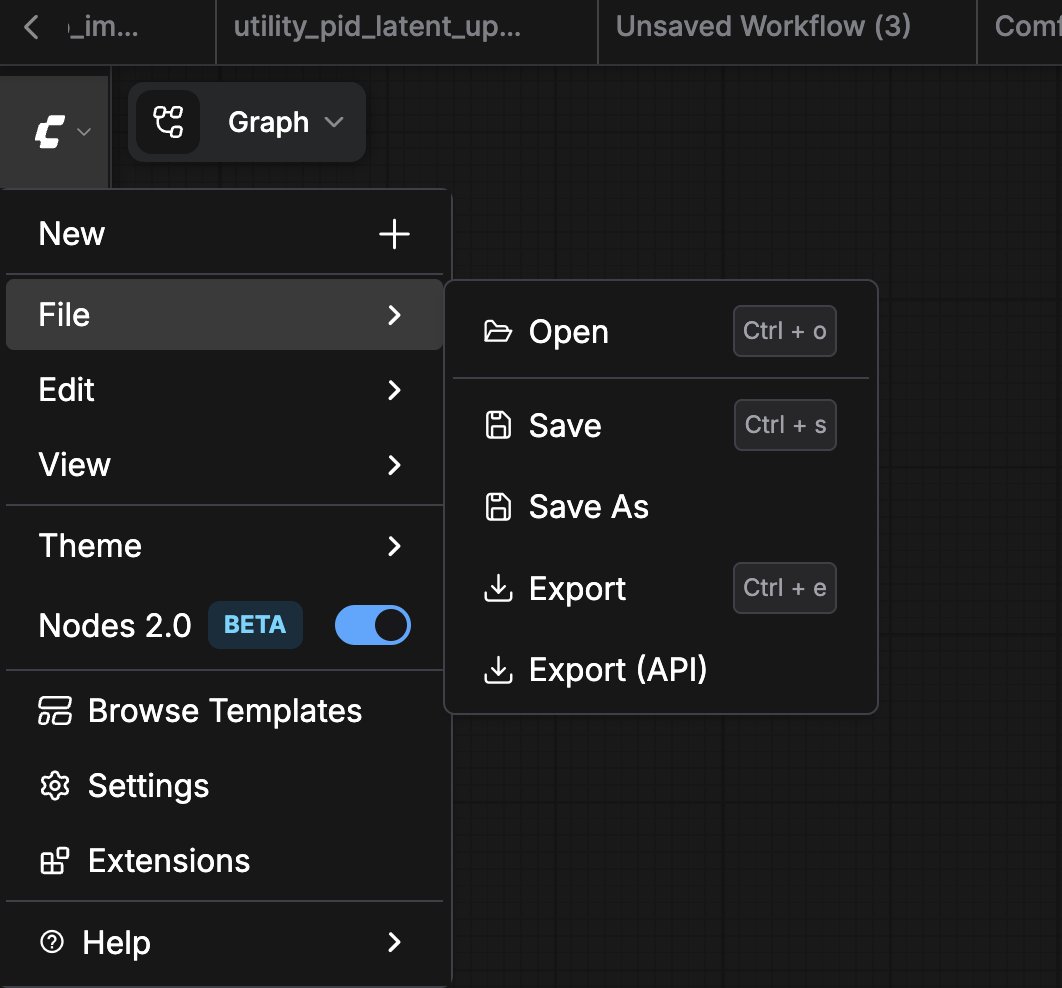 이렇게 하면 API 관련 데이터만 포함된 `.json` 파일이 다운로드됩니다:
```json theme={null}
{
"3": {
"inputs": {
"seed": 156680208700286,
"steps": 20,
"cfg": 8,
"sampler_name": "euler",
"scheduler": "normal",
"denoise": 1,
"model": [
"4",
0
],
"positive": [
"6",
0
],
"negative": [
"7",
0
],
"latent_image": [
"5",
0
]
},
"class_type": "KSampler",
"_meta": {
"title": "KSampler"
}
},
"4": {
"inputs": {
"ckpt_name": "v1-5-pruned-emaonly-fp16.safetensors"
},
"class_type": "CheckpointLoaderSimple",
"_meta": {
"title": "체크포인트 로드"
}
},
"5": {
"inputs": {
"width": 512,
"height": 512,
"batch_size": 1
},
"class_type": "EmptyLatentImage",
"_meta": {
"title": "빈 잠재 이미지"
}
},
"6": {
"inputs": {
"text": "아름다운 풍경 자연 유리병 풍경, , 보라색 은하 병,",
"clip": [
"4",
1
]
},
"class_type": "CLIPTextEncode",
"_meta": {
"title": "CLIP 텍스트 인코딩(프롬프트)"
}
},
"7": {
"inputs": {
"text": "텍스트, 워터마크",
"clip": [
"4",
1
]
},
"class_type": "CLIPTextEncode",
"_meta": {
"title": "CLIP 텍스트 인코딩(프롬프트)"
}
},
"8": {
"inputs": {
"samples": [
"3",
0
],
"vae": [
"4",
2
]
},
"class_type": "VAEDecode",
"_meta": {
"title": "VAE 디코딩"
}
},
"9": {
"inputs": {
"filename_prefix": "ComfyUI",
"images": [
"8",
0
]
},
"class_type": "SaveImage",
"_meta": {
"title": "이미지 저장"
}
}
}
```
***
## 형식 간 변환
저장 형식 워크플로우를 API 형식으로 변환해야 하는 경우, 가장 간단한 방법은 다음과 같습니다:
1. 프론트엔드에서 `파일 → 불러오기`를 사용해 `.json` 파일을 열기
2. `파일 → 워크플로우 내보내기(API)`를 통해 내보내기
자동 변환을 원한다면, 각 노드의 `x`, `y`, `width` 필드를 제거하고 루트 JSON에서 `groups`와 `extra` 섹션을 삭제하는 스크립트를 작성할 수 있습니다.
***
## 관련 페이지
* [API 개요](/ko/development/api-development/overview) — Cloud 및 서버 API 옵션 비교
* [Cloud API 개요](/ko/development/cloud/overview) — Comfy Cloud에 API 형식 워크플로우 제출
* [API 예제](/ko/development/comfyui-server/api-examples) — API 형식 워크플로우 실습 보기
* [API 키 얻기](/ko/development/api-development/getting-an-api-key) — Cloud API 및 파트너 노드에 필요
이렇게 하면 API 관련 데이터만 포함된 `.json` 파일이 다운로드됩니다:
```json theme={null}
{
"3": {
"inputs": {
"seed": 156680208700286,
"steps": 20,
"cfg": 8,
"sampler_name": "euler",
"scheduler": "normal",
"denoise": 1,
"model": [
"4",
0
],
"positive": [
"6",
0
],
"negative": [
"7",
0
],
"latent_image": [
"5",
0
]
},
"class_type": "KSampler",
"_meta": {
"title": "KSampler"
}
},
"4": {
"inputs": {
"ckpt_name": "v1-5-pruned-emaonly-fp16.safetensors"
},
"class_type": "CheckpointLoaderSimple",
"_meta": {
"title": "체크포인트 로드"
}
},
"5": {
"inputs": {
"width": 512,
"height": 512,
"batch_size": 1
},
"class_type": "EmptyLatentImage",
"_meta": {
"title": "빈 잠재 이미지"
}
},
"6": {
"inputs": {
"text": "아름다운 풍경 자연 유리병 풍경, , 보라색 은하 병,",
"clip": [
"4",
1
]
},
"class_type": "CLIPTextEncode",
"_meta": {
"title": "CLIP 텍스트 인코딩(프롬프트)"
}
},
"7": {
"inputs": {
"text": "텍스트, 워터마크",
"clip": [
"4",
1
]
},
"class_type": "CLIPTextEncode",
"_meta": {
"title": "CLIP 텍스트 인코딩(프롬프트)"
}
},
"8": {
"inputs": {
"samples": [
"3",
0
],
"vae": [
"4",
2
]
},
"class_type": "VAEDecode",
"_meta": {
"title": "VAE 디코딩"
}
},
"9": {
"inputs": {
"filename_prefix": "ComfyUI",
"images": [
"8",
0
]
},
"class_type": "SaveImage",
"_meta": {
"title": "이미지 저장"
}
}
}
```
***
## 형식 간 변환
저장 형식 워크플로우를 API 형식으로 변환해야 하는 경우, 가장 간단한 방법은 다음과 같습니다:
1. 프론트엔드에서 `파일 → 불러오기`를 사용해 `.json` 파일을 열기
2. `파일 → 워크플로우 내보내기(API)`를 통해 내보내기
자동 변환을 원한다면, 각 노드의 `x`, `y`, `width` 필드를 제거하고 루트 JSON에서 `groups`와 `extra` 섹션을 삭제하는 스크립트를 작성할 수 있습니다.
***
## 관련 페이지
* [API 개요](/ko/development/api-development/overview) — Cloud 및 서버 API 옵션 비교
* [Cloud API 개요](/ko/development/cloud/overview) — Comfy Cloud에 API 형식 워크플로우 제출
* [API 예제](/ko/development/comfyui-server/api-examples) — API 형식 워크플로우 실습 보기
* [API 키 얻기](/ko/development/api-development/getting-an-api-key) — Cloud API 및 파트너 노드에 필요