> ## Documentation Index
> Fetch the complete documentation index at: https://docs.comfy.org/llms.txt
> Use this file to discover all available pages before exploring further.
# Comfy API Build를 생성하는 다른 방법
> Comfy Desktop 스냅샷 또는 저장된 워크플로 JSON에서 Comfy API Build를 생성합니다.
이미 Desktop 스냅샷이나 워크플로가 있으신가요? 아래에서 해당하는 경로를 사용하여 Build를 시작한 다음, 릴리스하기 전에 내용을 검토하세요.
## Comfy Desktop 스냅샷
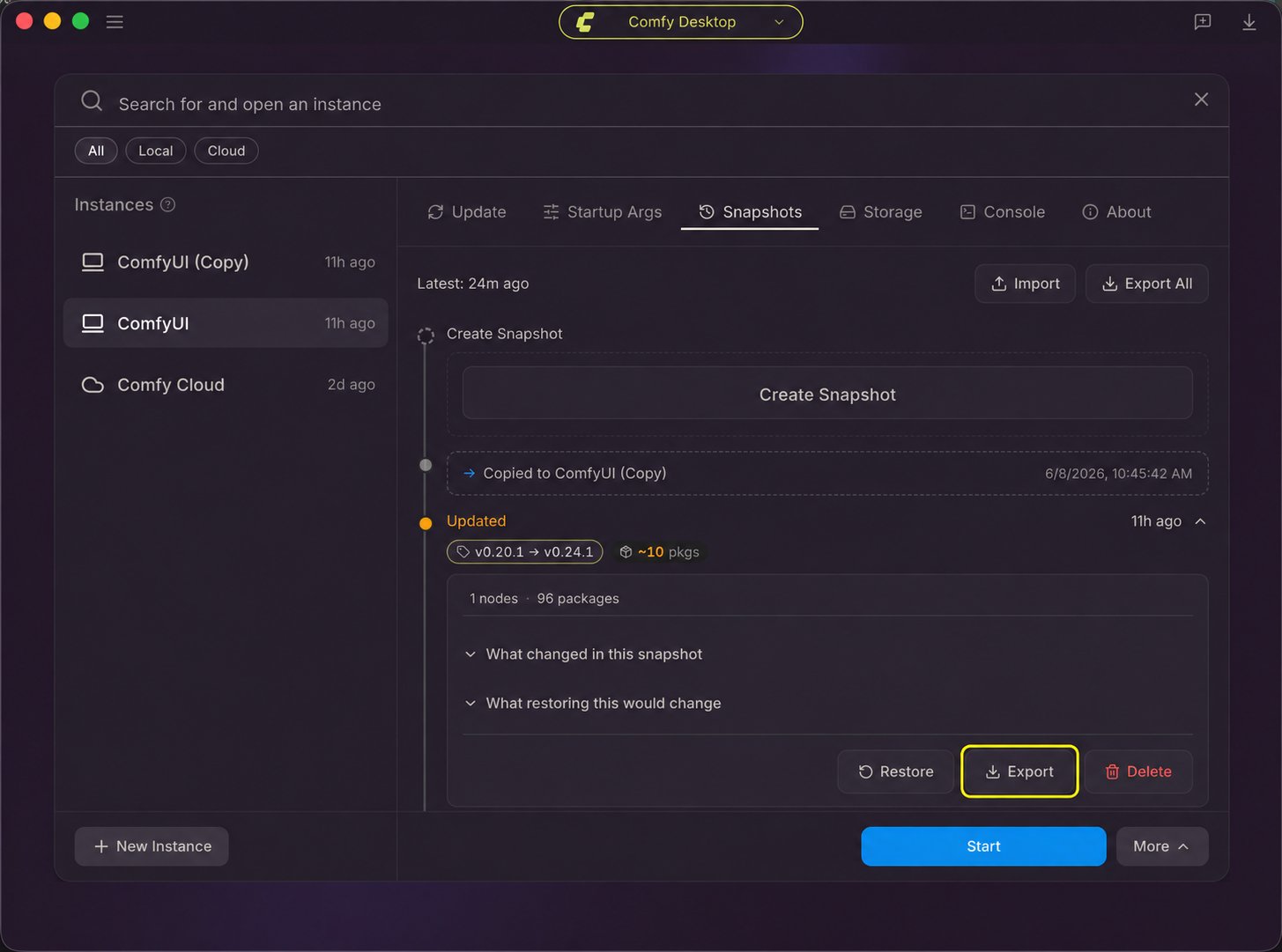
스냅샷을 사용하면 Desktop 인스턴스의 ComfyUI 버전, 커스텀 노드, Python 패키지를 Build로 가져올 수 있습니다.
1. Comfy Desktop에서 인스턴스의 **관리** 패널을 열고 **스냅샷**을 선택합니다. 빌드하려는 환경의 스냅샷을 선택하고 해당 **내보내기** 버튼을 클릭합니다. 현재 상태가 목록에 없으면 먼저 수동 스냅샷을 생성하세요. [Desktop 스냅샷 단계](/ko/installation/desktop/usage/snapshots#스냅샷-탭-개요)를 참조하세요.
2. [Comfy API Build Wizard](https://platform.comfy.org/?onboarding=comfyapi)를 열고 스냅샷 파일을 가져옵니다.
3. 릴리스를 생성하기 전에 Build 내용을 검토하고 누락된 모델이나 의존성을 추가하거나 수정하세요.
 ## 워크플로 JSON
저장된 워크플로 파일을 사용하여 Build Wizard에서 Build를 구성합니다.
1. [Comfy API Build Wizard](https://platform.comfy.org/?onboarding=comfyapi)를 엽니다.
2. 워크플로 JSON을 가져오기 단계로 드래그합니다.
3. 릴리스를 생성하기 전에 Build 내용을 검토하고 누락된 모델이나 의존성을 추가하거나 수정하세요.
## 워크플로 JSON
저장된 워크플로 파일을 사용하여 Build Wizard에서 Build를 구성합니다.
1. [Comfy API Build Wizard](https://platform.comfy.org/?onboarding=comfyapi)를 엽니다.
2. 워크플로 JSON을 가져오기 단계로 드래그합니다.
3. 릴리스를 생성하기 전에 Build 내용을 검토하고 누락된 모델이나 의존성을 추가하거나 수정하세요.
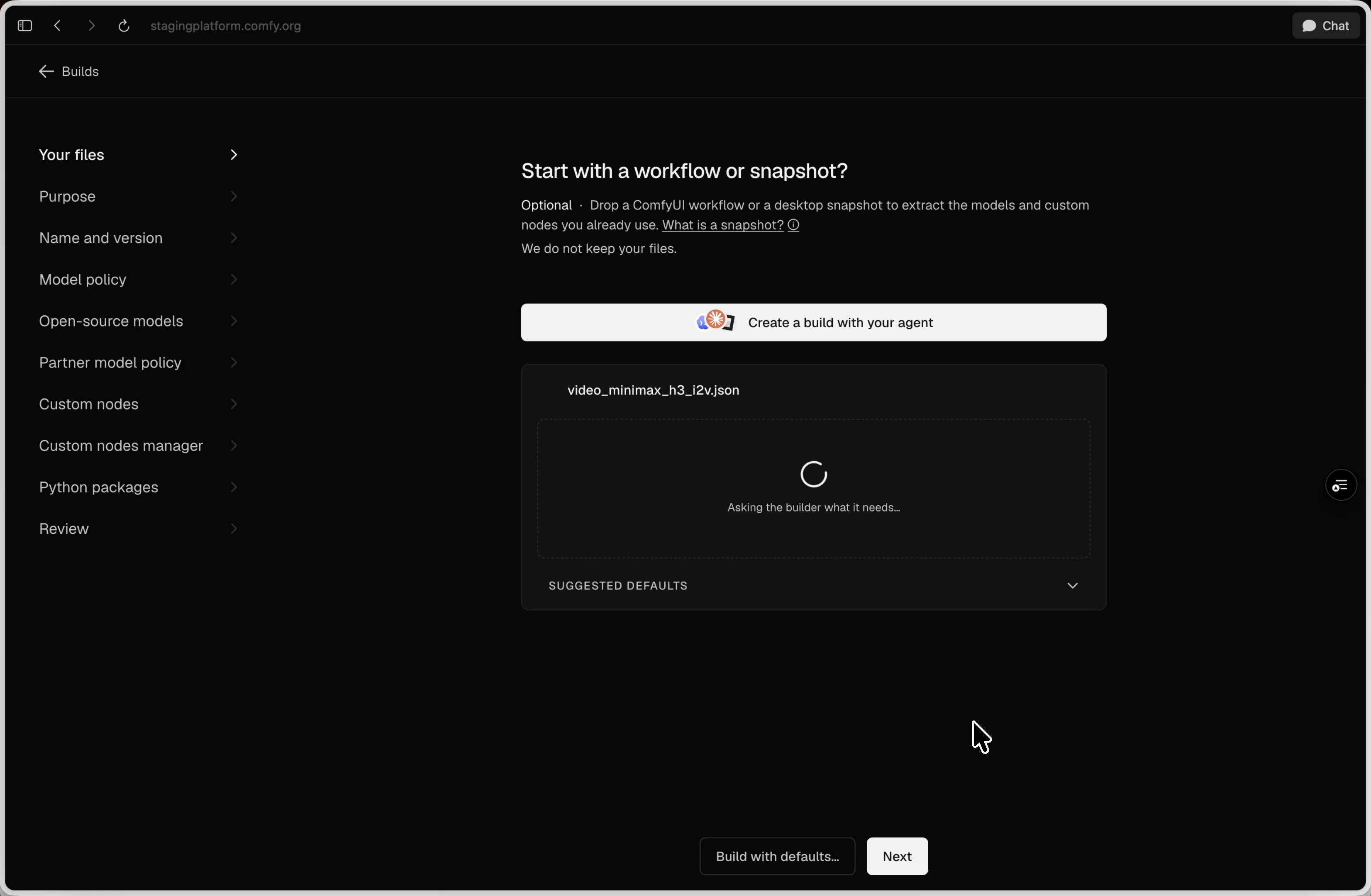 마법사는 워크플로를 검사하고 계속하기 전에 Build 설정을 제안합니다.
## 다음 단계
릴리스를 생성하고 배포한 뒤 에이전트나 CLI로 워크플로를 실행합니다.
Build 파일, 업데이트, 릴리스, 스케일링, 결제, 문제 해결을 관리합니다.
This documentation is built and hosted on [Mintlify](https://mintlify.com), a developer documentation platform.
마법사는 워크플로를 검사하고 계속하기 전에 Build 설정을 제안합니다.
## 다음 단계
릴리스를 생성하고 배포한 뒤 에이전트나 CLI로 워크플로를 실행합니다.
Build 파일, 업데이트, 릴리스, 스케일링, 결제, 문제 해결을 관리합니다.
This documentation is built and hosted on [Mintlify](https://mintlify.com), a developer documentation platform.