Run on Comfy Cloud
### 1. Workflow Please download the images below and drag into ComfyUI to load the workflow.  Download the images below we will use them as input images. 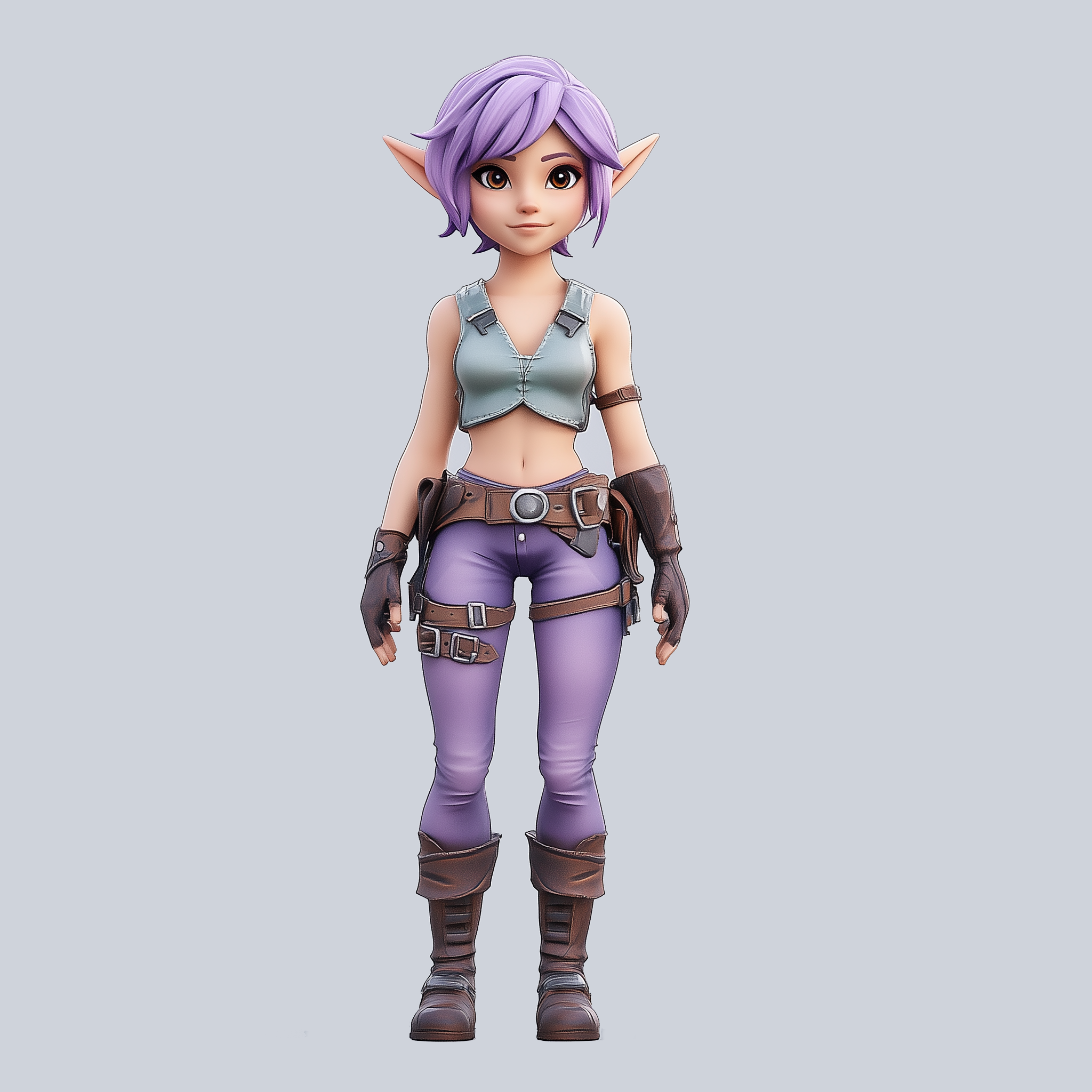 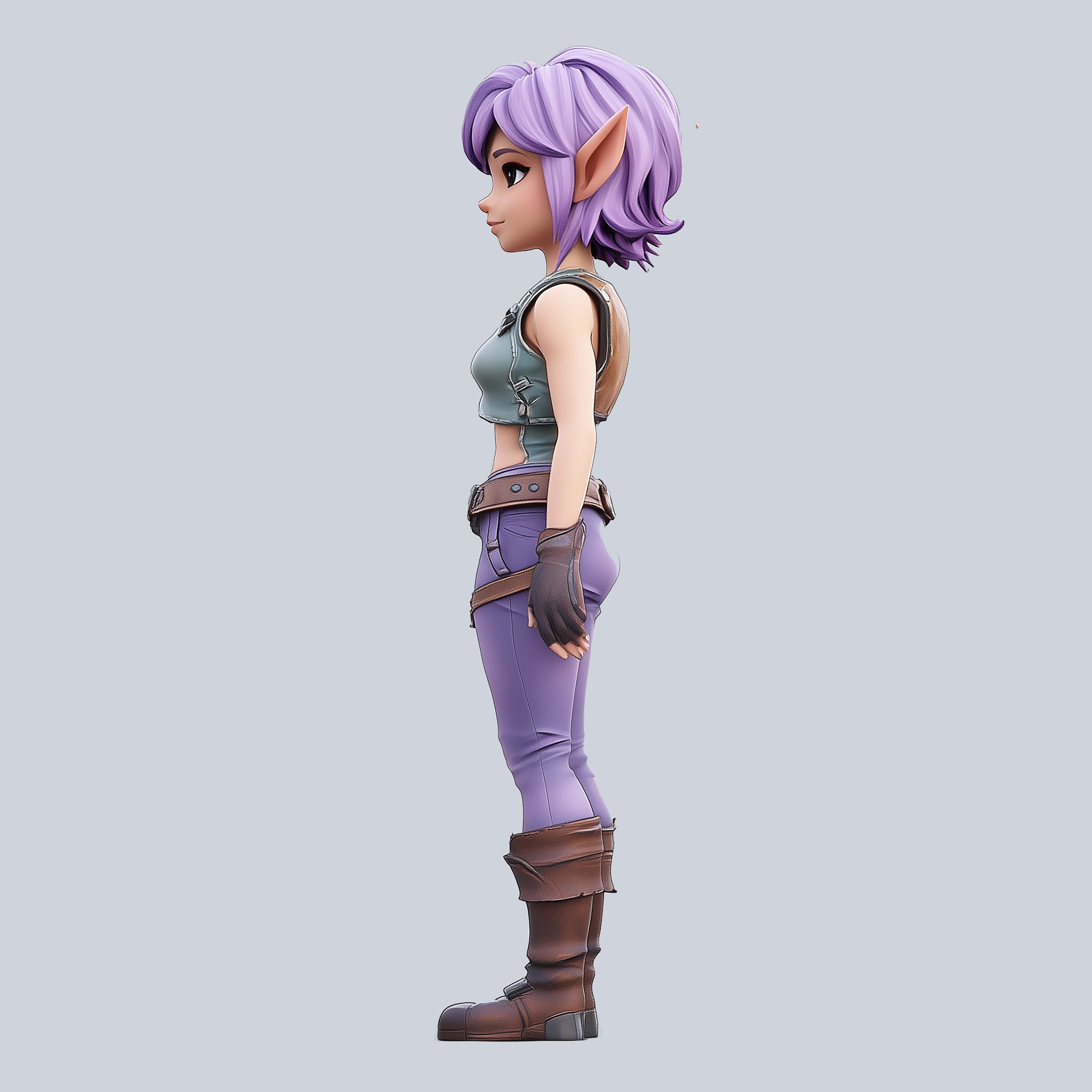 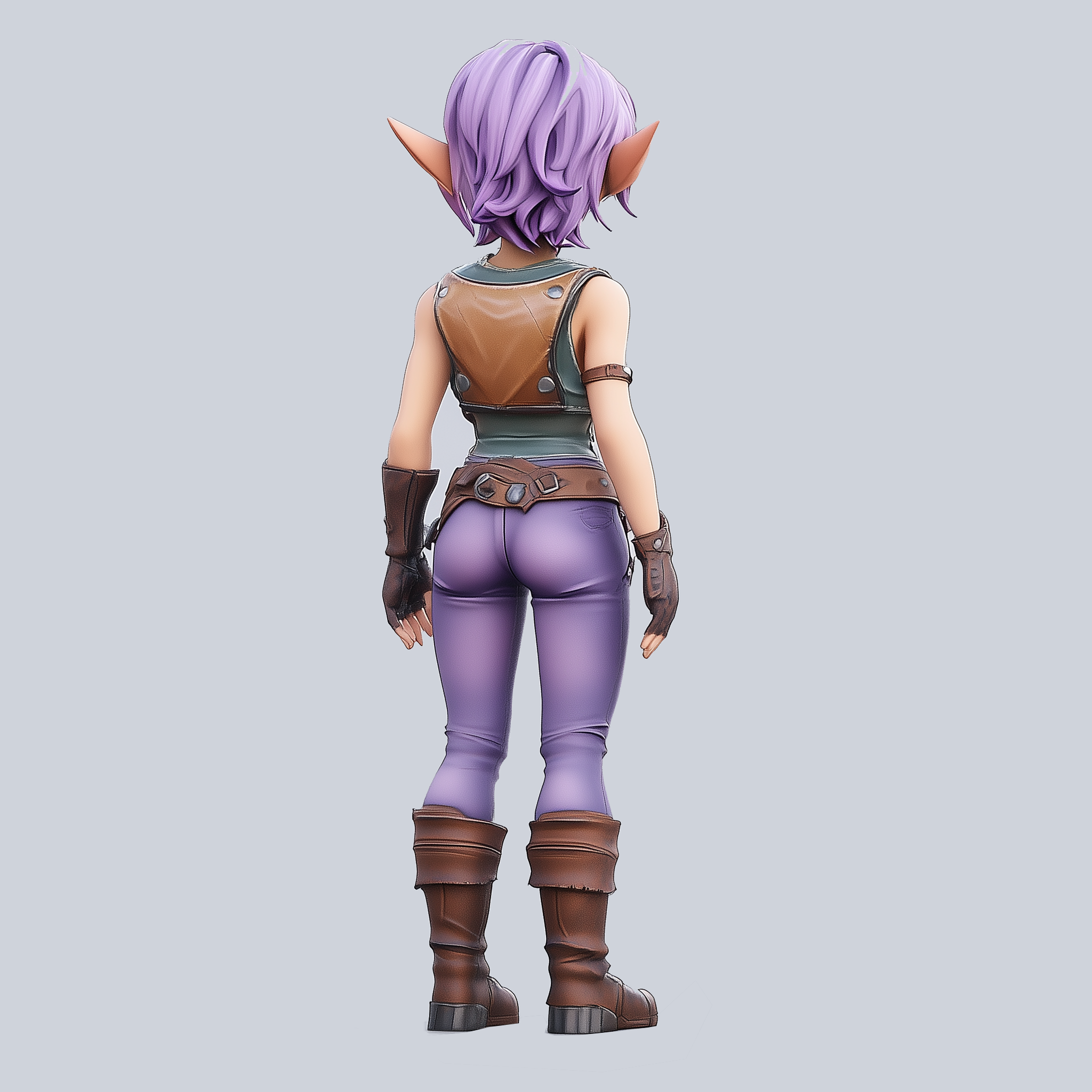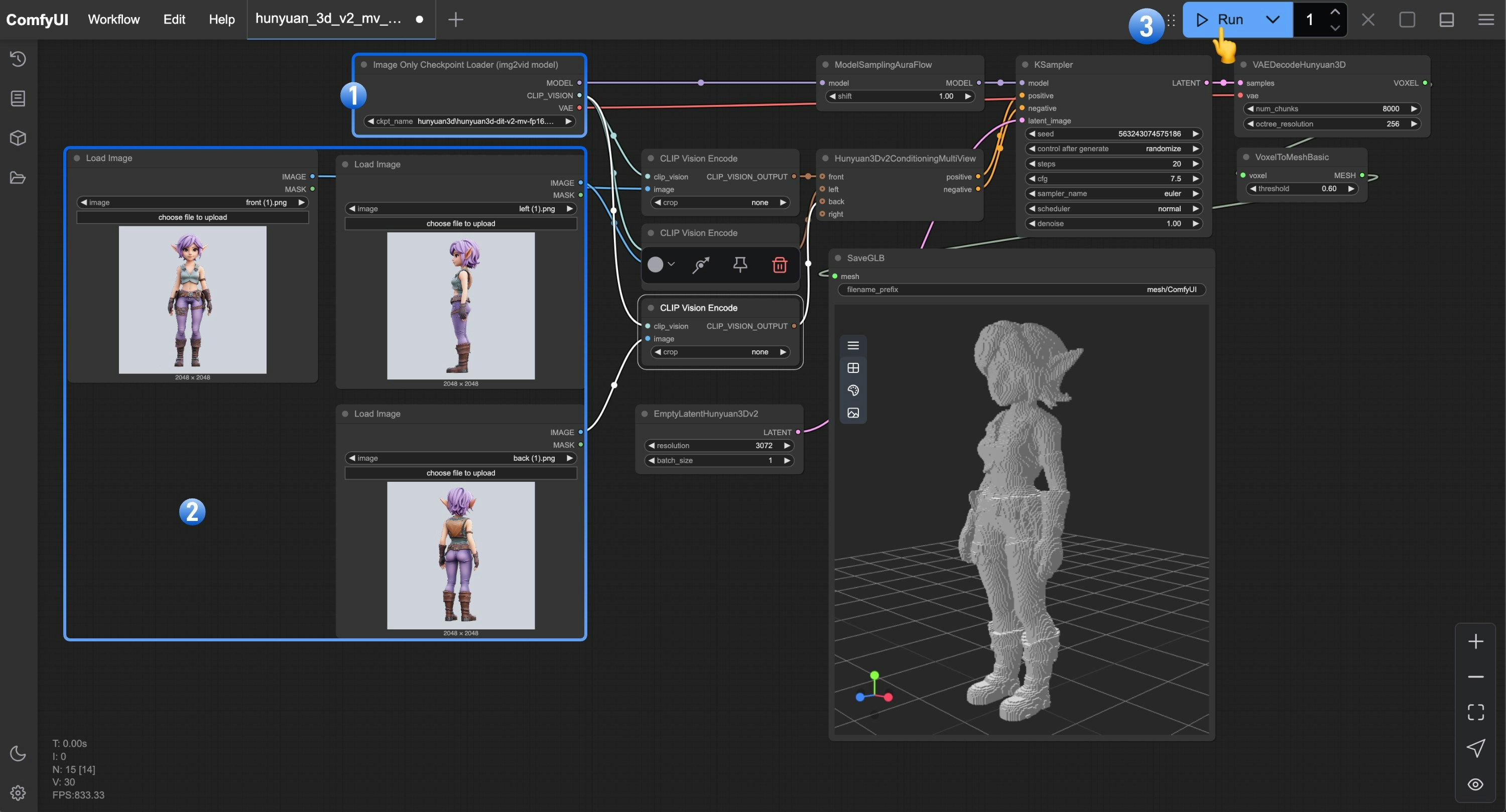 1. Ensure that the Image Only Checkpoint Loader(img2vid model) has loaded our downloaded and renamed `hunyuan3d-dit-v2-mv.safetensors` model
2. Load the corresponding view images in each of the `Load Image` nodes
3. Click the `Queue` button, or use the shortcut `Ctrl(cmd) + Enter` to run the workflow
If you need to add more views, make sure to load other view images in the `Hunyuan3Dv2ConditioningMultiView` node, and ensure that you load the corresponding view images in the `Load Image` nodes.
## Hunyuan3D-2mv-turbo Workflow
In the Hunyuan3D-2mv-turbo workflow, we'll use the Hunyuan3D-2mv-turbo model to generate 3D models. This model is a step distillation version of Hunyuan3D-2mv, allowing for faster 3D model generation. In this version of the workflow, we set `cfg` to 1.0 and add a `flux guidance` node to control the `distilled cfg` generation.
1. Ensure that the Image Only Checkpoint Loader(img2vid model) has loaded our downloaded and renamed `hunyuan3d-dit-v2-mv.safetensors` model
2. Load the corresponding view images in each of the `Load Image` nodes
3. Click the `Queue` button, or use the shortcut `Ctrl(cmd) + Enter` to run the workflow
If you need to add more views, make sure to load other view images in the `Hunyuan3Dv2ConditioningMultiView` node, and ensure that you load the corresponding view images in the `Load Image` nodes.
## Hunyuan3D-2mv-turbo Workflow
In the Hunyuan3D-2mv-turbo workflow, we'll use the Hunyuan3D-2mv-turbo model to generate 3D models. This model is a step distillation version of Hunyuan3D-2mv, allowing for faster 3D model generation. In this version of the workflow, we set `cfg` to 1.0 and add a `flux guidance` node to control the `distilled cfg` generation.
Run on Comfy Cloud
### 1. Workflow Please download the images below and drag into ComfyUI to load the workflow.  Download the images below we will use them as input images. 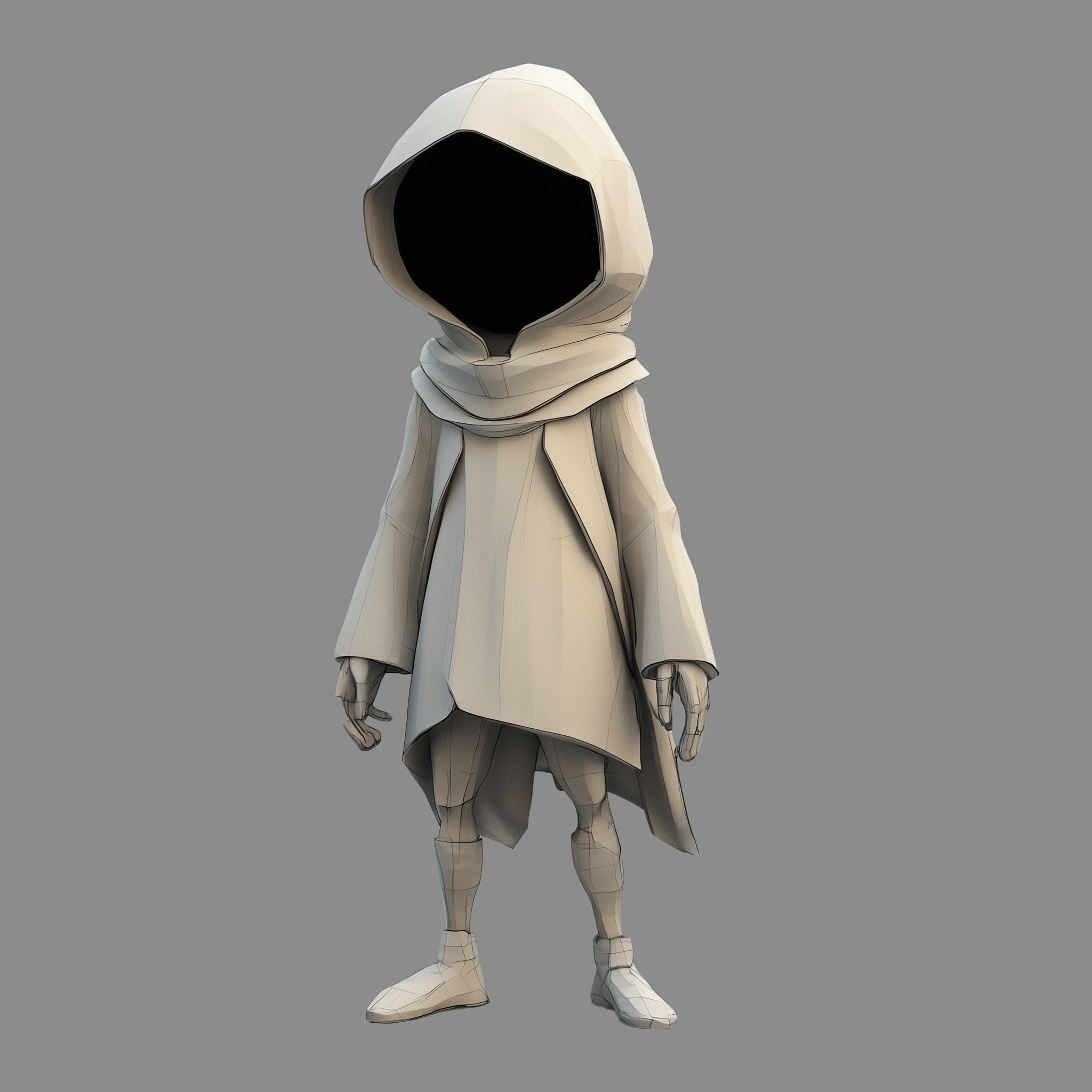 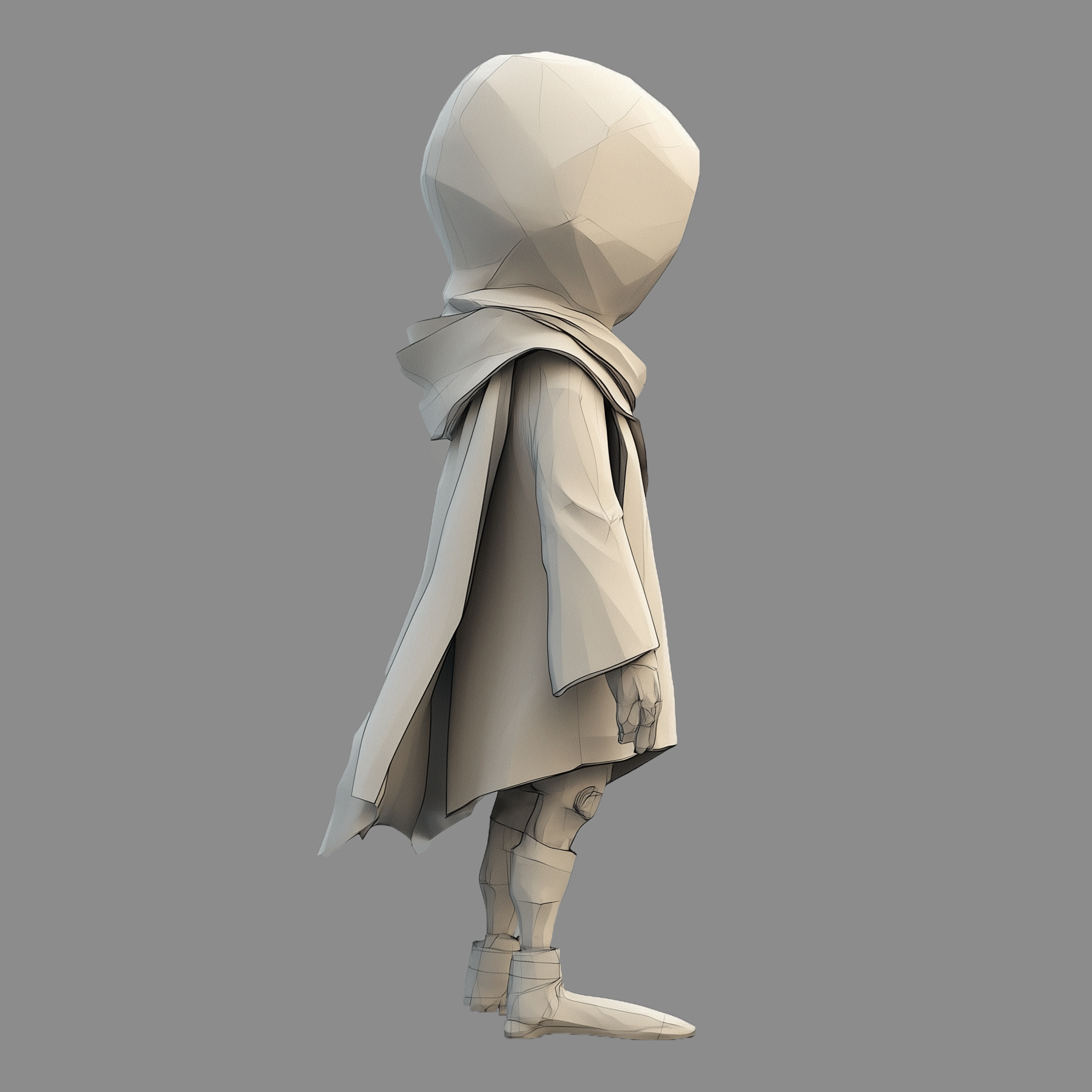 ### 2. Manual Model Installation Download the model below and save it to the corresponding ComfyUI folder * hunyuan3d-dit-v2-mv-turbo: [model.fp16.safetensors](https://huggingface.co/tencent/Hunyuan3D-2mv/resolve/main/hunyuan3d-dit-v2-mv-turbo/model.fp16.safetensors?download=true) - after downloading, you can rename it to `hunyuan3d-dit-v2-mv-turbo.safetensors` ``` ComfyUI/ ├── models/ │ ├── checkpoints/ │ │ └── hunyuan3d-dit-v2-mv-turbo.safetensors // renamed file ``` ### 3. Steps to Run the Workflow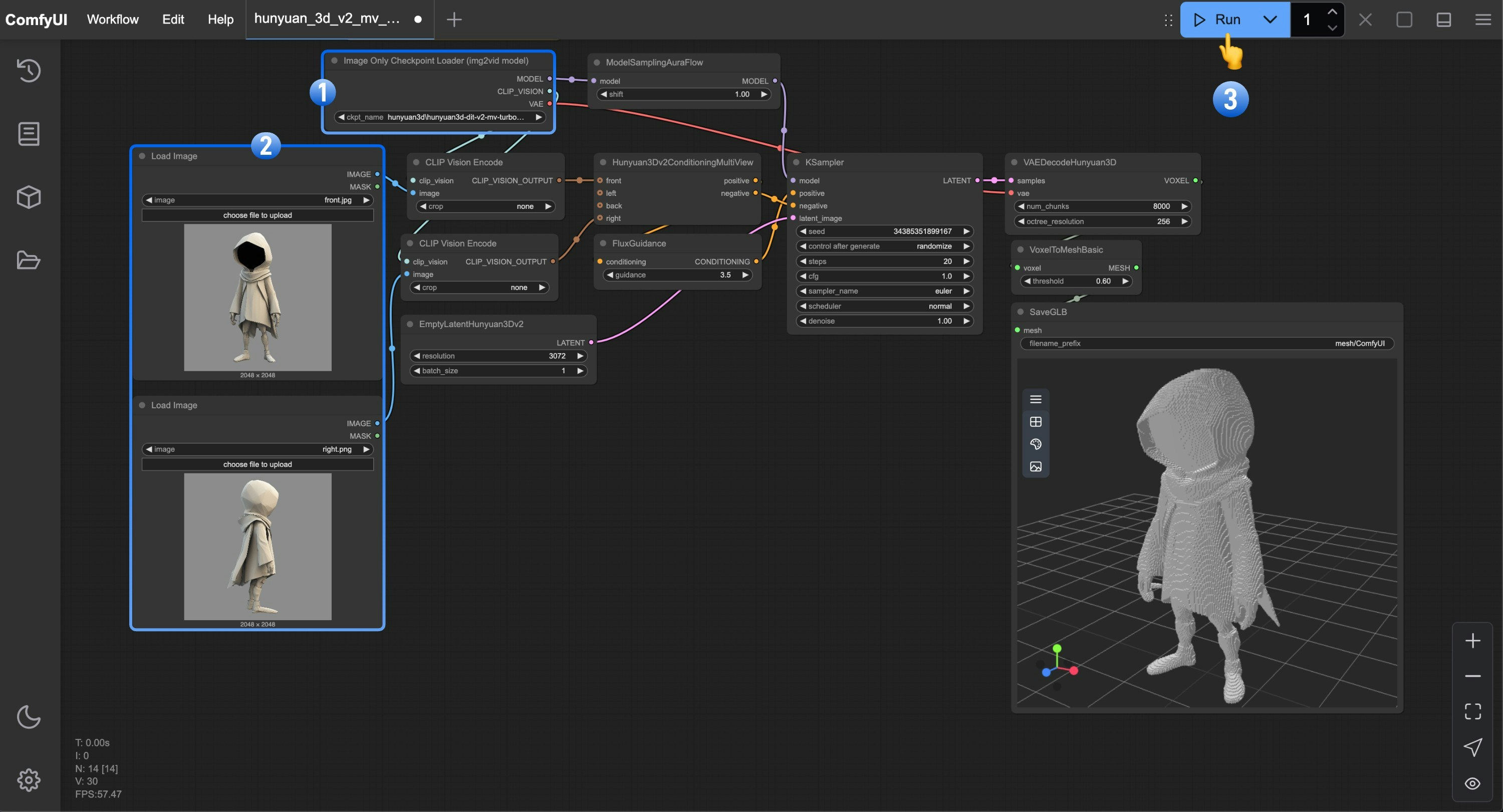 1. Ensure that the `Image Only Checkpoint Loader(img2vid model)` node has loaded our renamed `hunyuan3d-dit-v2-mv-turbo.safetensors` model
2. Load the corresponding view images in each of the `Load Image` nodes
3. Click the `Queue` button, or use the shortcut `Ctrl(cmd) + Enter` to run the workflow
## Hunyuan3D-2 Single View Workflow
In the Hunyuan3D-2 workflow, we'll use the Hunyuan3D-2 model to generate 3D models. This model is not a multi-view model. In this workflow, we use the `Hunyuan3Dv2Conditioning` node instead of the `Hunyuan3Dv2ConditioningMultiView` node.
1. Ensure that the `Image Only Checkpoint Loader(img2vid model)` node has loaded our renamed `hunyuan3d-dit-v2-mv-turbo.safetensors` model
2. Load the corresponding view images in each of the `Load Image` nodes
3. Click the `Queue` button, or use the shortcut `Ctrl(cmd) + Enter` to run the workflow
## Hunyuan3D-2 Single View Workflow
In the Hunyuan3D-2 workflow, we'll use the Hunyuan3D-2 model to generate 3D models. This model is not a multi-view model. In this workflow, we use the `Hunyuan3Dv2Conditioning` node instead of the `Hunyuan3Dv2ConditioningMultiView` node.
Run on Comfy Cloud
### 1. Workflow Please download the image below and drag it into ComfyUI to load the workflow.  Download the image below we will use it as input image.  ### 2. Manual Model Installation Download the model below and save it to the corresponding ComfyUI folder * hunyuan3d-dit-v2-0: [model.fp16.safetensors](https://huggingface.co/tencent/Hunyuan3D-2/resolve/main/hunyuan3d-dit-v2-0/model.fp16.safetensors?download=true) - after downloading, you can rename it to `hunyuan3d-dit-v2.safetensors` ``` ComfyUI/ ├── models/ │ ├── checkpoints/ │ │ └── hunyuan3d-dit-v2.safetensors // renamed file ``` ### 3. Steps to Run the Workflow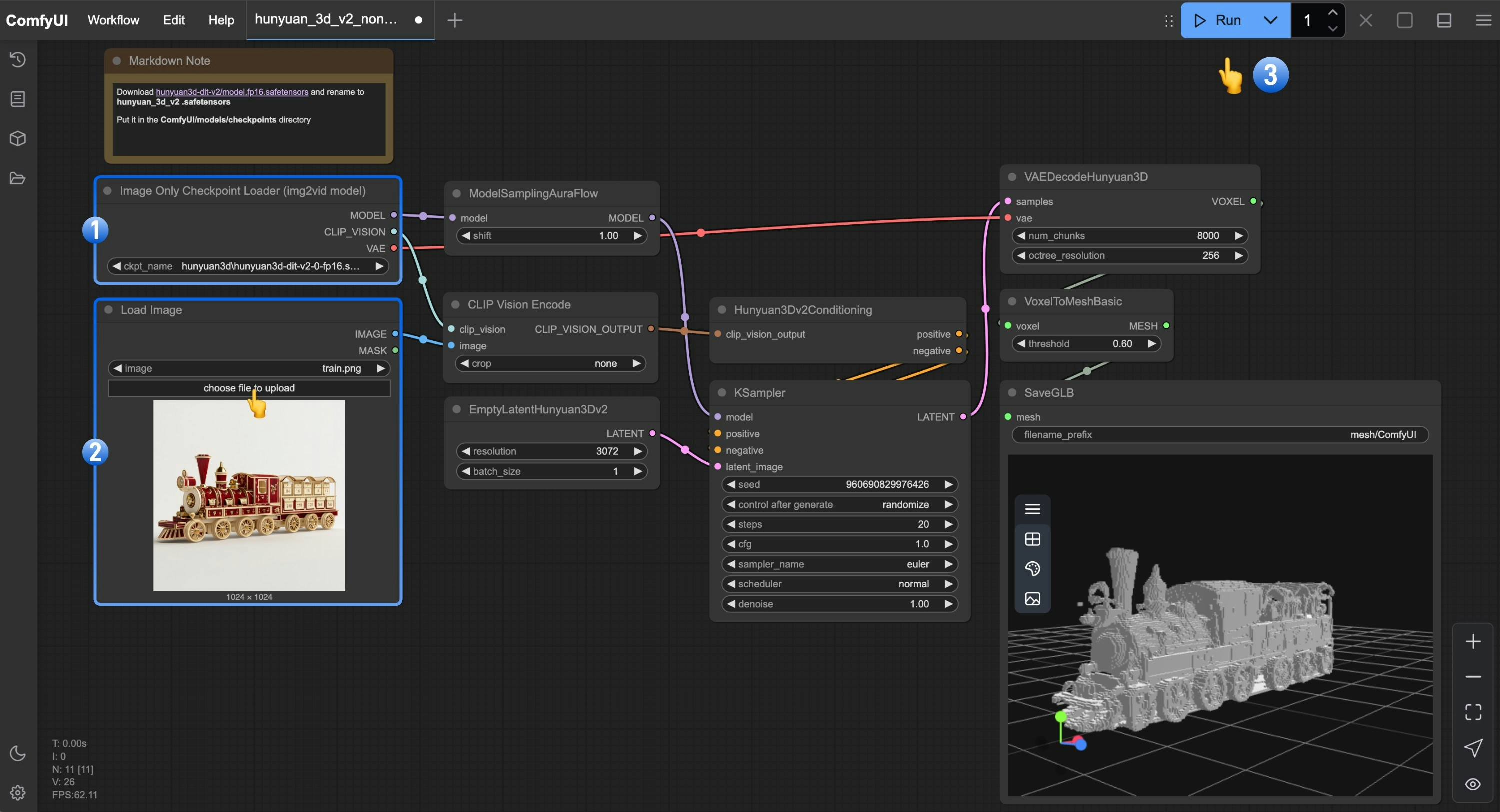 1. Ensure that the `Image Only Checkpoint Loader(img2vid model)` node has loaded our renamed `hunyuan3d-dit-v2.safetensors` model
2. Load the image in the `Load Image` node
3. Click the `Queue` button, or use the shortcut `Ctrl(cmd) + Enter` to run the workflow
## Community Resources
Below are ComfyUI community resources related to Hunyuan3D-2
* [ComfyUI-Hunyuan3DWrapper](https://github.com/kijai/ComfyUI-Hunyuan3DWrapper)
* [Kijai/Hunyuan3D-2\_safetensors](https://huggingface.co/Kijai/Hunyuan3D-2_safetensors/tree/main)
* [ComfyUI-3D-Pack](https://github.com/MrForExample/ComfyUI-3D-Pack)
## Hunyuan3D 2.0 Open-Source Model Series
Currently, Hunyuan3D 2.0 has open-sourced multiple models covering the complete 3D generation process. You can visit [Hunyuan3D-2](https://github.com/Tencent/Hunyuan3D-2) for more information.
**Hunyuan3D-2mini Series**
| Model | Description | Date | Parameters | Huggingface |
| --------------------- | ------------------------- | ---------- | ---------- | --------------------------------------------------------------------------------------- |
| Hunyuan3D-DiT-v2-mini | Mini Image to Shape Model | 2025-03-18 | 0.6B | [Visit](https://huggingface.co/tencent/Hunyuan3D-2mini/tree/main/hunyuan3d-dit-v2-mini) |
**Hunyuan3D-2mv Series**
| Model | Description | Date | Parameters | Huggingface |
| ------------------------ | ----------------------------------------------------------------------------------------------------------- | ---------- | ---------- | ---------------------------------------------------------------------------------------- |
| Hunyuan3D-DiT-v2-mv-Fast | Guidance Distillation Version, can halve DIT inference time | 2025-03-18 | 1.1B | [Visit](https://huggingface.co/tencent/Hunyuan3D-2mv/tree/main/hunyuan3d-dit-v2-mv-fast) |
| Hunyuan3D-DiT-v2-mv | Multi-view Image to Shape Model, suitable for 3D creation requiring multiple angles to understand the scene | 2025-03-18 | 1.1B | [Visit](https://huggingface.co/tencent/Hunyuan3D-2mv/tree/main/hunyuan3d-dit-v2-mv) |
**Hunyuan3D-2 Series**
| Model | Description | Date | Parameters | Huggingface |
| ----------------------- | --------------------------- | ---------- | ---------- | ------------------------------------------------------------------------------------- |
| Hunyuan3D-DiT-v2-0-Fast | Guidance Distillation Model | 2025-02-03 | 1.1B | [Visit](https://huggingface.co/tencent/Hunyuan3D-2/tree/main/hunyuan3d-dit-v2-0-fast) |
| Hunyuan3D-DiT-v2-0 | Image to Shape Model | 2025-01-21 | 1.1B | [Visit](https://huggingface.co/tencent/Hunyuan3D-2/tree/main/hunyuan3d-dit-v2-0) |
| Hunyuan3D-Paint-v2-0 | Texture Generation Model | 2025-01-21 | 1.3B | [Visit](https://huggingface.co/tencent/Hunyuan3D-2/tree/main/hunyuan3d-paint-v2-0) |
| Hunyuan3D-Delight-v2-0 | Image Delight Model | 2025-01-21 | 1.3B | [Visit](https://huggingface.co/tencent/Hunyuan3D-2/tree/main/hunyuan3d-delight-v2-0) |
1. Ensure that the `Image Only Checkpoint Loader(img2vid model)` node has loaded our renamed `hunyuan3d-dit-v2.safetensors` model
2. Load the image in the `Load Image` node
3. Click the `Queue` button, or use the shortcut `Ctrl(cmd) + Enter` to run the workflow
## Community Resources
Below are ComfyUI community resources related to Hunyuan3D-2
* [ComfyUI-Hunyuan3DWrapper](https://github.com/kijai/ComfyUI-Hunyuan3DWrapper)
* [Kijai/Hunyuan3D-2\_safetensors](https://huggingface.co/Kijai/Hunyuan3D-2_safetensors/tree/main)
* [ComfyUI-3D-Pack](https://github.com/MrForExample/ComfyUI-3D-Pack)
## Hunyuan3D 2.0 Open-Source Model Series
Currently, Hunyuan3D 2.0 has open-sourced multiple models covering the complete 3D generation process. You can visit [Hunyuan3D-2](https://github.com/Tencent/Hunyuan3D-2) for more information.
**Hunyuan3D-2mini Series**
| Model | Description | Date | Parameters | Huggingface |
| --------------------- | ------------------------- | ---------- | ---------- | --------------------------------------------------------------------------------------- |
| Hunyuan3D-DiT-v2-mini | Mini Image to Shape Model | 2025-03-18 | 0.6B | [Visit](https://huggingface.co/tencent/Hunyuan3D-2mini/tree/main/hunyuan3d-dit-v2-mini) |
**Hunyuan3D-2mv Series**
| Model | Description | Date | Parameters | Huggingface |
| ------------------------ | ----------------------------------------------------------------------------------------------------------- | ---------- | ---------- | ---------------------------------------------------------------------------------------- |
| Hunyuan3D-DiT-v2-mv-Fast | Guidance Distillation Version, can halve DIT inference time | 2025-03-18 | 1.1B | [Visit](https://huggingface.co/tencent/Hunyuan3D-2mv/tree/main/hunyuan3d-dit-v2-mv-fast) |
| Hunyuan3D-DiT-v2-mv | Multi-view Image to Shape Model, suitable for 3D creation requiring multiple angles to understand the scene | 2025-03-18 | 1.1B | [Visit](https://huggingface.co/tencent/Hunyuan3D-2mv/tree/main/hunyuan3d-dit-v2-mv) |
**Hunyuan3D-2 Series**
| Model | Description | Date | Parameters | Huggingface |
| ----------------------- | --------------------------- | ---------- | ---------- | ------------------------------------------------------------------------------------- |
| Hunyuan3D-DiT-v2-0-Fast | Guidance Distillation Model | 2025-02-03 | 1.1B | [Visit](https://huggingface.co/tencent/Hunyuan3D-2/tree/main/hunyuan3d-dit-v2-0-fast) |
| Hunyuan3D-DiT-v2-0 | Image to Shape Model | 2025-01-21 | 1.1B | [Visit](https://huggingface.co/tencent/Hunyuan3D-2/tree/main/hunyuan3d-dit-v2-0) |
| Hunyuan3D-Paint-v2-0 | Texture Generation Model | 2025-01-21 | 1.3B | [Visit](https://huggingface.co/tencent/Hunyuan3D-2/tree/main/hunyuan3d-paint-v2-0) |
| Hunyuan3D-Delight-v2-0 | Image Delight Model | 2025-01-21 | 1.3B | [Visit](https://huggingface.co/tencent/Hunyuan3D-2/tree/main/hunyuan3d-delight-v2-0) |