
 Flux is one of the largest open-source text-to-image generation models, with 12B parameters and an original file size of approximately 23GB. It was developed by [Black Forest Labs](https://blackforestlabs.ai/), a team founded by former Stable Diffusion team members.
Flux is known for its excellent image quality and flexibility, capable of generating high-quality, diverse images.
Currently, the Flux.1 model has several main versions:
* **Flux.1 Pro:** The best performing model, closed-source, only available through API calls.
* **[Flux.1 \[dev\]:](https://huggingface.co/black-forest-labs/FLUX.1-dev)** Open-source but limited to non-commercial use, distilled from the Pro version, with performance close to the Pro version.
* **[Flux.1 \[schnell\]:](https://huggingface.co/black-forest-labs/FLUX.1-schnell)** Uses the Apache2.0 license, requires only 4 steps to generate images, suitable for low-spec hardware.
**Flux.1 Model Features**
* **Hybrid Architecture:** Combines the advantages of Transformer networks and diffusion models, effectively integrating text and image information, improving the alignment accuracy between generated images and prompts, with excellent fidelity to complex prompts.
* **Parameter Scale:** Flux has 12B parameters, capturing more complex pattern relationships and generating more realistic, diverse images.
* **Supports Multiple Styles:** Supports diverse styles, with excellent performance for various types of images.
In this example, we'll introduce text-to-image examples using both Flux.1 Dev and Flux.1 Schnell versions, including the full version model and the simplified FP8 Checkpoint version.
* **Flux Full Version:** Best performance, but requires larger VRAM resources and installation of multiple model files.
* **Flux FP8 Checkpoint:** Requires only one fp8 version of the model, but quality is slightly reduced compared to the full version.
Flux is one of the largest open-source text-to-image generation models, with 12B parameters and an original file size of approximately 23GB. It was developed by [Black Forest Labs](https://blackforestlabs.ai/), a team founded by former Stable Diffusion team members.
Flux is known for its excellent image quality and flexibility, capable of generating high-quality, diverse images.
Currently, the Flux.1 model has several main versions:
* **Flux.1 Pro:** The best performing model, closed-source, only available through API calls.
* **[Flux.1 \[dev\]:](https://huggingface.co/black-forest-labs/FLUX.1-dev)** Open-source but limited to non-commercial use, distilled from the Pro version, with performance close to the Pro version.
* **[Flux.1 \[schnell\]:](https://huggingface.co/black-forest-labs/FLUX.1-schnell)** Uses the Apache2.0 license, requires only 4 steps to generate images, suitable for low-spec hardware.
**Flux.1 Model Features**
* **Hybrid Architecture:** Combines the advantages of Transformer networks and diffusion models, effectively integrating text and image information, improving the alignment accuracy between generated images and prompts, with excellent fidelity to complex prompts.
* **Parameter Scale:** Flux has 12B parameters, capturing more complex pattern relationships and generating more realistic, diverse images.
* **Supports Multiple Styles:** Supports diverse styles, with excellent performance for various types of images.
In this example, we'll introduce text-to-image examples using both Flux.1 Dev and Flux.1 Schnell versions, including the full version model and the simplified FP8 Checkpoint version.
* **Flux Full Version:** Best performance, but requires larger VRAM resources and installation of multiple model files.
* **Flux FP8 Checkpoint:** Requires only one fp8 version of the model, but quality is slightly reduced compared to the full version.
Run on Comfy Cloud
#### 2. Manual Model Installation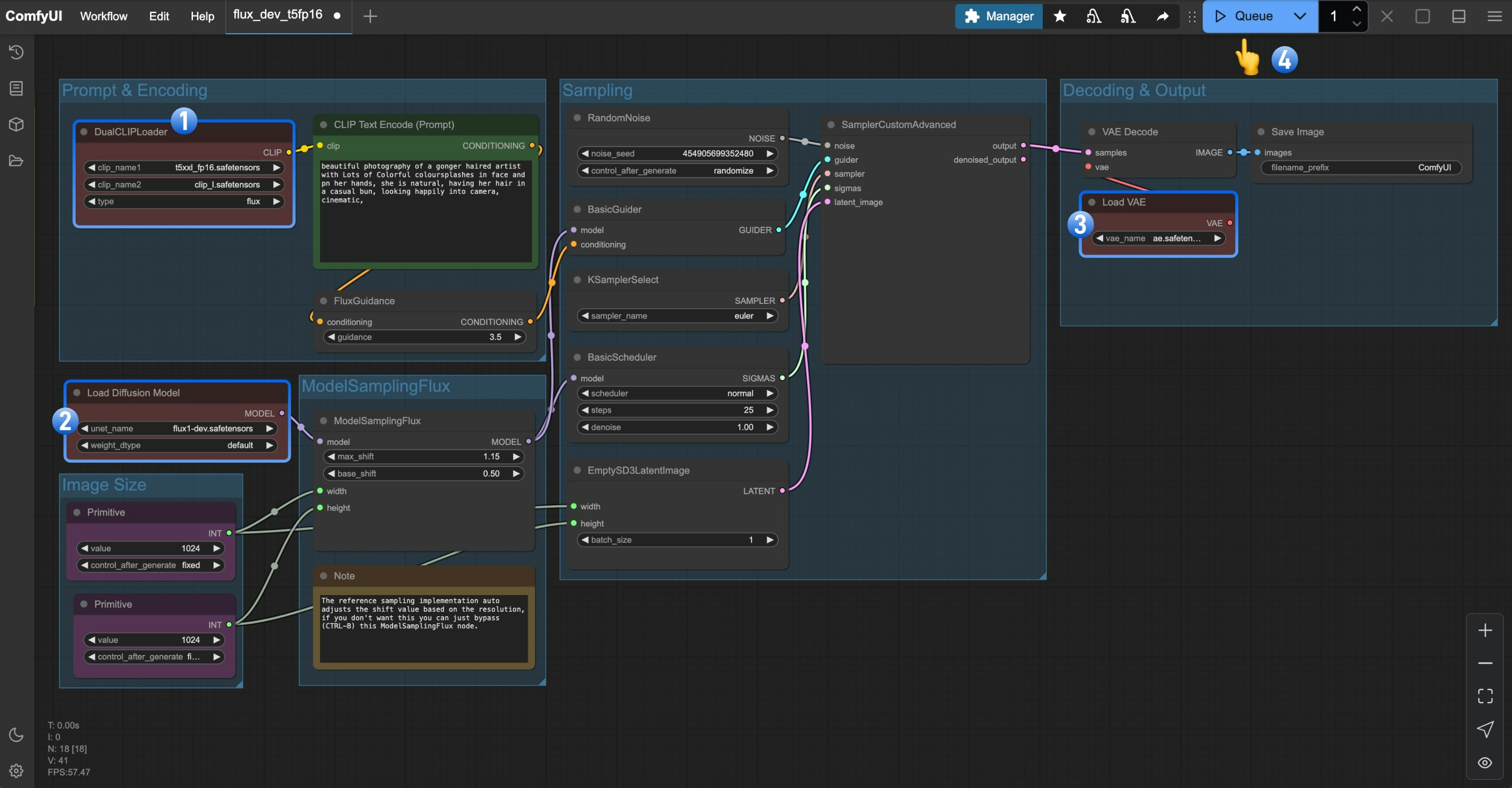 1. Ensure the `DualCLIPLoader` node has the following models loaded:
* clip\_name1: t5xxl\_fp16.safetensors
* clip\_name2: clip\_l.safetensors
2. Ensure the `Load Diffusion Model` node has `flux1-dev.safetensors` loaded
3. Make sure the `Load VAE` node has `ae.safetensors` loaded
4. Click the `Queue` button, or use the shortcut `Ctrl(cmd) + Enter` to run the workflow
1. Ensure the `DualCLIPLoader` node has the following models loaded:
* clip\_name1: t5xxl\_fp16.safetensors
* clip\_name2: clip\_l.safetensors
2. Ensure the `Load Diffusion Model` node has `flux1-dev.safetensors` loaded
3. Make sure the `Load VAE` node has `ae.safetensors` loaded
4. Click the `Queue` button, or use the shortcut `Ctrl(cmd) + Enter` to run the workflow
Run on Comfy Cloud
#### 2. Manual Models Installation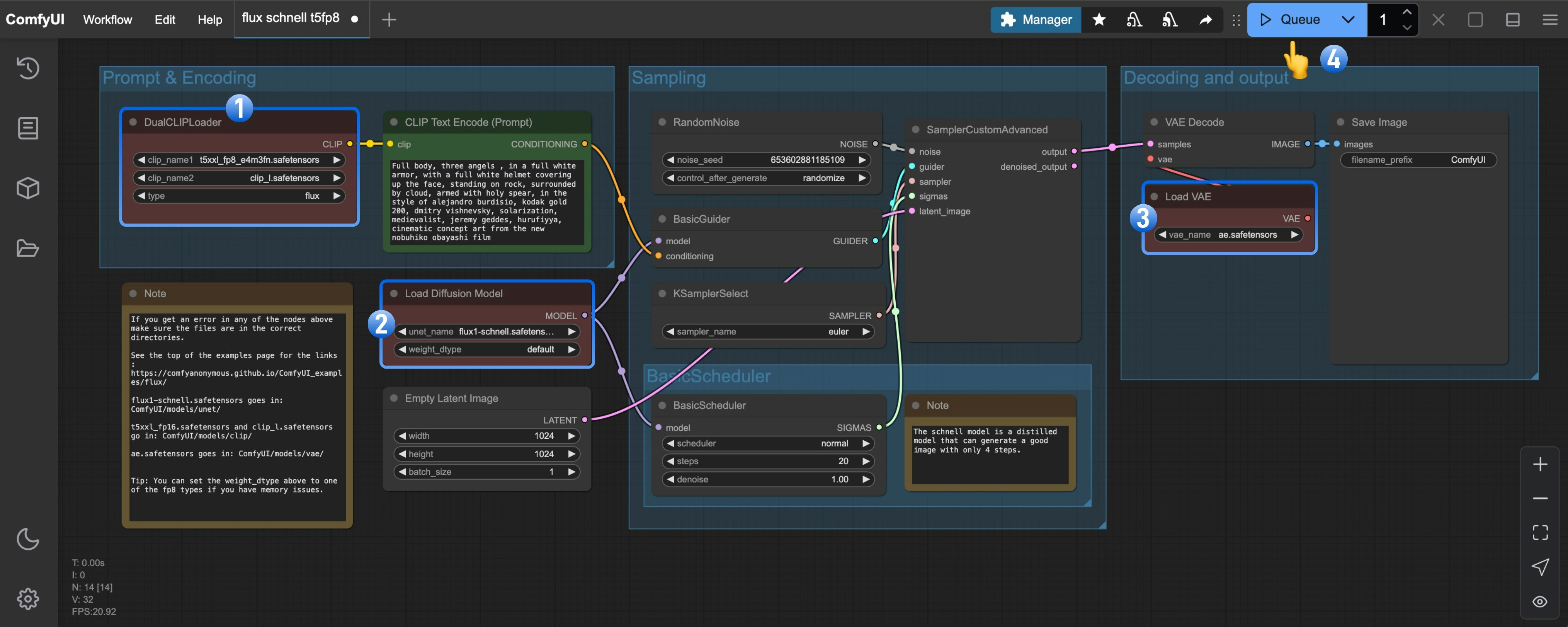 1. Ensure the `DualCLIPLoader` node has the following models loaded:
* clip\_name1: t5xxl\_fp8\_e4m3fn.safetensors
* clip\_name2: clip\_l.safetensors
2. Ensure the `Load Diffusion Model` node has `flux1-schnell.safetensors` loaded
3. Ensure the `Load VAE` node has `ae.safetensors` loaded
4. Click the `Queue` button, or use the shortcut `Ctrl(cmd) + Enter` to run the workflow
## Flux.1 FP8 Checkpoint Version Text-to-Image Example
The fp8 version is a quantized version of the original Flux.1 fp16 version.
To some extent, the quality of this version will be lower than that of the fp16 version,
but it also requires less VRAM, and you only need to install one model file to try running it.
### Flux.1 Dev
Please download the image below and drag it into ComfyUI to load the workflow.

1. Ensure the `DualCLIPLoader` node has the following models loaded:
* clip\_name1: t5xxl\_fp8\_e4m3fn.safetensors
* clip\_name2: clip\_l.safetensors
2. Ensure the `Load Diffusion Model` node has `flux1-schnell.safetensors` loaded
3. Ensure the `Load VAE` node has `ae.safetensors` loaded
4. Click the `Queue` button, or use the shortcut `Ctrl(cmd) + Enter` to run the workflow
## Flux.1 FP8 Checkpoint Version Text-to-Image Example
The fp8 version is a quantized version of the original Flux.1 fp16 version.
To some extent, the quality of this version will be lower than that of the fp16 version,
but it also requires less VRAM, and you only need to install one model file to try running it.
### Flux.1 Dev
Please download the image below and drag it into ComfyUI to load the workflow.

Run on Comfy Cloud
Please download [flux1-dev-fp8.safetensors](https://huggingface.co/Comfy-Org/flux1-dev/resolve/main/flux1-dev-fp8.safetensors?download=true) and save it to the `ComfyUI/models/checkpoints/` directory. Ensure that the corresponding `Load Checkpoint` node loads `flux1-dev-fp8.safetensors`, and you can try to run the workflow. ### Flux.1 Schnell Please download the image below and drag it into ComfyUI to load the workflow.  Please download [flux1-schnell-fp8.safetensors](https://huggingface.co/Comfy-Org/flux1-schnell/resolve/main/flux1-schnell-fp8.safetensors?download=true) and save it to the `ComfyUI/models/checkpoints/` directory. Ensure that the corresponding `Load Checkpoint` node loads `flux1-schnell-fp8.safetensors`, and you can try to run the workflow.