> ## Documentation Index
> Fetch the complete documentation index at: https://docs.comfy.org/llms.txt
> Use this file to discover all available pages before exploring further.
# Flux.1 Krea Dev ComfyUI Workflow Tutorial
> Best open-source FLUX model developed by Black Forest Labs in collaboration with Krea, focusing on unique aesthetic style and natural details, avoiding AI look, providing exceptional realism and image quality.
 [Flux.1 Krea Dev](https://huggingface.co/black-forest-labs/FLUX.1-Krea-dev) is an advanced text-to-image generation model developed in collaboration between Black Forest Labs (BFL) and Krea. This is currently the best open-source FLUX model, specifically designed for text-to-image generation.
**Model Features**
* **Unique Aesthetic Style**: Focuses on generating images with unique aesthetics, avoiding common "AI look" appearance
* **Natural Details**: Does not produce blown-out highlights, maintaining natural detail representatio
* **Exceptional Realism**: Provides outstanding realism and image quality
* **Fully Compatible Architecture**: Fully compatible architecture design with FLUX.1 \[dev]
**Model License**
This model is released under the [flux-1-dev-non-commercial-license](https://huggingface.co/black-forest-labs/FLUX.1-Krea-dev/blob/main/LICENSE.md)
## Flux.1 Krea Dev ComfyUI Workflow
Make sure your ComfyUI is updated.
* [Download ComfyUI](https://www.comfy.org/download)
* [Update Guide](/installation/update_comfyui)
Workflows in this guide can be found in the [Workflow Templates](/interface/features/template).
If you can't find them in the template, your ComfyUI may be outdated. (Desktop version's update will delay sometime)
If nodes are missing when loading a workflow, possible reasons:
1. You are not using the latest ComfyUI version (Nightly version)
2. Some nodes failed to import at startup
* The Desktop is base on ComfyUI stable release, it will auto-update when there is a new Desktop stable release available.
* [Cloud](https://cloud.comfy.org) will update after ComfyUI stable release.
So, if you find any core node missing in this document, it might be because the new core nodes have not yet been released in the latest stable version. Please wait for the next stable release.
#### 1. Workflow Files
Download the image or JSON below and drag it into ComfyUI to load the corresponding workflow

[Flux.1 Krea Dev](https://huggingface.co/black-forest-labs/FLUX.1-Krea-dev) is an advanced text-to-image generation model developed in collaboration between Black Forest Labs (BFL) and Krea. This is currently the best open-source FLUX model, specifically designed for text-to-image generation.
**Model Features**
* **Unique Aesthetic Style**: Focuses on generating images with unique aesthetics, avoiding common "AI look" appearance
* **Natural Details**: Does not produce blown-out highlights, maintaining natural detail representatio
* **Exceptional Realism**: Provides outstanding realism and image quality
* **Fully Compatible Architecture**: Fully compatible architecture design with FLUX.1 \[dev]
**Model License**
This model is released under the [flux-1-dev-non-commercial-license](https://huggingface.co/black-forest-labs/FLUX.1-Krea-dev/blob/main/LICENSE.md)
## Flux.1 Krea Dev ComfyUI Workflow
Make sure your ComfyUI is updated.
* [Download ComfyUI](https://www.comfy.org/download)
* [Update Guide](/installation/update_comfyui)
Workflows in this guide can be found in the [Workflow Templates](/interface/features/template).
If you can't find them in the template, your ComfyUI may be outdated. (Desktop version's update will delay sometime)
If nodes are missing when loading a workflow, possible reasons:
1. You are not using the latest ComfyUI version (Nightly version)
2. Some nodes failed to import at startup
* The Desktop is base on ComfyUI stable release, it will auto-update when there is a new Desktop stable release available.
* [Cloud](https://cloud.comfy.org) will update after ComfyUI stable release.
So, if you find any core node missing in this document, it might be because the new core nodes have not yet been released in the latest stable version. Please wait for the next stable release.
#### 1. Workflow Files
Download the image or JSON below and drag it into ComfyUI to load the corresponding workflow

Download JSON Workflow
Run on Comfy Cloud
#### 2. Manual Model Installation
Please download the following model files:
**Diffusion model**
* [flux1-krea-dev\_fp8\_scaled.safetensors](https://huggingface.co/Comfy-Org/FLUX.1-Krea-dev_ComfyUI/blob/main/split_files/diffusion_models/flux1-krea-dev_fp8_scaled.safetensors)
If you want to pursue higher quality and have enough VRAM, you can try the original model weights
* [flux1-krea-dev.safetensors](https://huggingface.co/black-forest-labs/FLUX.1-Krea-dev/resolve/main/flux1-krea-dev.safetensors)
The `flux1-dev.safetensors` file requires agreeing to the [black-forest-labs/FLUX.1-Krea-dev](https://huggingface.co/black-forest-labs/FLUX.1-Krea-dev/) agreement before downloading via browser.
If you have used Flux related workflows before, the following models are the same and don't need to be downloaded again
**Text encoders**
* [clip\_l.safetensors](https://huggingface.co/comfyanonymous/flux_text_encoders/resolve/main/clip_l.safetensors?download=true)
* [t5xxl\_fp16.safetensors](https://huggingface.co/comfyanonymous/flux_text_encoders/resolve/main/t5xxl_fp16.safetensors?download=true) Recommended when your VRAM is greater than 32GB.
* [t5xxl\_fp8\_e4m3fn.safetensors](https://huggingface.co/comfyanonymous/flux_text_encoders/resolve/main/t5xxl_fp8_e4m3fn.safetensors) For Low VRAM
**VAE**
* [ae.safetensors](https://huggingface.co/black-forest-labs/FLUX.1-schnell/resolve/main/ae.safetensors?download=true)
File save location:
```
ComfyUI/
├── models/
│ ├── diffusion_models/
│ │ └── flux1-krea-dev_fp8_scaled.safetensors or flux1-krea-dev.safetensors
│ ├── text_encoders/
│ │ ├── clip_l.safetensors
│ │ └── t5xxl_fp16.safetensors or t5xxl_fp8_e4m3fn.safetensors
│ ├── vae/
│ │ └── ae.safetensors
```
#### 3. Step-by-step Verification to Ensure Workflow Runs Properly
For low VRAM users, this model may not run smoothly on your device, you can wait for the community to provide FP8 or GGUF version.
Please refer to the image below to ensure all model files have been loaded correctly
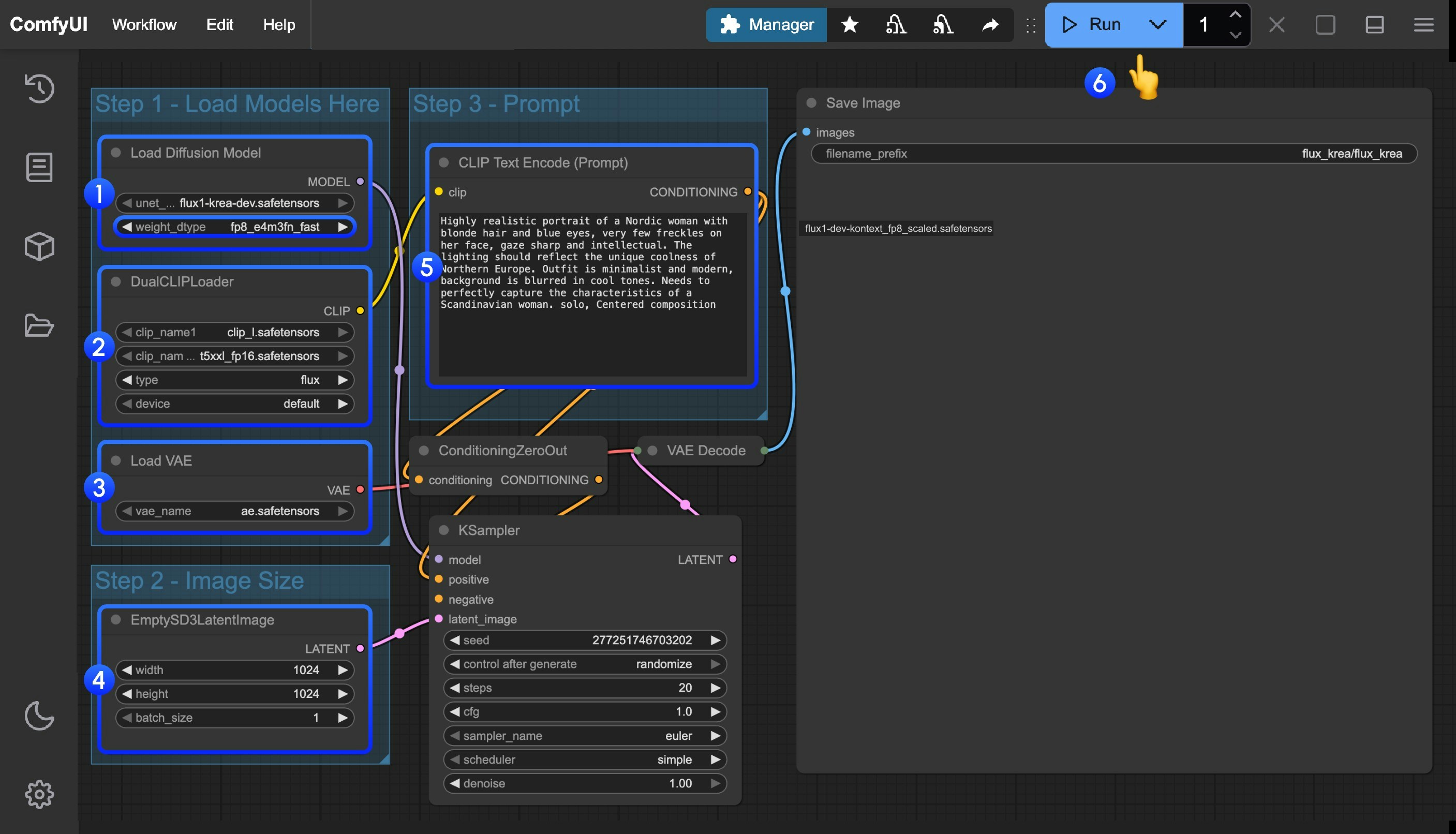 1. Ensure that `flux1-krea-dev_fp8_scaled.safetensors` or `flux1-krea-dev.safetensors` is loaded in the `Load Diffusion Model` node
* `flux1-krea-dev_fp8_scaled.safetensors` is recommended for low VRAM users
* `flux1-krea-dev.safetensors` is the original weights, if you have enough VRAM like 24GB you can use it for better quality
2. Ensure the following models are loaded in the `DualCLIPLoader` node:
* clip\_name1: t5xxl\_fp16.safetensors or t5xxl\_fp8\_e4m3fn.safetensors
* clip\_name2: clip\_l.safetensors
3. Ensure that `ae.safetensors` is loaded in the `Load VAE` node
4. Click the `Queue` button, or use the shortcut `Ctrl(cmd) + Enter` to run the workflow
1. Ensure that `flux1-krea-dev_fp8_scaled.safetensors` or `flux1-krea-dev.safetensors` is loaded in the `Load Diffusion Model` node
* `flux1-krea-dev_fp8_scaled.safetensors` is recommended for low VRAM users
* `flux1-krea-dev.safetensors` is the original weights, if you have enough VRAM like 24GB you can use it for better quality
2. Ensure the following models are loaded in the `DualCLIPLoader` node:
* clip\_name1: t5xxl\_fp16.safetensors or t5xxl\_fp8\_e4m3fn.safetensors
* clip\_name2: clip\_l.safetensors
3. Ensure that `ae.safetensors` is loaded in the `Load VAE` node
4. Click the `Queue` button, or use the shortcut `Ctrl(cmd) + Enter` to run the workflow