> ## Documentation Index
> Fetch the complete documentation index at: https://docs.comfy.org/llms.txt
> Use this file to discover all available pages before exploring further.
# OpenAI DALL·E 3 Node
> Learn how to use the OpenAI DALL·E 3 Partner node to generate images in ComfyUI
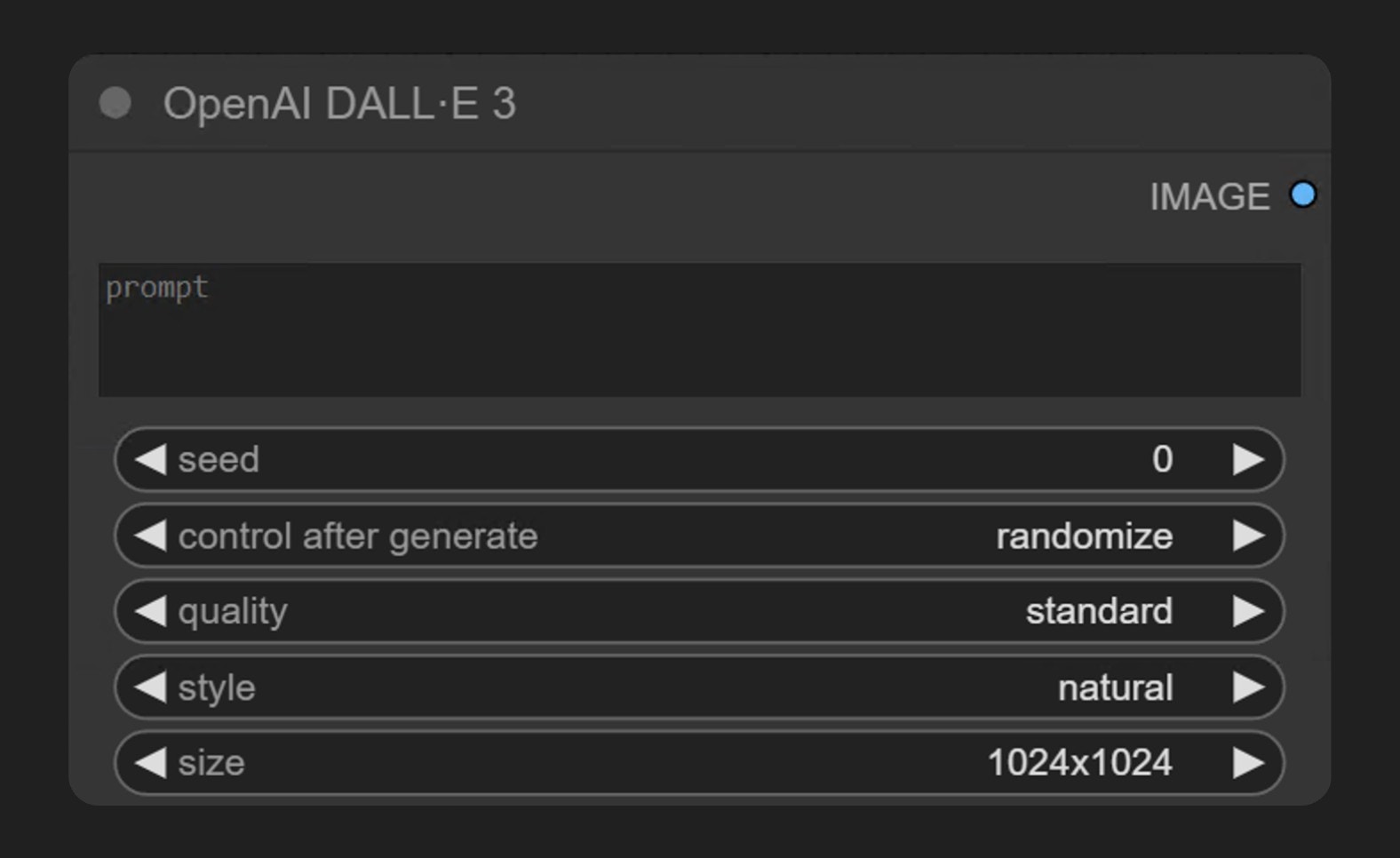
OpenAI DALL·E 3 is part of the ComfyUI Partner Nodes series, allowing users to generate images through OpenAI's **DALL·E 3** model. This node supports text-to-image generation functionality.
 ## Node Overview
DALL·E 3 is OpenAI's latest image generation model, capable of creating detailed and high-quality images based on text prompts. Through this node in ComfyUI, you can directly access DALL·E 3's generation capabilities without leaving the ComfyUI interface.
The **OpenAI DALL·E 3** node generates images synchronously through OpenAI's image generation API. It receives text prompts and returns images that match the description.
To use the Partner Nodes, you need to ensure that you are logged in properly and using a permitted network environment. Please refer to the [Partner Nodes Overview](/tutorials/partner-nodes/overview) section of the documentation to understand the specific requirements for using the Partner Nodes.
Make sure your ComfyUI is updated.
* [Download ComfyUI](https://www.comfy.org/download)
* [Update Guide](/installation/update_comfyui)
Workflows in this guide can be found in the [Workflow Templates](/interface/features/template).
If you can't find them in the template, your ComfyUI may be outdated. (Desktop version's update will delay sometime)
If nodes are missing when loading a workflow, possible reasons:
1. You are not using the latest ComfyUI version (Nightly version)
2. Some nodes failed to import at startup
* The Desktop is base on ComfyUI stable release, it will auto-update when there is a new Desktop stable release available.
* [Cloud](https://cloud.comfy.org) will update after ComfyUI stable release.
So, if you find any core node missing in this document, it might be because the new core nodes have not yet been released in the latest stable version. Please wait for the next stable release.
## Parameter Details
### Required Parameters
| Parameter | Type | Description |
| --------- | ---- | ---------------------------------------------------------------------------------------------------------------------------- |
| prompt | Text | Text prompt for generating images. Supports multi-line input, can describe in detail the image content you want to generate. |
### Widget Parameters
| Parameter | Type | Options | Default Value | Description |
| --------- | ------- | ------------------------------- | ------------- | ----------------------------------------------------------------------------------------------------------------------------------------- |
| seed | Integer | 0-2147483647 | 0 | Random seed used to control the generation result |
| quality | Option | standard, hd | standard | Image quality setting. The "hd" option generates higher quality images but may require more computational resources |
| style | Option | natural, vivid | natural | Image style. "Vivid" tends to generate hyperrealistic and dramatic images, while "natural" produces more natural, less exaggerated images |
| size | Option | 1024x1024, 1024x1792, 1792x1024 | 1024x1024 | Size of the generated image. You can choose square or rectangular images in different orientations |
## Usage Examples
You can download the image below and drag it into ComfyUI to load the corresponding workflow

Since the corresponding workflow is very simple, you can also directly add the **OpenAI DALL·E 3** node in ComfyUI, input the description of the image you want to generate, and then run the workflow
## Node Overview
DALL·E 3 is OpenAI's latest image generation model, capable of creating detailed and high-quality images based on text prompts. Through this node in ComfyUI, you can directly access DALL·E 3's generation capabilities without leaving the ComfyUI interface.
The **OpenAI DALL·E 3** node generates images synchronously through OpenAI's image generation API. It receives text prompts and returns images that match the description.
To use the Partner Nodes, you need to ensure that you are logged in properly and using a permitted network environment. Please refer to the [Partner Nodes Overview](/tutorials/partner-nodes/overview) section of the documentation to understand the specific requirements for using the Partner Nodes.
Make sure your ComfyUI is updated.
* [Download ComfyUI](https://www.comfy.org/download)
* [Update Guide](/installation/update_comfyui)
Workflows in this guide can be found in the [Workflow Templates](/interface/features/template).
If you can't find them in the template, your ComfyUI may be outdated. (Desktop version's update will delay sometime)
If nodes are missing when loading a workflow, possible reasons:
1. You are not using the latest ComfyUI version (Nightly version)
2. Some nodes failed to import at startup
* The Desktop is base on ComfyUI stable release, it will auto-update when there is a new Desktop stable release available.
* [Cloud](https://cloud.comfy.org) will update after ComfyUI stable release.
So, if you find any core node missing in this document, it might be because the new core nodes have not yet been released in the latest stable version. Please wait for the next stable release.
## Parameter Details
### Required Parameters
| Parameter | Type | Description |
| --------- | ---- | ---------------------------------------------------------------------------------------------------------------------------- |
| prompt | Text | Text prompt for generating images. Supports multi-line input, can describe in detail the image content you want to generate. |
### Widget Parameters
| Parameter | Type | Options | Default Value | Description |
| --------- | ------- | ------------------------------- | ------------- | ----------------------------------------------------------------------------------------------------------------------------------------- |
| seed | Integer | 0-2147483647 | 0 | Random seed used to control the generation result |
| quality | Option | standard, hd | standard | Image quality setting. The "hd" option generates higher quality images but may require more computational resources |
| style | Option | natural, vivid | natural | Image style. "Vivid" tends to generate hyperrealistic and dramatic images, while "natural" produces more natural, less exaggerated images |
| size | Option | 1024x1024, 1024x1792, 1792x1024 | 1024x1024 | Size of the generated image. You can choose square or rectangular images in different orientations |
## Usage Examples
You can download the image below and drag it into ComfyUI to load the corresponding workflow

Since the corresponding workflow is very simple, you can also directly add the **OpenAI DALL·E 3** node in ComfyUI, input the description of the image you want to generate, and then run the workflow
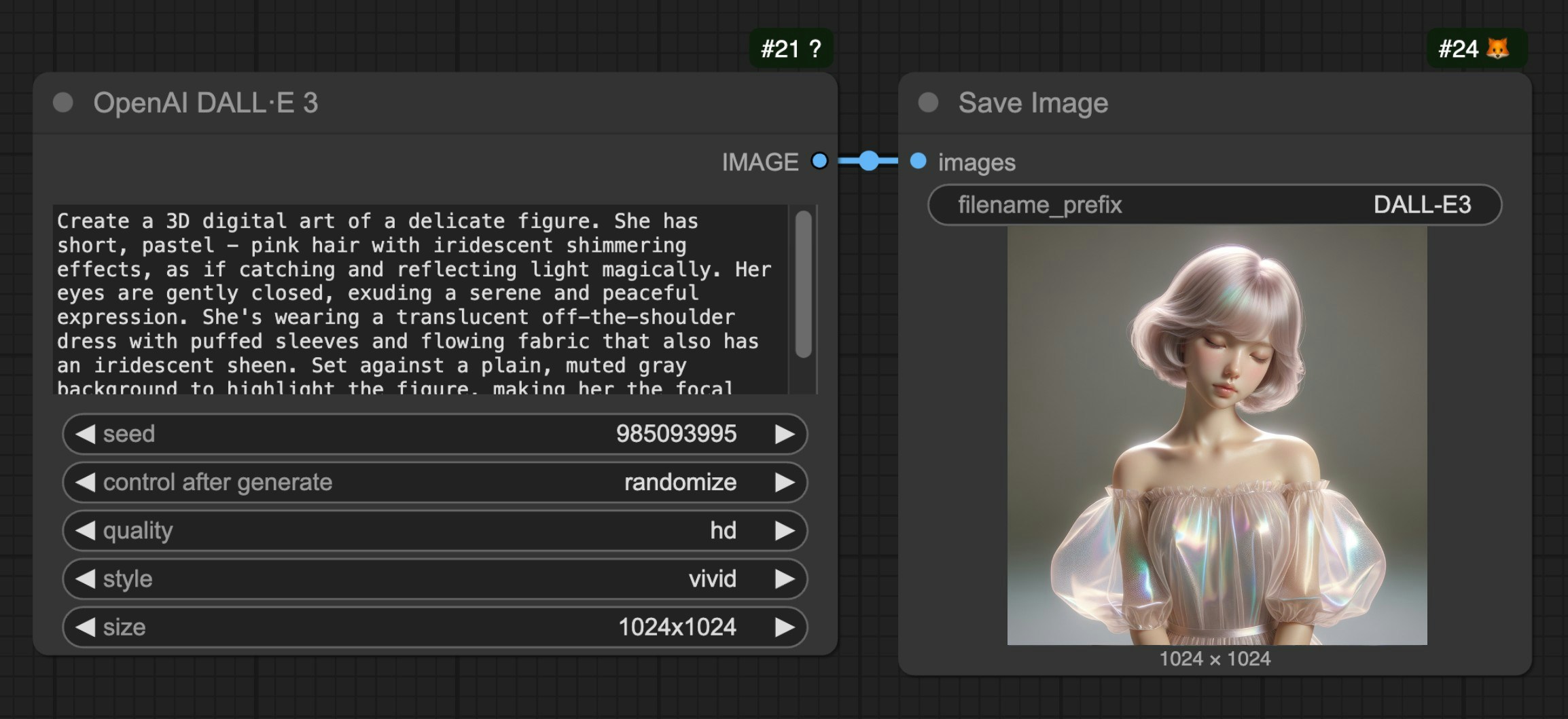 1. Add the **OpenAI DALL·E 3** node in ComfyUI
2. Enter the description of the image you want to generate in the prompt text box
3. Adjust optional parameters as needed (quality, style, size, etc.)
4. Run the workflow to generate the image
## FAQs
Please update your ComfyUI to the latest version (the latest commit or the latest [desktop version](https://www.comfy.org/download)).
We may add more API support in the future, and the corresponding nodes will be updated, so please keep your ComfyUI up to date.
Please note that you need to distinguish between the nightly version and the release version.
In some cases, the latest `release` version may not be updated in time compared to the `nightly` version.
Since we are still iterating quickly, please ensure you are using the latest version when you cannot find the corresponding node.
API access requires that your current request is based on a secure network environment. The current requirements for API access are as follows:
* The local network only allows access from `127.0.0.1` or `localhost`, which may mean that you cannot use the Partner Nodes in a ComfyUI service started with the `--listen` parameter in a LAN environment.
* Able to access our API service normally (a proxy service may be required in some regions).
* Your account does not have enough [credits](/interface/credits).
* Currently, only `127.0.0.1` or `localhost` access is supported.
* Ensure your account has enough credits.
Partner Nodes require credits for API calls to closed-source models, so they do not support free usage.
Please refer to the following documentation:
1. [Comfy Account](/interface/user): Find the `User` section in the settings menu to log in.
2. [Credits](/interface/credits): After logging in, the settings interface will show the credits menu. You can purchase credits in `Settings` → `Credits`. We use a prepaid system, so there will be no unexpected charges.
3. Complete the payment through Stripe.
4. Check if the credits have been updated. If not, try restarting or refreshing the page.
Currently, we do not support refunds for credits.
If you believe there is an error resulting in unused balance due to technical issues, please [contact support](mailto:support@comfy.org).
Credits are not intended to be used as a negative balance or credit line. However, due to race conditions where partner nodes don't always report costs before execution, a single execution may consume more credits than your remaining balance and temporarily result in a negative balance after completion. When your balance is negative, you will not be able to run Partner Nodes until you top up and restore a positive balance. Please ensure you have enough credits before making API calls.
Please visit the [Credits](/interface/credits) menu after logging in to check the corresponding credits.
Currently, the Partner Nodes are still in the testing phase and do not support this feature yet, but we have considered adding it.
Yes, the expiration depends on the type of credits:
* **Monthly credits**: Expire at the end of your billing period
* **Top-up credits**: Expire 1 year from the date of purchase
No, your credits cannot be transferred to other users and are limited to the currently logged-in account, but we do not restrict the number of devices that can log in.
We do not limit the number of devices that can log in; you can use your account anywhere you want.
Email a request to [support@comfy.org](mailto:support@comfy.org) and we will delete your information
1. Add the **OpenAI DALL·E 3** node in ComfyUI
2. Enter the description of the image you want to generate in the prompt text box
3. Adjust optional parameters as needed (quality, style, size, etc.)
4. Run the workflow to generate the image
## FAQs
Please update your ComfyUI to the latest version (the latest commit or the latest [desktop version](https://www.comfy.org/download)).
We may add more API support in the future, and the corresponding nodes will be updated, so please keep your ComfyUI up to date.
Please note that you need to distinguish between the nightly version and the release version.
In some cases, the latest `release` version may not be updated in time compared to the `nightly` version.
Since we are still iterating quickly, please ensure you are using the latest version when you cannot find the corresponding node.
API access requires that your current request is based on a secure network environment. The current requirements for API access are as follows:
* The local network only allows access from `127.0.0.1` or `localhost`, which may mean that you cannot use the Partner Nodes in a ComfyUI service started with the `--listen` parameter in a LAN environment.
* Able to access our API service normally (a proxy service may be required in some regions).
* Your account does not have enough [credits](/interface/credits).
* Currently, only `127.0.0.1` or `localhost` access is supported.
* Ensure your account has enough credits.
Partner Nodes require credits for API calls to closed-source models, so they do not support free usage.
Please refer to the following documentation:
1. [Comfy Account](/interface/user): Find the `User` section in the settings menu to log in.
2. [Credits](/interface/credits): After logging in, the settings interface will show the credits menu. You can purchase credits in `Settings` → `Credits`. We use a prepaid system, so there will be no unexpected charges.
3. Complete the payment through Stripe.
4. Check if the credits have been updated. If not, try restarting or refreshing the page.
Currently, we do not support refunds for credits.
If you believe there is an error resulting in unused balance due to technical issues, please [contact support](mailto:support@comfy.org).
Credits are not intended to be used as a negative balance or credit line. However, due to race conditions where partner nodes don't always report costs before execution, a single execution may consume more credits than your remaining balance and temporarily result in a negative balance after completion. When your balance is negative, you will not be able to run Partner Nodes until you top up and restore a positive balance. Please ensure you have enough credits before making API calls.
Please visit the [Credits](/interface/credits) menu after logging in to check the corresponding credits.
Currently, the Partner Nodes are still in the testing phase and do not support this feature yet, but we have considered adding it.
Yes, the expiration depends on the type of credits:
* **Monthly credits**: Expire at the end of your billing period
* **Top-up credits**: Expire 1 year from the date of purchase
No, your credits cannot be transferred to other users and are limited to the currently logged-in account, but we do not restrict the number of devices that can log in.
We do not limit the number of devices that can log in; you can use your account anywhere you want.
Email a request to [support@comfy.org](mailto:support@comfy.org) and we will delete your information