> ## Documentation Index
> Fetch the complete documentation index at: https://docs.comfy.org/llms.txt
> Use this file to discover all available pages before exploring further.
# Partner Nodes
> In this article, we will introduce ComfyUI's Partner Nodes and related information.
Partner Nodes are ComfyUI's new way of calling closed-source models through API requests, providing ComfyUI users with access to external state-of-the-art AI models without complex API key setup.
## What are Partner Nodes?
Partner Nodes are a set of special nodes that connect to external API services, allowing you to use closed-source or third-party hosted AI models directly in your ComfyUI workflows. These nodes are designed to seamlessly integrate the capabilities of external models while maintaining the open-source nature of ComfyUI's core.
## Prerequisites for Using Partner Nodes
To use Partner Nodes, the following requirements must be met:
### 1. ComfyUI Version Requirements
Please update your ComfyUI to the latest version, as we may add more API support in the future, and corresponding nodes will be updated, so please keep your ComfyUI up to date.
Please note the distinction between nightly and release versions. We recommend using the `nightly` version (which is the latest code commit), as the release version may not be updated in a timely manner.
This refers to the development version and the stable version, and since we are still rapidly iterating, this document may not be updated promptly, so please pay attention to the version differences.
### 2. Account and Credits Requirements
You need to be logged into your ComfyUI with a [Comfy account](/interface/user) and have a credit balance of [credits](/interface/credits) greater than 0.
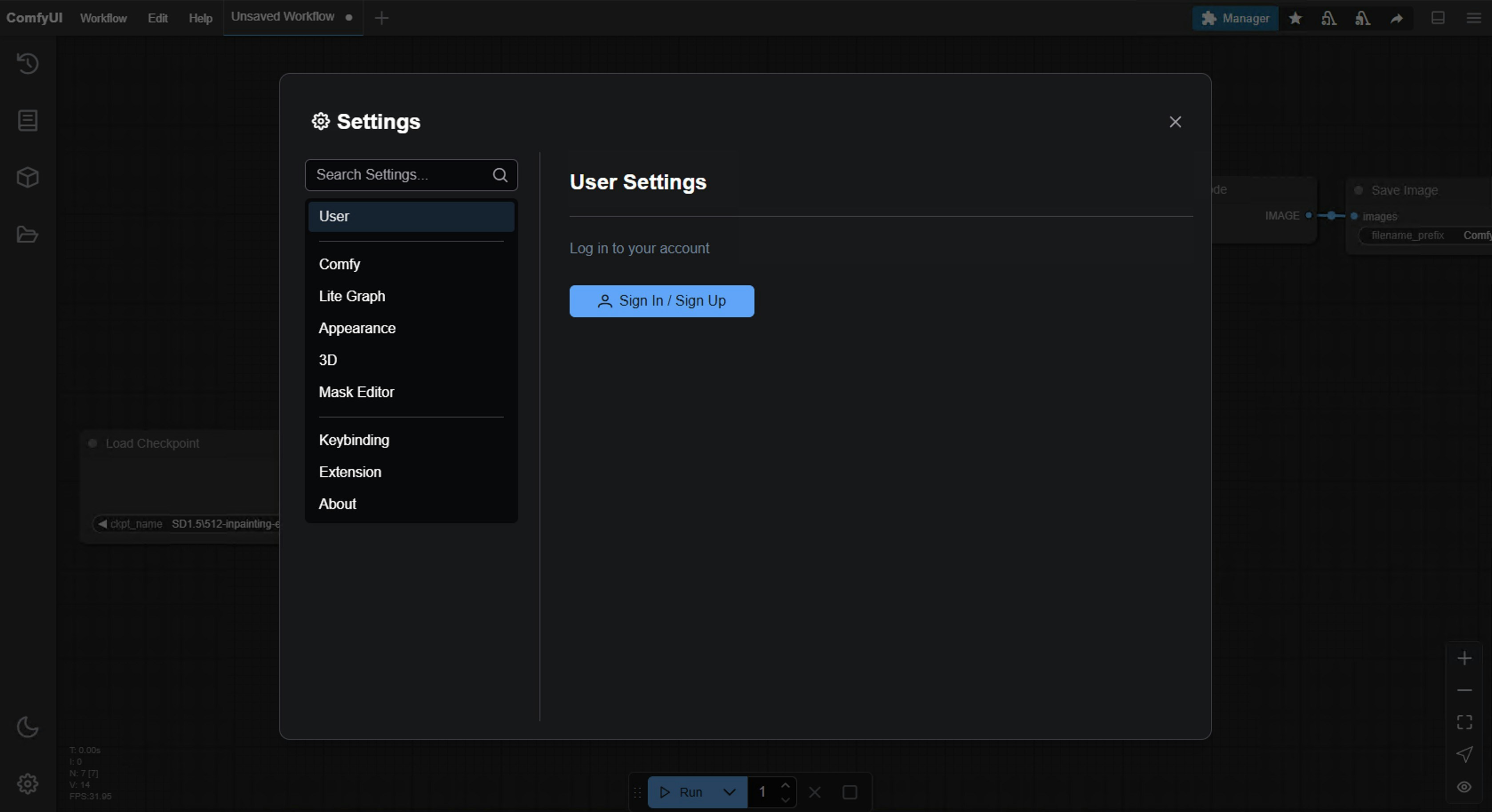
Log in via `Settings` -> `User`:
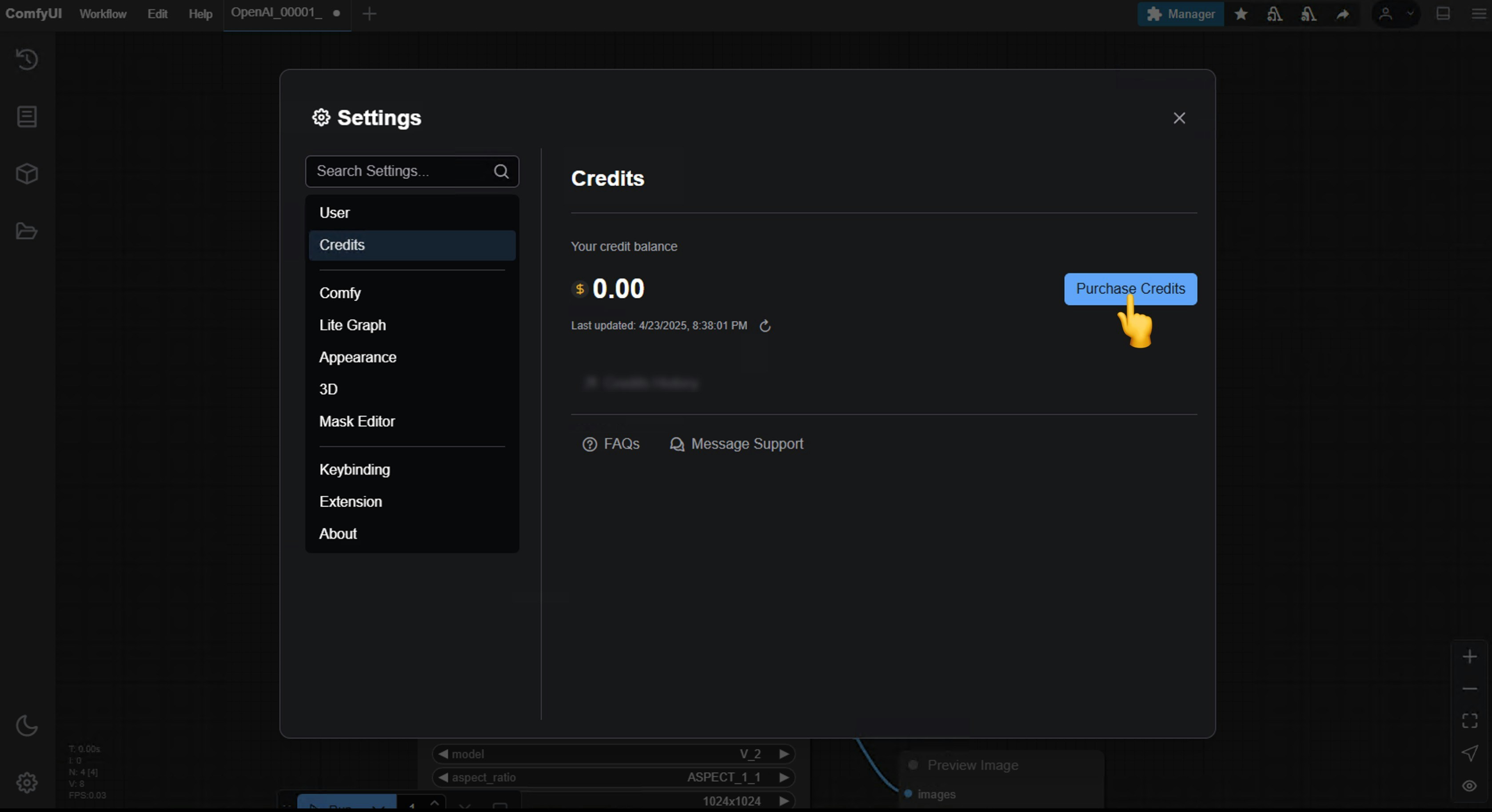
 Go to `Settings` -> `Credits` to purchase credits
 Please refer to the corresponding documentation for account and credits to ensure this requirement:
* [Comfy account](/interface/user): Find the `User` section in the settings menu to log in.
* [Credits](/interface/credits): After logging in, the settings interface will show a credits menu where you can purchase credits. We use a prepaid system, so there will be no unexpected charges.
### 3. Network Environment Requirements
API access requires that your current requests are based on a secure network environment. The current requirements for API access are as follows:
* The local network only allows access from `127.0.0.1` or `localhost`, and you can directly use the login function.
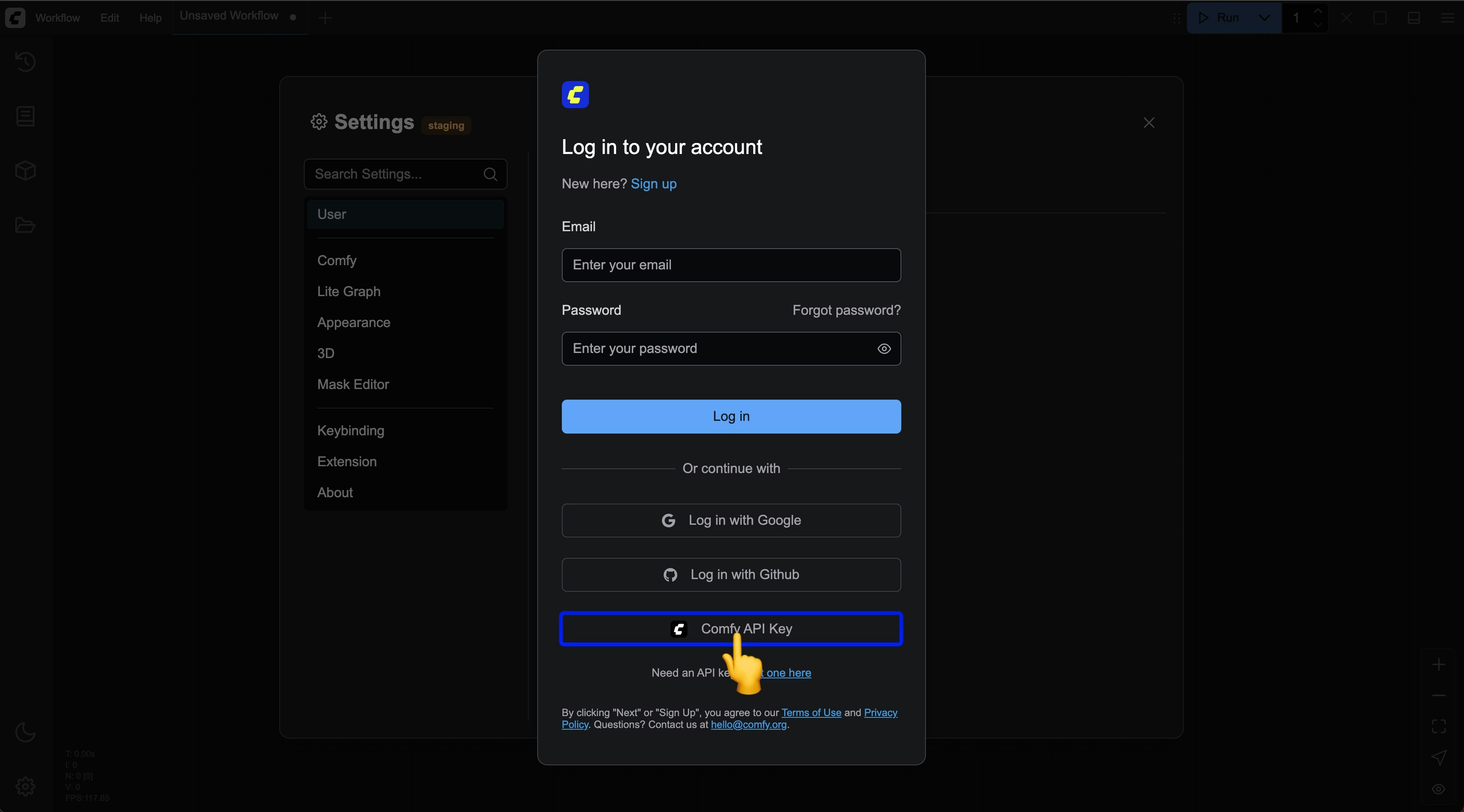
* If you are accessing from a local area network or a website that is not on the whitelist, please log in with an API Key. Please refer to [Log in with an API Key](/interface/user#logging-in-with-an-api-key).
* You should be able to access our API service normally (in some regions, you may need to use a proxy service).
* Access should be carried out in an `https` environment to ensure the security of the requests.
Accessing in an insecure context poses significant risks, which may result in the following consequences:
1. Authentication may be stolen, leading to the leakage of your account information.
2. Your account may be maliciously used, resulting in financial losses.
Even if we open this restriction in the future, we strongly advise against accessing API services through insecure network requests due to the high risks involved.
### 4. Using the Corresponding Nodes
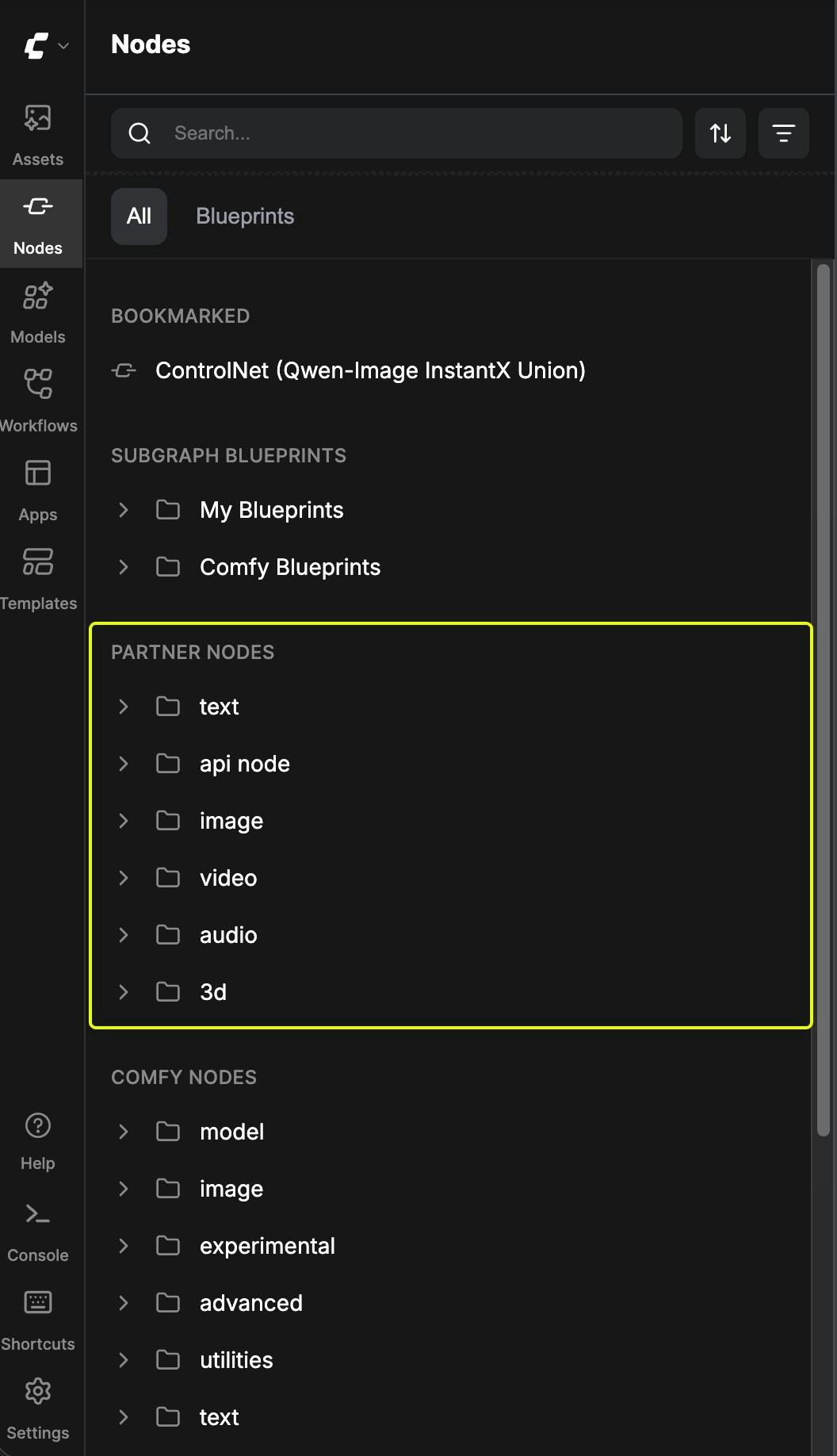
**Add to Workflow**: Add the Partner Node to your workflow just like you would with other nodes.
**Run**: Set the parameters and then run the workflow.
Please refer to the corresponding documentation for account and credits to ensure this requirement:
* [Comfy account](/interface/user): Find the `User` section in the settings menu to log in.
* [Credits](/interface/credits): After logging in, the settings interface will show a credits menu where you can purchase credits. We use a prepaid system, so there will be no unexpected charges.
### 3. Network Environment Requirements
API access requires that your current requests are based on a secure network environment. The current requirements for API access are as follows:
* The local network only allows access from `127.0.0.1` or `localhost`, and you can directly use the login function.
* If you are accessing from a local area network or a website that is not on the whitelist, please log in with an API Key. Please refer to [Log in with an API Key](/interface/user#logging-in-with-an-api-key).
* You should be able to access our API service normally (in some regions, you may need to use a proxy service).
* Access should be carried out in an `https` environment to ensure the security of the requests.
Accessing in an insecure context poses significant risks, which may result in the following consequences:
1. Authentication may be stolen, leading to the leakage of your account information.
2. Your account may be maliciously used, resulting in financial losses.
Even if we open this restriction in the future, we strongly advise against accessing API services through insecure network requests due to the high risks involved.
### 4. Using the Corresponding Nodes
**Add to Workflow**: Add the Partner Node to your workflow just like you would with other nodes.
**Run**: Set the parameters and then run the workflow.
 ## Log in with ComfyUI Account API Key on non-whitelisted websites
Currently, we have set up a whitelist to restrict the websites where you can log in to your ComfyUI account.
If you need to log in to your ComfyUI account on some non-whitelisted websites, please refer to the account management section to learn how to log in using an API Key.
In this case, the corresponding website does not need to be on our whitelist.
Learn how to log in with ComfyUI Account API Key
## Log in with ComfyUI Account API Key on non-whitelisted websites
Currently, we have set up a whitelist to restrict the websites where you can log in to your ComfyUI account.
If you need to log in to your ComfyUI account on some non-whitelisted websites, please refer to the account management section to learn how to log in using an API Key.
In this case, the corresponding website does not need to be on our whitelist.
Learn how to log in with ComfyUI Account API Key
 ## Use ComfyUI Account API Key Integration to call paid model Partner nodes
Currently, we support accessing our services through ComfyUI API Key Integration to call paid model Partner nodes. Please refer to the API Key Integration section to learn how to use API Key Integration to call paid model Partner nodes.
**Important:** The API key discussed here is your **ComfyUI Account API Key** (used for accessing paid Partner nodes in workflows). This is **NOT** the same as the **Registry Publishing API Key** used by developers to publish custom nodes to the registry. If you're looking to publish custom nodes, see [Publishing Nodes](/registry/publishing).
Please refer to the API Key Integration section to learn how to use API Key Integration to call paid model Partner nodes
## Advantages of Partner Nodes
Partner Nodes provide several important advantages for ComfyUI users:
* **Access to closed-source models**: Use state-of-the-art AI models without having to deploy them yourself
* **Seamless integration**: Partner nodes are fully compatible with other ComfyUI nodes and can be combined to create complex workflows
* **Simplified experience**: No need to manage API keys or handle complex API requests
* **Controlled costs**: The prepaid system ensures you have complete control over your spending with no unexpected charges
## Pricing
Please refer to the pricing page for the corresponding Partner pricing
## About Open Source and Opt-in
It's important to note that **Partner Nodes are completely optional**. ComfyUI will always remain fully open-source and free for local users. Partner nodes are designed as an "opt-in" feature, providing convenience for those who want access to external SOTA (state-of-the-art) models.
## How to disable partner nodes completely
You can add the `--disable-api-nodes` launch argument to disable all partner nodes in ComfyUI. This argument will also prevent the frontend from communicating with the internet.
**For manual install:**
```bash theme={null}
python main.py --disable-api-nodes
```
**For portable users (Windows):**
Update your `run_xxx.bat` file:
```batch theme={null}
.\python_embeded\python.exe -s ComfyUI\main.py --listen --windows-standalone-build --disable-api-nodes
pause
```
## Use Cases
A powerful application of Partner Nodes is combining the output of external models with local nodes. For example:
* Using GPT-Image-1 to generate a base image, then transforming it into video with a local `wan` node
* Combining externally generated images with local upscaling or style transfer nodes
* Creating hybrid workflows that leverage the advantages of both closed-source and open-source models
This flexibility makes ComfyUI a truly universal generative AI interface, integrating various AI capabilities into a unified workflow, opening up more possibilities
## FAQs
Please update your ComfyUI to the latest version (the latest commit or the latest [desktop version](https://www.comfy.org/download)).
We may add more API support in the future, and the corresponding nodes will be updated, so please keep your ComfyUI up to date.
Please note that you need to distinguish between the nightly version and the release version.
In some cases, the latest `release` version may not be updated in time compared to the `nightly` version.
Since we are still iterating quickly, please ensure you are using the latest version when you cannot find the corresponding node.
API access requires that your current request is based on a secure network environment. The current requirements for API access are as follows:
* The local network only allows access from `127.0.0.1` or `localhost`, which may mean that you cannot use the Partner Nodes in a ComfyUI service started with the `--listen` parameter in a LAN environment.
* Able to access our API service normally (a proxy service may be required in some regions).
* Your account does not have enough [credits](/interface/credits).
* Currently, only `127.0.0.1` or `localhost` access is supported.
* Ensure your account has enough credits.
Partner Nodes require credits for API calls to closed-source models, so they do not support free usage.
Please refer to the following documentation:
1. [Comfy Account](/interface/user): Find the `User` section in the settings menu to log in.
2. [Credits](/interface/credits): After logging in, the settings interface will show the credits menu. You can purchase credits in `Settings` → `Credits`. We use a prepaid system, so there will be no unexpected charges.
3. Complete the payment through Stripe.
4. Check if the credits have been updated. If not, try restarting or refreshing the page.
Currently, we do not support refunds for credits.
If you believe there is an error resulting in unused balance due to technical issues, please [contact support](mailto:support@comfy.org).
Credits are not intended to be used as a negative balance or credit line. However, due to race conditions where partner nodes don't always report costs before execution, a single execution may consume more credits than your remaining balance and temporarily result in a negative balance after completion. When your balance is negative, you will not be able to run Partner Nodes until you top up and restore a positive balance. Please ensure you have enough credits before making API calls.
Please visit the [Credits](/interface/credits) menu after logging in to check the corresponding credits.
Currently, the Partner Nodes are still in the testing phase and do not support this feature yet, but we have considered adding it.
Yes, the expiration depends on the type of credits:
* **Monthly credits**: Expire at the end of your billing period
* **Top-up credits**: Expire 1 year from the date of purchase
No, your credits cannot be transferred to other users and are limited to the currently logged-in account, but we do not restrict the number of devices that can log in.
We do not limit the number of devices that can log in; you can use your account anywhere you want.
Email a request to [support@comfy.org](mailto:support@comfy.org) and we will delete your information
## Use ComfyUI Account API Key Integration to call paid model Partner nodes
Currently, we support accessing our services through ComfyUI API Key Integration to call paid model Partner nodes. Please refer to the API Key Integration section to learn how to use API Key Integration to call paid model Partner nodes.
**Important:** The API key discussed here is your **ComfyUI Account API Key** (used for accessing paid Partner nodes in workflows). This is **NOT** the same as the **Registry Publishing API Key** used by developers to publish custom nodes to the registry. If you're looking to publish custom nodes, see [Publishing Nodes](/registry/publishing).
Please refer to the API Key Integration section to learn how to use API Key Integration to call paid model Partner nodes
## Advantages of Partner Nodes
Partner Nodes provide several important advantages for ComfyUI users:
* **Access to closed-source models**: Use state-of-the-art AI models without having to deploy them yourself
* **Seamless integration**: Partner nodes are fully compatible with other ComfyUI nodes and can be combined to create complex workflows
* **Simplified experience**: No need to manage API keys or handle complex API requests
* **Controlled costs**: The prepaid system ensures you have complete control over your spending with no unexpected charges
## Pricing
Please refer to the pricing page for the corresponding Partner pricing
## About Open Source and Opt-in
It's important to note that **Partner Nodes are completely optional**. ComfyUI will always remain fully open-source and free for local users. Partner nodes are designed as an "opt-in" feature, providing convenience for those who want access to external SOTA (state-of-the-art) models.
## How to disable partner nodes completely
You can add the `--disable-api-nodes` launch argument to disable all partner nodes in ComfyUI. This argument will also prevent the frontend from communicating with the internet.
**For manual install:**
```bash theme={null}
python main.py --disable-api-nodes
```
**For portable users (Windows):**
Update your `run_xxx.bat` file:
```batch theme={null}
.\python_embeded\python.exe -s ComfyUI\main.py --listen --windows-standalone-build --disable-api-nodes
pause
```
## Use Cases
A powerful application of Partner Nodes is combining the output of external models with local nodes. For example:
* Using GPT-Image-1 to generate a base image, then transforming it into video with a local `wan` node
* Combining externally generated images with local upscaling or style transfer nodes
* Creating hybrid workflows that leverage the advantages of both closed-source and open-source models
This flexibility makes ComfyUI a truly universal generative AI interface, integrating various AI capabilities into a unified workflow, opening up more possibilities
## FAQs
Please update your ComfyUI to the latest version (the latest commit or the latest [desktop version](https://www.comfy.org/download)).
We may add more API support in the future, and the corresponding nodes will be updated, so please keep your ComfyUI up to date.
Please note that you need to distinguish between the nightly version and the release version.
In some cases, the latest `release` version may not be updated in time compared to the `nightly` version.
Since we are still iterating quickly, please ensure you are using the latest version when you cannot find the corresponding node.
API access requires that your current request is based on a secure network environment. The current requirements for API access are as follows:
* The local network only allows access from `127.0.0.1` or `localhost`, which may mean that you cannot use the Partner Nodes in a ComfyUI service started with the `--listen` parameter in a LAN environment.
* Able to access our API service normally (a proxy service may be required in some regions).
* Your account does not have enough [credits](/interface/credits).
* Currently, only `127.0.0.1` or `localhost` access is supported.
* Ensure your account has enough credits.
Partner Nodes require credits for API calls to closed-source models, so they do not support free usage.
Please refer to the following documentation:
1. [Comfy Account](/interface/user): Find the `User` section in the settings menu to log in.
2. [Credits](/interface/credits): After logging in, the settings interface will show the credits menu. You can purchase credits in `Settings` → `Credits`. We use a prepaid system, so there will be no unexpected charges.
3. Complete the payment through Stripe.
4. Check if the credits have been updated. If not, try restarting or refreshing the page.
Currently, we do not support refunds for credits.
If you believe there is an error resulting in unused balance due to technical issues, please [contact support](mailto:support@comfy.org).
Credits are not intended to be used as a negative balance or credit line. However, due to race conditions where partner nodes don't always report costs before execution, a single execution may consume more credits than your remaining balance and temporarily result in a negative balance after completion. When your balance is negative, you will not be able to run Partner Nodes until you top up and restore a positive balance. Please ensure you have enough credits before making API calls.
Please visit the [Credits](/interface/credits) menu after logging in to check the corresponding credits.
Currently, the Partner Nodes are still in the testing phase and do not support this feature yet, but we have considered adding it.
Yes, the expiration depends on the type of credits:
* **Monthly credits**: Expire at the end of your billing period
* **Top-up credits**: Expire 1 year from the date of purchase
No, your credits cannot be transferred to other users and are limited to the currently logged-in account, but we do not restrict the number of devices that can log in.
We do not limit the number of devices that can log in; you can use your account anywhere you want.
Email a request to [support@comfy.org](mailto:support@comfy.org) and we will delete your information