> ## Documentation Index
> Fetch the complete documentation index at: https://docs.comfy.org/llms.txt
> Use this file to discover all available pages before exploring further.
# ComfyUI Marigold V2 Depth, Normal, and Albedo Estimation Guide
> Estimate depth, surface normals, and albedo from a single image in ComfyUI with Marigold V2: Qwen-Image Edit based diffusion transformers with dedicated LoRAs.
Marigold V2 is a family of monocular estimation models from Huawei Bayer Lab that repurpose a diffusion transformer (Qwen-Image Edit 2509) for geometry and intrinsic image estimation. From a single RGB image, the models predict a depth map, surface normals, or albedo, following up on the original Marigold (CVPR 2024) which repurposed Stable Diffusion for the same task. The V2 models ship as LoRAs on top of a shared base diffusion model, which keeps each download small and the workflow structure identical across the three tasks.
Compared with classical depth networks, the diffusion-based approach produces sharp, boundary-aware predictions and generalizes to open-domain images without retraining. Typical uses include depth-guided control for image and video generation, 3D scene reconstruction pipelines, relighting, and material editing driven by the estimated albedo.
Marigold V2 is supported natively in ComfyUI. Update to the latest version of [ComfyUI](https://github.com/comfyanonymous/ComfyUI) before starting.
Make sure your ComfyUI is updated.
* [Download ComfyUI](https://www.comfy.org/download)
* [Update Guide](/installation/update_comfyui)
Workflows in this guide can be found in the [Workflow Templates](/interface/features/template).
If you can't find them in the template, your ComfyUI may be outdated.
If nodes are missing when loading a workflow, possible reasons:
1. You are not using the latest ComfyUI version (Nightly version)
2. Some nodes failed to import at startup
* [Cloud](https://cloud.comfy.org) will update after ComfyUI stable release.
So, if you find any core node missing in this document, it might be because the new core nodes have not yet been released in the latest stable version. Please wait for the next stable release.
## Model Installation
Each workflow uses four files: the shared base diffusion model, plus a task-specific LoRA, VAE, and conditioning embedding. The three tasks use different LoRA, VAE, and conditioning files, so each workflow section below links the exact files it needs.
The base diffusion model is shared across all three workflows:
qwen\_image\_edit\_2509\_int8\_convrot.safetensors → ComfyUI/models/diffusion\_models/
If you plan to run all three tasks, download the per-task LoRAs, VAEs, and conditioning embeddings from the workflow sections and store them as shown in each section.
Depth Estimation
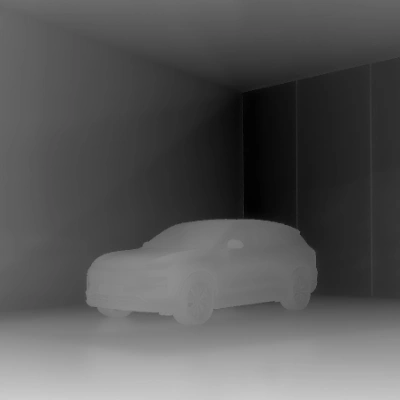
Predict a depth map from a single image. The decoded prediction is normalized so that near surfaces appear bright.
 Open in Comfy Cloud
Download JSON or search "Depth Estimation: Marigold V2" in Template Library
**Input materials**
Upload this file to the matching `LoadImage` node:
`LoadImage` node · `ev_suv_gold_desert_pavilion.png`
### 1. Steps to Run
1. Load your input image in the `LoadImage` node
2. Queue the workflow: the base model runs with the depth LoRA, and the Marigold V2 Post-Process node normalizes the decoded prediction
3. Save or preview the resulting depth map
### 2. Model Downloads
marigold\_v2\_depth\_log\_stage2.safetensors → ComfyUI/models/loras/
marigold\_v2\_depth\_log\_stage2\_vae.safetensors → ComfyUI/models/vae/
marigold\_v2\_depth\_conditioning.safetensors → ComfyUI/models/embeddings/
```
📂 ComfyUI/
├── 📂 models/
│ ├── 📂 loras/
│ │ └── marigold_v2_depth_log_stage2.safetensors
│ ├── 📂 vae/
│ │ └── marigold_v2_depth_log_stage2_vae.safetensors
│ └── 📂 embeddings/
│ └── marigold_v2_depth_conditioning.safetensors
```
Open in Comfy Cloud
Download JSON or search "Depth Estimation: Marigold V2" in Template Library
**Input materials**
Upload this file to the matching `LoadImage` node:
`LoadImage` node · `ev_suv_gold_desert_pavilion.png`
### 1. Steps to Run
1. Load your input image in the `LoadImage` node
2. Queue the workflow: the base model runs with the depth LoRA, and the Marigold V2 Post-Process node normalizes the decoded prediction
3. Save or preview the resulting depth map
### 2. Model Downloads
marigold\_v2\_depth\_log\_stage2.safetensors → ComfyUI/models/loras/
marigold\_v2\_depth\_log\_stage2\_vae.safetensors → ComfyUI/models/vae/
marigold\_v2\_depth\_conditioning.safetensors → ComfyUI/models/embeddings/
```
📂 ComfyUI/
├── 📂 models/
│ ├── 📂 loras/
│ │ └── marigold_v2_depth_log_stage2.safetensors
│ ├── 📂 vae/
│ │ └── marigold_v2_depth_log_stage2_vae.safetensors
│ └── 📂 embeddings/
│ └── marigold_v2_depth_conditioning.safetensors
```
Surface Normal Estimation
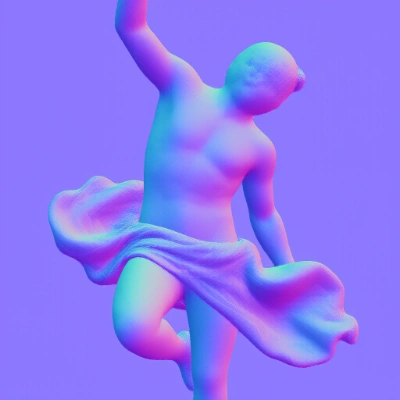
Predict per-pixel surface normals from a single image. The output maps each pixel to the direction the surface faces, useful for relighting and geometry analysis.
 Open in Comfy Cloud
Download JSON or search "Surface Normal Estimation: Marigold V2" in Template Library
**Input materials**
Upload this file to the matching `LoadImage` node:
`LoadImage` node · `greek_statue_orange_cloth.png`
### 1. Steps to Run
1. Load your input image in the `LoadImage` node
2. Queue the workflow with the normals LoRA loaded
3. Save or preview the resulting normal map
### 2. Model Downloads
marigold\_v2\_normals.safetensors → ComfyUI/models/loras/
marigold\_v2\_normals\_vae.safetensors → ComfyUI/models/vae/
marigold\_v2\_normals\_conditioning.safetensors → ComfyUI/models/embeddings/
```
📂 ComfyUI/
├── 📂 models/
│ ├── 📂 loras/
│ │ └── marigold_v2_normals.safetensors
│ ├── 📂 vae/
│ │ └── marigold_v2_normals_vae.safetensors
│ └── 📂 embeddings/
│ └── marigold_v2_normals_conditioning.safetensors
```
Open in Comfy Cloud
Download JSON or search "Surface Normal Estimation: Marigold V2" in Template Library
**Input materials**
Upload this file to the matching `LoadImage` node:
`LoadImage` node · `greek_statue_orange_cloth.png`
### 1. Steps to Run
1. Load your input image in the `LoadImage` node
2. Queue the workflow with the normals LoRA loaded
3. Save or preview the resulting normal map
### 2. Model Downloads
marigold\_v2\_normals.safetensors → ComfyUI/models/loras/
marigold\_v2\_normals\_vae.safetensors → ComfyUI/models/vae/
marigold\_v2\_normals\_conditioning.safetensors → ComfyUI/models/embeddings/
```
📂 ComfyUI/
├── 📂 models/
│ ├── 📂 loras/
│ │ └── marigold_v2_normals.safetensors
│ ├── 📂 vae/
│ │ └── marigold_v2_normals_vae.safetensors
│ └── 📂 embeddings/
│ └── marigold_v2_normals_conditioning.safetensors
```
Albedo Estimation
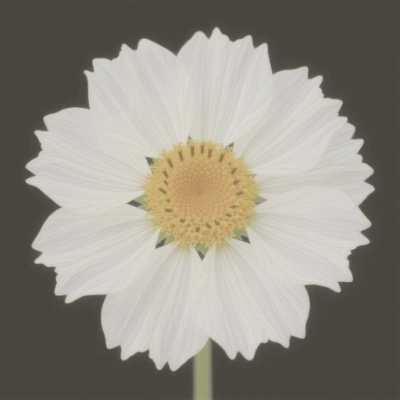
Predict the albedo (intrinsic color) of a single image, separating material color from lighting and shading. The output is converted to sRGB by the Marigold V2 Post-Process node.
 Open in Comfy Cloud
Download JSON or search "Albedo Estimation: Marigold V2" in Template Library
**Input materials**
Upload this file to the matching `LoadImage` node:
`LoadImage` node · `flower_with_texture.png`
### 1. Steps to Run
1. Load your input image in the `LoadImage` node
2. Queue the workflow with the albedo LoRA loaded
3. Save or preview the resulting albedo image
### 2. Model Downloads
marigold\_v2\_albedo.safetensors → ComfyUI/models/loras/
marigold\_v2\_albedo\_vae.safetensors → ComfyUI/models/vae/
marigold\_v2\_albedo\_conditioning.safetensors → ComfyUI/models/embeddings/
```
📂 ComfyUI/
├── 📂 models/
│ ├── 📂 loras/
│ │ └── marigold_v2_albedo.safetensors
│ ├── 📂 vae/
│ │ └── marigold_v2_albedo_vae.safetensors
│ └── 📂 embeddings/
│ └── marigold_v2_albedo_conditioning.safetensors
```
## Marigold V2 Post-Process Node
Every workflow ends in the **Marigold V2 Post-Process** node, which turns the raw decoded prediction into a viewable image. The **prediction** option must match the task:
* **depth**: normalizes the prediction so near surfaces are bright
* **normals**: maps raw values to unit surface normals
* **albedo**: converts the prediction to sRGB
Open in Comfy Cloud
Download JSON or search "Albedo Estimation: Marigold V2" in Template Library
**Input materials**
Upload this file to the matching `LoadImage` node:
`LoadImage` node · `flower_with_texture.png`
### 1. Steps to Run
1. Load your input image in the `LoadImage` node
2. Queue the workflow with the albedo LoRA loaded
3. Save or preview the resulting albedo image
### 2. Model Downloads
marigold\_v2\_albedo.safetensors → ComfyUI/models/loras/
marigold\_v2\_albedo\_vae.safetensors → ComfyUI/models/vae/
marigold\_v2\_albedo\_conditioning.safetensors → ComfyUI/models/embeddings/
```
📂 ComfyUI/
├── 📂 models/
│ ├── 📂 loras/
│ │ └── marigold_v2_albedo.safetensors
│ ├── 📂 vae/
│ │ └── marigold_v2_albedo_vae.safetensors
│ └── 📂 embeddings/
│ └── marigold_v2_albedo_conditioning.safetensors
```
## Marigold V2 Post-Process Node
Every workflow ends in the **Marigold V2 Post-Process** node, which turns the raw decoded prediction into a viewable image. The **prediction** option must match the task:
* **depth**: normalizes the prediction so near surfaces are bright
* **normals**: maps raw values to unit surface normals
* **albedo**: converts the prediction to sRGB