> ## Documentation Index
> Fetch the complete documentation index at: https://docs.comfy.org/llms.txt
> Use this file to discover all available pages before exploring further.
# Luma Reference - ComfyUI 原生节点文档
> 为Luma图像生成提供参考图像的辅助节点
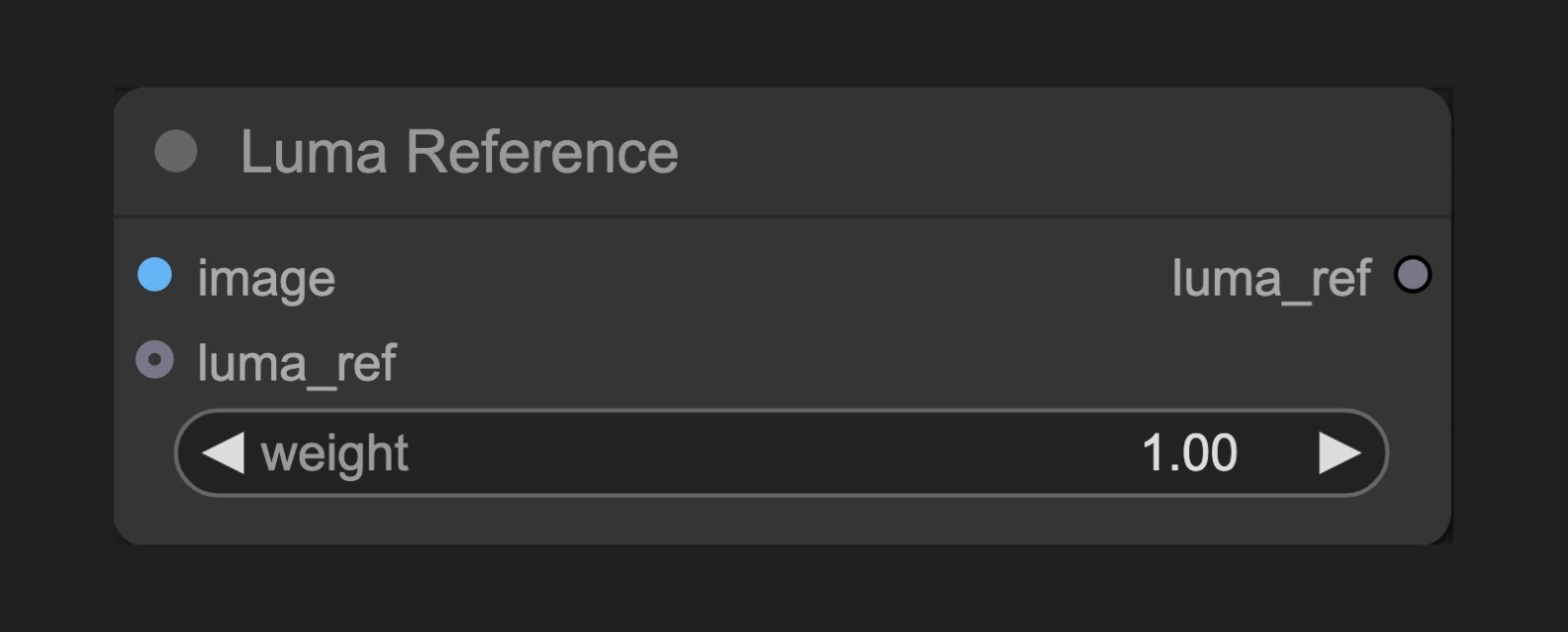 Luma Reference 节点允许你设置参考图像和权重,用于指导Luma图像生成节点的创作过程,使得生成的图像更接近参考图像的特定特征。
## 节点功能
此节点作为Luma生成节点的辅助工具,允许用户提供参考图像来影响生成结果。它让用户能够设置参考图像的权重,以控制参考图像对最终结果的影响程度。
多个 Luma Reference 节点可以串联,根据对应的 API 要求,最多运行同时串联 4 个进行工作
## 参数说明
### 基本参数
| 参数 | 类型 | 默认值 | 说明 |
| ------ | --- | --- | ----------------- |
| image | 图像 | - | 作为参考的输入图像 |
| weight | 浮点数 | 1.0 | 控制参考图像的影响强度 (0-1) |
### 输出
| 输出 | 类型 | 说明 |
| --------- | --------- | ------------ |
| luma\_ref | LUMA\_REF | 包含图像和权重的参考对象 |
## 使用示例
Luma Text to Image 工作流示例
## 工作原理
Luma Reference 节点接收图像输入并允许设置权重值。该节点不直接生成或修改图像,而是创建一个包含图像数据和权重信息的参考对象,后续传递给Luma生成节点。
在生成过程中,Luma AI 会分析参考图像的特征,并根据设定的权重将这些特征融入到生成结果中。较高的权重值意味着生成的图像将更接近参考图像的特征,而较低的权重值则表示参考图像只会轻微影响最终结果。
## 源码参考
\[节点源码 (更新于2025-05-03)]
```python theme={null}
class LumaReferenceNode(ComfyNodeABC):
"""
Holds an image and weight for use with Luma Generate Image node.
"""
RETURN_TYPES = (LumaIO.LUMA_REF,)
RETURN_NAMES = ("luma_ref",)
DESCRIPTION = cleandoc(__doc__ or "") # Handle potential None value
FUNCTION = "create_luma_reference"
CATEGORY = "api node/image/Luma"
@classmethod
def INPUT_TYPES(s):
return {
"required": {
"image": (
IO.IMAGE,
{
"tooltip": "Image to use as reference.",
},
),
"weight": (
IO.FLOAT,
{
"default": 1.0,
"min": 0.0,
"max": 1.0,
"step": 0.01,
"tooltip": "Weight of image reference.",
},
),
},
"optional": {"luma_ref": (LumaIO.LUMA_REF,)},
}
def create_luma_reference(
self, image: torch.Tensor, weight: float, luma_ref: LumaReferenceChain = None
):
if luma_ref is not None:
luma_ref = luma_ref.clone()
else:
luma_ref = LumaReferenceChain()
luma_ref.add(LumaReference(image=image, weight=round(weight, 2)))
return (luma_ref,)
```
Luma Reference 节点允许你设置参考图像和权重,用于指导Luma图像生成节点的创作过程,使得生成的图像更接近参考图像的特定特征。
## 节点功能
此节点作为Luma生成节点的辅助工具,允许用户提供参考图像来影响生成结果。它让用户能够设置参考图像的权重,以控制参考图像对最终结果的影响程度。
多个 Luma Reference 节点可以串联,根据对应的 API 要求,最多运行同时串联 4 个进行工作
## 参数说明
### 基本参数
| 参数 | 类型 | 默认值 | 说明 |
| ------ | --- | --- | ----------------- |
| image | 图像 | - | 作为参考的输入图像 |
| weight | 浮点数 | 1.0 | 控制参考图像的影响强度 (0-1) |
### 输出
| 输出 | 类型 | 说明 |
| --------- | --------- | ------------ |
| luma\_ref | LUMA\_REF | 包含图像和权重的参考对象 |
## 使用示例
Luma Text to Image 工作流示例
## 工作原理
Luma Reference 节点接收图像输入并允许设置权重值。该节点不直接生成或修改图像,而是创建一个包含图像数据和权重信息的参考对象,后续传递给Luma生成节点。
在生成过程中,Luma AI 会分析参考图像的特征,并根据设定的权重将这些特征融入到生成结果中。较高的权重值意味着生成的图像将更接近参考图像的特征,而较低的权重值则表示参考图像只会轻微影响最终结果。
## 源码参考
\[节点源码 (更新于2025-05-03)]
```python theme={null}
class LumaReferenceNode(ComfyNodeABC):
"""
Holds an image and weight for use with Luma Generate Image node.
"""
RETURN_TYPES = (LumaIO.LUMA_REF,)
RETURN_NAMES = ("luma_ref",)
DESCRIPTION = cleandoc(__doc__ or "") # Handle potential None value
FUNCTION = "create_luma_reference"
CATEGORY = "api node/image/Luma"
@classmethod
def INPUT_TYPES(s):
return {
"required": {
"image": (
IO.IMAGE,
{
"tooltip": "Image to use as reference.",
},
),
"weight": (
IO.FLOAT,
{
"default": 1.0,
"min": 0.0,
"max": 1.0,
"step": 0.01,
"tooltip": "Weight of image reference.",
},
),
},
"optional": {"luma_ref": (LumaIO.LUMA_REF,)},
}
def create_luma_reference(
self, image: torch.Tensor, weight: float, luma_ref: LumaReferenceChain = None
):
if luma_ref is not None:
luma_ref = luma_ref.clone()
else:
luma_ref = LumaReferenceChain()
luma_ref.add(LumaReference(image=image, weight=round(weight, 2)))
return (luma_ref,)
```