> ## Documentation Index
> Fetch the complete documentation index at: https://docs.comfy.org/llms.txt
> Use this file to discover all available pages before exploring further.
# Luma Text to Image - ComfyUI 原生节点文档
> 使用Luma AI将文本描述转换为高质量图像的节点
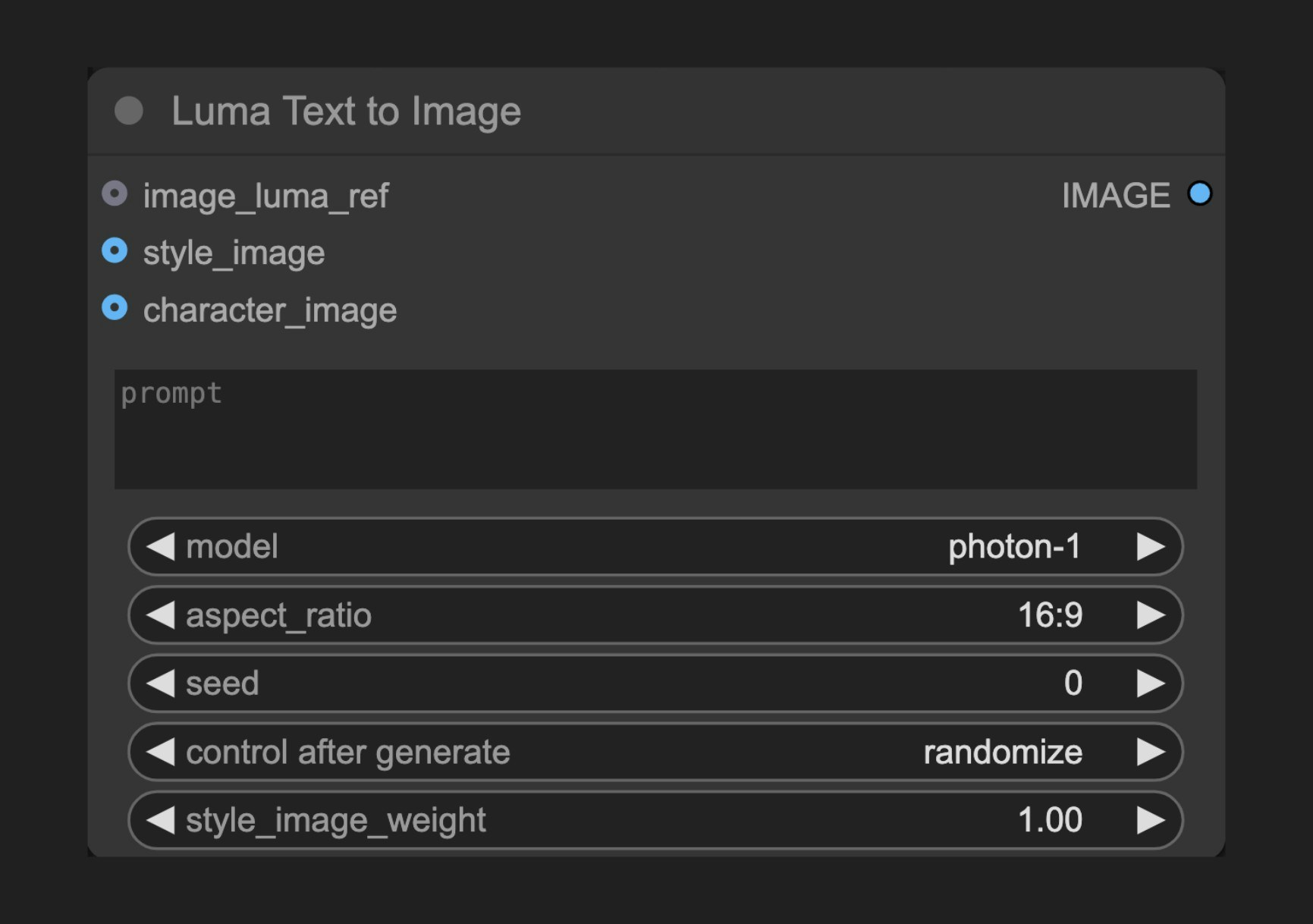 Luma Text to Image 节点允许你使用Luma AI的先进图像生成功能,通过文本描述创建高度逼真和艺术化的图像。
## 节点功能
此节点连接到Luma AI的文本到图像API,让用户能够通过详细的文本提示词生成图像。Luma AI以其出色的真实感和细节表现而闻名,特别擅长生成照片级别的逼真内容和艺术风格图像。
## 参数说明
### 基本参数
| 参数 | 类型 | 默认值 | 说明 |
| -------------------- | --- | ---- | ---------------------------------------------- |
| prompt | 字符串 | "" | 描述要生成内容的文本提示词 |
| model | 选择项 | - | 选择使用的生成模型 |
| aspect\_ratio | 选择项 | 16:9 | 设置输出图像的宽高比 |
| seed | 整数 | 0 | 种子值,用于确定节点是否应重新运行,但实际结果与种子无关 |
| style\_image\_weight | 浮点数 | 1.0 | 样式图像的权重,范围0.0-1.0,仅在提供style\_image时生效,越大风格参考越强 |
### 可选参数
| 参数 | 类型 | 说明 |
| ---------------- | --------- | --------------------------------- |
| image\_luma\_ref | LUMA\_REF | Luma参考节点连接,通过输入图像影响生成结果,最多可考虑4张图像 |
| style\_image | 图像 | 样式参考图像,仅使用1张图像 |
| character\_image | 图像 | 角色参考图像,可以是多张图像的批次,最多可考虑4张图像 |
### 输出
| 输出 | 类型 | 说明 |
| ----- | -- | ------- |
| IMAGE | 图像 | 生成的图像结果 |
## 使用示例
Luma Text to Image 工作流详细使用指南
## 工作原理
Luma Text to Image 节点分析用户提供的文本提示词,通过Luma AI的生成模型创建相应的图像。该过程利用深度学习技术理解文本描述并将其转换为视觉表现。用户可以通过调整各种参数来精细控制生成过程,包括分辨率、引导尺度和负面提示词。
此外,节点支持使用参考图像和概念引导来进一步影响生成结果,使创作者能够更精确地实现他们的创意愿景。
## 源码参考
\[节点源码 (更新于2025-05-03)]
```python theme={null}
class LumaImageGenerationNode(ComfyNodeABC):
"""
Generates images synchronously based on prompt and aspect ratio.
"""
RETURN_TYPES = (IO.IMAGE,)
DESCRIPTION = cleandoc(__doc__ or "") # Handle potential None value
FUNCTION = "api_call"
API_NODE = True
CATEGORY = "api node/image/Luma"
@classmethod
def INPUT_TYPES(s):
return {
"required": {
"prompt": (
IO.STRING,
{
"multiline": True,
"default": "",
"tooltip": "Prompt for the image generation",
},
),
"model": ([model.value for model in LumaImageModel],),
"aspect_ratio": (
[ratio.value for ratio in LumaAspectRatio],
{
"default": LumaAspectRatio.ratio_16_9,
},
),
"seed": (
IO.INT,
{
"default": 0,
"min": 0,
"max": 0xFFFFFFFFFFFFFFFF,
"control_after_generate": True,
"tooltip": "Seed to determine if node should re-run; actual results are nondeterministic regardless of seed.",
},
),
"style_image_weight": (
IO.FLOAT,
{
"default": 1.0,
"min": 0.0,
"max": 1.0,
"step": 0.01,
"tooltip": "Weight of style image. Ignored if no style_image provided.",
},
),
},
"optional": {
"image_luma_ref": (
LumaIO.LUMA_REF,
{
"tooltip": "Luma Reference node connection to influence generation with input images; up to 4 images can be considered."
},
),
"style_image": (
IO.IMAGE,
{"tooltip": "Style reference image; only 1 image will be used."},
),
"character_image": (
IO.IMAGE,
{
"tooltip": "Character reference images; can be a batch of multiple, up to 4 images can be considered."
},
),
},
"hidden": {
"auth_token": "AUTH_TOKEN_COMFY_ORG",
},
}
def api_call(
self,
prompt: str,
model: str,
aspect_ratio: str,
seed,
style_image_weight: float,
image_luma_ref: LumaReferenceChain = None,
style_image: torch.Tensor = None,
character_image: torch.Tensor = None,
auth_token=None,
**kwargs,
):
# handle image_luma_ref
api_image_ref = None
if image_luma_ref is not None:
api_image_ref = self._convert_luma_refs(
image_luma_ref, max_refs=4, auth_token=auth_token
)
# handle style_luma_ref
api_style_ref = None
if style_image is not None:
api_style_ref = self._convert_style_image(
style_image, weight=style_image_weight, auth_token=auth_token
)
# handle character_ref images
character_ref = None
if character_image is not None:
download_urls = upload_images_to_comfyapi(
character_image, max_images=4, auth_token=auth_token
)
character_ref = LumaCharacterRef(
identity0=LumaImageIdentity(images=download_urls)
)
operation = SynchronousOperation(
endpoint=ApiEndpoint(
path="/proxy/luma/generations/image",
method=HttpMethod.POST,
request_model=LumaImageGenerationRequest,
response_model=LumaGeneration,
),
request=LumaImageGenerationRequest(
prompt=prompt,
model=model,
aspect_ratio=aspect_ratio,
image_ref=api_image_ref,
style_ref=api_style_ref,
character_ref=character_ref,
),
auth_token=auth_token,
)
response_api: LumaGeneration = operation.execute()
operation = PollingOperation(
poll_endpoint=ApiEndpoint(
path=f"/proxy/luma/generations/{response_api.id}",
method=HttpMethod.GET,
request_model=EmptyRequest,
response_model=LumaGeneration,
),
completed_statuses=[LumaState.completed],
failed_statuses=[LumaState.failed],
status_extractor=lambda x: x.state,
auth_token=auth_token,
)
response_poll = operation.execute()
img_response = requests.get(response_poll.assets.image)
img = process_image_response(img_response)
return (img,)
def _convert_luma_refs(
self, luma_ref: LumaReferenceChain, max_refs: int, auth_token=None
):
luma_urls = []
ref_count = 0
for ref in luma_ref.refs:
download_urls = upload_images_to_comfyapi(
ref.image, max_images=1, auth_token=auth_token
)
luma_urls.append(download_urls[0])
ref_count += 1
if ref_count >= max_refs:
break
return luma_ref.create_api_model(download_urls=luma_urls, max_refs=max_refs)
def _convert_style_image(
self, style_image: torch.Tensor, weight: float, auth_token=None
):
chain = LumaReferenceChain(
first_ref=LumaReference(image=style_image, weight=weight)
)
return self._convert_luma_refs(chain, max_refs=1, auth_token=auth_token)
```
Luma Text to Image 节点允许你使用Luma AI的先进图像生成功能,通过文本描述创建高度逼真和艺术化的图像。
## 节点功能
此节点连接到Luma AI的文本到图像API,让用户能够通过详细的文本提示词生成图像。Luma AI以其出色的真实感和细节表现而闻名,特别擅长生成照片级别的逼真内容和艺术风格图像。
## 参数说明
### 基本参数
| 参数 | 类型 | 默认值 | 说明 |
| -------------------- | --- | ---- | ---------------------------------------------- |
| prompt | 字符串 | "" | 描述要生成内容的文本提示词 |
| model | 选择项 | - | 选择使用的生成模型 |
| aspect\_ratio | 选择项 | 16:9 | 设置输出图像的宽高比 |
| seed | 整数 | 0 | 种子值,用于确定节点是否应重新运行,但实际结果与种子无关 |
| style\_image\_weight | 浮点数 | 1.0 | 样式图像的权重,范围0.0-1.0,仅在提供style\_image时生效,越大风格参考越强 |
### 可选参数
| 参数 | 类型 | 说明 |
| ---------------- | --------- | --------------------------------- |
| image\_luma\_ref | LUMA\_REF | Luma参考节点连接,通过输入图像影响生成结果,最多可考虑4张图像 |
| style\_image | 图像 | 样式参考图像,仅使用1张图像 |
| character\_image | 图像 | 角色参考图像,可以是多张图像的批次,最多可考虑4张图像 |
### 输出
| 输出 | 类型 | 说明 |
| ----- | -- | ------- |
| IMAGE | 图像 | 生成的图像结果 |
## 使用示例
Luma Text to Image 工作流详细使用指南
## 工作原理
Luma Text to Image 节点分析用户提供的文本提示词,通过Luma AI的生成模型创建相应的图像。该过程利用深度学习技术理解文本描述并将其转换为视觉表现。用户可以通过调整各种参数来精细控制生成过程,包括分辨率、引导尺度和负面提示词。
此外,节点支持使用参考图像和概念引导来进一步影响生成结果,使创作者能够更精确地实现他们的创意愿景。
## 源码参考
\[节点源码 (更新于2025-05-03)]
```python theme={null}
class LumaImageGenerationNode(ComfyNodeABC):
"""
Generates images synchronously based on prompt and aspect ratio.
"""
RETURN_TYPES = (IO.IMAGE,)
DESCRIPTION = cleandoc(__doc__ or "") # Handle potential None value
FUNCTION = "api_call"
API_NODE = True
CATEGORY = "api node/image/Luma"
@classmethod
def INPUT_TYPES(s):
return {
"required": {
"prompt": (
IO.STRING,
{
"multiline": True,
"default": "",
"tooltip": "Prompt for the image generation",
},
),
"model": ([model.value for model in LumaImageModel],),
"aspect_ratio": (
[ratio.value for ratio in LumaAspectRatio],
{
"default": LumaAspectRatio.ratio_16_9,
},
),
"seed": (
IO.INT,
{
"default": 0,
"min": 0,
"max": 0xFFFFFFFFFFFFFFFF,
"control_after_generate": True,
"tooltip": "Seed to determine if node should re-run; actual results are nondeterministic regardless of seed.",
},
),
"style_image_weight": (
IO.FLOAT,
{
"default": 1.0,
"min": 0.0,
"max": 1.0,
"step": 0.01,
"tooltip": "Weight of style image. Ignored if no style_image provided.",
},
),
},
"optional": {
"image_luma_ref": (
LumaIO.LUMA_REF,
{
"tooltip": "Luma Reference node connection to influence generation with input images; up to 4 images can be considered."
},
),
"style_image": (
IO.IMAGE,
{"tooltip": "Style reference image; only 1 image will be used."},
),
"character_image": (
IO.IMAGE,
{
"tooltip": "Character reference images; can be a batch of multiple, up to 4 images can be considered."
},
),
},
"hidden": {
"auth_token": "AUTH_TOKEN_COMFY_ORG",
},
}
def api_call(
self,
prompt: str,
model: str,
aspect_ratio: str,
seed,
style_image_weight: float,
image_luma_ref: LumaReferenceChain = None,
style_image: torch.Tensor = None,
character_image: torch.Tensor = None,
auth_token=None,
**kwargs,
):
# handle image_luma_ref
api_image_ref = None
if image_luma_ref is not None:
api_image_ref = self._convert_luma_refs(
image_luma_ref, max_refs=4, auth_token=auth_token
)
# handle style_luma_ref
api_style_ref = None
if style_image is not None:
api_style_ref = self._convert_style_image(
style_image, weight=style_image_weight, auth_token=auth_token
)
# handle character_ref images
character_ref = None
if character_image is not None:
download_urls = upload_images_to_comfyapi(
character_image, max_images=4, auth_token=auth_token
)
character_ref = LumaCharacterRef(
identity0=LumaImageIdentity(images=download_urls)
)
operation = SynchronousOperation(
endpoint=ApiEndpoint(
path="/proxy/luma/generations/image",
method=HttpMethod.POST,
request_model=LumaImageGenerationRequest,
response_model=LumaGeneration,
),
request=LumaImageGenerationRequest(
prompt=prompt,
model=model,
aspect_ratio=aspect_ratio,
image_ref=api_image_ref,
style_ref=api_style_ref,
character_ref=character_ref,
),
auth_token=auth_token,
)
response_api: LumaGeneration = operation.execute()
operation = PollingOperation(
poll_endpoint=ApiEndpoint(
path=f"/proxy/luma/generations/{response_api.id}",
method=HttpMethod.GET,
request_model=EmptyRequest,
response_model=LumaGeneration,
),
completed_statuses=[LumaState.completed],
failed_statuses=[LumaState.failed],
status_extractor=lambda x: x.state,
auth_token=auth_token,
)
response_poll = operation.execute()
img_response = requests.get(response_poll.assets.image)
img = process_image_response(img_response)
return (img,)
def _convert_luma_refs(
self, luma_ref: LumaReferenceChain, max_refs: int, auth_token=None
):
luma_urls = []
ref_count = 0
for ref in luma_ref.refs:
download_urls = upload_images_to_comfyapi(
ref.image, max_images=1, auth_token=auth_token
)
luma_urls.append(download_urls[0])
ref_count += 1
if ref_count >= max_refs:
break
return luma_ref.create_api_model(download_urls=luma_urls, max_refs=max_refs)
def _convert_style_image(
self, style_image: torch.Tensor, weight: float, auth_token=None
):
chain = LumaReferenceChain(
first_ref=LumaReference(image=style_image, weight=weight)
)
return self._convert_luma_refs(chain, max_refs=1, auth_token=auth_token)
```