

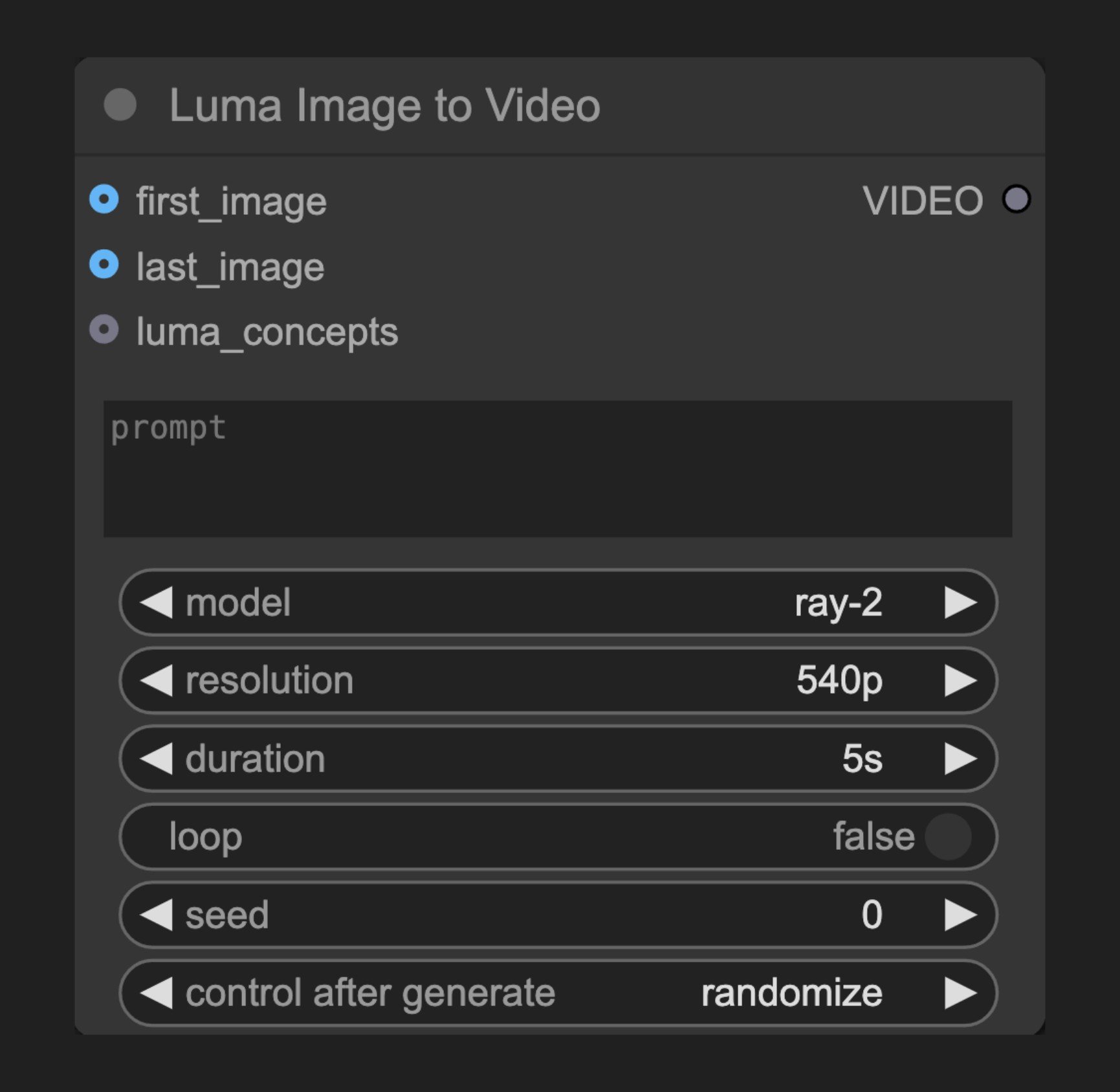
Node Function
This node connects to Luma AI’s image-to-video API, allowing users to create dynamic videos from input images. It understands the image content and generates natural, coherent motion while maintaining the original visual style. Combined with text prompts, users can precisely control the video’s dynamic effects.Parameters
Basic Parameters
| Parameter | Type | Default | Description |
|---|---|---|---|
| prompt | string | "" | Text prompt describing video motion and content |
| model | select | - | Video generation model to use |
| resolution | select | ”540p” | Output video resolution |
| duration | select | - | Video length options |
| loop | boolean | False | Whether to loop the video |
| seed | integer | 0 | Seed value for node rerun, results are nondeterministic |
Optional Parameters
| Parameter | Type | Description |
|---|---|---|
| first_image | image | First frame of video (required if no last_image) |
| last_image | image | Last frame of video (required if no first_image) |
| luma_concepts | LUMA_CONCEPTS | Concepts for controlling camera motion and shot style |
Requirements
- Either first_image or last_image must be provided
- Each image input (first_image and last_image) accepts only 1 image
Output
| Output | Type | Description |
|---|---|---|
| VIDEO | video | Generated video |
Usage Example
Luma Image to Video Workflow Example
Luma Image to Video Workflow Tutorial
Source Code
[Node Source Code (Updated 2025-05-03)]
class LumaImageToVideoGenerationNode(ComfyNodeABC):
    """
    Generates videos synchronously based on prompt, input images, and output_size.
    """

    RETURN_TYPES = (IO.VIDEO,)
    DESCRIPTION = cleandoc(__doc__ or "")  # Handle potential None value
    FUNCTION = "api_call"
    API_NODE = True
    CATEGORY = "api node/video/Luma"

    @classmethod
    def INPUT_TYPES(s):
        return {
            "required": {
                "prompt": (
                    IO.STRING,
                    {
                        "multiline": True,
                        "default": "",
                        "tooltip": "Prompt for the video generation",
                    },
                ),
                "model": ([model.value for model in LumaVideoModel],),
                # "aspect_ratio": ([ratio.value for ratio in LumaAspectRatio], {
                #     "default": LumaAspectRatio.ratio_16_9,
                # }),
                "resolution": (
                    [resolution.value for resolution in LumaVideoOutputResolution],
                    {
                        "default": LumaVideoOutputResolution.res_540p,
                    },
                ),
                "duration": ([dur.value for dur in LumaVideoModelOutputDuration],),
                "loop": (
                    IO.BOOLEAN,
                    {
                        "default": False,
                    },
                ),
                "seed": (
                    IO.INT,
                    {
                        "default": 0,
                        "min": 0,
                        "max": 0xFFFFFFFFFFFFFFFF,
                        "control_after_generate": True,
                        "tooltip": "Seed to determine if node should re-run; actual results are nondeterministic regardless of seed.",
                    },
                ),
            },
            "optional": {
                "first_image": (
                    IO.IMAGE,
                    {"tooltip": "First frame of generated video."},
                ),
                "last_image": (IO.IMAGE, {"tooltip": "Last frame of generated video."}),
                "luma_concepts": (
                    LumaIO.LUMA_CONCEPTS,
                    {
                        "tooltip": "Optional Camera Concepts to dictate camera motion via the Luma Concepts node."
                    },
                ),
            },
            "hidden": {
                "auth_token": "AUTH_TOKEN_COMFY_ORG",
            },
        }

    def api_call(
        self,
        prompt: str,
        model: str,
        resolution: str,
        duration: str,
        loop: bool,
        seed,
        first_image: torch.Tensor = None,
        last_image: torch.Tensor = None,
        luma_concepts: LumaConceptChain = None,
        auth_token=None,
        **kwargs,
    ):
        if first_image is None and last_image is None:
            raise Exception(
                "At least one of first_image and last_image requires an input."
            )
        keyframes = self._convert_to_keyframes(first_image, last_image, auth_token)
        duration = duration if model != LumaVideoModel.ray_1_6 else None
        resolution = resolution if model != LumaVideoModel.ray_1_6 else None

        operation = SynchronousOperation(
            endpoint=ApiEndpoint(
                path="/proxy/luma/generations",
                method=HttpMethod.POST,
                request_model=LumaGenerationRequest,
                response_model=LumaGeneration,
            ),
            request=LumaGenerationRequest(
                prompt=prompt,
                model=model,
                aspect_ratio=LumaAspectRatio.ratio_16_9,  # ignored, but still needed by the API for some reason
                resolution=resolution,
                duration=duration,
                loop=loop,
                keyframes=keyframes,
                concepts=luma_concepts.create_api_model() if luma_concepts else None,
            ),
            auth_token=auth_token,
        )
        response_api: LumaGeneration = operation.execute()

        operation = PollingOperation(
            poll_endpoint=ApiEndpoint(
                path=f"/proxy/luma/generations/{response_api.id}",
                method=HttpMethod.GET,
                request_model=EmptyRequest,
                response_model=LumaGeneration,
            ),
            completed_statuses=[LumaState.completed],
            failed_statuses=[LumaState.failed],
            status_extractor=lambda x: x.state,
            auth_token=auth_token,
        )
        response_poll = operation.execute()

        vid_response = requests.get(response_poll.assets.video)
        return (VideoFromFile(BytesIO(vid_response.content)),)

    def _convert_to_keyframes(
        self,
        first_image: torch.Tensor = None,
        last_image: torch.Tensor = None,
        auth_token=None,
    ):
        if first_image is None and last_image is None:
            return None
        frame0 = None
        frame1 = None
        if first_image is not None:
            download_urls = upload_images_to_comfyapi(
                first_image, max_images=1, auth_token=auth_token
            )
            frame0 = LumaImageReference(type="image", url=download_urls[0])
        if last_image is not None:
            download_urls = upload_images_to_comfyapi(
                last_image, max_images=1, auth_token=auth_token
            )
            frame1 = LumaImageReference(type="image", url=download_urls[0])
        return LumaKeyframes(frame0=frame0, frame1=frame1)