跳转到主要内容
ComfyUI 工作流是描述节点图的 JSON 对象。当你通过 Cloud API 或自建服务器以编程方式调用 ComfyUI 时,工作流必须以 API 格式提交——这是一种与浏览器中使用的常规保存格式不同的专用 JSON 结构。 本页解释两者的区别以及如何正确导出你的工作流。

保存格式 vs API 格式

ComfyUI 前端可以以两种格式保存工作流:
保存格式API 格式
菜单路径文件 → 保存Ctrl+S文件 → 导出工作流 (API)
文件后缀.json.json
节点键节点标题或标签数字节点 ID
组件值包含包含
位置/布局数据包含 (x, y, width)不包含
颜色/分组包含不包含
用途在前端重新打开API 提交
可否加载到 UI可以可以,但没有布局
关键区别:API 格式省略了 UI 元数据(位置、颜色、分组、节点尺寸),这些仅在前端可视化编辑时需要。这使 JSON 更小、更简洁,适合程序化使用。

如何导出

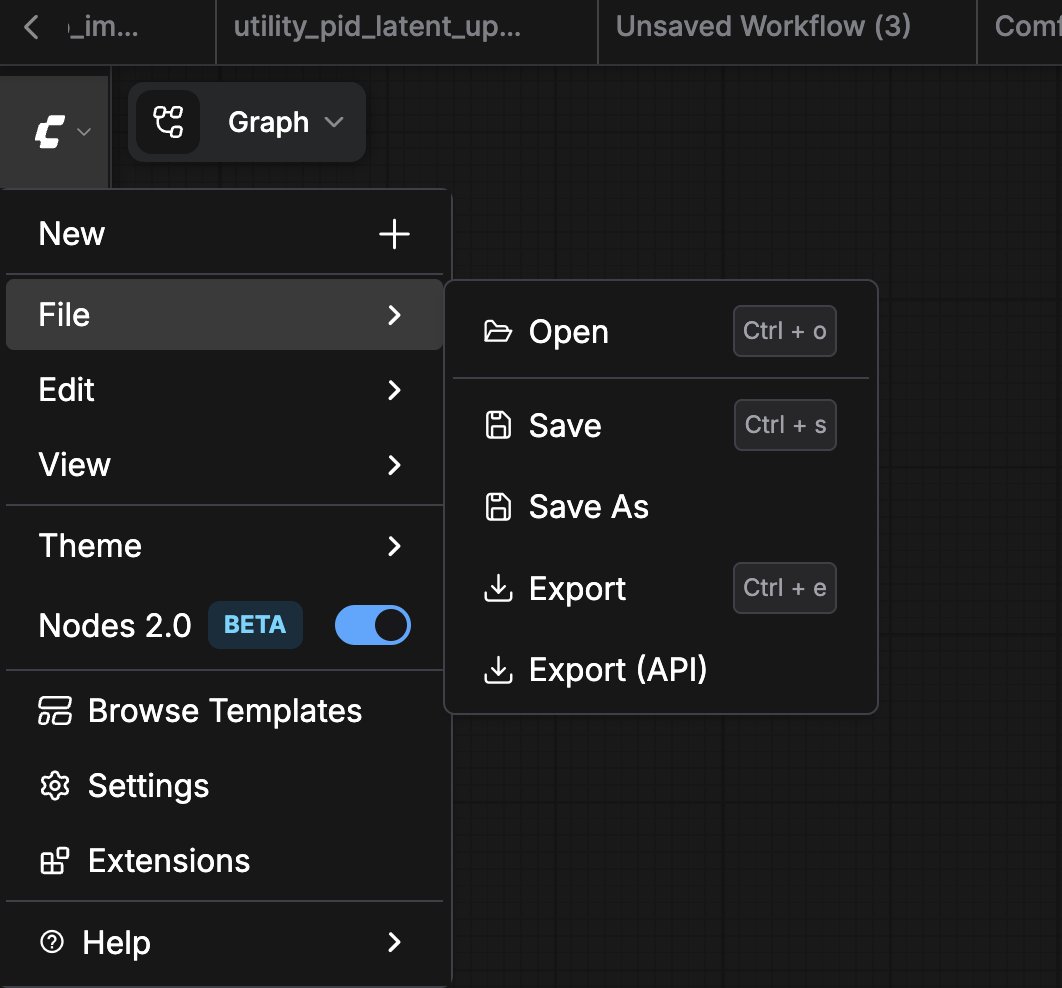
在 ComfyUI 前端打开工作流,然后导航到 文件 → 导出工作流 (API)
以 API 格式保存工作流
这将下载一个只包含 API 相关数据的 .json 文件:
{
  "3": {
    "inputs": {
      "seed": 156680208700286,
      "steps": 20,
      "cfg": 8,
      "sampler_name": "euler",
      "scheduler": "normal",
      "denoise": 1,
      "model": [
        "4",
        0
      ],
      "positive": [
        "6",
        0
      ],
      "negative": [
        "7",
        0
      ],
      "latent_image": [
        "5",
        0
      ]
    },
    "class_type": "KSampler",
    "_meta": {
      "title": "KSampler"
    }
  },
  "4": {
    "inputs": {
      "ckpt_name": "v1-5-pruned-emaonly-fp16.safetensors"
    },
    "class_type": "CheckpointLoaderSimple",
    "_meta": {
      "title": "Load Checkpoint"
    }
  },
  "5": {
    "inputs": {
      "width": 512,
      "height": 512,
      "batch_size": 1
    },
    "class_type": "EmptyLatentImage",
    "_meta": {
      "title": "Empty Latent Image"
    }
  },
  "6": {
    "inputs": {
      "text": "beautiful scenery nature glass bottle landscape, , purple galaxy bottle,",
      "clip": [
        "4",
        1
      ]
    },
    "class_type": "CLIPTextEncode",
    "_meta": {
      "title": "CLIP Text Encode (Prompt)"
    }
  },
  "7": {
    "inputs": {
      "text": "text, watermark",
      "clip": [
        "4",
        1
      ]
    },
    "class_type": "CLIPTextEncode",
    "_meta": {
      "title": "CLIP Text Encode (Prompt)"
    }
  },
  "8": {
    "inputs": {
      "samples": [
        "3",
        0
      ],
      "vae": [
        "4",
        2
      ]
    },
    "class_type": "VAEDecode",
    "_meta": {
      "title": "VAE Decode"
    }
  },
  "9": {
    "inputs": {
      "filename_prefix": "ComfyUI",
      "images": [
        "8",
        0
      ]
    },
    "class_type": "SaveImage",
    "_meta": {
      "title": "Save Image"
    }
  }
}

格式转换

如果你有一个保存格式的工作流需要转为 API 格式,最简单的方法是:
  1. 在前端通过 文件 → 加载 打开 .json 文件
  2. 通过 文件 → 导出工作流 (API) 重新导出
如果需要自动化转换,可以编写脚本去除每个节点的 xywidth 字段,并移除根 JSON 中的 groupsextra 部分。

相关页面