Connect AI agents to ComfyUI over the Model Context Protocol. Generate images, video, audio, and 3D, and run real workflows on Comfy Cloud or your own machine.
Comfy MCP connects AI agents to ComfyUI over the Model Context Protocol. Once connected, you can generate images, video, audio and 3D, search models, nodes and templates, and run real ComfyUI workflows from a chat with your agent.It comes with two connections: a Comfy Cloud connection and a local ComfyUI connection, with the local one fully open source.
Stuck on anything below? The best way is to hand this page to your agent and ask for help.
For new users, we recommend starting with the cloud connection — it is the simplest setup. If you use claude.ai, ChatGPT, or the Claude Desktop chat app, the cloud connection is also the more compatible choice.If you already run ComfyUI locally or in your own deployed environment, or you work mostly in a coding agent like Claude Code, Cursor, or Codex, start with the local connection.
For Mac users, if you plan to run open-source models, we recommend the cloud connection. Today’s open-weight models — the local versions of MiniMax H3, LTX-2.3, and similar — are large, and will not run at a workable speed on the Apple GPU.
Running both at once is normal, and most clients host two MCP servers happily. They sign in to the same Comfy account, but separately — one sign-in does not cover the other.
The hosted connection, linking your agent to your Comfy Cloud account. Nothing to install, and workflows run on Comfy Cloud GPUs. To learn more about Comfy Cloud, see Comfy Cloud.
You need a Comfy Cloud account before connecting. Sign up if you do not have one yet; new users get 5 free runs to try it out. OAuth sign-in during setup uses your Comfy account.
Comfy Cloud MCP runs at:
https://cloud.comfy.org/mcp
Pick your client:
Claude Desktop
Claude Code
Cursor
Codex
OpenClaw
Other clients
Claude Desktop adds Comfy Cloud as a custom connector through its UI, then runs the OAuth sign-in.
1
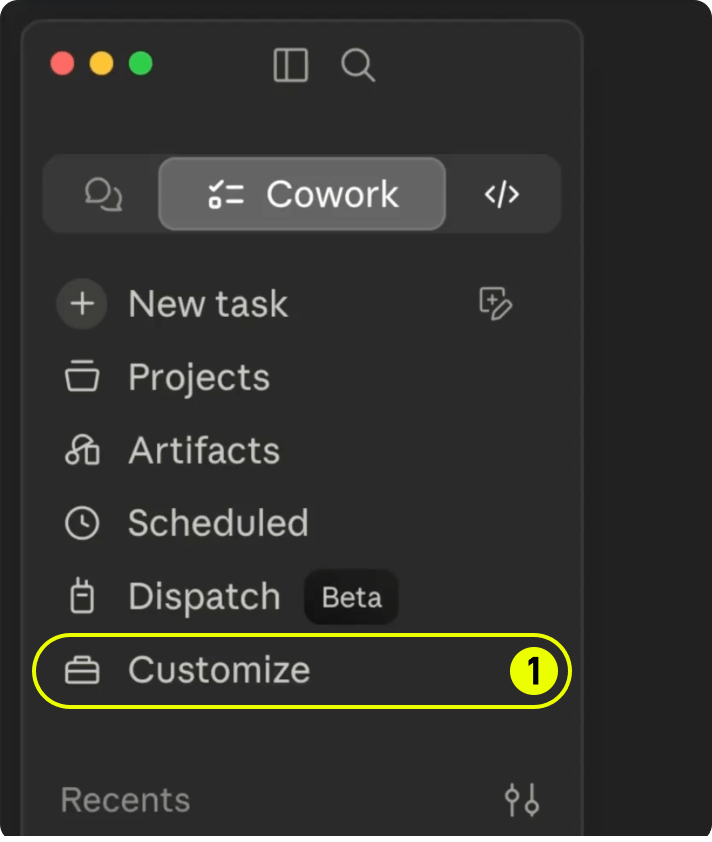
Open Customize
In the sidebar, click Customize (labeled 1).
2
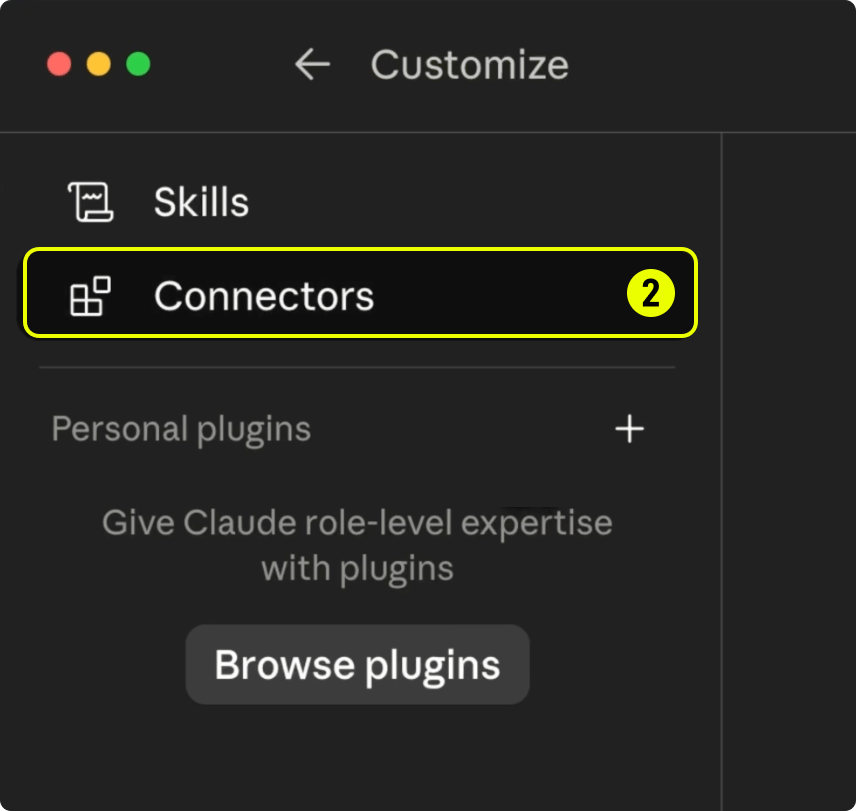
Open Connectors
Click Connectors (labeled 2).
3
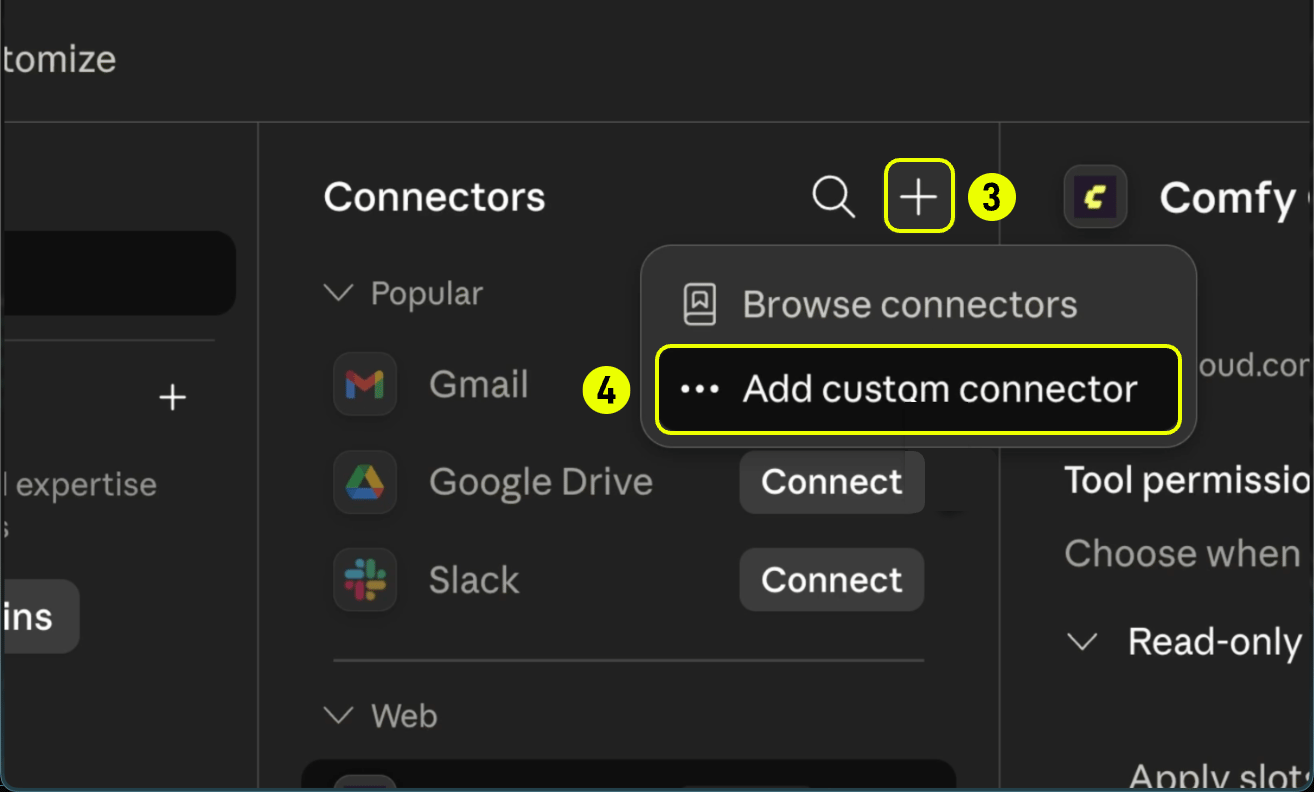
Add a custom connector
Click the + button (labeled 3) in the Connectors header.
Choose Add custom connector (labeled 4).
4
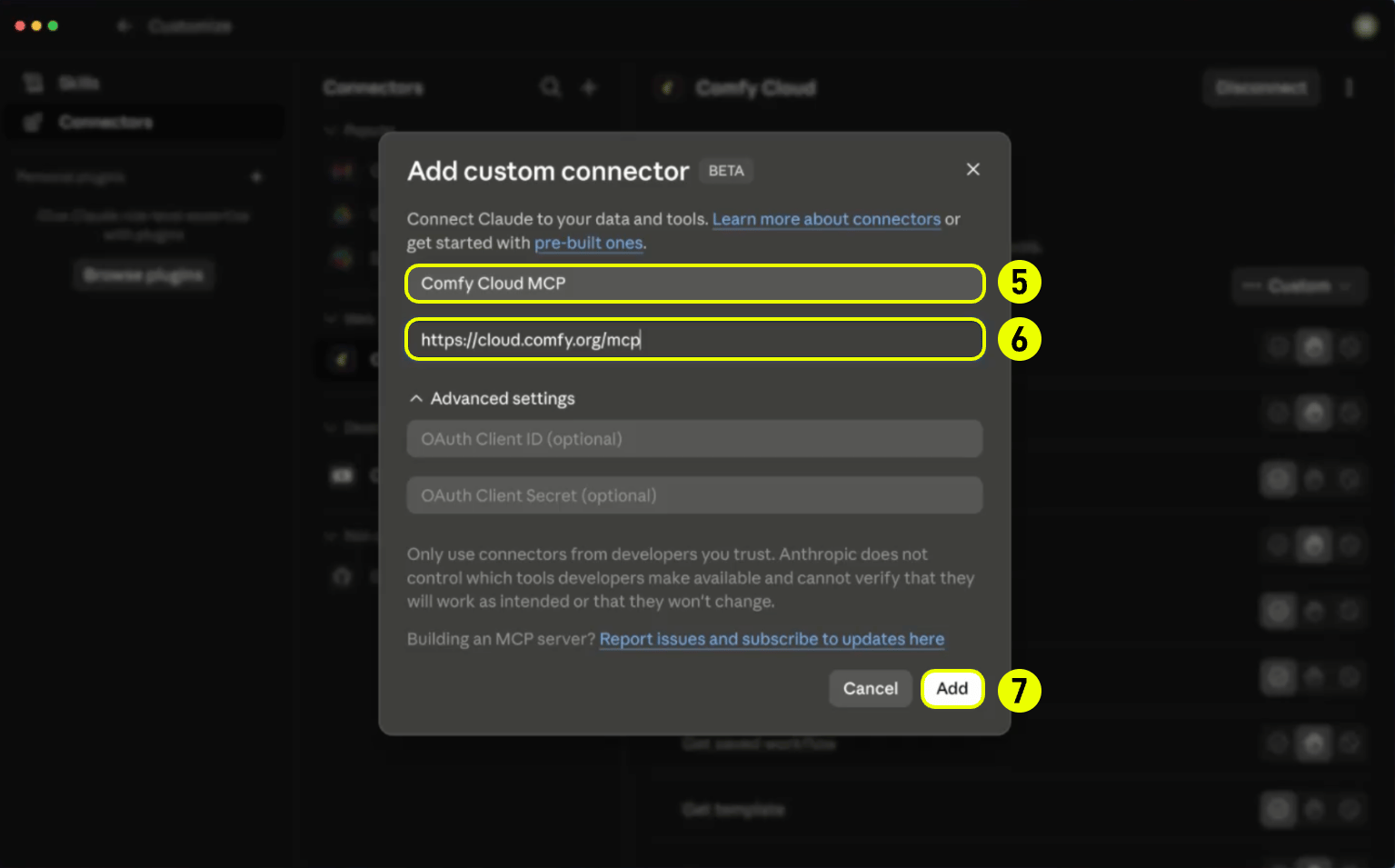
Enter server details
Enter a name such as Comfy Cloud MCP in the Name field (labeled 5).
Set the Remote MCP server URL to https://cloud.comfy.org/mcp (labeled 6).
Click Add (labeled 7).
5
Sign in
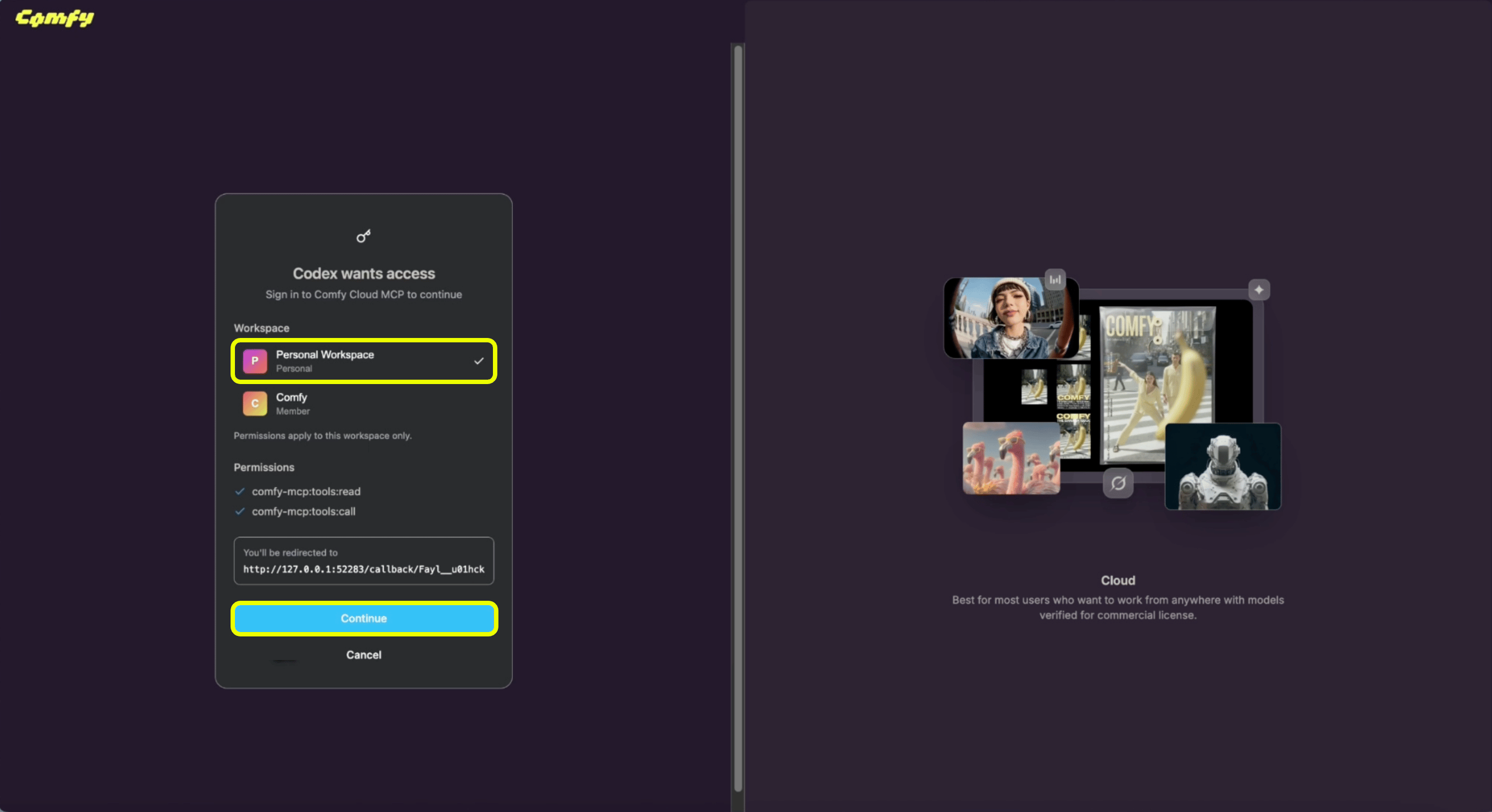
When the browser opens, choose your workspace (for example Personal Workspace).
Click Continue to authorize the connector. You are connected.
Install the comfy-cloud plugin. It adds the MCP connection and slash commands in one step. The plugin is published through the Comfy Skills repository, which hosts Claude Code plugins and community agent skills for Comfy.
1
Add the marketplace
Register the Comfy Skills marketplace (one-time):
/plugin marketplace add Comfy-Org/comfy-skills
2
Install the plugin
/plugin install comfy-cloud@comfy-skills
3
Sign in
Run /mcp, select comfy-cloud → Authenticate. Your browser opens to sign in, and tokens refresh automatically.
claude mcp add --transport http comfy-cloud https://cloud.comfy.org/mcp
Then run /mcp, select comfy-cloud → Authenticate. Add -s user to make it available in all your projects.This path still exposes the same workflows as MCP prompts: /mcp__comfy-cloud__generate-image, /mcp__comfy-cloud__search-models, and so on (the /mcp__<name>__ prefix uses the name you passed to claude mcp add). The plugin above is recommended because it wraps these as the friendlier /comfy-cloud:* commands.
Cursor connects to remote MCP servers over HTTP. Cursor does not support MCP OAuth today. Add Comfy Cloud with a Comfy Cloud API key in your MCP config.
1
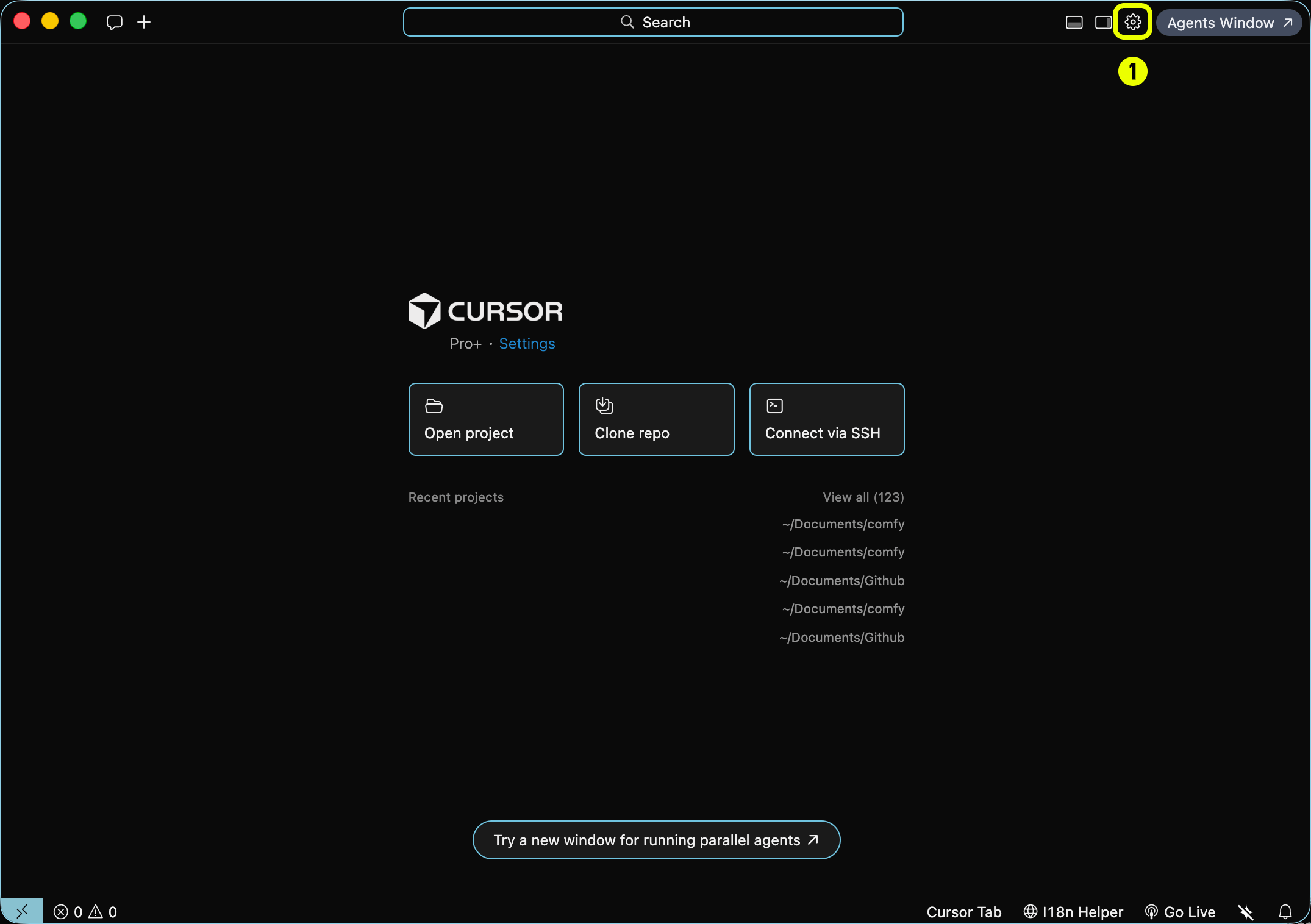
Open Cursor Settings
Click the Settings gear in the top-right corner (labeled 1).
2
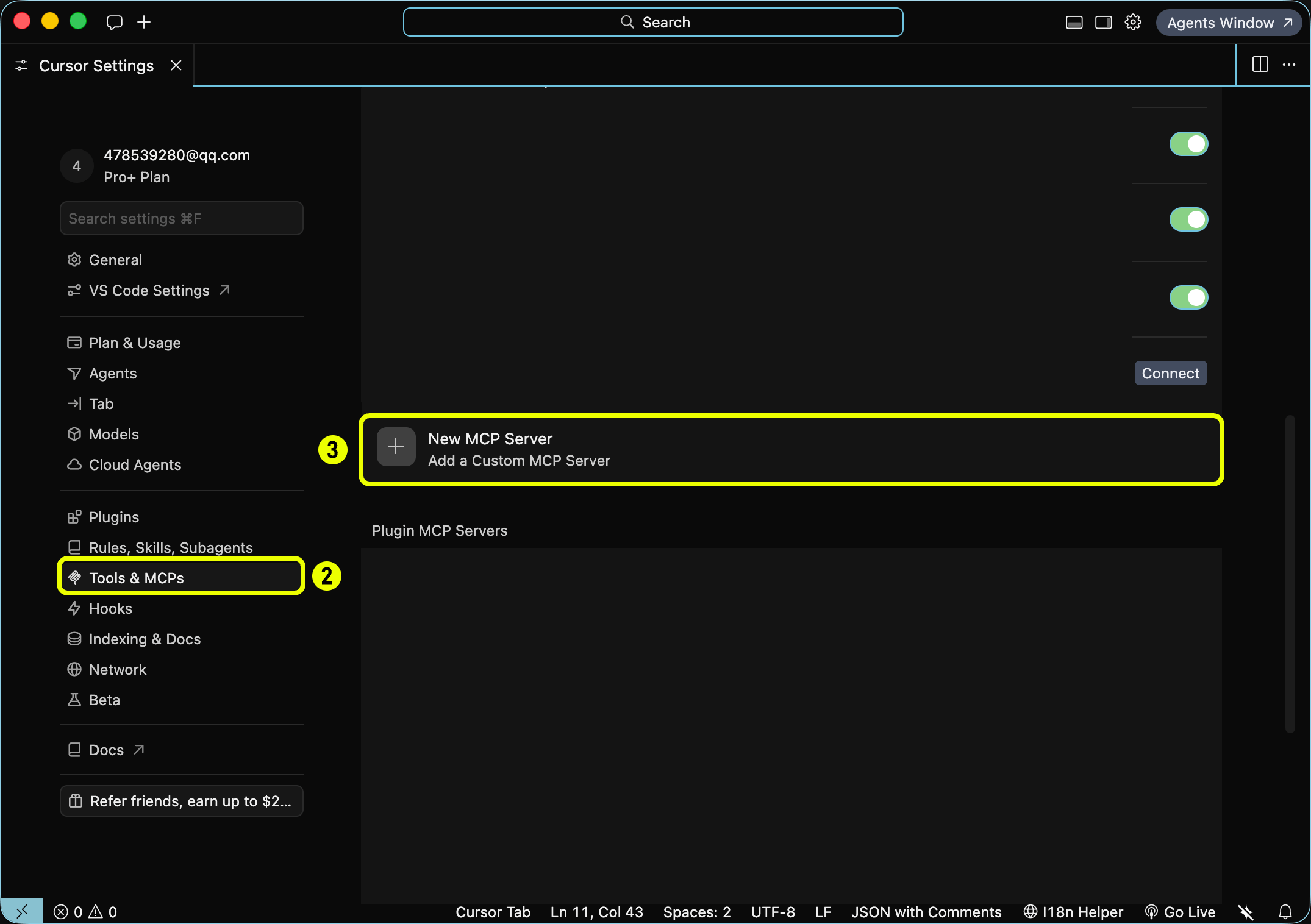
Open Tools & MCP
In the sidebar, click Tools & MCPs (labeled 2).
Click + New MCP Server (labeled 3) → Add a Custom MCP Server.
3
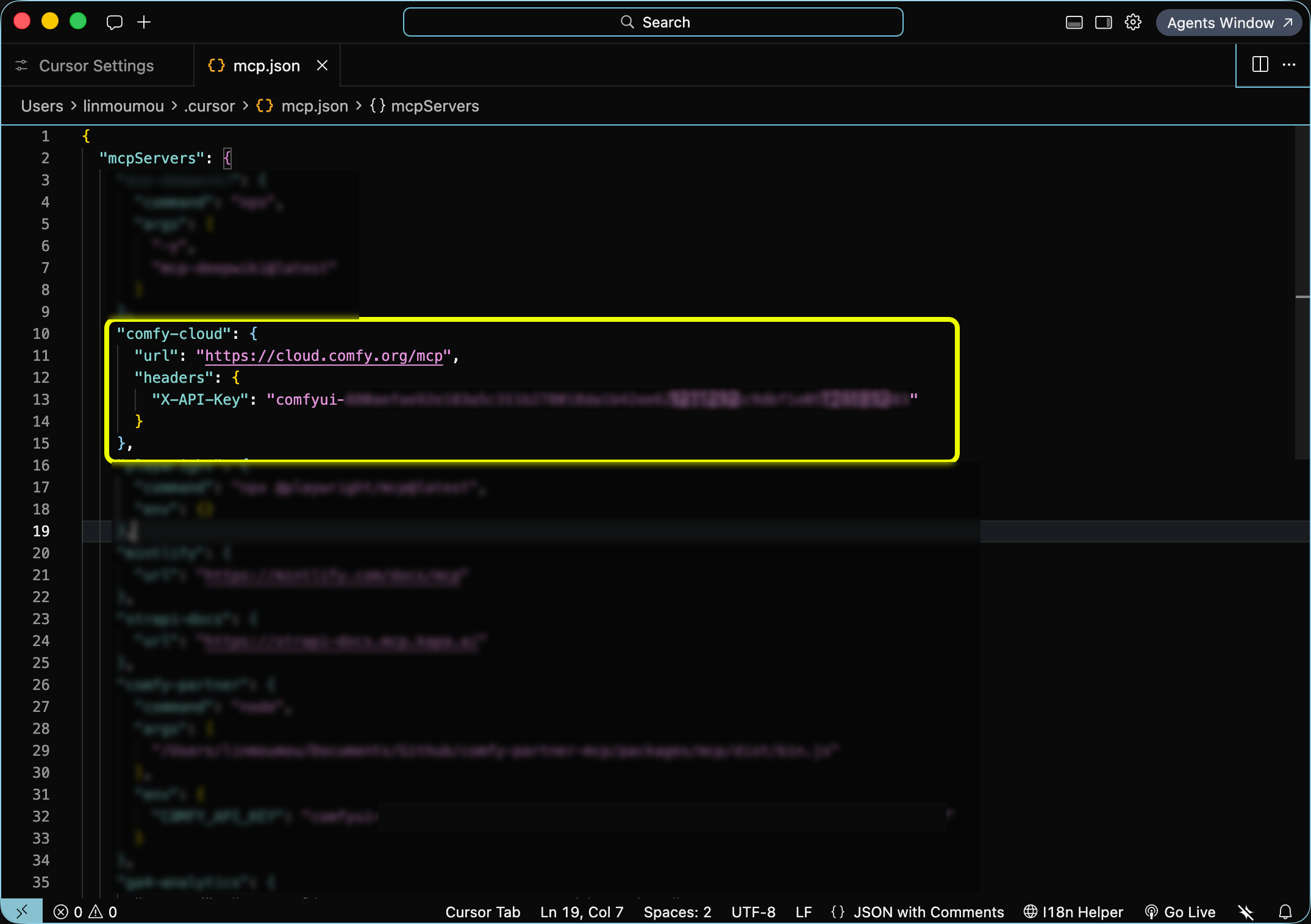
Add your API key
Edit ~/.cursor/mcp.json (global) or .cursor/mcp.json (project). Set the server URL and pass your Comfy Cloud API key in the X-API-Key header. Create a key at platform.comfy.org/profile/api-keys (starts with comfyui-):
This writes an entry to ~/.codex/config.toml (or .codex/config.toml in a trusted project).
API key instead of OAuth (headless or CI)
When no browser is available, add the server with a header pulled from an environment variable. Create a key at platform.comfy.org/profile/api-keys (starts with comfyui-), then add to ~/.codex/config.toml:
Set COMFY_API_KEY in your shell or system environment. Do not commit the key to version control.
Codex keeps asking you to sign in again (invalid_grant or refresh token reuse)
Symptom: Codex signs you out of Comfy Cloud and asks you to reauthenticate over and over, sometimes every few minutes. Codex warnings or logs may mention invalid_grant, a refresh token that was already used or revoked, or a failed OAuth token refresh.Cause: This comes from how Codex stores and refreshes MCP OAuth credentials, not from Comfy Cloud. When several Codex processes (TUI sessions, the app server, codex mcp commands) share one OAuth server, one process can refresh with a token that another has already rotated. The authorization server treats that as token reuse and ends the session. Users of other OAuth MCP servers report the same behavior. These issues are open in the Codex repository, so you can check their current status:
Workaround 1: turn on Codex’s refresh coordination flag. Codex has a feature flag, mcp_oauth_refresh_coordination, that coordinates OAuth token refreshes between Codex processes. It is a Codex setting, not a Comfy one. Codex lists it as under development and off by default, and neither Codex nor Comfy supports it as an official fix. In openai/codex#46028, enabling it stopped the stale token reuse in the reporter’s test. If your Codex version still has it off, add it to ~/.codex/config.toml:
[features]mcp_oauth_refresh_coordination = true
Close and restart every running Codex session so they all pick up the flag. If Codex already shows comfy-cloud as signed out, sign in once more (codex mcp login comfy-cloud, or Authenticate in Settings). If a later Codex release turns this on by default or removes the flag, you can skip this step.Workaround 2: keep one Codex process refreshing each server. If the flag is not available or does not help, move the [mcp_servers.comfy-cloud] entry out of the global ~/.codex/config.toml and into a .codex/config.toml in a trusted project, so only sessions in that project load and refresh it. Avoid running many Codex sessions against Comfy Cloud at the same time, and close Codex sessions before restarting your computer. This is the workaround reported in openai/codex#48507.Moving the entry does not stop Codex processes that already loaded the global config, and those keep refreshing the old server definition. After the move, close every running Codex session and stop the Codex app server, then start Codex only in the project that holds the entry.If you do not need OAuth, the API key setup above does not use refresh tokens.These steps reduce sign-outs but may not stop them completely. We are also working on changes on the Comfy Cloud side to reduce how often this happens.
Install the Comfy Cloud skill from ClawHub. It connects OpenClaw to the hosted MCP server (cloud.comfy.org/mcp). Cloud only: it does not drive a local ComfyUI install.
Register the MCP server and sign in with your Comfy account:
openclaw mcp set comfy '{"url":"https://cloud.comfy.org/mcp","transport":"streamable-http","auth":"oauth"}'openclaw mcp login comfyopenclaw gateway restart
openclaw mcp login prints an authorization URL. Open it, sign in, and finish the flow as the CLI directs (it may ask you to rerun with a --code value). Verify with openclaw mcp status --verbose.
When auth: "oauth" is set, OpenClaw ignores static headers on that server entry. Do not combine OAuth with a hardcoded API key header.
3
Start generating
Ask in plain language (“generate an image of a cat astronaut”, “find a Wan 2.2 video template”). OpenClaw invokes the MCP tools on your behalf.
export COMFY_API_KEY="comfyui-..."openclaw mcp set comfy '{"url":"https://cloud.comfy.org/mcp","transport":"streamable-http","headers":{"Authorization":"Bearer ${COMFY_API_KEY}"}}'openclaw gateway restart
Prefer Authorization: Bearer over a custom X-API-Key header for OpenClaw. Some OpenClaw builds drop custom headers on streamable-http transports; Bearer survives proxies more reliably. Put COMFY_API_KEY in your shell profile or OpenClaw env. Do not commit the key.
Any MCP client that supports remote HTTP transport can connect to Comfy Cloud. The server URL is always https://cloud.comfy.org/mcp.
1
Add the server URL
Add a remote MCP entry pointing at https://cloud.comfy.org/mcp. Most clients use a JSON config with a url field:
Windsurf uses serverUrl instead of url. Amp uses the same mcpServers shape in Settings → MCP Servers or ~/.config/amp/settings.json.
2
Authenticate
If your client supports MCP OAuth, sign in through the browser when prompted. Otherwise, add an API key header (see below).
3
Restart and verify
Restart your client. You should see Comfy Cloud tools (search_templates, submit_workflow, get_output, and others) registered under the comfy-cloud server.
Headless / CI (API key): when OAuth is not available, create a key at platform.comfy.org/profile/api-keys and pass it as the X-API-Key header:
You do not call MCP tools yourself. Your agent picks the right tool based on what you ask for. Slash commands and prompts (below) are shortcuts that steer the agent toward common tasks, but plain language works too (“generate an image of a cat astronaut”, “upscale this photo”, “find a Wan 2.2 video template”).Typical flow:
Discover what is available (search_templates, search_models, search_nodes, or cql for graph-style questions).
Run a generation: run_template for a matching pre-built template, submit_workflow for a custom workflow (with upload_file when an input image is needed), or partner_generate for partner models like Flux, Grok, Gemini, OpenAI, Ideogram, and Seedance.
Wait and retrieve outputs (wait_for_job, then get_output returns a download command your agent runs in your shell).
The server prefers matching pre-built templates before building a workflow from scratch, which tends to produce better results faster.
These are the tools your agent has access to once connected. Names match what appears in MCP client logs and debugging output.Discovery
Tool
Description
search_templates
Search pre-built workflow templates from comfy.org by text, tag, media type, or model
get_template
Fetch a template’s full workflow JSON for inspection or hand-editing
get_template_schema
See which of a template’s parameters can be overridden at run time
search_models
Search the model catalog by text, type, base model, or source
search_nodes
Search available nodes by text, category, or input/output types. Also surfaces subgraph blueprints (pre-wired node groups like Text to Image or Remove Background)
get_node
Get the complete input spec for specific nodes, including full option lists
cql
Run a CQL graph query for structural questions (for example, which nodes produce images, or paths between node types). Use search_nodes when you need full input specs for a specific node
get_prompting_guide
Prompt style and recommended settings (steps, cfg, sampler, resolution) per model family
Generation
Tool
Description
run_template
Run a pre-built template by name, with optional parameter overrides — the preferred path when a template matches
submit_workflow
Submit a ComfyUI API-format workflow for execution on Comfy Cloud
partner_generate
Generate with partner-API models (Flux/BFL, Grok, Gemini, OpenAI, Ideogram, Seedream/Seedance, and more)
upload_file
Upload an input image or file for use in workflows (for example, with LoadImage)
apply_slots
Apply parameter overrides to a workflow’s interior values and return the modified workflow
Jobs and batches
Tool
Description
get_job_status
Poll execution status of a submitted workflow
wait_for_job
Wait until a job finishes instead of polling repeatedly
get_output
Retrieve output images, videos, or audio from a completed workflow
use_previous_output
Chain workflows by reusing output from one run as input to another
Submit many generations in one call and collect them together later — the batch ID stays valid across sessions
Saved workflows
Tool
Description
list_saved_workflows
Browse your saved workflows from Comfy Cloud
get_saved_workflow
Inspect a saved workflow’s nodes, inputs, and customizable settings
save_workflow
Save a workflow to your Comfy Cloud account
update_workflow
Update an existing workflow in place as a new version (earlier versions stay recoverable)
run_saved_workflow
Run a saved workflow by filename — the server converts it from editor format to executable format automatically
Sharing workflows
Tool
Description
share_workflow
Publish a saved workflow and return a ?share=<id> URL anyone can open
import_shared_workflow
Resolve a share URL or bare share ID into workflow JSON, optionally saving it to your account
Hub URL share IDs: the trailing hyphen-delimited hex token in a comfy.org/workflows/<slug>-<hex> hub URL is the share ID. For example, comfy.org/workflows/topaz-starlight-upscale-1c77e82713b7 has share ID 1c77e82713b7. Pass that token to import_shared_workflow as share_id. The share_url parameter only accepts ?share=<id> query URLs like https://cloud.comfy.org/?share=..., not hub page URLs.Apps and links
Tool
Description
create_app
Turn a saved workflow into an App Mode app — a simplified “run this workflow” view with chosen inputs and outputs
get_app_mode_url
Get the stable link that opens a workflow as a runnable app
get_workflow_canvas_url
Get a link that opens a workflow directly on the Comfy Cloud canvas, ready to view, edit, or run
Account and session
Tool
Description
get_billing_status
Check your credit balance, subscription tier, and billing link
get_server_info
Confirm which server the agent reached: environment, host, version, and auth state
submit_feedback
Get the feedback survey link
report_session_summary
Share an anonymized session summary with the Comfy team — only with your explicit consent; the agent must ask first, and no prompts, file paths, or personal information are included
Prompts (Claude Desktop)Claude Desktop does not support Claude Code slash commands. Instead, open the prompt picker for the same workflows:
Prompt
Description
generate-image
Generate an image from a text description
generate-video
Generate a video from text or an image
generate-audio
Generate audio, music, or sound effects
generate-3d
Generate a 3D model from text or an image
upscale-image
Upscale an image to higher resolution
remove-background
Remove the background from an image
search-templates
Find pre-built workflow templates
search-models
Search for models (checkpoints, LoRAs, VAEs)
search-nodes
Search nodes and get wiring suggestions
help
See what you can do with ComfyUI Cloud
You can also skip prompts and ask in plain language. The MCP tools work the same way.
Discovery is free: search_templates, search_models, and search_nodes work with just a Comfy account. Running generations requires an active Comfy Cloud subscription. A credit or top-up balance alone does not grant access: you need an active subscription to run generations, even if you have unused credits.
The MCP server runs in the cloud and the MCP itself doesn’t write files to your machine. When a generation completes, your agent calls get_output, which returns:
A temporary signed download URL (valid for a short window).
A ready-to-run shell command (curl on macOS and Linux, curl.exe on Windows).
Your agent should run that command in your shell. The command includes the destination path and filename.
Run the returned command verbatim. Do not re-encode or edit the signed URL. The signature lives in the query string and breaks if the URL is modified.
If your MCP client cannot run shell commands (some GUI-only setups), copy the command and run it yourself in a terminal.Asset upload and download depend on the client’s file access. If Claude Desktop or another agent client has trouble handling asset uploads or downloads, it may be related to the agent’s access to your local file directories. For Claude users we recommend Claude Code (desktop app or terminal), which has more capabilities. Similarly, for other agent families, the coding agent is usually better than the web chat version.
Upload size limits may apply depending on your MCP client. Some clients impose their own limits on file uploads.
Authentication
OAuth or API key. Claude Code and Claude Desktop use a one-time browser OAuth flow. Cursor requires a Comfy Cloud API key in your MCP config (no OAuth). Other headless clients can pass a Comfy Cloud API key via the X-API-Key header instead. A device-code OAuth flow for clients that cannot open a browser is planned.
The open-source connection: your client launches the server on your machine and it drives the ComfyUI installed there.comfy-mcp is Comfy’s first-party local MCP server — the official way to drive a local ComfyUI install from AI agents (Claude Code, Claude Desktop, Cursor, and other MCP clients).Unlike the cloud and partner servers, it talks to the ComfyUI running on your own machine — so it can run your workflows and inspect the nodes, custom nodes, and models your install actually has.
The fastest setup: hand it to your agent. Paste https://docs.comfy.org/agent-tools/mcp#installation into your AI client and ask it to set up the local connection for you.
This puts a comfy-mcp console script on your PATH — that command is the MCP server (it speaks MCP over stdio). Point your AI client at it below. (Hacking on the server itself? pip install -e . from a checkout of the repository instead.)
COMFY_BIN (optional). MCP clients launch the server with their own environment, which often does not include your shell’s PATH. If comfy lives in a virtualenv or a non-standard location, set COMFY_BIN to its absolute path (for example /path/to/venv/bin/comfy). Every client example below shows where it goes; drop it if comfy is already on the environment your client launches the server with.
All clients speak the same MCP stdio contract: run the comfy-mcp command as a server. Pick your client:
Claude Desktop
Claude Code
Cursor
Edit claude_desktop_config.json (Settings → Developer → Edit Config; on macOS it lives at ~/Library/Application Support/Claude/claude_desktop_config.json), add the server, then restart Claude Desktop:
pip install "comfy-cli>=1.14.0" # the enginecomfy install # create a ComfyUI workspace (skip if you have one)pip install comfy-mcp # this MCP server → the `comfy-mcp` command
2
Launch ComfyUI and leave it running
comfy launch
3
Add the server to your client
Use the snippet for your client above, then restart / reload it so the tools appear.
4
Ask your agent to run a workflow
For example:
“Confirm my local ComfyUI is running, then run the workflow at ~/workflows/txt2img.json and show me the image.”
Under the hood the agent calls server_info to confirm ComfyUI is up, run_workflow to execute the workflow JSON, and fetch_outputs to collect the result.
Each tool maps onto a comfy-cli command, run with --where local. Highlights:
Tool
Purpose
server_info()
Is a local ComfyUI running, where, and which workspace. Call first.
run_workflow(workflow_path, wait=True)
Run a workflow JSON; wait=False submits async and returns a prompt_id.
job_status / wait_for_job / watch_job
Poll, wait on, or stream a submitted job.
fetch_outputs(prompt_id, out_dir)
Copy a finished job’s outputs into out_dir.
launch_comfyui / stop_comfyui
Start or stop the local ComfyUI.
search_templates / fetch_template
Find a built-in template and write its runnable workflow JSON.
search_nodes / get_node / list_nodes
Inspect the node classes in your live local install (custom nodes included).
search_models
List the model files on disk.
validate_workflow
Pre-flight a workflow against the live object_info before a slow run.
Node introspection and model search read your live install — custom nodes included — which is the local differentiator from the cloud connection. See the repository for the full tool list and reference.
Claude Code plugin marketplace and community skill library. The comfy-cloud plugin used above is distributed here; browse or contribute additional skills for Comfy workflows.
Command-line tool for local ComfyUI install/launch and for calling hosted partner nodes from scripts or CI (comfy generate, in beta). Complements MCP when you need terminal or automation workflows.
Any MCP-compatible client.The cloud connection needs remote HTTP support. Claude Code, Claude Desktop, Cursor, Codex and OpenClaw have first-class setup above; Windsurf, Amp and others use the same URL with OAuth or an API key.The local connection needs a client that can launch a local stdio server as a subprocess. That rules out browser-based clients. claude.ai and ChatGPT accept remote connectors only.
What's the server URL?
The cloud connection runs at https://cloud.comfy.org/mcp.The local connection has no URL. Your client launches the comfy-mcp command directly and talks to it over stdio.
Can I use it with my local ComfyUI?
Yes. That is the Local Comfy MCP Connection. It drives the ComfyUI installed on your own machine, so your agent sees the models, LoRAs and custom nodes you actually have, and runs on your GPU.
Can I connect both the cloud and local connections at once?
Yes, and we recommend it if you run ComfyUI locally. Most clients host two MCP servers happily, and your agent keeps them straight. Each connection runs its own workflows and returns its own results.The two sign-ins are separate, though. Signing in on one does not sign you in on the other, even though it is the same Comfy account.
How do I know if my machine can run the local connection?
Ask your agent. It reads your hardware before starting anything heavy.On a Mac, use the cloud connection for generating: today’s open-weight models are too large to run at a workable speed on the Apple GPU. On a PC with a dedicated graphics card, 24 GB or more of VRAM handles most things including video; 8–24 GB is fine for images but video will be slow or will not fit; under 8 GB, use cloud.
Is it generally available?
Yes. The cloud connection is generally available, and the local connection is available for local ComfyUI installations. See Feedback to report issues or share suggestions.
Discovery is free on both connections: searching templates, models and nodes needs only a Comfy account.On the cloud connection, running generations requires an active Comfy Cloud subscription; new users get 5 free runs. On the local connection, runs are free because they happen on your hardware, with one exception: partner models execute on partner infrastructure and spend credits.
Do I need an API key?
Not for interactive clients that support OAuth, including Claude Code, Claude Desktop, Codex and OpenClaw.Cursor requires a Comfy Cloud API key in your MCP config; there is no MCP OAuth there yet. Headless and CI setups with no browser need one too. See the Cursor and Other clients tabs under Set up the cloud connection.
You do not call MCP tools yourself — your agent picks them based on what you ask for. Typically it discovers what is available (search_templates, search_models, search_nodes), runs a generation, then waits and retrieves the output. See What your agent can do.
Where do my outputs go?
On the cloud connection, the server never writes to your machine: get_output returns a temporary signed URL and a ready-to-run download command for your agent to execute in your shell. See Uploads and downloads.On the local connection, ComfyUI writes into your workspace’s output/ directory, and fetch_outputs(prompt_id, out_dir) copies a finished job’s files anywhere you name.
I started on one connection and now I need the other. What do I do?
Nothing to undo — add the second connection alongside the first.Going local → cloud (you need Cloud GPUs or partner models): ask your agent to sign you in, then add https://cloud.comfy.org/mcp to your client.Going cloud → local (you want your own models and custom nodes): install ComfyUI and the local server, then point your client at it. Your agent can do most of this for you.
How do I switch between the local and cloud connections?
Just ask your agent. With both connections added, say where you want a job to run — “run this one on Comfy Cloud”, “do this locally” — and it uses the right connection. There is no mode to toggle and nothing to reconfigure between runs.If a workflow turns out to be too heavy for your machine, your agent can tell you and offer to run it on Comfy Cloud instead. And if only one connection is set up, ask it to add the other — see Set up the cloud connection or the Local Comfy MCP Connection.
How do I update Comfy MCP?
On the cloud connection, nothing to do — it is hosted, so you are always on the current version.On the local connection, ask your agent to handle it. Afterwards, restart your client or start a new session: MCP servers load when a session starts, so a running one keeps serving the old version until you do.
No. Slash commands ship in the Claude Code plugin. Claude Desktop connects to the same MCP server — the tools work if you ask in plain language or use the prompt picker — but it does not support Claude Code plugins or slash commands.
I typed /comfy or /cloud and nothing came up.
There is no /comfy or /cloud command. Commands appear under one of two prefixes depending on how you connected:
Plugin (recommended):/comfy-cloud:generate-image, /comfy-cloud:generate-video, … — type /comfy-cloud: to see them all.
Direct connection (no plugin):/mcp__comfy-cloud__generate-image, … — type /mcp__ to see them.
Either way you can just ask in plain language (“generate an image of …”). The MCP tools are model-invoked and do not require a slash command.
The sign-in did not open a browser.
In Claude Code, run /mcp, select comfy-cloud, and choose Authenticate. In Claude Desktop, reopen the connector from Customize → Connectors and trigger sign-in.
{"docsConfig":{"theme":"mint","$schema":"https://mintlify.com/docs.json","name":"ComfyUI","colors":{"primary":"#49378B","light":"#F2FF59","dark":"#F2FF59"},"logo":{"light":"https://mintcdn.com/dripart/WCFdTagRdhtvk9-o/logo/light.svg?fit=max\u0026auto=format\u0026n=WCFdTagRdhtvk9-o\u0026q=85\u0026s=ec112de87239058f5a931a7e4b594965","dark":"https://mintcdn.com/dripart/QzWbjSCBG7w61rR3/logo/dark.svg?fit=max\u0026auto=format\u0026n=QzWbjSCBG7w61rR3\u0026q=85\u0026s=62b4d879fb3aadbd7a468d1539032d6f","href":"/"},"favicon":"https://mintcdn.com/dripart/maKDA164-rrTfyxY/favicon.ico?fit=max\u0026auto=format\u0026n=maKDA164-rrTfyxY\u0026q=85\u0026s=94f3a697cf4c9a1ee3961b69219d0942","appearance":{"default":"dark"},"navbar":{"links":[{"href":"https://blog.comfy.org/?utm_source=docs","label":"Blog"},{"href":"/tutorials/partner-nodes/pricing","label":"Pricing"},{"href":"https://platform.comfy.org/?utm_source=docs","label":"Platform"},{"href":"https://comfy.org/download?utm_source=docs","label":"Download"}],"primary":{"type":"button","label":"Comfy Cloud","href":"https://comfy.org/cloud?utm_source=docs"}},"footer":{"socials":{"github":"https://github.com/Comfy-Org/ComfyUI","x":"https://x.com/ComfyUI","discord":"https://discord.com/invite/comfyorg","youtube":"https://www.youtube.com/@comfyorg"},"links":[{"header":"Resources","items":[{"label":"installation","href":"/installation/system_requirements"},{"label":"Tutorials","href":"/tutorials/basic/text-to-image"},{"label":"Development","href":"/development/overview"}]},{"header":"Products","items":[{"label":"Features","href":"https://www.comfy.org/?utm_source=docs"},{"label":"Gallery","href":"https://www.comfy.org/gallery?utm_source=docs"},{"label":"Download","href":"https://www.comfy.org/download?utm_source=docs"}]},{"header":"Company","items":[{"label":"About","href":"https://www.comfy.org/about?utm_source=docs"},{"label":"Careers","href":"https://www.comfy.org/careers?utm_source=docs"},{"label":"Terms of Service","href":"https://www.comfy.org/terms-of-service?utm_source=docs"},{"label":"Privacy Policy","href":"https://www.comfy.org/privacy-policy?utm_source=docs"}]}]},"search":{"prompt":"Search Comfy documentation..."},"seo":{"metatags":{"googlebot":"max-video-preview:0"}},"icons":{"library":"fontawesome"},"integrations":{"ga4":{"measurementId":"G-MXC01ZDDHQ"},"posthog":{"apiKey":"phc_iKfK86id4xVYws9LybMje0h44eGtfwFgRPIBehmy8rO"}},"contextual":{"options":["copy","view","chatgpt","claude"],"display":"header"},"styling":{"latex":true},"navigation":{"languages":[{"language":"en","href":""},{"language":"zh","footer":{"socials":{"github":"https://github.com/Comfy-Org/ComfyUI","x":"https://x.com/ComfyUI","discord":"https://discord.com/invite/comfyorg","youtube":"https://www.youtube.com/@comfyorg"},"links":[{"header":"资源","items":[{"label":"安装","href":"/zh/installation/system_requirements"},{"label":"教程","href":"/zh/tutorials/basic/text-to-image"},{"label":"开发","href":"/zh/development/overview"}]},{"header":"产品","items":[{"label":"功能","href":"https://www.comfy.org/?utm_source=docs"},{"label":"画廊","href":"https://www.comfy.org/gallery?utm_source=docs"},{"label":"下载","href":"https://www.comfy.org/download?utm_source=docs"}]},{"header":"公司","items":[{"label":"关于","href":"https://www.comfy.org/about?utm_source=docs"},{"label":"招聘","href":"https://www.comfy.org/careers?utm_source=docs"},{"label":"服务条款","href":"https://www.comfy.org/terms-of-service?utm_source=docs"},{"label":"隐私政策","href":"https://www.comfy.org/privacy-policy?utm_source=docs"}]}]},"href":"zh"},{"language":"ja","footer":{"socials":{"github":"https://github.com/Comfy-Org/ComfyUI","x":"https://x.com/ComfyUI","discord":"https://discord.com/invite/comfyorg","youtube":"https://www.youtube.com/@comfyorg"},"links":[{"header":"リソース","items":[{"label":"インストール","href":"/ja/installation/system_requirements"},{"label":"チュートリアル","href":"/ja/tutorials/basic/text-to-image"},{"label":"開発","href":"/ja/development/overview"}]},{"header":"プロダクト","items":[{"label":"機能","href":"https://www.comfy.org/?utm_source=docs"},{"label":"ギャラリー","href":"https://www.comfy.org/gallery?utm_source=docs"},{"label":"ダウンロード","href":"https://www.comfy.org/download?utm_source=docs"}]},{"header":"会社情報","items":[{"label":"概要","href":"https://www.comfy.org/about?utm_source=docs"},{"label":"採用情報","href":"https://www.comfy.org/careers?utm_source=docs"},{"label":"利用規約","href":"https://www.comfy.org/terms-of-service?utm_source=docs"},{"label":"プライバシーポリシー","href":"https://www.comfy.org/privacy-policy?utm_source=docs"}]}]},"navbar":{"links":[{"href":"/ja/tutorials/partner-nodes/pricing","label":"料金"},{"href":"https://comfy.org/download?utm_source=docs","label":"ダウンロード"}],"primary":{"type":"button","label":"Comfy Cloud","href":"https://comfy.org/cloud?utm_source=docs"}},"href":"ja"},{"language":"ko","footer":{"socials":{"github":"https://github.com/Comfy-Org/ComfyUI","x":"https://x.com/ComfyUI","discord":"https://discord.com/invite/comfyorg","youtube":"https://www.youtube.com/@comfyorg"},"links":[{"header":"리소스","items":[{"label":"설치","href":"/ko/installation/system_requirements"},{"label":"튜토리얼","href":"/ko/tutorials/basic/text-to-image"},{"label":"개발","href":"/ko/development/overview"}]},{"header":"제품","items":[{"label":"기능","href":"https://www.comfy.org/?utm_source=docs"},{"label":"갤러리","href":"https://www.comfy.org/gallery?utm_source=docs"},{"label":"다운로드","href":"https://www.comfy.org/download?utm_source=docs"}]},{"header":"회사 정보","items":[{"label":"소개","href":"https://www.comfy.org/about?utm_source=docs"},{"label":"채용","href":"https://www.comfy.org/careers?utm_source=docs"},{"label":"이용약관","href":"https://www.comfy.org/terms-of-service?utm_source=docs"},{"label":"개인정보 처리방침","href":"https://www.comfy.org/privacy-policy?utm_source=docs"}]}]},"navbar":{"links":[{"href":"/ko/tutorials/partner-nodes/pricing","label":"가격 정책"},{"href":"https://comfy.org/download?utm_source=docs","label":"다운로드"}],"primary":{"type":"button","label":"Comfy Cloud","href":"https://comfy.org/cloud?utm_source=docs"}},"href":"ko"},{"language":"es","href":"es"}]}},"deployment":{"deploymentMetadataValue":{"subdomain":"dripart","hasAudioNarration":false,"actualSubdomain":"dripart","customDomains":["docs.comfy.org"],"gitSource":{"type":"github","owner":"comfy-org","repo":"docs","deployBranch":"main","contentDirectory":"","isPrivate":false,"mountPath":"","label":""},"chroma":{"liveDeploymentHistoryId":"6aec6e2e0c9d6432d6b3d27a","collectionId":"44429ea8-a43b-44b2-b02d-b971c5540aa6","schemaVersion":"v3","latestBuiltDeploymentHistoryId":"6aec6e2e0c9d6432d6b3d27a"},"feedback":{"thumbs":true,"edits":true,"issues":true,"agentFeedback":true},"entitlements":{"AI_CHAT":{"status":"DISABLED"},"WEB_MCP":{"status":"ENABLED"},"NARRATION":{"status":"DISABLED"}},"buildId":"6aec6e2e0c9d6432d6b3d27a","clientVersion":"0.0.4067","searchFilterCounts":[{"language":"en","tag":"Built-in Nodes","count":1142},{"language":"ja","tag":"組み込みノード","count":1142},{"language":"zh","tag":"内置节点","count":1142},{"language":"en","tag":"Nodes","count":1141},{"language":"ja","tag":"ノード","count":1141},{"language":"zh","tag":"节点","count":1141},{"language":"ko","tag":"내장 노드 (Built-in Nodes)","count":1100},{"language":"ko","tag":"노드","count":1099},{"language":"es","tag":"Nodos integrados","count":1034},{"language":"es","tag":"Nodos","count":1033},{"language":"en","tag":"Tutorials","count":409},{"language":"es","tag":"Tutoriales","count":409},{"language":"en","tag":"Model","count":378},{"language":"es","tag":"Modelo","count":378},{"language":"ja","tag":"Model","count":378},{"language":"ko","tag":"Model","count":378},{"language":"zh","tag":"Model","count":378},{"language":"en","tag":"Image","count":348},{"language":"en","tag":"Partner","count":329},{"language":"ja","tag":"Partner","count":329},{"language":"ko","tag":"Partner","count":329},{"language":"zh","tag":"Partner","count":329},{"language":"es","tag":"Partner","count":327},{"language":"es","tag":"Imagen","count":318},{"language":"ja","tag":"はじめに","count":303},{"language":"ko","tag":"시작하기","count":303},{"language":"zh","tag":"开始使用","count":303},{"language":"ja","tag":"API 開発","count":294},{"language":"ko","tag":"API 개발","count":294},{"language":"zh","tag":"API 开发","count":294},{"language":"en","tag":"Video","count":278},{"language":"es","tag":"Comfy Router","count":266},{"language":"en","tag":"Comfy Router","count":257},{"language":"ja","tag":"Comfy Router","count":257},{"language":"ko","tag":"Comfy Router","count":257},{"language":"zh","tag":"Comfy Router","count":257},{"language":"es","tag":"Video","count":253},{"language":"en","tag":"Models","count":228},{"language":"es","tag":"Models","count":228},{"language":"ja","tag":"Models","count":228},{"language":"ko","tag":"Models","count":228},{"language":"zh","tag":"Models","count":228},{"language":"en","tag":"All Models","count":225},{"language":"es","tag":"All Models","count":225},{"language":"ja","tag":"画像","count":203},{"language":"ko","tag":"이미지","count":203},{"language":"zh","tag":"图像","count":203},{"language":"ja","tag":"Video","count":184},{"language":"zh","tag":"Video","count":184},{"language":"ko","tag":"Video","count":167}],"searchSettings":{"maxResults":10}},"assistantConfig":{"enableStarterQuestions":false},"basePath":"","hasChatPermissions":false,"hasWebMcpPermissions":true,"toggles":[{"name":"kill-isr","enabled":true,"variant":{"name":"disabled","enabled":false,"feature_enabled":true},"impressionData":false},{"name":"agent-mintlify-slack","enabled":true,"variant":{"name":"disabled","enabled":false,"feature_enabled":true},"impressionData":false},{"name":"agent-integrations-settings","enabled":true,"variant":{"name":"disabled","enabled":false,"feature_enabled":true},"impressionData":false},{"name":"rbac-expansion","enabled":true,"variant":{"name":"disabled","enabled":false,"feature_enabled":true},"impressionData":false},{"name":"automations-pr-grouping","enabled":true,"variant":{"name":"disabled","enabled":false,"feature_enabled":true},"impressionData":false},{"name":"custom-prefix","enabled":true,"variant":{"name":"disabled","enabled":false,"feature_enabled":true},"impressionData":false},{"name":"analytics-v7","enabled":true,"variant":{"name":"disabled","enabled":false,"feature_enabled":true},"impressionData":false},{"name":"user-flows-analytics","enabled":true,"variant":{"name":"disabled","enabled":false,"feature_enabled":true},"impressionData":false},{"name":"no-publish-flow","enabled":true,"variant":{"name":"disabled","enabled":false,"feature_enabled":true},"impressionData":false},{"name":"workos-onboarding","enabled":true,"variant":{"name":"disabled","enabled":false,"feature_enabled":true},"impressionData":false},{"name":"llms-txt-v2","enabled":true,"variant":{"name":"disabled","enabled":false,"feature_enabled":true},"impressionData":false},{"name":"snapshot-serving-live","enabled":true,"variant":{"name":"disabled","enabled":false,"feature_enabled":true},"impressionData":false},{"name":"stripTemperatureMiddleware","enabled":true,"variant":{"name":"disabled","enabled":false,"feature_enabled":true},"impressionData":false},{"name":"support-platform-pylon-zendesk","enabled":true,"variant":{"name":"disabled","enabled":false,"feature_enabled":true},"impressionData":false},{"name":"snapshot-serving","enabled":true,"variant":{"name":"disabled","enabled":false,"feature_enabled":true},"impressionData":false},{"name":"instant-rollback","enabled":true,"variant":{"name":"disabled","enabled":false,"feature_enabled":true},"impressionData":false},{"name":"granular-notifications-server","enabled":true,"variant":{"name":"disabled","enabled":false,"feature_enabled":true},"impressionData":false},{"name":"granular-notifications","enabled":true,"variant":{"name":"disabled","enabled":false,"feature_enabled":true},"impressionData":false},{"name":"automations-fable","enabled":true,"variant":{"name":"disabled","enabled":false,"feature_enabled":true},"impressionData":false},{"name":"fixed-ai-action-pricing","enabled":true,"variant":{"name":"disabled","enabled":false,"feature_enabled":true},"impressionData":false},{"name":"automation-resolve-merge-conflict","enabled":true,"variant":{"name":"disabled","enabled":false,"feature_enabled":true},"impressionData":false},{"name":"scoped-publishing","enabled":true,"variant":{"name":"disabled","enabled":false,"feature_enabled":true},"impressionData":false},{"name":"mintql","enabled":true,"variant":{"name":"disabled","enabled":false,"feature_enabled":true},"impressionData":false},{"name":"page-level-analytics","enabled":true,"variant":{"name":"disabled","enabled":false,"feature_enabled":true},"impressionData":false},{"name":"editor-version-history-v2","enabled":true,"variant":{"name":"disabled","enabled":false,"feature_enabled":true},"impressionData":false},{"name":"billing-page-v2","enabled":true,"variant":{"name":"disabled","enabled":false,"feature_enabled":true},"impressionData":false},{"name":"full-page-search","enabled":true,"variant":{"name":"disabled","enabled":false,"feature_enabled":true},"impressionData":false},{"name":"workspace-projects","enabled":true,"variant":{"name":"disabled","enabled":false,"feature_enabled":true},"impressionData":false},{"name":"assistant-v5","enabled":true,"variant":{"name":"disabled","enabled":false,"feature_enabled":true},"impressionData":false},{"name":"fork-pr-previews","enabled":true,"variant":{"name":"disabled","enabled":false,"feature_enabled":true},"impressionData":false},{"name":"revalidation-jwt","enabled":true,"variant":{"name":"disabled","enabled":false,"feature_enabled":true},"impressionData":false},{"name":"vite-origin","enabled":true,"variant":{"name":"disabled","enabled":false,"feature_enabled":true},"impressionData":false},{"name":"workos-sso-scim","enabled":true,"variant":{"name":"disabled","enabled":false,"feature_enabled":true},"impressionData":false},{"name":"hobby-abuse-scan","enabled":true,"variant":{"name":"disabled","enabled":false,"feature_enabled":true},"impressionData":false},{"name":"dashboard-inbox","enabled":true,"variant":{"name":"disabled","enabled":false,"feature_enabled":true},"impressionData":false},{"name":"workos-signup","enabled":true,"variant":{"name":"disabled","enabled":false,"feature_enabled":true},"impressionData":false},{"name":"turbopuffer-dual-write","enabled":true,"variant":{"name":"disabled","enabled":false,"feature_enabled":true},"impressionData":false},{"name":"workos-enabled","enabled":true,"variant":{"name":"disabled","enabled":false,"feature_enabled":true},"impressionData":false},{"name":"approve-review-flow","enabled":true,"variant":{"name":"disabled","enabled":false,"feature_enabled":true},"impressionData":false},{"name":"sso-setup-deadline-banner","enabled":true,"variant":{"name":"disabled","enabled":false,"feature_enabled":true},"impressionData":false},{"name":"turbopuffer-serve","enabled":true,"variant":{"name":"disabled","enabled":false,"feature_enabled":true},"impressionData":false},{"name":"live-agents","enabled":true,"variant":{"name":"disabled","enabled":false,"feature_enabled":true},"impressionData":false}],"googleFontsInlined":false},"customCss":[{"filePath":"custom.css","content":":root{--ink-900: #151417;--hub-shell-light: #f7f6f9;--accent-purple: #49378b;--accent-yellow: #f2ff59;--primary: 73 55 139 !important;--primary-light: 242 255 89 !important;--primary-dark: 242 255 89 !important}html.dark{--primary: 242 255 89 !important;--background-dark: 14 14 13 !important}html.dark body{background-color:#0e0e0d!important}html.dark #navbar,html.dark #navbar-transition{background-color:var(--ink-900)!important}html.dark #sidebar,html.dark #sidebar-content{background-color:rgb(var(--background-dark))!important}html.dark #navbar,html.dark #navbar-transition{box-shadow:none!important;filter:none!important;backdrop-filter:none!important;-webkit-backdrop-filter:none!important}html.dark #navbar-transition{border-bottom:1px solid rgba(255, 255, 255, 0.08)!important;opacity:1!important}html.dark img.nav-logo{filter:none}html.dark #sidebar-content a:not([aria-current=\"page\"]){color:rgba(255, 255, 255, 0.72)!important}html.dark #sidebar-content a:not([aria-current=\"page\"]) *{color:inherit!important}html.dark #sidebar-content a[aria-current=\"page\"]{color:var(--accent-yellow)!important;background-color:rgba(242, 255, 89, 0.10)!important}html.dark #sidebar-content a[aria-current=\"page\"] *{color:inherit!important}html.dark .nav-tabs-item[data-active],html.dark mobile-nav-tabs-item[data-active]{color:var(--accent-yellow)!important}html.dark #navbar a[href*=\"comfy.org/cloud\"] span.absolute{background-color:var(--accent-yellow)!important}html.dark #navbar a[href*=\"comfy.org/cloud\"] span.text-white{color:#151417!important}html:not(.dark) #background-color,html:not(.dark) #navbar,html:not(.dark) #navbar-transition,html:not(.dark) #sidebar,html:not(.dark) #sidebar-content{background-color:var(--hub-shell-light)!important}html:not(.dark) .nav-tabs-item[data-active],html:not(.dark) mobile-nav-tabs-item[data-active],html:not(.dark) nav-dropdown-item[data-active]{background-color:transparent!important;box-shadow:none!important;color:var(--accent-purple)!important;font-weight:600!important}html:not(.dark) .nav-tabs-item[data-active] *,html:not(.dark) mobile-nav-tabs-item[data-active] *,html:not(.dark) nav-dropdown-item[data-active] *{color:inherit!important}html:not(.dark) #sidebar-content li:has(>a[aria-current=\"page\"]){background-color:transparent!important;box-shadow:none!important}html:not(.dark) #sidebar-content a[aria-current=\"page\"]{color:var(--accent-purple)!important;background-color:rgba(73, 55, 139, 0.1)!important;font-weight:600!important}html:not(.dark) #sidebar-content a[aria-current=\"page\"] *{color:inherit!important}html:not(.dark) toc-item[data-active],html:not(.dark) toc-item[data-active-deepest],html:not(.dark) toc-item[data-active] a,html:not(.dark) toc-item[data-active-deepest] a{background-color:transparent!important;color:var(--accent-purple)!important;font-weight:600!important}html:not(.dark) #header :where(h1,h2,h3,h4,h5,h6),html:not(.dark) #content-area :where(h1,h2,h3,h4,h5,h6){color:#151417!important}html:not(.dark) #navbar a[href*=\"comfy.org/cloud\"]{background-color:transparent!important;color:var(--accent-purple)!important;border-radius:0.75rem;box-shadow:inset 0 0 0 1px var(--accent-purple)!important}html:not(.dark) #navbar a[href*=\"comfy.org/cloud\"] span.absolute{background-color:transparent!important}html:not(.dark) #navbar a[href*=\"comfy.org/cloud\"] *{color:inherit!important}#sidebar .sticky.top-0.pointer-events-none.bg-linear-to-b{background-image:none!important}@media (min-width: 1024px){#navbar.is-not-custom.is-not-center+div:has(>#sidebar),.max-w-8xl.mx-auto.relative,.max-w-8xl.mx-auto{max-width:none!important;width:100%!important;margin-left:0!important;margin-right:0!important;padding-left:0!important;padding-right:0!important}#navbar [class*=\"px-12\"],#navbar [class*=\"mx-4\"]{padding-left:0!important;padding-right:1.5rem!important;margin-left:0!important;margin-right:0!important}#navbar a.select-none,#navbar .nav-logo{margin-left:1rem!important}#navbar .nav-tabs{padding-left:2rem!important}#sidebar{left:0!important;margin-left:0!important;box-shadow:none!important}#sidebar-content{margin-left:0!important;padding-left:1rem!important;box-sizing:border-box!important}#navbar,#navbar-transition{left:0!important;right:0!important;width:100%!important;max-width:none!important}#content-area{margin-left:0!important;max-width:none!important;width:100%!important;padding-left:18rem!important}#sidebar.sticky~#content-container #content-area{padding-left:2rem!important;padding-right:2rem!important}#content-container,#body-content{max-width:none!important;width:100%!important}:root{--content-width: 100%;--sidebar-width: 18rem}}@media (min-width: 1024px){nav#sidebar,#sidebar[style]{left:0!important;right:auto!important;margin-left:0!important;transform:none!important}#navbar li.navbar-link:has(a[href*=\"comfy.org/download\"]){margin-right:0!important}#navbar a[href*=\"comfy.org/download\"]{box-sizing:border-box;border:1px solid rgb(255 255 255 / 0.22);border-radius:0.75rem;padding:7px 0.875rem!important;color:#fff!important;font-size:0.875rem;line-height:1.25rem}html:not(.dark) #navbar a[href*=\"comfy.org/download\"]{border-color:rgb(0 0 0 / 0.16);color:#151417!important}#navbar a[href*=\"comfy.org/download\"]:hover{background:rgb(255 255 255 / 0.06)}html:not(.dark) #navbar a[href*=\"comfy.org/download\"]:hover{background:rgb(0 0 0 / 0.04)}#navbar li.navbar-link:has(a[href*=\"comfy.org/download\"])+.whitespace-nowrap,#navbar .flex.space-x-6>.whitespace-nowrap.hidden{margin-left:0.5rem!important}}body:has(.router-api-reference-marker) #content,body:has(.router-api-reference-marker) #header{max-width:48rem}body:has(.router-api-reference-marker) #content-area table{width:100%;table-layout:auto}body:has(.router-api-reference-marker) #content-area th,body:has(.router-api-reference-marker) #content-area td{min-width:4rem!important;overflow-wrap:anywhere}body:has(.router-api-reference-marker) #content-area table:has(th:nth-child(6)) th:nth-child(3),body:has(.router-api-reference-marker) #content-area table:has(th:nth-child(6)) td:nth-child(3){min-width:5rem!important}@media (max-width: 1535px){body:has(.router-api-reference-marker) #content-side-layout{display:none!important}}body:has(.router-provider-coverage-marker) #content,body:has(.router-provider-coverage-marker) #header{max-width:64rem}body:has(.router-provider-coverage-marker) #content-area table{width:100%;table-layout:auto}body:has(.router-provider-coverage-marker) #content-area th,body:has(.router-provider-coverage-marker) #content-area td{min-width:5rem!important;overflow-wrap:anywhere}body:has(.router-provider-coverage-marker) #content-area th:first-child,body:has(.router-provider-coverage-marker) #content-area td:first-child{min-width:12rem!important}body:has(.router-quickstart-marker) [data-component-part=\"card-content\"] [data-component-part=\"code-block-root\"][style*=\"height:190px\"],body:has(.router-quickstart-marker) [data-component-part=\"card-content\"] [data-component-part=\"code-block-root\"][style*=\"height: 190px\"]{height:86px!important}"},{"filePath":"samples-cards.css","content":".sample-card-grid{display:grid;gap:20px;grid-template-columns:repeat(2, minmax(0, 1fr));margin-top:28px}.sample-card{min-width:0;perspective:1200px}.sample-card-inner{height:565px;position:relative;transform-style:preserve-3d;transition:transform 560ms cubic-bezier(.2, .75, .3, 1)}.sample-card[data-flipped=\"true\"] .sample-card-inner{transform:rotateY(180deg)}.sample-card-face{backface-visibility:hidden;background:#fff;border:1px solid #e5e1eb;border-radius:12px;box-sizing:border-box;height:100%;inset:0;overflow:hidden;position:absolute;width:100%}.sample-card-front{display:flex;flex-direction:column}.sample-card-back{opacity:0;pointer-events:none;transform:rotateY(180deg);visibility:hidden}.sample-card[data-flipped=\"true\"] .sample-card-front{pointer-events:none;transition:visibility 0s linear 280ms;visibility:hidden}.sample-card[data-flipped=\"true\"][data-active-path=\"api\"] .sample-card-back[data-sample-path=\"api\"],.sample-card[data-flipped=\"true\"][data-active-path=\"endpoint\"] .sample-card-back[data-sample-path=\"endpoint\"]{opacity:1;pointer-events:auto;visibility:visible}.sample-card-preview{border-bottom:1px solid #e5e1eb;cursor:pointer;display:block;width:100%}.sample-card-body{display:flex;flex:1;flex-direction:column;padding:20px}.sample-card-body h2,.sample-path-body h2{color:#49378b;font-size:18px;font-weight:700;letter-spacing:-.02em;margin:0 0 8px}.sample-path-body h2{text-align:center}.sample-card-body>p{color:#5f5966;font-size:14px;line-height:1.55;margin:0;min-height:66px}.sample-card-actions{display:flex;gap:8px;margin-top:20px}.sample-card-actions button{background:#fff;border:1px solid #cfc8de;border-radius:6px;color:#49378b;cursor:pointer;flex:1;font-size:13px;font-weight:700;padding:10px 12px}.sample-card-links{border-top:1px solid #eeeaf1;display:flex;gap:8px;margin-top:16px;padding-top:12px}.sample-card-links a{color:#625b6c;font-size:12px;font-weight:650;text-decoration:none}.sample-card-links span{color:#b3adba}.sample-path-body{padding:20px}.sample-path-body>button{background:transparent;border:0;color:#625b6c;cursor:pointer;font-size:12px;font-weight:700;padding:0}.sample-path-eyebrow{color:#857a9e;font-size:10px;font-weight:700;letter-spacing:.08em;margin:19px 0 5px;text-align:center;text-transform:uppercase}.sample-path-body>p:not(.sample-path-eyebrow){color:#5f5966;font-size:12px;line-height:1.5;margin:0 0 15px}.sample-path-steps{display:grid;gap:8px}.sample-path-step{align-items:center;background:#faf9fc;border:1px solid #e5e1ea;border-radius:8px;display:flex;gap:10px;padding:10px 11px}.sample-path-number{align-items:center;background:#49378b;border-radius:999px;color:#fff;display:inline-flex;flex:0 0 21px;font-size:11px;font-weight:700;height:21px;justify-content:center}.sample-path-copy{flex:1;min-width:0}.sample-path-copy strong{color:#312c36;display:block;font-size:12px}.sample-path-copy span{color:#706a75;display:block;font-size:11px;line-height:1.35;margin-top:2px}.sample-path-step a{color:#49378b;flex:0 0 auto;font-size:11px;font-weight:700;text-decoration:none}@media (max-width: 768px){.sample-card-grid{grid-template-columns:1fr}.sample-card-inner{height:clamp(620px, 180vw, 760px)}}"}],"page":{"pagePath":"agent-tools/mcp","slug":"/agent-tools/mcp","pageMetadata":{"title":"Comfy MCP: Connect AI Agents to ComfyUI","sidebarTitle":"Comfy MCP","description":"Connect AI agents to ComfyUI over the Model Context Protocol. Generate images, video, audio, and 3D, and run real workflows on Comfy Cloud or your own machine.","icon":"bolt","href":"/agent-tools/mcp"},"description":{"compiledSource":"\"use strict\";\nconst {jsx: _jsx} = arguments[0];\nconst {useMDXComponents: _provideComponents} = arguments[0];\nfunction _createMdxContent(props) {\n const _components = {\n p: \"p\",\n ..._provideComponents(),\n ...props.components\n };\n return _jsx(_components.p, {\n children: \"Connect AI agents to ComfyUI over the Model Context Protocol. Generate images, video, audio, and 3D, and run real workflows on Comfy Cloud or your own machine.\"\n });\n}\nfunction MDXContent(props = {}) {\n const {wrapper: MDXLayout} = {\n ..._provideComponents(),\n ...props.components\n };\n return MDXLayout ? _jsx(MDXLayout, {\n ...props,\n children: _jsx(_createMdxContent, {\n ...props\n })\n }) : _createMdxContent(props);\n}\nreturn {\n default: MDXContent\n};\n","frontmatter":{},"scope":{}},"pageType":"default","mdx":{"mdxSource":{"compiledSource":"\"use strict\";const{Fragment:_Fragment,jsx:_jsx,jsxs:_jsxs}=arguments[0];const{useMDXComponents:_provideComponents}=arguments[0];function _createMdxContent(props){const _components={a:`a`,blockquote:`blockquote`,code:`code`,em:`em`,hr:`hr`,li:`li`,ol:`ol`,p:`p`,pre:`pre`,span:`span`,strong:`strong`,tbody:`tbody`,td:`td`,th:`th`,thead:`thead`,tr:`tr`,ul:`ul`,..._provideComponents(),...props.components},{Accordion,AccordionGroup,Card,CodeBlock,Heading,Info,Note,OptimizedImage,Step,Steps,Tab,Table,Tabs,Tip,Warning}=_components;if(!Accordion)_missingMdxReference(`Accordion`,true);if(!AccordionGroup)_missingMdxReference(`AccordionGroup`,true);if(!Card)_missingMdxReference(`Card`,true);if(!CodeBlock)_missingMdxReference(`CodeBlock`,true);if(!Heading)_missingMdxReference(`Heading`,true);if(!Info)_missingMdxReference(`Info`,true);if(!Note)_missingMdxReference(`Note`,true);if(!OptimizedImage)_missingMdxReference(`OptimizedImage`,true);if(!Step)_missingMdxReference(`Step`,true);if(!Steps)_missingMdxReference(`Steps`,true);if(!Tab)_missingMdxReference(`Tab`,true);if(!Table)_missingMdxReference(`Table`,true);if(!Tabs)_missingMdxReference(`Tabs`,true);if(!Tip)_missingMdxReference(`Tip`,true);if(!Warning)_missingMdxReference(`Warning`,true);return _jsxs(_Fragment,{children:[_jsx(Heading,{level:`2`,id:`overview`,children:`Overview`}),`\n`,_jsxs(_components.p,{children:[_jsx(_components.strong,{children:`Comfy MCP`}),` connects AI agents to ComfyUI over the `,_jsx(_components.a,{href:`https://modelcontextprotocol.io`,children:`Model Context Protocol`}),`. Once connected, you can generate images, video, audio and 3D, search models, nodes and templates, and run real ComfyUI workflows from a chat with your agent.`]}),`\n`,_jsxs(_components.p,{children:[`It comes with two connections: a `,_jsx(_components.strong,{children:`Comfy Cloud`}),` connection and a `,_jsx(_components.strong,{children:`local ComfyUI`}),` connection, with the local one fully open source.`]}),`\n`,_jsx(Tip,{children:_jsx(_components.p,{children:_jsx(_components.strong,{children:`Stuck on anything below? The best way is to hand this page to your agent and ask for help.`})})}),`\n`,_jsx(Heading,{level:`3`,id:`which-connection-do-i-want`,children:`Which connection do I want?`}),`\n`,_jsxs(_components.p,{children:[_jsx(_components.strong,{children:`For new users, we recommend starting with the cloud connection`}),` — it is the simplest setup. If you use claude.ai, ChatGPT, or the Claude Desktop chat app, the cloud connection is also the more compatible choice.`]}),`\n`,_jsxs(_components.p,{children:[_jsx(_components.strong,{children:`If you already run ComfyUI locally or in your own deployed environment, or you work mostly in a coding agent`}),` like Claude Code, Cursor, or Codex, start with the `,_jsx(_components.strong,{children:`local`}),` connection.`]}),`\n`,_jsx(Info,{children:_jsxs(_components.p,{children:[_jsx(_components.strong,{children:`For Mac users, if you plan to run open-source models, we recommend the cloud connection.`}),` Today’s open-weight models — the local versions of MiniMax H3, LTX-2.3, and similar — are large, and will not run at a workable speed on the Apple GPU.`]})}),`\n`,_jsxs(_components.p,{children:[`Running both at once is normal, and most clients host two MCP servers happily. They sign in to the same Comfy account, but `,_jsx(_components.strong,{children:`separately`}),` — one sign-in does not cover the other.`]}),`\n`,_jsx(Heading,{level:`2`,id:`comfy-cloud-mcp-connection`,children:`Comfy Cloud MCP Connection`}),`\n`,_jsxs(_components.p,{children:[`The hosted connection, linking your agent to your `,_jsx(_components.strong,{children:`Comfy Cloud`}),` account. Nothing to install, and workflows run on Comfy Cloud GPUs. To learn more about Comfy Cloud, see `,_jsx(_components.a,{href:`/get_started/cloud`,children:`Comfy Cloud`}),`.`]}),`\n`,_jsx(Heading,{level:`3`,id:`set-up-the-cloud-connection`,children:`Set up the cloud connection`}),`\n`,_jsx(Info,{children:_jsxs(_components.p,{children:[`You need a `,_jsx(_components.a,{href:`https://cloud.comfy.org`,children:`Comfy Cloud`}),` account before connecting. `,_jsx(_components.a,{href:`https://cloud.comfy.org`,children:`Sign up`}),` if you do not have one yet; new users get `,_jsx(_components.strong,{children:`5 free runs`}),` to try it out. OAuth sign-in during setup uses your Comfy account.`]})}),`\n`,_jsx(_components.p,{children:`Comfy Cloud MCP runs at:`}),`\n`,_jsx(CodeBlock,{numberOfLines:`2`,language:`text`,children:_jsx(_components.pre,{className:`shiki shiki-themes github-light-default dark-plus`,style:{backgroundColor:`#ffffff`,\"--shiki-dark-bg\":`#0B0C0E`,color:`#1f2328`,\"--shiki-dark\":`#D4D4D4`},language:`text`,children:_jsxs(_components.code,{language:`text`,numberOfLines:`2`,children:[_jsx(_components.span,{className:`line`,children:_jsx(_components.span,{children:`https://cloud.comfy.org/mcp`})}),`\n`,_jsx(_components.span,{className:`line`,children:_jsx(_components.span,{})})]})})}),`\n`,_jsx(_components.p,{children:`Pick your client:`}),`\n`,_jsxs(Tabs,{children:[_jsxs(Tab,{title:`Claude Desktop`,id:`claude-desktop`,children:[_jsxs(_components.p,{children:[`Claude Desktop adds Comfy Cloud as a `,_jsx(_components.strong,{children:`custom connector`}),` through its UI, then runs the OAuth sign-in.`]}),_jsx(`video`,{controls:true,className:`mint-w-full mint-aspect-video mint-rounded-xl`,src:`https://mintcdn.com/dripart/UM6LYOmx4pqCW3H7/images/agent_tools/Claude_desktop.mp4?fit=max\u0026auto=format\u0026n=UM6LYOmx4pqCW3H7\u0026q=85\u0026s=6bb8cfd8fcf2c004809bf23f7a42ee41`,\"data-path\":`images/agent_tools/Claude_desktop.mp4`}),_jsxs(Steps,{children:[_jsxs(Step,{title:`Open Customize`,children:[_jsxs(_components.p,{children:[`In the sidebar, click `,_jsx(_components.strong,{children:`Customize`}),` (labeled `,_jsx(_components.strong,{children:`1`}),`).`]}),_jsx(OptimizedImage,{src:`https://mintcdn.com/dripart/oeEoB3PP1mIk3aIP/images/agent_tools/claude_desktop_mcp_setup_step1.png?fit=max\u0026auto=format\u0026n=oeEoB3PP1mIk3aIP\u0026q=85\u0026s=3ecfb670bf79af89d160544ed2352e3c`,alt:`Claude Desktop — open Customize`,\"data-og-width\":`712`,width:`712`,\"data-og-height\":`842`,height:`842`,\"data-path\":`images/agent_tools/claude_desktop_mcp_setup_step1.png`,\"data-optimize\":`true`,\"data-opv\":`3`,srcset:`https://mintcdn.com/dripart/oeEoB3PP1mIk3aIP/images/agent_tools/claude_desktop_mcp_setup_step1.png?w=280\u0026fit=max\u0026auto=format\u0026n=oeEoB3PP1mIk3aIP\u0026q=85\u0026s=26135fbfa922271a566f89d5b70f355b 280w, https://mintcdn.com/dripart/oeEoB3PP1mIk3aIP/images/agent_tools/claude_desktop_mcp_setup_step1.png?w=560\u0026fit=max\u0026auto=format\u0026n=oeEoB3PP1mIk3aIP\u0026q=85\u0026s=768b5b71b96d0c1cda8225e6078a8a6d 560w, https://mintcdn.com/dripart/oeEoB3PP1mIk3aIP/images/agent_tools/claude_desktop_mcp_setup_step1.png?w=840\u0026fit=max\u0026auto=format\u0026n=oeEoB3PP1mIk3aIP\u0026q=85\u0026s=c2382f68b2ff2e69c5f5f697962c4475 840w, https://mintcdn.com/dripart/oeEoB3PP1mIk3aIP/images/agent_tools/claude_desktop_mcp_setup_step1.png?w=1100\u0026fit=max\u0026auto=format\u0026n=oeEoB3PP1mIk3aIP\u0026q=85\u0026s=382a7bb0f7a72528cc7c63fc65c501e8 1100w, https://mintcdn.com/dripart/oeEoB3PP1mIk3aIP/images/agent_tools/claude_desktop_mcp_setup_step1.png?w=1650\u0026fit=max\u0026auto=format\u0026n=oeEoB3PP1mIk3aIP\u0026q=85\u0026s=90d54d1180c5a55b13bdbabb14fabf23 1650w, https://mintcdn.com/dripart/oeEoB3PP1mIk3aIP/images/agent_tools/claude_desktop_mcp_setup_step1.png?w=2500\u0026fit=max\u0026auto=format\u0026n=oeEoB3PP1mIk3aIP\u0026q=85\u0026s=23c3e92e2173122316f1a6f2b0b110d9 2500w`})]}),_jsxs(Step,{title:`Open Connectors`,children:[_jsxs(_components.p,{children:[`Click `,_jsx(_components.strong,{children:`Connectors`}),` (labeled `,_jsx(_components.strong,{children:`2`}),`).`]}),_jsx(OptimizedImage,{src:`https://mintcdn.com/dripart/oeEoB3PP1mIk3aIP/images/agent_tools/claude_desktop_mcp_setup_step2.png?fit=max\u0026auto=format\u0026n=oeEoB3PP1mIk3aIP\u0026q=85\u0026s=b38a899b51042ea6142dc4bf34c23582`,alt:`Claude Desktop — open Connectors`,\"data-og-width\":`856`,width:`856`,\"data-og-height\":`811`,height:`811`,\"data-path\":`images/agent_tools/claude_desktop_mcp_setup_step2.png`,\"data-optimize\":`true`,\"data-opv\":`3`,srcset:`https://mintcdn.com/dripart/oeEoB3PP1mIk3aIP/images/agent_tools/claude_desktop_mcp_setup_step2.png?w=280\u0026fit=max\u0026auto=format\u0026n=oeEoB3PP1mIk3aIP\u0026q=85\u0026s=045142f410a10d90750c8795107b505d 280w, https://mintcdn.com/dripart/oeEoB3PP1mIk3aIP/images/agent_tools/claude_desktop_mcp_setup_step2.png?w=560\u0026fit=max\u0026auto=format\u0026n=oeEoB3PP1mIk3aIP\u0026q=85\u0026s=ec52359cb0b39e8ca03c8f64a7a54c9d 560w, https://mintcdn.com/dripart/oeEoB3PP1mIk3aIP/images/agent_tools/claude_desktop_mcp_setup_step2.png?w=840\u0026fit=max\u0026auto=format\u0026n=oeEoB3PP1mIk3aIP\u0026q=85\u0026s=0e4312a6691c9cfaaaa04e49f91c46d8 840w, https://mintcdn.com/dripart/oeEoB3PP1mIk3aIP/images/agent_tools/claude_desktop_mcp_setup_step2.png?w=1100\u0026fit=max\u0026auto=format\u0026n=oeEoB3PP1mIk3aIP\u0026q=85\u0026s=3d99c818e03d75545067ee9a262a265c 1100w, https://mintcdn.com/dripart/oeEoB3PP1mIk3aIP/images/agent_tools/claude_desktop_mcp_setup_step2.png?w=1650\u0026fit=max\u0026auto=format\u0026n=oeEoB3PP1mIk3aIP\u0026q=85\u0026s=4ac1ce990cbc4e9b08128377d79d8274 1650w, https://mintcdn.com/dripart/oeEoB3PP1mIk3aIP/images/agent_tools/claude_desktop_mcp_setup_step2.png?w=2500\u0026fit=max\u0026auto=format\u0026n=oeEoB3PP1mIk3aIP\u0026q=85\u0026s=3680967110e2aedb5af71de132b211e5 2500w`})]}),_jsx(Step,{title:`Add a custom connector`,children:_jsxs(_components.ol,{children:[`\n`,_jsxs(_components.li,{children:[`\n`,_jsxs(_components.p,{children:[`Click the `,_jsx(_components.strong,{children:`+`}),` button (labeled `,_jsx(_components.strong,{children:`3`}),`) in the Connectors header.`]}),`\n`]}),`\n`,_jsxs(_components.li,{children:[`\n`,_jsxs(_components.p,{children:[`Choose `,_jsx(_components.strong,{children:`Add custom connector`}),` (labeled `,_jsx(_components.strong,{children:`4`}),`).`]}),`\n`,_jsx(OptimizedImage,{src:`https://mintcdn.com/dripart/oeEoB3PP1mIk3aIP/images/agent_tools/claude_desktop_mcp_setup_step3.png?fit=max\u0026auto=format\u0026n=oeEoB3PP1mIk3aIP\u0026q=85\u0026s=fc8a799aa218a2cf10de4cbd9d6d060f`,alt:`Claude Desktop — add custom connector`,\"data-og-width\":`1314`,width:`1314`,\"data-og-height\":`792`,height:`792`,\"data-path\":`images/agent_tools/claude_desktop_mcp_setup_step3.png`,\"data-optimize\":`true`,\"data-opv\":`3`,srcset:`https://mintcdn.com/dripart/oeEoB3PP1mIk3aIP/images/agent_tools/claude_desktop_mcp_setup_step3.png?w=280\u0026fit=max\u0026auto=format\u0026n=oeEoB3PP1mIk3aIP\u0026q=85\u0026s=7c3607450a3863c5ac5e293ad92dc720 280w, https://mintcdn.com/dripart/oeEoB3PP1mIk3aIP/images/agent_tools/claude_desktop_mcp_setup_step3.png?w=560\u0026fit=max\u0026auto=format\u0026n=oeEoB3PP1mIk3aIP\u0026q=85\u0026s=928cc6d8c113c624cb7222aad98348b2 560w, https://mintcdn.com/dripart/oeEoB3PP1mIk3aIP/images/agent_tools/claude_desktop_mcp_setup_step3.png?w=840\u0026fit=max\u0026auto=format\u0026n=oeEoB3PP1mIk3aIP\u0026q=85\u0026s=a3727b61ec002c51235d5ebf418cbba1 840w, https://mintcdn.com/dripart/oeEoB3PP1mIk3aIP/images/agent_tools/claude_desktop_mcp_setup_step3.png?w=1100\u0026fit=max\u0026auto=format\u0026n=oeEoB3PP1mIk3aIP\u0026q=85\u0026s=ce721aad371389d9e812c31ebb5b7ca1 1100w, https://mintcdn.com/dripart/oeEoB3PP1mIk3aIP/images/agent_tools/claude_desktop_mcp_setup_step3.png?w=1650\u0026fit=max\u0026auto=format\u0026n=oeEoB3PP1mIk3aIP\u0026q=85\u0026s=5c3ef7cdc5bc22142359386e4c64d7f4 1650w, https://mintcdn.com/dripart/oeEoB3PP1mIk3aIP/images/agent_tools/claude_desktop_mcp_setup_step3.png?w=2500\u0026fit=max\u0026auto=format\u0026n=oeEoB3PP1mIk3aIP\u0026q=85\u0026s=813b2d45909f6007bc0c8e79171e142c 2500w`}),`\n`]}),`\n`]})}),_jsx(Step,{title:`Enter server details`,children:_jsxs(_components.ol,{children:[`\n`,_jsxs(_components.li,{children:[`\n`,_jsxs(_components.p,{children:[`Enter a name such as `,_jsx(_components.strong,{children:`Comfy Cloud MCP`}),` in the `,_jsx(_components.strong,{children:`Name`}),` field (labeled `,_jsx(_components.strong,{children:`5`}),`).`]}),`\n`]}),`\n`,_jsxs(_components.li,{children:[`\n`,_jsxs(_components.p,{children:[`Set the `,_jsx(_components.strong,{children:`Remote MCP server URL`}),` to `,_jsx(_components.code,{children:`https://cloud.comfy.org/mcp`}),` (labeled `,_jsx(_components.strong,{children:`6`}),`).`]}),`\n`]}),`\n`,_jsxs(_components.li,{children:[`\n`,_jsxs(_components.p,{children:[`Click `,_jsx(_components.strong,{children:`Add`}),` (labeled `,_jsx(_components.strong,{children:`7`}),`).`]}),`\n`,_jsx(OptimizedImage,{src:`https://mintcdn.com/dripart/oeEoB3PP1mIk3aIP/images/agent_tools/claude_desktop_mcp_setup_step4.png?fit=max\u0026auto=format\u0026n=oeEoB3PP1mIk3aIP\u0026q=85\u0026s=7b3f175799b8a02ecdbd1e73feb37831`,alt:`Claude Desktop — connector details`,\"data-og-width\":`1535`,width:`1535`,\"data-og-height\":`955`,height:`955`,\"data-path\":`images/agent_tools/claude_desktop_mcp_setup_step4.png`,\"data-optimize\":`true`,\"data-opv\":`3`,srcset:`https://mintcdn.com/dripart/oeEoB3PP1mIk3aIP/images/agent_tools/claude_desktop_mcp_setup_step4.png?w=280\u0026fit=max\u0026auto=format\u0026n=oeEoB3PP1mIk3aIP\u0026q=85\u0026s=18f518a47e3237fe98a7575c31359f61 280w, https://mintcdn.com/dripart/oeEoB3PP1mIk3aIP/images/agent_tools/claude_desktop_mcp_setup_step4.png?w=560\u0026fit=max\u0026auto=format\u0026n=oeEoB3PP1mIk3aIP\u0026q=85\u0026s=bd9d6406596fac278406b338a9ed0cfb 560w, https://mintcdn.com/dripart/oeEoB3PP1mIk3aIP/images/agent_tools/claude_desktop_mcp_setup_step4.png?w=840\u0026fit=max\u0026auto=format\u0026n=oeEoB3PP1mIk3aIP\u0026q=85\u0026s=b1e001438fa4c94531b9e1c75d60d0f7 840w, https://mintcdn.com/dripart/oeEoB3PP1mIk3aIP/images/agent_tools/claude_desktop_mcp_setup_step4.png?w=1100\u0026fit=max\u0026auto=format\u0026n=oeEoB3PP1mIk3aIP\u0026q=85\u0026s=12926aad2efd5e6da0da324b9cda53aa 1100w, https://mintcdn.com/dripart/oeEoB3PP1mIk3aIP/images/agent_tools/claude_desktop_mcp_setup_step4.png?w=1650\u0026fit=max\u0026auto=format\u0026n=oeEoB3PP1mIk3aIP\u0026q=85\u0026s=52c655ff5d2fa9d401f07184ad1ee1dc 1650w, https://mintcdn.com/dripart/oeEoB3PP1mIk3aIP/images/agent_tools/claude_desktop_mcp_setup_step4.png?w=2500\u0026fit=max\u0026auto=format\u0026n=oeEoB3PP1mIk3aIP\u0026q=85\u0026s=e4bcc4e8fa26dab7625b23226ade5f1c 2500w`}),`\n`]}),`\n`]})}),_jsx(Step,{title:`Sign in`,children:_jsxs(_components.ol,{children:[`\n`,_jsxs(_components.li,{children:[`\n`,_jsxs(_components.p,{children:[`When the browser opens, choose your workspace (for example `,_jsx(_components.strong,{children:`Personal Workspace`}),`).`]}),`\n`]}),`\n`,_jsxs(_components.li,{children:[`\n`,_jsxs(_components.p,{children:[`Click `,_jsx(_components.strong,{children:`Continue`}),` to authorize the connector. You are connected.`]}),`\n`,_jsx(OptimizedImage,{src:`https://mintcdn.com/dripart/oeEoB3PP1mIk3aIP/images/agent_tools/auth.png?fit=max\u0026auto=format\u0026n=oeEoB3PP1mIk3aIP\u0026q=85\u0026s=a98bd22924e6fcaf791f72e02dc0bd5c`,alt:`Comfy Cloud MCP authorization`,\"data-og-width\":`2718`,width:`2718`,\"data-og-height\":`1480`,height:`1480`,\"data-path\":`images/agent_tools/auth.png`,\"data-optimize\":`true`,\"data-opv\":`3`,srcset:`https://mintcdn.com/dripart/oeEoB3PP1mIk3aIP/images/agent_tools/auth.png?w=280\u0026fit=max\u0026auto=format\u0026n=oeEoB3PP1mIk3aIP\u0026q=85\u0026s=906c0c658d32593b4786a02624ffb6a8 280w, https://mintcdn.com/dripart/oeEoB3PP1mIk3aIP/images/agent_tools/auth.png?w=560\u0026fit=max\u0026auto=format\u0026n=oeEoB3PP1mIk3aIP\u0026q=85\u0026s=f88b1dd017423a039b323773216d3f1f 560w, https://mintcdn.com/dripart/oeEoB3PP1mIk3aIP/images/agent_tools/auth.png?w=840\u0026fit=max\u0026auto=format\u0026n=oeEoB3PP1mIk3aIP\u0026q=85\u0026s=67b3709120603ed5410b4c0ccc491c34 840w, https://mintcdn.com/dripart/oeEoB3PP1mIk3aIP/images/agent_tools/auth.png?w=1100\u0026fit=max\u0026auto=format\u0026n=oeEoB3PP1mIk3aIP\u0026q=85\u0026s=3995eb4945ee76a0f66c639d542eb5ce 1100w, https://mintcdn.com/dripart/oeEoB3PP1mIk3aIP/images/agent_tools/auth.png?w=1650\u0026fit=max\u0026auto=format\u0026n=oeEoB3PP1mIk3aIP\u0026q=85\u0026s=a4a6f78a573f9c81d87f5b8fb3e40eed 1650w, https://mintcdn.com/dripart/oeEoB3PP1mIk3aIP/images/agent_tools/auth.png?w=2500\u0026fit=max\u0026auto=format\u0026n=oeEoB3PP1mIk3aIP\u0026q=85\u0026s=545e4ef748a8de6ced4f3304976c5a7b 2500w`}),`\n`]}),`\n`]})})]})]}),_jsxs(Tab,{title:`Claude Code`,id:`claude-code`,children:[_jsxs(_components.p,{children:[`Install the `,_jsx(_components.strong,{children:`comfy-cloud`}),` plugin. It adds the MCP connection and slash commands in one step. The plugin is published through the `,_jsx(_components.a,{href:`https://github.com/Comfy-Org/comfy-skills/`,children:`Comfy Skills`}),` repository, which hosts Claude Code plugins and community agent skills for Comfy.`]}),_jsxs(Steps,{children:[_jsxs(Step,{title:`Add the marketplace`,children:[_jsx(_components.p,{children:`Register the Comfy Skills marketplace (one-time):`}),_jsx(CodeBlock,{numberOfLines:`2`,language:`text`,children:_jsx(_components.pre,{className:`shiki shiki-themes github-light-default dark-plus`,style:{backgroundColor:`#ffffff`,\"--shiki-dark-bg\":`#0B0C0E`,color:`#1f2328`,\"--shiki-dark\":`#D4D4D4`},language:`text`,children:_jsxs(_components.code,{language:`text`,numberOfLines:`2`,children:[_jsx(_components.span,{className:`line`,children:_jsx(_components.span,{children:`/plugin marketplace add Comfy-Org/comfy-skills`})}),`\n`,_jsx(_components.span,{className:`line`,children:_jsx(_components.span,{})})]})})})]}),_jsx(Step,{title:`Install the plugin`,children:_jsx(CodeBlock,{numberOfLines:`2`,language:`text`,children:_jsx(_components.pre,{className:`shiki shiki-themes github-light-default dark-plus`,style:{backgroundColor:`#ffffff`,\"--shiki-dark-bg\":`#0B0C0E`,color:`#1f2328`,\"--shiki-dark\":`#D4D4D4`},language:`text`,children:_jsxs(_components.code,{language:`text`,numberOfLines:`2`,children:[_jsx(_components.span,{className:`line`,children:_jsx(_components.span,{children:`/plugin install comfy-cloud@comfy-skills`})}),`\n`,_jsx(_components.span,{className:`line`,children:_jsx(_components.span,{})})]})})})}),_jsx(Step,{title:`Sign in`,children:_jsxs(_components.p,{children:[`Run `,_jsx(_components.code,{children:`/mcp`}),`, select `,_jsx(_components.strong,{children:`comfy-cloud`}),` → `,_jsx(_components.strong,{children:`Authenticate`}),`. Your browser opens to sign in, and tokens refresh automatically.`]})})]}),_jsx(_components.p,{children:`The plugin adds these slash commands:`}),_jsxs(Table,{children:[_jsx(_components.thead,{children:_jsxs(_components.tr,{children:[_jsx(_components.th,{children:`Command`}),_jsx(_components.th,{children:`What it does`})]})}),_jsxs(_components.tbody,{children:[_jsxs(_components.tr,{children:[_jsx(_components.td,{children:_jsx(_components.code,{children:`/comfy-cloud:generate-image`})}),_jsx(_components.td,{children:`Generate, edit, or modify an image`})]}),_jsxs(_components.tr,{children:[_jsx(_components.td,{children:_jsx(_components.code,{children:`/comfy-cloud:generate-video`})}),_jsx(_components.td,{children:`Generate, edit, or extend a video`})]}),_jsxs(_components.tr,{children:[_jsx(_components.td,{children:_jsx(_components.code,{children:`/comfy-cloud:generate-audio`})}),_jsx(_components.td,{children:`Generate audio, music, or sound effects`})]}),_jsxs(_components.tr,{children:[_jsx(_components.td,{children:_jsx(_components.code,{children:`/comfy-cloud:generate-3d`})}),_jsx(_components.td,{children:`Generate a 3D model from text or an image`})]}),_jsxs(_components.tr,{children:[_jsx(_components.td,{children:_jsx(_components.code,{children:`/comfy-cloud:remove-background`})}),_jsx(_components.td,{children:`Remove the background from an image`})]}),_jsxs(_components.tr,{children:[_jsx(_components.td,{children:_jsx(_components.code,{children:`/comfy-cloud:upscale-image`})}),_jsx(_components.td,{children:`Upscale an image to higher resolution`})]}),_jsxs(_components.tr,{children:[_jsx(_components.td,{children:_jsx(_components.code,{children:`/comfy-cloud:search-templates`})}),_jsxs(_components.td,{children:[`Find pre-built workflow templates on `,_jsx(_components.a,{href:`https://comfy.org`,children:`comfy.org`})]})]}),_jsxs(_components.tr,{children:[_jsx(_components.td,{children:_jsx(_components.code,{children:`/comfy-cloud:search-models`})}),_jsx(_components.td,{children:`Search for available models`})]}),_jsxs(_components.tr,{children:[_jsx(_components.td,{children:_jsx(_components.code,{children:`/comfy-cloud:search-nodes`})}),_jsx(_components.td,{children:`Search for nodes and get wiring suggestions`})]}),_jsxs(_components.tr,{children:[_jsx(_components.td,{children:_jsx(_components.code,{children:`/comfy-cloud:help`})}),_jsx(_components.td,{children:`See what you can do with ComfyUI Cloud`})]})]})]}),_jsxs(Accordion,{title:`Prefer just the connection, without the plugin?`,id:`prefer-just-the-connection-without-the-plugin`,children:[_jsx(_components.p,{children:`Add the server directly:`}),_jsx(CodeBlock,{filename:``,numberOfLines:`1`,language:`shellscript`,children:_jsx(_components.pre,{className:`shiki shiki-themes github-light-default dark-plus`,style:{backgroundColor:`#ffffff`,\"--shiki-dark-bg\":`#0B0C0E`,color:`#1f2328`,\"--shiki-dark\":`#D4D4D4`},language:`shellscript`,children:_jsxs(_components.code,{language:`shellscript`,numberOfLines:`1`,children:[_jsxs(_components.span,{className:`line`,children:[_jsx(_components.span,{style:{color:`#953800`,\"--shiki-dark\":`#DCDCAA`},children:`claude`}),_jsx(_components.span,{style:{color:`#0A3069`,\"--shiki-dark\":`#CE9178`},children:` mcp`}),_jsx(_components.span,{style:{color:`#0A3069`,\"--shiki-dark\":`#CE9178`},children:` add`}),_jsx(_components.span,{style:{color:`#0550AE`,\"--shiki-dark\":`#569CD6`},children:` --transport`}),_jsx(_components.span,{style:{color:`#0A3069`,\"--shiki-dark\":`#CE9178`},children:` http`}),_jsx(_components.span,{style:{color:`#0A3069`,\"--shiki-dark\":`#CE9178`},children:` comfy-cloud`}),_jsx(_components.span,{style:{color:`#0A3069`,\"--shiki-dark\":`#CE9178`},children:` https://cloud.comfy.org/mcp`})]}),`\n`]})})}),_jsxs(_components.p,{children:[`Then run `,_jsx(_components.code,{children:`/mcp`}),`, select `,_jsx(_components.strong,{children:`comfy-cloud`}),` → `,_jsx(_components.strong,{children:`Authenticate`}),`. Add `,_jsx(_components.code,{children:`-s user`}),` to make it available in all your projects.`]}),_jsxs(_components.p,{children:[`This path still exposes the same workflows as MCP prompts: `,_jsx(_components.code,{children:`/mcp__comfy-cloud__generate-image`}),`, `,_jsx(_components.code,{children:`/mcp__comfy-cloud__search-models`}),`, and so on (the `,_jsx(_components.code,{children:`/mcp__\u003cname>__`}),` prefix uses the name you passed to `,_jsx(_components.code,{children:`claude mcp add`}),`). The plugin above is recommended because it wraps these as the friendlier `,_jsx(_components.code,{children:`/comfy-cloud:*`}),` commands.`]})]})]}),_jsxs(Tab,{title:`Cursor`,id:`cursor`,children:[_jsxs(_components.p,{children:[`Cursor connects to remote MCP servers over HTTP. Cursor does `,_jsx(_components.strong,{children:`not`}),` support MCP OAuth today. Add Comfy Cloud with a Comfy Cloud API key in your MCP config.`]}),_jsxs(Steps,{children:[_jsxs(Step,{title:`Open Cursor Settings`,children:[_jsxs(_components.p,{children:[`Click the `,_jsx(_components.strong,{children:`Settings`}),` gear in the top-right corner (labeled `,_jsx(_components.strong,{children:`1`}),`).`]}),_jsx(OptimizedImage,{src:`https://mintcdn.com/dripart/mACqBeflyHg8jsn0/images/agent_tools/cursor_mcp_setup_step1.png?fit=max\u0026auto=format\u0026n=mACqBeflyHg8jsn0\u0026q=85\u0026s=29b7a2b1e73d952bdd243730c876319b`,alt:`Cursor — open Settings`,\"data-og-width\":`2150`,width:`2150`,\"data-og-height\":`1516`,height:`1516`,\"data-path\":`images/agent_tools/cursor_mcp_setup_step1.png`,\"data-optimize\":`true`,\"data-opv\":`3`,srcset:`https://mintcdn.com/dripart/mACqBeflyHg8jsn0/images/agent_tools/cursor_mcp_setup_step1.png?w=280\u0026fit=max\u0026auto=format\u0026n=mACqBeflyHg8jsn0\u0026q=85\u0026s=8841d583798515dfd3aa5c874818abd9 280w, https://mintcdn.com/dripart/mACqBeflyHg8jsn0/images/agent_tools/cursor_mcp_setup_step1.png?w=560\u0026fit=max\u0026auto=format\u0026n=mACqBeflyHg8jsn0\u0026q=85\u0026s=b7ca9a698b3471da9b8e9843561a1bcd 560w, https://mintcdn.com/dripart/mACqBeflyHg8jsn0/images/agent_tools/cursor_mcp_setup_step1.png?w=840\u0026fit=max\u0026auto=format\u0026n=mACqBeflyHg8jsn0\u0026q=85\u0026s=4f1fab52e80d63f0ac619e81280c6aab 840w, https://mintcdn.com/dripart/mACqBeflyHg8jsn0/images/agent_tools/cursor_mcp_setup_step1.png?w=1100\u0026fit=max\u0026auto=format\u0026n=mACqBeflyHg8jsn0\u0026q=85\u0026s=7c90b65c905a2bfca2a7c0e479ee2d26 1100w, https://mintcdn.com/dripart/mACqBeflyHg8jsn0/images/agent_tools/cursor_mcp_setup_step1.png?w=1650\u0026fit=max\u0026auto=format\u0026n=mACqBeflyHg8jsn0\u0026q=85\u0026s=4f8da8f0362d665e066669770c72d1f1 1650w, https://mintcdn.com/dripart/mACqBeflyHg8jsn0/images/agent_tools/cursor_mcp_setup_step1.png?w=2500\u0026fit=max\u0026auto=format\u0026n=mACqBeflyHg8jsn0\u0026q=85\u0026s=c714b43efbf0598c78dfc14f3f51f27c 2500w`})]}),_jsx(Step,{title:`Open Tools \u0026 MCP`,children:_jsxs(_components.ol,{children:[`\n`,_jsxs(_components.li,{children:[`\n`,_jsxs(_components.p,{children:[`In the sidebar, click `,_jsx(_components.strong,{children:`Tools \u0026 MCPs`}),` (labeled `,_jsx(_components.strong,{children:`2`}),`).`]}),`\n`]}),`\n`,_jsxs(_components.li,{children:[`\n`,_jsxs(_components.p,{children:[`Click `,_jsx(_components.strong,{children:`+ New MCP Server`}),` (labeled `,_jsx(_components.strong,{children:`3`}),`) → `,_jsx(_components.strong,{children:`Add a Custom MCP Server`}),`.`]}),`\n`,_jsx(OptimizedImage,{src:`https://mintcdn.com/dripart/mACqBeflyHg8jsn0/images/agent_tools/cursor_mcp_setup_step2.png?fit=max\u0026auto=format\u0026n=mACqBeflyHg8jsn0\u0026q=85\u0026s=286ee00e070b36f5f6c741f38171b13e`,alt:`Cursor — Tools \u0026 MCPs`,\"data-og-width\":`2150`,width:`2150`,\"data-og-height\":`1516`,height:`1516`,\"data-path\":`images/agent_tools/cursor_mcp_setup_step2.png`,\"data-optimize\":`true`,\"data-opv\":`3`,srcset:`https://mintcdn.com/dripart/mACqBeflyHg8jsn0/images/agent_tools/cursor_mcp_setup_step2.png?w=280\u0026fit=max\u0026auto=format\u0026n=mACqBeflyHg8jsn0\u0026q=85\u0026s=6dda442296ef32a6b0fe993301c20647 280w, https://mintcdn.com/dripart/mACqBeflyHg8jsn0/images/agent_tools/cursor_mcp_setup_step2.png?w=560\u0026fit=max\u0026auto=format\u0026n=mACqBeflyHg8jsn0\u0026q=85\u0026s=ea21b4958e206ca8e81bf1b0f296a1d2 560w, https://mintcdn.com/dripart/mACqBeflyHg8jsn0/images/agent_tools/cursor_mcp_setup_step2.png?w=840\u0026fit=max\u0026auto=format\u0026n=mACqBeflyHg8jsn0\u0026q=85\u0026s=5751c4451b8d042dfa5c3a64e863c6f7 840w, https://mintcdn.com/dripart/mACqBeflyHg8jsn0/images/agent_tools/cursor_mcp_setup_step2.png?w=1100\u0026fit=max\u0026auto=format\u0026n=mACqBeflyHg8jsn0\u0026q=85\u0026s=a6bf6b30b7df10b2416f00dde47d7efc 1100w, https://mintcdn.com/dripart/mACqBeflyHg8jsn0/images/agent_tools/cursor_mcp_setup_step2.png?w=1650\u0026fit=max\u0026auto=format\u0026n=mACqBeflyHg8jsn0\u0026q=85\u0026s=4cc610c77768b21b73e0ad2c3b04baa1 1650w, https://mintcdn.com/dripart/mACqBeflyHg8jsn0/images/agent_tools/cursor_mcp_setup_step2.png?w=2500\u0026fit=max\u0026auto=format\u0026n=mACqBeflyHg8jsn0\u0026q=85\u0026s=93fa4af4420f9fcb46b019803c586c3b 2500w`}),`\n`]}),`\n`]})}),_jsxs(Step,{title:`Add your API key`,children:[_jsxs(_components.p,{children:[`Edit `,_jsx(_components.code,{children:`~/.cursor/mcp.json`}),` (global) or `,_jsx(_components.code,{children:`.cursor/mcp.json`}),` (project). Set the server URL and pass your Comfy Cloud API key in the `,_jsx(_components.code,{children:`X-API-Key`}),` header. Create a key at `,_jsx(_components.a,{href:`https://platform.comfy.org/profile/api-keys`,children:`platform.comfy.org/profile/api-keys`}),` (starts with `,_jsx(_components.code,{children:`comfyui-`}),`):`]}),_jsx(CodeBlock,{filename:``,numberOfLines:`10`,language:`json`,children:_jsx(_components.pre,{className:`shiki shiki-themes github-light-default dark-plus`,style:{backgroundColor:`#ffffff`,\"--shiki-dark-bg\":`#0B0C0E`,color:`#1f2328`,\"--shiki-dark\":`#D4D4D4`},language:`json`,children:_jsxs(_components.code,{language:`json`,numberOfLines:`10`,children:[_jsx(_components.span,{className:`line`,children:_jsx(_components.span,{style:{color:`#1F2328`,\"--shiki-dark\":`#D4D4D4`},children:`{`})}),`\n`,_jsxs(_components.span,{className:`line`,children:[_jsx(_components.span,{style:{color:`#116329`,\"--shiki-dark\":`#9CDCFE`},children:` \"mcpServers\"`}),_jsx(_components.span,{style:{color:`#1F2328`,\"--shiki-dark\":`#D4D4D4`},children:`: {`})]}),`\n`,_jsxs(_components.span,{className:`line`,children:[_jsx(_components.span,{style:{color:`#116329`,\"--shiki-dark\":`#9CDCFE`},children:` \"comfy-cloud\"`}),_jsx(_components.span,{style:{color:`#1F2328`,\"--shiki-dark\":`#D4D4D4`},children:`: {`})]}),`\n`,_jsxs(_components.span,{className:`line`,children:[_jsx(_components.span,{style:{color:`#116329`,\"--shiki-dark\":`#9CDCFE`},children:` \"url\"`}),_jsx(_components.span,{style:{color:`#1F2328`,\"--shiki-dark\":`#D4D4D4`},children:`: `}),_jsx(_components.span,{style:{color:`#0A3069`,\"--shiki-dark\":`#CE9178`},children:`\"https://cloud.comfy.org/mcp\"`}),_jsx(_components.span,{style:{color:`#1F2328`,\"--shiki-dark\":`#D4D4D4`},children:`,`})]}),`\n`,_jsxs(_components.span,{className:`line`,children:[_jsx(_components.span,{style:{color:`#116329`,\"--shiki-dark\":`#9CDCFE`},children:` \"headers\"`}),_jsx(_components.span,{style:{color:`#1F2328`,\"--shiki-dark\":`#D4D4D4`},children:`: {`})]}),`\n`,_jsxs(_components.span,{className:`line`,children:[_jsx(_components.span,{style:{color:`#116329`,\"--shiki-dark\":`#9CDCFE`},children:` \"X-API-Key\"`}),_jsx(_components.span,{style:{color:`#1F2328`,\"--shiki-dark\":`#D4D4D4`},children:`: `}),_jsx(_components.span,{style:{color:`#0A3069`,\"--shiki-dark\":`#CE9178`},children:'\"${env:COMFY_API_KEY}\"'})]}),`\n`,_jsx(_components.span,{className:`line`,children:_jsx(_components.span,{style:{color:`#1F2328`,\"--shiki-dark\":`#D4D4D4`},children:` }`})}),`\n`,_jsx(_components.span,{className:`line`,children:_jsx(_components.span,{style:{color:`#1F2328`,\"--shiki-dark\":`#D4D4D4`},children:` }`})}),`\n`,_jsx(_components.span,{className:`line`,children:_jsx(_components.span,{style:{color:`#1F2328`,\"--shiki-dark\":`#D4D4D4`},children:` }`})}),`\n`,_jsx(_components.span,{className:`line`,children:_jsx(_components.span,{style:{color:`#1F2328`,\"--shiki-dark\":`#D4D4D4`},children:`}`})}),`\n`]})})}),_jsxs(_components.p,{children:[`Set `,_jsx(_components.code,{children:`COMFY_API_KEY`}),` in your shell or system environment. Prefer `,_jsx(_components.code,{children:\"${env:COMFY_API_KEY}\"}),` over hardcoding the key in a file you might commit to Git.`]}),_jsx(OptimizedImage,{src:`https://mintcdn.com/dripart/mACqBeflyHg8jsn0/images/agent_tools/cursor_mcp_setup_step3.png?fit=max\u0026auto=format\u0026n=mACqBeflyHg8jsn0\u0026q=85\u0026s=8e39c284d270a2035b438e10175c256e`,alt:`Cursor — mcp.json with API key`,\"data-og-width\":`2150`,width:`2150`,\"data-og-height\":`1516`,height:`1516`,\"data-path\":`images/agent_tools/cursor_mcp_setup_step3.png`,\"data-optimize\":`true`,\"data-opv\":`3`,srcset:`https://mintcdn.com/dripart/mACqBeflyHg8jsn0/images/agent_tools/cursor_mcp_setup_step3.png?w=280\u0026fit=max\u0026auto=format\u0026n=mACqBeflyHg8jsn0\u0026q=85\u0026s=8f2d980fc5f558854fa090ab0722daac 280w, https://mintcdn.com/dripart/mACqBeflyHg8jsn0/images/agent_tools/cursor_mcp_setup_step3.png?w=560\u0026fit=max\u0026auto=format\u0026n=mACqBeflyHg8jsn0\u0026q=85\u0026s=fe9b2df1ec1ae9a55d98a31d1bf9e88d 560w, https://mintcdn.com/dripart/mACqBeflyHg8jsn0/images/agent_tools/cursor_mcp_setup_step3.png?w=840\u0026fit=max\u0026auto=format\u0026n=mACqBeflyHg8jsn0\u0026q=85\u0026s=ae655a50e7086efaa4d2faddee6ad5e1 840w, https://mintcdn.com/dripart/mACqBeflyHg8jsn0/images/agent_tools/cursor_mcp_setup_step3.png?w=1100\u0026fit=max\u0026auto=format\u0026n=mACqBeflyHg8jsn0\u0026q=85\u0026s=a4f6e85b0ef316d4c507755dd0a2fc3f 1100w, https://mintcdn.com/dripart/mACqBeflyHg8jsn0/images/agent_tools/cursor_mcp_setup_step3.png?w=1650\u0026fit=max\u0026auto=format\u0026n=mACqBeflyHg8jsn0\u0026q=85\u0026s=b59de4cb6fe42a83dab56080822b19a3 1650w, https://mintcdn.com/dripart/mACqBeflyHg8jsn0/images/agent_tools/cursor_mcp_setup_step3.png?w=2500\u0026fit=max\u0026auto=format\u0026n=mACqBeflyHg8jsn0\u0026q=85\u0026s=aa3e4c15e66e45655dc5703944c857d8 2500w`})]}),_jsx(Step,{title:`Start generating`,children:_jsx(_components.p,{children:`Ask in plain language (“generate an image of a cat astronaut”, “find a Wan 2.2 video template”). Cursor invokes the MCP tools on your behalf.`})})]})]}),_jsxs(Tab,{title:`Codex`,id:`codex`,children:[_jsxs(_components.p,{children:[_jsx(_components.a,{href:`https://developers.openai.com/codex/cli`,children:`Codex`}),` connects to Comfy Cloud over Streamable HTTP. Add the server in Settings, then sign in with OAuth.`]}),_jsx(`video`,{controls:true,className:`mint-w-full mint-aspect-video mint-rounded-xl`,src:`https://mintcdn.com/dripart/oeEoB3PP1mIk3aIP/images/agent_tools/CodeX_Oauth_mcp.mp4?fit=max\u0026auto=format\u0026n=oeEoB3PP1mIk3aIP\u0026q=85\u0026s=c09f1520aadfb3f325d7a166a56ba5a7`,\"data-path\":`images/agent_tools/CodeX_Oauth_mcp.mp4`}),_jsxs(Steps,{children:[_jsx(Step,{title:`Open the settings panel`,children:_jsxs(_components.ol,{children:[`\n`,_jsxs(_components.li,{children:[`\n`,_jsxs(_components.p,{children:[`Click `,_jsx(_components.strong,{children:`Settings`}),` (labeled `,_jsx(_components.strong,{children:`1`}),`) under `,_jsx(_components.em,{children:`Logged in with API key`}),`.`]}),`\n`]}),`\n`,_jsxs(_components.li,{children:[`\n`,_jsxs(_components.p,{children:[`Click `,_jsx(_components.strong,{children:`Settings`}),` (labeled `,_jsx(_components.strong,{children:`2`}),`) to open the full settings panel.`]}),`\n`,_jsx(OptimizedImage,{src:`https://mintcdn.com/dripart/oeEoB3PP1mIk3aIP/images/agent_tools/codex_mcp_setup_step1.png?fit=max\u0026auto=format\u0026n=oeEoB3PP1mIk3aIP\u0026q=85\u0026s=da14a7540351620e759010debe90dab8`,alt:`Codex settings panel — step 1`,\"data-og-width\":`1868`,width:`1868`,\"data-og-height\":`1278`,height:`1278`,\"data-path\":`images/agent_tools/codex_mcp_setup_step1.png`,\"data-optimize\":`true`,\"data-opv\":`3`,srcset:`https://mintcdn.com/dripart/oeEoB3PP1mIk3aIP/images/agent_tools/codex_mcp_setup_step1.png?w=280\u0026fit=max\u0026auto=format\u0026n=oeEoB3PP1mIk3aIP\u0026q=85\u0026s=d56941b9744507c00599c38064763775 280w, https://mintcdn.com/dripart/oeEoB3PP1mIk3aIP/images/agent_tools/codex_mcp_setup_step1.png?w=560\u0026fit=max\u0026auto=format\u0026n=oeEoB3PP1mIk3aIP\u0026q=85\u0026s=09d850c7ca13d60d52e76ca1e7558f65 560w, https://mintcdn.com/dripart/oeEoB3PP1mIk3aIP/images/agent_tools/codex_mcp_setup_step1.png?w=840\u0026fit=max\u0026auto=format\u0026n=oeEoB3PP1mIk3aIP\u0026q=85\u0026s=2737626c9ecf002f18216e98f1cebdc2 840w, https://mintcdn.com/dripart/oeEoB3PP1mIk3aIP/images/agent_tools/codex_mcp_setup_step1.png?w=1100\u0026fit=max\u0026auto=format\u0026n=oeEoB3PP1mIk3aIP\u0026q=85\u0026s=921dfd54b1048d5ce1b87db322fd15a9 1100w, https://mintcdn.com/dripart/oeEoB3PP1mIk3aIP/images/agent_tools/codex_mcp_setup_step1.png?w=1650\u0026fit=max\u0026auto=format\u0026n=oeEoB3PP1mIk3aIP\u0026q=85\u0026s=acee3d80f4c0a3d5848bbfff01080a41 1650w, https://mintcdn.com/dripart/oeEoB3PP1mIk3aIP/images/agent_tools/codex_mcp_setup_step1.png?w=2500\u0026fit=max\u0026auto=format\u0026n=oeEoB3PP1mIk3aIP\u0026q=85\u0026s=8c28ac630de945bf96723272bf3869e6 2500w`}),`\n`]}),`\n`]})}),_jsx(Step,{title:`Open MCP server settings`,children:_jsxs(_components.ol,{children:[`\n`,_jsxs(_components.li,{children:[`\n`,_jsxs(_components.p,{children:[`Click `,_jsx(_components.strong,{children:`MCP servers`}),` (labeled `,_jsx(_components.strong,{children:`3`}),`) in the settings list.`]}),`\n`]}),`\n`,_jsxs(_components.li,{children:[`\n`,_jsxs(_components.p,{children:[`Click `,_jsx(_components.strong,{children:`+ Add server`}),` (labeled `,_jsx(_components.strong,{children:`4`}),`) to add a new MCP server.`]}),`\n`,_jsx(OptimizedImage,{src:`https://mintcdn.com/dripart/oeEoB3PP1mIk3aIP/images/agent_tools/codex_mcp_setup_step2.png?fit=max\u0026auto=format\u0026n=oeEoB3PP1mIk3aIP\u0026q=85\u0026s=1ea1244dd7f937a81b8fa058775872bf`,alt:`Codex MCP servers — step 2`,\"data-og-width\":`1888`,width:`1888`,\"data-og-height\":`1364`,height:`1364`,\"data-path\":`images/agent_tools/codex_mcp_setup_step2.png`,\"data-optimize\":`true`,\"data-opv\":`3`,srcset:`https://mintcdn.com/dripart/oeEoB3PP1mIk3aIP/images/agent_tools/codex_mcp_setup_step2.png?w=280\u0026fit=max\u0026auto=format\u0026n=oeEoB3PP1mIk3aIP\u0026q=85\u0026s=2688573a8d56116712e2abe5d14e3b4a 280w, https://mintcdn.com/dripart/oeEoB3PP1mIk3aIP/images/agent_tools/codex_mcp_setup_step2.png?w=560\u0026fit=max\u0026auto=format\u0026n=oeEoB3PP1mIk3aIP\u0026q=85\u0026s=e6414f8071d52c515b92ac416bd82019 560w, https://mintcdn.com/dripart/oeEoB3PP1mIk3aIP/images/agent_tools/codex_mcp_setup_step2.png?w=840\u0026fit=max\u0026auto=format\u0026n=oeEoB3PP1mIk3aIP\u0026q=85\u0026s=e7ab4b4b09d25679d49b2987119e7457 840w, https://mintcdn.com/dripart/oeEoB3PP1mIk3aIP/images/agent_tools/codex_mcp_setup_step2.png?w=1100\u0026fit=max\u0026auto=format\u0026n=oeEoB3PP1mIk3aIP\u0026q=85\u0026s=b413ed725ec07d334fd693137c2ae6f3 1100w, https://mintcdn.com/dripart/oeEoB3PP1mIk3aIP/images/agent_tools/codex_mcp_setup_step2.png?w=1650\u0026fit=max\u0026auto=format\u0026n=oeEoB3PP1mIk3aIP\u0026q=85\u0026s=55a96a1447bc39ddeae026c47158c707 1650w, https://mintcdn.com/dripart/oeEoB3PP1mIk3aIP/images/agent_tools/codex_mcp_setup_step2.png?w=2500\u0026fit=max\u0026auto=format\u0026n=oeEoB3PP1mIk3aIP\u0026q=85\u0026s=7968a7f73d26f1439fe98fdd28edfb53 2500w`}),`\n`]}),`\n`]})}),_jsx(Step,{title:`Connect to Comfy Cloud`,children:_jsxs(_components.ol,{children:[`\n`,_jsxs(_components.li,{children:[`\n`,_jsxs(_components.p,{children:[`Choose `,_jsx(_components.strong,{children:`Streamable HTTP`}),` as the connection type.`]}),`\n`]}),`\n`,_jsxs(_components.li,{children:[`\n`,_jsxs(_components.p,{children:[`Enter a name such as `,_jsx(_components.strong,{children:`Comfy Cloud MCP`}),` in the `,_jsx(_components.strong,{children:`Name`}),` field (labeled `,_jsx(_components.strong,{children:`5`}),`).`]}),`\n`]}),`\n`,_jsxs(_components.li,{children:[`\n`,_jsxs(_components.p,{children:[`Enter the URL `,_jsx(_components.code,{children:`https://cloud.comfy.org/mcp`}),` in the `,_jsx(_components.strong,{children:`URL`}),` field (labeled `,_jsx(_components.strong,{children:`6`}),`).`]}),`\n`]}),`\n`,_jsxs(_components.li,{children:[`\n`,_jsxs(_components.p,{children:[`Click `,_jsx(_components.strong,{children:`Save`}),` (labeled `,_jsx(_components.strong,{children:`7`}),`).`]}),`\n`,_jsx(OptimizedImage,{src:`https://mintcdn.com/dripart/oeEoB3PP1mIk3aIP/images/agent_tools/codex_mcp_setup_step3.png?fit=max\u0026auto=format\u0026n=oeEoB3PP1mIk3aIP\u0026q=85\u0026s=f704ee542861064b3dd0e373babeea02`,alt:`Codex add MCP server — step 3`,\"data-og-width\":`1888`,width:`1888`,\"data-og-height\":`1364`,height:`1364`,\"data-path\":`images/agent_tools/codex_mcp_setup_step3.png`,\"data-optimize\":`true`,\"data-opv\":`3`,srcset:`https://mintcdn.com/dripart/oeEoB3PP1mIk3aIP/images/agent_tools/codex_mcp_setup_step3.png?w=280\u0026fit=max\u0026auto=format\u0026n=oeEoB3PP1mIk3aIP\u0026q=85\u0026s=09779e3fd631251ff7b0afce0f899af8 280w, https://mintcdn.com/dripart/oeEoB3PP1mIk3aIP/images/agent_tools/codex_mcp_setup_step3.png?w=560\u0026fit=max\u0026auto=format\u0026n=oeEoB3PP1mIk3aIP\u0026q=85\u0026s=00039e1f3336741a0ba01f6f263dbdd1 560w, https://mintcdn.com/dripart/oeEoB3PP1mIk3aIP/images/agent_tools/codex_mcp_setup_step3.png?w=840\u0026fit=max\u0026auto=format\u0026n=oeEoB3PP1mIk3aIP\u0026q=85\u0026s=ef71b989fa514eec3ce7174a9e018965 840w, https://mintcdn.com/dripart/oeEoB3PP1mIk3aIP/images/agent_tools/codex_mcp_setup_step3.png?w=1100\u0026fit=max\u0026auto=format\u0026n=oeEoB3PP1mIk3aIP\u0026q=85\u0026s=d3352e8eb61a22040e133b889597ad74 1100w, https://mintcdn.com/dripart/oeEoB3PP1mIk3aIP/images/agent_tools/codex_mcp_setup_step3.png?w=1650\u0026fit=max\u0026auto=format\u0026n=oeEoB3PP1mIk3aIP\u0026q=85\u0026s=23faf731399ba737243494b1135d14c9 1650w, https://mintcdn.com/dripart/oeEoB3PP1mIk3aIP/images/agent_tools/codex_mcp_setup_step3.png?w=2500\u0026fit=max\u0026auto=format\u0026n=oeEoB3PP1mIk3aIP\u0026q=85\u0026s=81a599480ad5b9a6cfd1ebf324fb4288 2500w`}),`\n`]}),`\n`]})}),_jsx(Step,{title:`Authenticate`,children:_jsxs(_components.ol,{children:[`\n`,_jsxs(_components.li,{children:[`\n`,_jsxs(_components.p,{children:[`Click `,_jsx(_components.strong,{children:`Authenticate`}),` (labeled `,_jsx(_components.strong,{children:`8`}),`) on the saved server entry.`]}),`\n`,_jsx(OptimizedImage,{src:`https://mintcdn.com/dripart/oeEoB3PP1mIk3aIP/images/agent_tools/codex_mcp_setup_step4.png?fit=max\u0026auto=format\u0026n=oeEoB3PP1mIk3aIP\u0026q=85\u0026s=1afe7051207daa053cbadba8e620aa72`,alt:`Codex authenticate MCP server — step 4`,\"data-og-width\":`1888`,width:`1888`,\"data-og-height\":`1364`,height:`1364`,\"data-path\":`images/agent_tools/codex_mcp_setup_step4.png`,\"data-optimize\":`true`,\"data-opv\":`3`,srcset:`https://mintcdn.com/dripart/oeEoB3PP1mIk3aIP/images/agent_tools/codex_mcp_setup_step4.png?w=280\u0026fit=max\u0026auto=format\u0026n=oeEoB3PP1mIk3aIP\u0026q=85\u0026s=f66b2af108f7262d2ae2b0e9ef4c6d76 280w, https://mintcdn.com/dripart/oeEoB3PP1mIk3aIP/images/agent_tools/codex_mcp_setup_step4.png?w=560\u0026fit=max\u0026auto=format\u0026n=oeEoB3PP1mIk3aIP\u0026q=85\u0026s=1ff8ee1927f1b86dbd8c732027e48f89 560w, https://mintcdn.com/dripart/oeEoB3PP1mIk3aIP/images/agent_tools/codex_mcp_setup_step4.png?w=840\u0026fit=max\u0026auto=format\u0026n=oeEoB3PP1mIk3aIP\u0026q=85\u0026s=118c4c9707c55e2d0b691a93bd353d77 840w, https://mintcdn.com/dripart/oeEoB3PP1mIk3aIP/images/agent_tools/codex_mcp_setup_step4.png?w=1100\u0026fit=max\u0026auto=format\u0026n=oeEoB3PP1mIk3aIP\u0026q=85\u0026s=f58a34fc876a7ddd04597452eb6dd1bb 1100w, https://mintcdn.com/dripart/oeEoB3PP1mIk3aIP/images/agent_tools/codex_mcp_setup_step4.png?w=1650\u0026fit=max\u0026auto=format\u0026n=oeEoB3PP1mIk3aIP\u0026q=85\u0026s=0f597d0f0c32f508bb1e55f0f63b6b57 1650w, https://mintcdn.com/dripart/oeEoB3PP1mIk3aIP/images/agent_tools/codex_mcp_setup_step4.png?w=2500\u0026fit=max\u0026auto=format\u0026n=oeEoB3PP1mIk3aIP\u0026q=85\u0026s=2590d1f81b7772a184e5ca4d83c016b2 2500w`}),`\n`]}),`\n`,_jsxs(_components.li,{children:[`\n`,_jsxs(_components.p,{children:[`In the browser popup, choose your workspace and click `,_jsx(_components.strong,{children:`Continue`}),` to finish signing in. You are connected.`]}),`\n`,_jsx(OptimizedImage,{src:`https://mintcdn.com/dripart/oeEoB3PP1mIk3aIP/images/agent_tools/auth.png?fit=max\u0026auto=format\u0026n=oeEoB3PP1mIk3aIP\u0026q=85\u0026s=a98bd22924e6fcaf791f72e02dc0bd5c`,alt:`Comfy Cloud MCP authorization`,\"data-og-width\":`2718`,width:`2718`,\"data-og-height\":`1480`,height:`1480`,\"data-path\":`images/agent_tools/auth.png`,\"data-optimize\":`true`,\"data-opv\":`3`,srcset:`https://mintcdn.com/dripart/oeEoB3PP1mIk3aIP/images/agent_tools/auth.png?w=280\u0026fit=max\u0026auto=format\u0026n=oeEoB3PP1mIk3aIP\u0026q=85\u0026s=906c0c658d32593b4786a02624ffb6a8 280w, https://mintcdn.com/dripart/oeEoB3PP1mIk3aIP/images/agent_tools/auth.png?w=560\u0026fit=max\u0026auto=format\u0026n=oeEoB3PP1mIk3aIP\u0026q=85\u0026s=f88b1dd017423a039b323773216d3f1f 560w, https://mintcdn.com/dripart/oeEoB3PP1mIk3aIP/images/agent_tools/auth.png?w=840\u0026fit=max\u0026auto=format\u0026n=oeEoB3PP1mIk3aIP\u0026q=85\u0026s=67b3709120603ed5410b4c0ccc491c34 840w, https://mintcdn.com/dripart/oeEoB3PP1mIk3aIP/images/agent_tools/auth.png?w=1100\u0026fit=max\u0026auto=format\u0026n=oeEoB3PP1mIk3aIP\u0026q=85\u0026s=3995eb4945ee76a0f66c639d542eb5ce 1100w, https://mintcdn.com/dripart/oeEoB3PP1mIk3aIP/images/agent_tools/auth.png?w=1650\u0026fit=max\u0026auto=format\u0026n=oeEoB3PP1mIk3aIP\u0026q=85\u0026s=a4a6f78a573f9c81d87f5b8fb3e40eed 1650w, https://mintcdn.com/dripart/oeEoB3PP1mIk3aIP/images/agent_tools/auth.png?w=2500\u0026fit=max\u0026auto=format\u0026n=oeEoB3PP1mIk3aIP\u0026q=85\u0026s=545e4ef748a8de6ced4f3304976c5a7b 2500w`}),`\n`]}),`\n`]})})]}),_jsx(_components.p,{children:`Ask in plain language (“generate an image of a cat astronaut”, “find a Wan 2.2 video template”). Codex invokes the MCP tools on your behalf.`}),_jsxs(Accordion,{title:`Prefer the CLI instead?`,id:`prefer-the-cli-instead`,children:[_jsx(_components.p,{children:`Register and sign in from the terminal:`}),_jsx(CodeBlock,{filename:``,numberOfLines:`2`,language:`shellscript`,children:_jsx(_components.pre,{className:`shiki shiki-themes github-light-default dark-plus`,style:{backgroundColor:`#ffffff`,\"--shiki-dark-bg\":`#0B0C0E`,color:`#1f2328`,\"--shiki-dark\":`#D4D4D4`},language:`shellscript`,children:_jsxs(_components.code,{language:`shellscript`,numberOfLines:`2`,children:[_jsxs(_components.span,{className:`line`,children:[_jsx(_components.span,{style:{color:`#953800`,\"--shiki-dark\":`#DCDCAA`},children:`codex`}),_jsx(_components.span,{style:{color:`#0A3069`,\"--shiki-dark\":`#CE9178`},children:` mcp`}),_jsx(_components.span,{style:{color:`#0A3069`,\"--shiki-dark\":`#CE9178`},children:` add`}),_jsx(_components.span,{style:{color:`#0A3069`,\"--shiki-dark\":`#CE9178`},children:` comfy-cloud`}),_jsx(_components.span,{style:{color:`#0550AE`,\"--shiki-dark\":`#569CD6`},children:` --url`}),_jsx(_components.span,{style:{color:`#0A3069`,\"--shiki-dark\":`#CE9178`},children:` https://cloud.comfy.org/mcp`})]}),`\n`,_jsxs(_components.span,{className:`line`,children:[_jsx(_components.span,{style:{color:`#953800`,\"--shiki-dark\":`#DCDCAA`},children:`codex`}),_jsx(_components.span,{style:{color:`#0A3069`,\"--shiki-dark\":`#CE9178`},children:` mcp`}),_jsx(_components.span,{style:{color:`#0A3069`,\"--shiki-dark\":`#CE9178`},children:` login`}),_jsx(_components.span,{style:{color:`#0A3069`,\"--shiki-dark\":`#CE9178`},children:` comfy-cloud`})]}),`\n`]})})}),_jsxs(_components.p,{children:[`This writes an entry to `,_jsx(_components.code,{children:`~/.codex/config.toml`}),` (or `,_jsx(_components.code,{children:`.codex/config.toml`}),` in a trusted project).`]})]}),_jsxs(Accordion,{title:`API key instead of OAuth (headless or CI)`,id:`api-key-instead-of-oauth-headless-or-ci`,children:[_jsxs(_components.p,{children:[`When no browser is available, add the server with a header pulled from an environment variable. Create a key at `,_jsx(_components.a,{href:`https://platform.comfy.org/profile/api-keys`,children:`platform.comfy.org/profile/api-keys`}),` (starts with `,_jsx(_components.code,{children:`comfyui-`}),`), then add to `,_jsx(_components.code,{children:`~/.codex/config.toml`}),`:`]}),_jsx(CodeBlock,{filename:``,numberOfLines:`3`,language:`toml`,children:_jsx(_components.pre,{className:`shiki shiki-themes github-light-default dark-plus`,style:{backgroundColor:`#ffffff`,\"--shiki-dark-bg\":`#0B0C0E`,color:`#1f2328`,\"--shiki-dark\":`#D4D4D4`},language:`toml`,children:_jsxs(_components.code,{language:`toml`,numberOfLines:`3`,children:[_jsxs(_components.span,{className:`line`,children:[_jsx(_components.span,{style:{color:`#1F2328`,\"--shiki-dark\":`#D4D4D4`},children:`[`}),_jsx(_components.span,{style:{color:`#953800`,\"--shiki-dark\":`#D4D4D4`},children:`mcp_servers`}),_jsx(_components.span,{style:{color:`#1F2328`,\"--shiki-dark\":`#D4D4D4`},children:`.`}),_jsx(_components.span,{style:{color:`#953800`,\"--shiki-dark\":`#D4D4D4`},children:`comfy-cloud`}),_jsx(_components.span,{style:{color:`#1F2328`,\"--shiki-dark\":`#D4D4D4`},children:`]`})]}),`\n`,_jsxs(_components.span,{className:`line`,children:[_jsx(_components.span,{style:{color:`#1F2328`,\"--shiki-dark\":`#9CDCFE`},children:`url`}),_jsx(_components.span,{style:{color:`#1F2328`,\"--shiki-dark\":`#D4D4D4`},children:` = `}),_jsx(_components.span,{style:{color:`#0A3069`,\"--shiki-dark\":`#CE9178`},children:`\"https://cloud.comfy.org/mcp\"`})]}),`\n`,_jsxs(_components.span,{className:`line`,children:[_jsx(_components.span,{style:{color:`#1F2328`,\"--shiki-dark\":`#9CDCFE`},children:`env_http_headers`}),_jsx(_components.span,{style:{color:`#1F2328`,\"--shiki-dark\":`#D4D4D4`},children:` = { `}),_jsx(_components.span,{style:{color:`#1F2328`,\"--shiki-dark\":`#9CDCFE`},children:`\"`}),_jsx(_components.span,{style:{color:`#1F2328`,\"--shiki-dark\":`#D4D4D4`},children:`X-API-Key`}),_jsx(_components.span,{style:{color:`#1F2328`,\"--shiki-dark\":`#9CDCFE`},children:`\"`}),_jsx(_components.span,{style:{color:`#1F2328`,\"--shiki-dark\":`#D4D4D4`},children:` = `}),_jsx(_components.span,{style:{color:`#0A3069`,\"--shiki-dark\":`#CE9178`},children:`\"COMFY_API_KEY\"`}),_jsx(_components.span,{style:{color:`#1F2328`,\"--shiki-dark\":`#D4D4D4`},children:` }`})]}),`\n`]})})}),_jsxs(_components.p,{children:[`Set `,_jsx(_components.code,{children:`COMFY_API_KEY`}),` in your shell or system environment. Do not commit the key to version control.`]})]}),_jsxs(Accordion,{title:`Codex keeps asking you to sign in again (invalid_grant or refresh token reuse)`,id:`codex-keeps-asking-you-to-sign-in-again-invalid-grant-or-refresh-token-reuse`,children:[_jsxs(_components.p,{children:[_jsx(_components.strong,{children:`Symptom:`}),` Codex signs you out of Comfy Cloud and asks you to reauthenticate over and over, sometimes every few minutes. Codex warnings or logs may mention `,_jsx(_components.code,{children:`invalid_grant`}),`, a refresh token that was already used or revoked, or a failed OAuth token refresh.`]}),_jsxs(_components.p,{children:[_jsx(_components.strong,{children:`Cause:`}),` This comes from how Codex stores and refreshes MCP OAuth credentials, not from Comfy Cloud. When several Codex processes (TUI sessions, the app server, `,_jsx(_components.code,{children:`codex mcp`}),` commands) share one OAuth server, one process can refresh with a token that another has already rotated. The authorization server treats that as token reuse and ends the session. Users of other OAuth MCP servers report the same behavior. These issues are open in the Codex repository, so you can check their current status:`]}),_jsxs(_components.ul,{children:[`\n`,_jsxs(_components.li,{children:[_jsx(_components.a,{href:`https://github.com/openai/codex/issues/46028`,children:`openai/codex#46028`}),`: long-lived clients reuse rotated refresh tokens`]}),`\n`,_jsxs(_components.li,{children:[_jsx(_components.a,{href:`https://github.com/openai/codex/issues/48507`,children:`openai/codex#48507`}),`: concurrent processes race refresh token rotation and the next startup hits `,_jsx(_components.code,{children:`invalid_grant`})]}),`\n`,_jsxs(_components.li,{children:[_jsx(_components.a,{href:`https://github.com/openai/codex/issues/41133`,children:`openai/codex#41133`}),`: shutdown can lose a rotated refresh token`]}),`\n`,_jsxs(_components.li,{children:[_jsx(_components.a,{href:`https://github.com/openai/codex/issues/17265`,children:`openai/codex#17265`}),`: Codex does not refresh stored MCP OAuth tokens`]}),`\n`]}),_jsxs(_components.p,{children:[_jsx(_components.strong,{children:`Workaround 1: turn on Codex’s refresh coordination flag.`}),` Codex has a feature flag, `,_jsx(_components.code,{children:`mcp_oauth_refresh_coordination`}),`, that coordinates OAuth token refreshes between Codex processes. It is a Codex setting, not a Comfy one. Codex lists it as under development and off by default, and neither Codex nor Comfy supports it as an official fix. In openai/codex#46028, enabling it stopped the stale token reuse in the reporter’s test. If your Codex version still has it off, add it to `,_jsx(_components.code,{children:`~/.codex/config.toml`}),`:`]}),_jsx(CodeBlock,{filename:``,numberOfLines:`2`,language:`toml`,children:_jsx(_components.pre,{className:`shiki shiki-themes github-light-default dark-plus`,style:{backgroundColor:`#ffffff`,\"--shiki-dark-bg\":`#0B0C0E`,color:`#1f2328`,\"--shiki-dark\":`#D4D4D4`},language:`toml`,children:_jsxs(_components.code,{language:`toml`,numberOfLines:`2`,children:[_jsxs(_components.span,{className:`line`,children:[_jsx(_components.span,{style:{color:`#1F2328`,\"--shiki-dark\":`#D4D4D4`},children:`[`}),_jsx(_components.span,{style:{color:`#953800`,\"--shiki-dark\":`#D4D4D4`},children:`features`}),_jsx(_components.span,{style:{color:`#1F2328`,\"--shiki-dark\":`#D4D4D4`},children:`]`})]}),`\n`,_jsxs(_components.span,{className:`line`,children:[_jsx(_components.span,{style:{color:`#1F2328`,\"--shiki-dark\":`#9CDCFE`},children:`mcp_oauth_refresh_coordination`}),_jsx(_components.span,{style:{color:`#1F2328`,\"--shiki-dark\":`#D4D4D4`},children:` = `}),_jsx(_components.span,{style:{color:`#0550AE`,\"--shiki-dark\":`#569CD6`},children:`true`})]}),`\n`]})})}),_jsxs(_components.p,{children:[`Close and restart every running Codex session so they all pick up the flag. If Codex already shows `,_jsx(_components.strong,{children:`comfy-cloud`}),` as signed out, sign in once more (`,_jsx(_components.code,{children:`codex mcp login comfy-cloud`}),`, or `,_jsx(_components.strong,{children:`Authenticate`}),` in Settings). If a later Codex release turns this on by default or removes the flag, you can skip this step.`]}),_jsxs(_components.p,{children:[_jsx(_components.strong,{children:`Workaround 2: keep one Codex process refreshing each server.`}),` If the flag is not available or does not help, move the `,_jsx(_components.code,{children:`[mcp_servers.comfy-cloud]`}),` entry out of the global `,_jsx(_components.code,{children:`~/.codex/config.toml`}),` and into a `,_jsx(_components.code,{children:`.codex/config.toml`}),` in a trusted project, so only sessions in that project load and refresh it. Avoid running many Codex sessions against Comfy Cloud at the same time, and close Codex sessions before restarting your computer. This is the workaround reported in openai/codex#48507.`]}),_jsx(_components.p,{children:`Moving the entry does not stop Codex processes that already loaded the global config, and those keep refreshing the old server definition. After the move, close every running Codex session and stop the Codex app server, then start Codex only in the project that holds the entry.`}),_jsx(_components.p,{children:`If you do not need OAuth, the API key setup above does not use refresh tokens.`}),_jsx(_components.p,{children:`These steps reduce sign-outs but may not stop them completely. We are also working on changes on the Comfy Cloud side to reduce how often this happens.`})]})]}),_jsxs(Tab,{title:`OpenClaw`,id:`openclaw`,children:[_jsxs(_components.p,{children:[`Install the `,_jsx(_components.strong,{children:`Comfy Cloud`}),` skill from `,_jsx(_components.a,{href:`https://clawhub.ai/comfy-org/skills/comfy`,children:`ClawHub`}),`. It connects OpenClaw to the hosted MCP server (`,_jsx(_components.code,{children:`cloud.comfy.org/mcp`}),`). Cloud only: it does not drive a local ComfyUI install.`]}),_jsxs(Steps,{children:[_jsxs(Step,{title:`Install the skill`,children:[_jsx(CodeBlock,{filename:``,numberOfLines:`1`,language:`shellscript`,children:_jsx(_components.pre,{className:`shiki shiki-themes github-light-default dark-plus`,style:{backgroundColor:`#ffffff`,\"--shiki-dark-bg\":`#0B0C0E`,color:`#1f2328`,\"--shiki-dark\":`#D4D4D4`},language:`shellscript`,children:_jsxs(_components.code,{language:`shellscript`,numberOfLines:`1`,children:[_jsxs(_components.span,{className:`line`,children:[_jsx(_components.span,{style:{color:`#953800`,\"--shiki-dark\":`#DCDCAA`},children:`openclaw`}),_jsx(_components.span,{style:{color:`#0A3069`,\"--shiki-dark\":`#CE9178`},children:` skills`}),_jsx(_components.span,{style:{color:`#0A3069`,\"--shiki-dark\":`#CE9178`},children:` install`}),_jsx(_components.span,{style:{color:`#0A3069`,\"--shiki-dark\":`#CE9178`},children:` @comfy-org/comfy`})]}),`\n`]})})}),_jsxs(_components.p,{children:[`Skill page: `,_jsx(_components.a,{href:`https://clawhub.ai/comfy-org/skills/comfy`,children:`clawhub.ai/comfy-org/skills/comfy`}),`.`]})]}),_jsxs(Step,{title:`Connect with OAuth (recommended)`,children:[_jsx(_components.p,{children:`Register the MCP server and sign in with your Comfy account:`}),_jsx(CodeBlock,{filename:``,numberOfLines:`3`,language:`shellscript`,children:_jsx(_components.pre,{className:`shiki shiki-themes github-light-default dark-plus`,style:{backgroundColor:`#ffffff`,\"--shiki-dark-bg\":`#0B0C0E`,color:`#1f2328`,\"--shiki-dark\":`#D4D4D4`},language:`shellscript`,children:_jsxs(_components.code,{language:`shellscript`,numberOfLines:`3`,children:[_jsxs(_components.span,{className:`line`,children:[_jsx(_components.span,{style:{color:`#953800`,\"--shiki-dark\":`#DCDCAA`},children:`openclaw`}),_jsx(_components.span,{style:{color:`#0A3069`,\"--shiki-dark\":`#CE9178`},children:` mcp`}),_jsx(_components.span,{style:{color:`#0A3069`,\"--shiki-dark\":`#CE9178`},children:` set`}),_jsx(_components.span,{style:{color:`#0A3069`,\"--shiki-dark\":`#CE9178`},children:` comfy`}),_jsx(_components.span,{style:{color:`#0A3069`,\"--shiki-dark\":`#CE9178`},children:` '{\"url\":\"https://cloud.comfy.org/mcp\",\"transport\":\"streamable-http\",\"auth\":\"oauth\"}'`})]}),`\n`,_jsxs(_components.span,{className:`line`,children:[_jsx(_components.span,{style:{color:`#953800`,\"--shiki-dark\":`#DCDCAA`},children:`openclaw`}),_jsx(_components.span,{style:{color:`#0A3069`,\"--shiki-dark\":`#CE9178`},children:` mcp`}),_jsx(_components.span,{style:{color:`#0A3069`,\"--shiki-dark\":`#CE9178`},children:` login`}),_jsx(_components.span,{style:{color:`#0A3069`,\"--shiki-dark\":`#CE9178`},children:` comfy`})]}),`\n`,_jsxs(_components.span,{className:`line`,children:[_jsx(_components.span,{style:{color:`#953800`,\"--shiki-dark\":`#DCDCAA`},children:`openclaw`}),_jsx(_components.span,{style:{color:`#0A3069`,\"--shiki-dark\":`#CE9178`},children:` gateway`}),_jsx(_components.span,{style:{color:`#0A3069`,\"--shiki-dark\":`#CE9178`},children:` restart`})]}),`\n`]})})}),_jsxs(_components.p,{children:[_jsx(_components.code,{children:`openclaw mcp login`}),` prints an authorization URL. Open it, sign in, and finish the flow as the CLI directs (it may ask you to rerun with a `,_jsx(_components.code,{children:`--code`}),` value). Verify with `,_jsx(_components.code,{children:`openclaw mcp status --verbose`}),`.`]}),_jsx(Note,{children:_jsxs(_components.p,{children:[`When `,_jsx(_components.code,{children:`auth: \"oauth\"`}),` is set, OpenClaw ignores static `,_jsx(_components.code,{children:`headers`}),` on that server entry. Do not combine OAuth with a hardcoded API key header.`]})})]}),_jsx(Step,{title:`Start generating`,children:_jsx(_components.p,{children:`Ask in plain language (“generate an image of a cat astronaut”, “find a Wan 2.2 video template”). OpenClaw invokes the MCP tools on your behalf.`})})]}),_jsxs(Accordion,{title:`API key instead of OAuth (headless or CI)`,id:`api-key-instead-of-oauth-headless-or-ci-1`,children:[_jsxs(_components.p,{children:[`Create a key at `,_jsx(_components.a,{href:`https://platform.comfy.org/profile/api-keys`,children:`platform.comfy.org/profile/api-keys`}),` (starts with `,_jsx(_components.code,{children:`comfyui-`}),`), export it, then register the server:`]}),_jsx(CodeBlock,{filename:``,numberOfLines:`3`,language:`shellscript`,children:_jsx(_components.pre,{className:`shiki shiki-themes github-light-default dark-plus`,style:{backgroundColor:`#ffffff`,\"--shiki-dark-bg\":`#0B0C0E`,color:`#1f2328`,\"--shiki-dark\":`#D4D4D4`},language:`shellscript`,children:_jsxs(_components.code,{language:`shellscript`,numberOfLines:`3`,children:[_jsxs(_components.span,{className:`line`,children:[_jsx(_components.span,{style:{color:`#CF222E`,\"--shiki-dark\":`#569CD6`},children:`export`}),_jsx(_components.span,{style:{color:`#1F2328`,\"--shiki-dark\":`#9CDCFE`},children:` COMFY_API_KEY`}),_jsx(_components.span,{style:{color:`#CF222E`,\"--shiki-dark\":`#D4D4D4`},children:`=`}),_jsx(_components.span,{style:{color:`#0A3069`,\"--shiki-dark\":`#CE9178`},children:`\"comfyui-...\"`})]}),`\n`,_jsxs(_components.span,{className:`line`,children:[_jsx(_components.span,{style:{color:`#953800`,\"--shiki-dark\":`#DCDCAA`},children:`openclaw`}),_jsx(_components.span,{style:{color:`#0A3069`,\"--shiki-dark\":`#CE9178`},children:` mcp`}),_jsx(_components.span,{style:{color:`#0A3069`,\"--shiki-dark\":`#CE9178`},children:` set`}),_jsx(_components.span,{style:{color:`#0A3069`,\"--shiki-dark\":`#CE9178`},children:` comfy`}),_jsx(_components.span,{style:{color:`#0A3069`,\"--shiki-dark\":`#CE9178`},children:` '{\"url\":\"https://cloud.comfy.org/mcp\",\"transport\":\"streamable-http\",\"headers\":{\"Authorization\":\"Bearer \\${COMFY_API_KEY}\"}}'`})]}),`\n`,_jsxs(_components.span,{className:`line`,children:[_jsx(_components.span,{style:{color:`#953800`,\"--shiki-dark\":`#DCDCAA`},children:`openclaw`}),_jsx(_components.span,{style:{color:`#0A3069`,\"--shiki-dark\":`#CE9178`},children:` gateway`}),_jsx(_components.span,{style:{color:`#0A3069`,\"--shiki-dark\":`#CE9178`},children:` restart`})]}),`\n`]})})}),_jsxs(_components.p,{children:[`Prefer `,_jsx(_components.code,{children:`Authorization: Bearer`}),` over a custom `,_jsx(_components.code,{children:`X-API-Key`}),` header for OpenClaw. Some OpenClaw builds drop custom headers on streamable-http transports; Bearer survives proxies more reliably. Put `,_jsx(_components.code,{children:`COMFY_API_KEY`}),` in your shell profile or OpenClaw env. Do not commit the key.`]})]})]}),_jsxs(Tab,{title:`Other clients`,id:`other-clients`,children:[_jsxs(_components.p,{children:[`Any MCP client that supports `,_jsx(_components.strong,{children:`remote HTTP`}),` transport can connect to Comfy Cloud. The server URL is always `,_jsx(_components.code,{children:`https://cloud.comfy.org/mcp`}),`.`]}),_jsxs(Steps,{children:[_jsxs(Step,{title:`Add the server URL`,children:[_jsxs(_components.p,{children:[`Add a remote MCP entry pointing at `,_jsx(_components.code,{children:`https://cloud.comfy.org/mcp`}),`. Most clients use a JSON config with a `,_jsx(_components.code,{children:`url`}),` field:`]}),_jsx(CodeBlock,{filename:``,numberOfLines:`7`,language:`json`,children:_jsx(_components.pre,{className:`shiki shiki-themes github-light-default dark-plus`,style:{backgroundColor:`#ffffff`,\"--shiki-dark-bg\":`#0B0C0E`,color:`#1f2328`,\"--shiki-dark\":`#D4D4D4`},language:`json`,children:_jsxs(_components.code,{language:`json`,numberOfLines:`7`,children:[_jsx(_components.span,{className:`line`,children:_jsx(_components.span,{style:{color:`#1F2328`,\"--shiki-dark\":`#D4D4D4`},children:`{`})}),`\n`,_jsxs(_components.span,{className:`line`,children:[_jsx(_components.span,{style:{color:`#116329`,\"--shiki-dark\":`#9CDCFE`},children:` \"mcpServers\"`}),_jsx(_components.span,{style:{color:`#1F2328`,\"--shiki-dark\":`#D4D4D4`},children:`: {`})]}),`\n`,_jsxs(_components.span,{className:`line`,children:[_jsx(_components.span,{style:{color:`#116329`,\"--shiki-dark\":`#9CDCFE`},children:` \"comfy-cloud\"`}),_jsx(_components.span,{style:{color:`#1F2328`,\"--shiki-dark\":`#D4D4D4`},children:`: {`})]}),`\n`,_jsxs(_components.span,{className:`line`,children:[_jsx(_components.span,{style:{color:`#116329`,\"--shiki-dark\":`#9CDCFE`},children:` \"url\"`}),_jsx(_components.span,{style:{color:`#1F2328`,\"--shiki-dark\":`#D4D4D4`},children:`: `}),_jsx(_components.span,{style:{color:`#0A3069`,\"--shiki-dark\":`#CE9178`},children:`\"https://cloud.comfy.org/mcp\"`})]}),`\n`,_jsx(_components.span,{className:`line`,children:_jsx(_components.span,{style:{color:`#1F2328`,\"--shiki-dark\":`#D4D4D4`},children:` }`})}),`\n`,_jsx(_components.span,{className:`line`,children:_jsx(_components.span,{style:{color:`#1F2328`,\"--shiki-dark\":`#D4D4D4`},children:` }`})}),`\n`,_jsx(_components.span,{className:`line`,children:_jsx(_components.span,{style:{color:`#1F2328`,\"--shiki-dark\":`#D4D4D4`},children:`}`})}),`\n`]})})}),_jsxs(_components.p,{children:[_jsx(_components.strong,{children:`Windsurf`}),` uses `,_jsx(_components.code,{children:`serverUrl`}),` instead of `,_jsx(_components.code,{children:`url`}),`. `,_jsx(_components.strong,{children:`Amp`}),` uses the same `,_jsx(_components.code,{children:`mcpServers`}),` shape in `,_jsx(_components.strong,{children:`Settings → MCP Servers`}),` or `,_jsx(_components.code,{children:`~/.config/amp/settings.json`}),`.`]})]}),_jsx(Step,{title:`Authenticate`,children:_jsx(_components.p,{children:`If your client supports MCP OAuth, sign in through the browser when prompted. Otherwise, add an API key header (see below).`})}),_jsx(Step,{title:`Restart and verify`,children:_jsxs(_components.p,{children:[`Restart your client. You should see Comfy Cloud tools (`,_jsx(_components.code,{children:`search_templates`}),`, `,_jsx(_components.code,{children:`submit_workflow`}),`, `,_jsx(_components.code,{children:`get_output`}),`, and others) registered under the `,_jsx(_components.strong,{children:`comfy-cloud`}),` server.`]})})]}),_jsxs(_components.p,{children:[_jsx(_components.strong,{children:`Headless / CI (API key):`}),` when OAuth is not available, create a key at `,_jsx(_components.a,{href:`https://platform.comfy.org/profile/api-keys`,children:`platform.comfy.org/profile/api-keys`}),` and pass it as the `,_jsx(_components.code,{children:`X-API-Key`}),` header:`]}),_jsx(CodeBlock,{filename:``,numberOfLines:`10`,language:`json`,children:_jsx(_components.pre,{className:`shiki shiki-themes github-light-default dark-plus`,style:{backgroundColor:`#ffffff`,\"--shiki-dark-bg\":`#0B0C0E`,color:`#1f2328`,\"--shiki-dark\":`#D4D4D4`},language:`json`,children:_jsxs(_components.code,{language:`json`,numberOfLines:`10`,children:[_jsx(_components.span,{className:`line`,children:_jsx(_components.span,{style:{color:`#1F2328`,\"--shiki-dark\":`#D4D4D4`},children:`{`})}),`\n`,_jsxs(_components.span,{className:`line`,children:[_jsx(_components.span,{style:{color:`#116329`,\"--shiki-dark\":`#9CDCFE`},children:` \"mcpServers\"`}),_jsx(_components.span,{style:{color:`#1F2328`,\"--shiki-dark\":`#D4D4D4`},children:`: {`})]}),`\n`,_jsxs(_components.span,{className:`line`,children:[_jsx(_components.span,{style:{color:`#116329`,\"--shiki-dark\":`#9CDCFE`},children:` \"comfy-cloud\"`}),_jsx(_components.span,{style:{color:`#1F2328`,\"--shiki-dark\":`#D4D4D4`},children:`: {`})]}),`\n`,_jsxs(_components.span,{className:`line`,children:[_jsx(_components.span,{style:{color:`#116329`,\"--shiki-dark\":`#9CDCFE`},children:` \"url\"`}),_jsx(_components.span,{style:{color:`#1F2328`,\"--shiki-dark\":`#D4D4D4`},children:`: `}),_jsx(_components.span,{style:{color:`#0A3069`,\"--shiki-dark\":`#CE9178`},children:`\"https://cloud.comfy.org/mcp\"`}),_jsx(_components.span,{style:{color:`#1F2328`,\"--shiki-dark\":`#D4D4D4`},children:`,`})]}),`\n`,_jsxs(_components.span,{className:`line`,children:[_jsx(_components.span,{style:{color:`#116329`,\"--shiki-dark\":`#9CDCFE`},children:` \"headers\"`}),_jsx(_components.span,{style:{color:`#1F2328`,\"--shiki-dark\":`#D4D4D4`},children:`: {`})]}),`\n`,_jsxs(_components.span,{className:`line`,children:[_jsx(_components.span,{style:{color:`#116329`,\"--shiki-dark\":`#9CDCFE`},children:` \"X-API-Key\"`}),_jsx(_components.span,{style:{color:`#1F2328`,\"--shiki-dark\":`#D4D4D4`},children:`: `}),_jsx(_components.span,{style:{color:`#0A3069`,\"--shiki-dark\":`#CE9178`},children:`\"comfyui-…\"`})]}),`\n`,_jsx(_components.span,{className:`line`,children:_jsx(_components.span,{style:{color:`#1F2328`,\"--shiki-dark\":`#D4D4D4`},children:` }`})}),`\n`,_jsx(_components.span,{className:`line`,children:_jsx(_components.span,{style:{color:`#1F2328`,\"--shiki-dark\":`#D4D4D4`},children:` }`})}),`\n`,_jsx(_components.span,{className:`line`,children:_jsx(_components.span,{style:{color:`#1F2328`,\"--shiki-dark\":`#D4D4D4`},children:` }`})}),`\n`,_jsx(_components.span,{className:`line`,children:_jsx(_components.span,{style:{color:`#1F2328`,\"--shiki-dark\":`#D4D4D4`},children:`}`})}),`\n`]})})}),_jsx(_components.p,{children:`For Claude Code from the terminal:`}),_jsx(CodeBlock,{filename:``,numberOfLines:`1`,language:`shellscript`,children:_jsx(_components.pre,{className:`shiki shiki-themes github-light-default dark-plus`,style:{backgroundColor:`#ffffff`,\"--shiki-dark-bg\":`#0B0C0E`,color:`#1f2328`,\"--shiki-dark\":`#D4D4D4`},language:`shellscript`,children:_jsxs(_components.code,{language:`shellscript`,numberOfLines:`1`,children:[_jsxs(_components.span,{className:`line`,children:[_jsx(_components.span,{style:{color:`#953800`,\"--shiki-dark\":`#DCDCAA`},children:`claude`}),_jsx(_components.span,{style:{color:`#0A3069`,\"--shiki-dark\":`#CE9178`},children:` mcp`}),_jsx(_components.span,{style:{color:`#0A3069`,\"--shiki-dark\":`#CE9178`},children:` add`}),_jsx(_components.span,{style:{color:`#0550AE`,\"--shiki-dark\":`#569CD6`},children:` --transport`}),_jsx(_components.span,{style:{color:`#0A3069`,\"--shiki-dark\":`#CE9178`},children:` http`}),_jsx(_components.span,{style:{color:`#0A3069`,\"--shiki-dark\":`#CE9178`},children:` comfy-cloud`}),_jsx(_components.span,{style:{color:`#0A3069`,\"--shiki-dark\":`#CE9178`},children:` https://cloud.comfy.org/mcp`}),_jsx(_components.span,{style:{color:`#0550AE`,\"--shiki-dark\":`#569CD6`},children:` -H`}),_jsx(_components.span,{style:{color:`#0A3069`,\"--shiki-dark\":`#CE9178`},children:` \"X-API-Key: comfyui-…\"`})]}),`\n`]})})}),_jsxs(_components.p,{children:[`Prefer `,_jsx(_components.code,{children:\"${env:COMFY_API_KEY}\"}),` or your client’s secret interpolation instead of hardcoding keys in config files you commit to Git.`]})]})]}),`\n`,_jsx(Heading,{level:`3`,id:`what-your-agent-can-do`,children:`What your agent can do`}),`\n`,_jsx(_components.p,{children:`You do not call MCP tools yourself. Your agent picks the right tool based on what you ask for. Slash commands and prompts (below) are shortcuts that steer the agent toward common tasks, but plain language works too (“generate an image of a cat astronaut”, “upscale this photo”, “find a Wan 2.2 video template”).`}),`\n`,_jsx(_components.p,{children:`Typical flow:`}),`\n`,_jsxs(_components.ol,{children:[`\n`,_jsxs(_components.li,{children:[_jsx(_components.strong,{children:`Discover`}),` what is available (`,_jsx(_components.code,{children:`search_templates`}),`, `,_jsx(_components.code,{children:`search_models`}),`, `,_jsx(_components.code,{children:`search_nodes`}),`, or `,_jsx(_components.code,{children:`cql`}),` for graph-style questions).`]}),`\n`,_jsxs(_components.li,{children:[_jsx(_components.strong,{children:`Run`}),` a generation: `,_jsx(_components.code,{children:`run_template`}),` for a matching pre-built template, `,_jsx(_components.code,{children:`submit_workflow`}),` for a custom workflow (with `,_jsx(_components.code,{children:`upload_file`}),` when an input image is needed), or `,_jsx(_components.code,{children:`partner_generate`}),` for partner models like Flux, Grok, Gemini, OpenAI, Ideogram, and Seedance.`]}),`\n`,_jsxs(_components.li,{children:[_jsx(_components.strong,{children:`Wait and retrieve`}),` outputs (`,_jsx(_components.code,{children:`wait_for_job`}),`, then `,_jsx(_components.code,{children:`get_output`}),` returns a download command your agent runs in your shell).`]}),`\n`]}),`\n`,_jsxs(_components.p,{children:[`The server prefers matching `,_jsx(_components.a,{href:`https://comfy.org/workflows`,children:`pre-built templates`}),` before building a workflow from scratch, which tends to produce better results faster.`]}),`\n`,_jsx(Heading,{level:`3`,id:`cloud-mcp-tools`,children:`Cloud MCP tools`}),`\n`,_jsx(_components.p,{children:`These are the tools your agent has access to once connected. Names match what appears in MCP client logs and debugging output.`}),`\n`,_jsx(_components.p,{children:_jsx(_components.strong,{children:`Discovery`})}),`\n`,_jsxs(Table,{children:[_jsx(_components.thead,{children:_jsxs(_components.tr,{children:[_jsx(_components.th,{children:`Tool`}),_jsx(_components.th,{children:`Description`})]})}),_jsxs(_components.tbody,{children:[_jsxs(_components.tr,{children:[_jsx(_components.td,{children:_jsx(_components.code,{children:`search_templates`})}),_jsxs(_components.td,{children:[`Search pre-built workflow templates from `,_jsx(_components.a,{href:`https://comfy.org/workflows`,children:`comfy.org`}),` by text, tag, media type, or model`]})]}),_jsxs(_components.tr,{children:[_jsx(_components.td,{children:_jsx(_components.code,{children:`get_template`})}),_jsx(_components.td,{children:`Fetch a template’s full workflow JSON for inspection or hand-editing`})]}),_jsxs(_components.tr,{children:[_jsx(_components.td,{children:_jsx(_components.code,{children:`get_template_schema`})}),_jsx(_components.td,{children:`See which of a template’s parameters can be overridden at run time`})]}),_jsxs(_components.tr,{children:[_jsx(_components.td,{children:_jsx(_components.code,{children:`search_models`})}),_jsx(_components.td,{children:`Search the model catalog by text, type, base model, or source`})]}),_jsxs(_components.tr,{children:[_jsx(_components.td,{children:_jsx(_components.code,{children:`search_nodes`})}),_jsxs(_components.td,{children:[`Search available nodes by text, category, or input/output types. Also surfaces `,_jsx(_components.strong,{children:`subgraph blueprints`}),` (pre-wired node groups like Text to Image or Remove Background)`]})]}),_jsxs(_components.tr,{children:[_jsx(_components.td,{children:_jsx(_components.code,{children:`get_node`})}),_jsx(_components.td,{children:`Get the complete input spec for specific nodes, including full option lists`})]}),_jsxs(_components.tr,{children:[_jsx(_components.td,{children:_jsx(_components.code,{children:`cql`})}),_jsxs(_components.td,{children:[`Run a `,_jsx(_components.a,{href:`https://github.com/Comfy-Org/cql`,children:`CQL`}),` graph query for structural questions (for example, which nodes produce images, or paths between node types). Use `,_jsx(_components.code,{children:`search_nodes`}),` when you need full input specs for a specific node`]})]}),_jsxs(_components.tr,{children:[_jsx(_components.td,{children:_jsx(_components.code,{children:`get_prompting_guide`})}),_jsx(_components.td,{children:`Prompt style and recommended settings (steps, cfg, sampler, resolution) per model family`})]})]})]}),`\n`,_jsx(_components.p,{children:_jsx(_components.strong,{children:`Generation`})}),`\n`,_jsxs(Table,{children:[_jsx(_components.thead,{children:_jsxs(_components.tr,{children:[_jsx(_components.th,{children:`Tool`}),_jsx(_components.th,{children:`Description`})]})}),_jsxs(_components.tbody,{children:[_jsxs(_components.tr,{children:[_jsx(_components.td,{children:_jsx(_components.code,{children:`run_template`})}),_jsx(_components.td,{children:`Run a pre-built template by name, with optional parameter overrides — the preferred path when a template matches`})]}),_jsxs(_components.tr,{children:[_jsx(_components.td,{children:_jsx(_components.code,{children:`submit_workflow`})}),_jsx(_components.td,{children:`Submit a ComfyUI API-format workflow for execution on Comfy Cloud`})]}),_jsxs(_components.tr,{children:[_jsx(_components.td,{children:_jsx(_components.code,{children:`partner_generate`})}),_jsx(_components.td,{children:`Generate with partner-API models (Flux/BFL, Grok, Gemini, OpenAI, Ideogram, Seedream/Seedance, and more)`})]}),_jsxs(_components.tr,{children:[_jsx(_components.td,{children:_jsx(_components.code,{children:`upload_file`})}),_jsx(_components.td,{children:`Upload an input image or file for use in workflows (for example, with LoadImage)`})]}),_jsxs(_components.tr,{children:[_jsx(_components.td,{children:_jsx(_components.code,{children:`apply_slots`})}),_jsx(_components.td,{children:`Apply parameter overrides to a workflow’s interior values and return the modified workflow`})]})]})]}),`\n`,_jsx(_components.p,{children:_jsx(_components.strong,{children:`Jobs and batches`})}),`\n`,_jsxs(Table,{children:[_jsx(_components.thead,{children:_jsxs(_components.tr,{children:[_jsx(_components.th,{children:`Tool`}),_jsx(_components.th,{children:`Description`})]})}),_jsxs(_components.tbody,{children:[_jsxs(_components.tr,{children:[_jsx(_components.td,{children:_jsx(_components.code,{children:`get_job_status`})}),_jsx(_components.td,{children:`Poll execution status of a submitted workflow`})]}),_jsxs(_components.tr,{children:[_jsx(_components.td,{children:_jsx(_components.code,{children:`wait_for_job`})}),_jsx(_components.td,{children:`Wait until a job finishes instead of polling repeatedly`})]}),_jsxs(_components.tr,{children:[_jsx(_components.td,{children:_jsx(_components.code,{children:`get_output`})}),_jsx(_components.td,{children:`Retrieve output images, videos, or audio from a completed workflow`})]}),_jsxs(_components.tr,{children:[_jsx(_components.td,{children:_jsx(_components.code,{children:`use_previous_output`})}),_jsx(_components.td,{children:`Chain workflows by reusing output from one run as input to another`})]}),_jsxs(_components.tr,{children:[_jsx(_components.td,{children:_jsx(_components.code,{children:`cancel_job`})}),_jsx(_components.td,{children:`Cancel a pending or running job`})]}),_jsxs(_components.tr,{children:[_jsx(_components.td,{children:_jsx(_components.code,{children:`get_queue`})}),_jsx(_components.td,{children:`Check how many jobs are running and pending`})]}),_jsxs(_components.tr,{children:[_jsxs(_components.td,{children:[_jsx(_components.code,{children:`submit_batch`}),`, `,_jsx(_components.code,{children:`get_batch_status`}),`, `,_jsx(_components.code,{children:`get_batch_output`}),`, `,_jsx(_components.code,{children:`wait_for_batch`})]}),_jsx(_components.td,{children:`Submit many generations in one call and collect them together later — the batch ID stays valid across sessions`})]})]})]}),`\n`,_jsx(_components.p,{children:_jsx(_components.strong,{children:`Saved workflows`})}),`\n`,_jsxs(Table,{children:[_jsx(_components.thead,{children:_jsxs(_components.tr,{children:[_jsx(_components.th,{children:`Tool`}),_jsx(_components.th,{children:`Description`})]})}),_jsxs(_components.tbody,{children:[_jsxs(_components.tr,{children:[_jsx(_components.td,{children:_jsx(_components.code,{children:`list_saved_workflows`})}),_jsx(_components.td,{children:`Browse your saved workflows from Comfy Cloud`})]}),_jsxs(_components.tr,{children:[_jsx(_components.td,{children:_jsx(_components.code,{children:`get_saved_workflow`})}),_jsx(_components.td,{children:`Inspect a saved workflow’s nodes, inputs, and customizable settings`})]}),_jsxs(_components.tr,{children:[_jsx(_components.td,{children:_jsx(_components.code,{children:`save_workflow`})}),_jsx(_components.td,{children:`Save a workflow to your Comfy Cloud account`})]}),_jsxs(_components.tr,{children:[_jsx(_components.td,{children:_jsx(_components.code,{children:`update_workflow`})}),_jsx(_components.td,{children:`Update an existing workflow in place as a new version (earlier versions stay recoverable)`})]}),_jsxs(_components.tr,{children:[_jsx(_components.td,{children:_jsx(_components.code,{children:`run_saved_workflow`})}),_jsx(_components.td,{children:`Run a saved workflow by filename — the server converts it from editor format to executable format automatically`})]})]})]}),`\n`,_jsx(_components.p,{children:_jsx(_components.strong,{children:`Sharing workflows`})}),`\n`,_jsxs(Table,{children:[_jsx(_components.thead,{children:_jsxs(_components.tr,{children:[_jsx(_components.th,{children:`Tool`}),_jsx(_components.th,{children:`Description`})]})}),_jsxs(_components.tbody,{children:[_jsxs(_components.tr,{children:[_jsx(_components.td,{children:_jsx(_components.code,{children:`share_workflow`})}),_jsxs(_components.td,{children:[`Publish a saved workflow and return a `,_jsx(_components.code,{children:`?share=\u003cid>`}),` URL anyone can open`]})]}),_jsxs(_components.tr,{children:[_jsx(_components.td,{children:_jsx(_components.code,{children:`import_shared_workflow`})}),_jsx(_components.td,{children:`Resolve a share URL or bare share ID into workflow JSON, optionally saving it to your account`})]})]})]}),`\n`,_jsxs(_components.p,{children:[_jsx(_components.strong,{children:`Hub URL share IDs:`}),` the trailing hyphen-delimited hex token in a `,_jsx(_components.code,{children:`comfy.org/workflows/\u003cslug>-\u003chex>`}),` hub URL is the share ID. For example, `,_jsx(_components.code,{children:`comfy.org/workflows/topaz-starlight-upscale-1c77e82713b7`}),` has share ID `,_jsx(_components.code,{children:`1c77e82713b7`}),`. Pass that token to `,_jsx(_components.code,{children:`import_shared_workflow`}),` as `,_jsx(_components.code,{children:`share_id`}),`. The `,_jsx(_components.code,{children:`share_url`}),` parameter only accepts `,_jsx(_components.code,{children:`?share=\u003cid>`}),` query URLs like `,_jsx(_components.code,{children:`https://cloud.comfy.org/?share=...`}),`, not hub page URLs.`]}),`\n`,_jsx(_components.p,{children:_jsx(_components.strong,{children:`Apps and links`})}),`\n`,_jsxs(Table,{children:[_jsx(_components.thead,{children:_jsxs(_components.tr,{children:[_jsx(_components.th,{children:`Tool`}),_jsx(_components.th,{children:`Description`})]})}),_jsxs(_components.tbody,{children:[_jsxs(_components.tr,{children:[_jsx(_components.td,{children:_jsx(_components.code,{children:`create_app`})}),_jsx(_components.td,{children:`Turn a saved workflow into an App Mode app — a simplified “run this workflow” view with chosen inputs and outputs`})]}),_jsxs(_components.tr,{children:[_jsx(_components.td,{children:_jsx(_components.code,{children:`get_app_mode_url`})}),_jsx(_components.td,{children:`Get the stable link that opens a workflow as a runnable app`})]}),_jsxs(_components.tr,{children:[_jsx(_components.td,{children:_jsx(_components.code,{children:`get_workflow_canvas_url`})}),_jsx(_components.td,{children:`Get a link that opens a workflow directly on the Comfy Cloud canvas, ready to view, edit, or run`})]})]})]}),`\n`,_jsx(_components.p,{children:_jsx(_components.strong,{children:`Account and session`})}),`\n`,_jsxs(Table,{children:[_jsx(_components.thead,{children:_jsxs(_components.tr,{children:[_jsx(_components.th,{children:`Tool`}),_jsx(_components.th,{children:`Description`})]})}),_jsxs(_components.tbody,{children:[_jsxs(_components.tr,{children:[_jsx(_components.td,{children:_jsx(_components.code,{children:`get_billing_status`})}),_jsx(_components.td,{children:`Check your credit balance, subscription tier, and billing link`})]}),_jsxs(_components.tr,{children:[_jsx(_components.td,{children:_jsx(_components.code,{children:`get_server_info`})}),_jsx(_components.td,{children:`Confirm which server the agent reached: environment, host, version, and auth state`})]}),_jsxs(_components.tr,{children:[_jsx(_components.td,{children:_jsx(_components.code,{children:`submit_feedback`})}),_jsx(_components.td,{children:`Get the feedback survey link`})]}),_jsxs(_components.tr,{children:[_jsx(_components.td,{children:_jsx(_components.code,{children:`report_session_summary`})}),_jsxs(_components.td,{children:[`Share an anonymized session summary with the Comfy team — `,_jsx(_components.strong,{children:`only with your explicit consent`}),`; the agent must ask first, and no prompts, file paths, or personal information are included`]})]})]})]}),`\n`,_jsx(_components.p,{children:_jsx(_components.strong,{children:`Prompts (Claude Desktop)`})}),`\n`,_jsxs(_components.p,{children:[`Claude Desktop does not support Claude Code slash commands. Instead, open the `,_jsx(_components.strong,{children:`prompt picker`}),` for the same workflows:`]}),`\n`,_jsxs(Table,{children:[_jsx(_components.thead,{children:_jsxs(_components.tr,{children:[_jsx(_components.th,{children:`Prompt`}),_jsx(_components.th,{children:`Description`})]})}),_jsxs(_components.tbody,{children:[_jsxs(_components.tr,{children:[_jsx(_components.td,{children:_jsx(_components.code,{children:`generate-image`})}),_jsx(_components.td,{children:`Generate an image from a text description`})]}),_jsxs(_components.tr,{children:[_jsx(_components.td,{children:_jsx(_components.code,{children:`generate-video`})}),_jsx(_components.td,{children:`Generate a video from text or an image`})]}),_jsxs(_components.tr,{children:[_jsx(_components.td,{children:_jsx(_components.code,{children:`generate-audio`})}),_jsx(_components.td,{children:`Generate audio, music, or sound effects`})]}),_jsxs(_components.tr,{children:[_jsx(_components.td,{children:_jsx(_components.code,{children:`generate-3d`})}),_jsx(_components.td,{children:`Generate a 3D model from text or an image`})]}),_jsxs(_components.tr,{children:[_jsx(_components.td,{children:_jsx(_components.code,{children:`upscale-image`})}),_jsx(_components.td,{children:`Upscale an image to higher resolution`})]}),_jsxs(_components.tr,{children:[_jsx(_components.td,{children:_jsx(_components.code,{children:`remove-background`})}),_jsx(_components.td,{children:`Remove the background from an image`})]}),_jsxs(_components.tr,{children:[_jsx(_components.td,{children:_jsx(_components.code,{children:`search-templates`})}),_jsx(_components.td,{children:`Find pre-built workflow templates`})]}),_jsxs(_components.tr,{children:[_jsx(_components.td,{children:_jsx(_components.code,{children:`search-models`})}),_jsx(_components.td,{children:`Search for models (checkpoints, LoRAs, VAEs)`})]}),_jsxs(_components.tr,{children:[_jsx(_components.td,{children:_jsx(_components.code,{children:`search-nodes`})}),_jsx(_components.td,{children:`Search nodes and get wiring suggestions`})]}),_jsxs(_components.tr,{children:[_jsx(_components.td,{children:_jsx(_components.code,{children:`help`})}),_jsx(_components.td,{children:`See what you can do with ComfyUI Cloud`})]})]})]}),`\n`,_jsx(_components.p,{children:`You can also skip prompts and ask in plain language. The MCP tools work the same way.`}),`\n`,_jsx(Heading,{level:`3`,id:`credits-and-spending`,children:`Credits and spending`}),`\n`,_jsxs(_components.p,{children:[`Discovery is free: `,_jsx(_components.code,{children:`search_templates`}),`, `,_jsx(_components.code,{children:`search_models`}),`, and `,_jsx(_components.code,{children:`search_nodes`}),` work with just a `,_jsx(_components.a,{href:`https://cloud.comfy.org`,children:`Comfy account`}),`. Running generations requires an active Comfy Cloud subscription. A credit or top-up balance alone does not grant access: you need an active subscription to run generations, even if you have unused credits.`]}),`\n`,_jsx(Heading,{level:`3`,id:`uploads-and-downloads`,children:`Uploads and downloads`}),`\n`,_jsxs(_components.p,{children:[`The MCP server runs in the cloud and the MCP itself doesn’t write files to your machine. When a generation completes, your agent calls `,_jsx(_components.code,{children:`get_output`}),`, which returns:`]}),`\n`,_jsxs(_components.ol,{children:[`\n`,_jsxs(_components.li,{children:[`A `,_jsx(_components.strong,{children:`temporary signed download URL`}),` (valid for a short window).`]}),`\n`,_jsxs(_components.li,{children:[`A ready-to-run `,_jsx(_components.strong,{children:`shell command`}),` (`,_jsx(_components.code,{children:`curl`}),` on macOS and Linux, `,_jsx(_components.code,{children:`curl.exe`}),` on Windows).`]}),`\n`]}),`\n`,_jsx(_components.p,{children:`Your agent should run that command in your shell. The command includes the destination path and filename.`}),`\n`,_jsx(Warning,{children:_jsxs(_components.p,{children:[`Run the returned command `,_jsx(_components.strong,{children:`verbatim`}),`. Do not re-encode or edit the signed URL. The signature lives in the query string and breaks if the URL is modified.`]})}),`\n`,_jsx(_components.p,{children:`If your MCP client cannot run shell commands (some GUI-only setups), copy the command and run it yourself in a terminal.`}),`\n`,_jsxs(_components.p,{children:[`Asset upload and download depend on the client’s file access. If Claude Desktop or another agent client has trouble handling asset uploads or downloads, it may be related to the agent’s access to your local file directories. For Claude users we recommend `,_jsx(_components.strong,{children:`Claude Code`}),` (desktop app or terminal), which has more capabilities. Similarly, for other agent families, the coding agent is usually better than the web chat version.`]}),`\n`,_jsx(Heading,{level:`3`,id:`known-limitations`,children:`Known limitations`}),`\n`,_jsx(_components.p,{children:`Comfy Cloud MCP is an early release. These limitations are known and being worked on:`}),`\n`,_jsx(_components.p,{children:_jsx(_components.strong,{children:`Workflows`})}),`\n`,_jsxs(_components.ul,{children:[`\n`,_jsxs(_components.li,{children:[_jsxs(_components.strong,{children:[`Assets generated via `,_jsx(_components.code,{children:`submit_workflow`}),` may not embed workflow metadata.`]}),` They might not reopen the originating workflow when opened in ComfyUI.`]}),`\n`,_jsxs(_components.li,{children:[_jsx(_components.strong,{children:`Workflow building depends on agent accuracy.`}),` Complex multi-node workflows may need a retry or refinement.`]}),`\n`]}),`\n`,_jsx(_components.p,{children:_jsx(_components.strong,{children:`File handling`})}),`\n`,_jsxs(_components.ul,{children:[`\n`,_jsxs(_components.li,{children:[_jsx(_components.strong,{children:`Outputs require a shell download step.`}),` See `,_jsx(_components.a,{href:`#uploads-and-downloads`,children:`Uploads and downloads`}),`.`]}),`\n`,_jsxs(_components.li,{children:[_jsx(_components.strong,{children:`Upload size limits`}),` may apply depending on your MCP client. Some clients impose their own limits on file uploads.`]}),`\n`]}),`\n`,_jsx(_components.p,{children:_jsx(_components.strong,{children:`Authentication`})}),`\n`,_jsxs(_components.ul,{children:[`\n`,_jsxs(_components.li,{children:[_jsx(_components.strong,{children:`OAuth or API key.`}),` Claude Code and Claude Desktop use a one-time browser OAuth flow. `,_jsx(_components.strong,{children:`Cursor`}),` requires a Comfy Cloud API key in your MCP config (no OAuth). Other headless clients can pass a Comfy Cloud API key via the `,_jsx(_components.code,{children:`X-API-Key`}),` header instead. A device-code OAuth flow for clients that cannot open a browser is planned.`]}),`\n`]}),`\n`,_jsx(Heading,{level:`2`,id:`local-comfy-mcp-connection`,children:`Local Comfy MCP Connection`}),`\n`,_jsx(_components.p,{children:`The open-source connection: your client launches the server on your machine and it drives the ComfyUI installed there.`}),`\n`,_jsxs(_components.p,{children:[_jsx(_components.a,{href:`https://github.com/Comfy-Org/comfy-mcp`,children:_jsx(_components.strong,{children:`comfy-mcp`})}),` is Comfy’s `,_jsx(_components.strong,{children:`first-party local MCP server`}),` — the official way to drive a `,_jsx(_components.strong,{children:`local`}),` ComfyUI install from AI agents (Claude Code, Claude Desktop, Cursor, and other MCP clients).`]}),`\n`,_jsxs(_components.p,{children:[`Unlike the cloud and partner servers, it talks to the ComfyUI running on `,_jsx(_components.strong,{children:`your own machine`}),` — so it can run your workflows and inspect the nodes, custom nodes, and models your install actually has.`]}),`\n`,_jsx(Tip,{children:_jsxs(_components.p,{children:[_jsx(_components.strong,{children:`The fastest setup: hand it to your agent.`}),` Paste `,_jsx(_components.code,{children:`https://docs.comfy.org/agent-tools/mcp#installation`}),` into your AI client and ask it to set up the local connection for you.`]})}),`\n`,_jsx(Heading,{level:`3`,id:`requirements`,children:`Requirements`}),`\n`,_jsxs(_components.ul,{children:[`\n`,_jsx(_components.li,{children:_jsx(_components.strong,{children:`Python 3.10+`})}),`\n`,_jsxs(_components.li,{children:[_jsx(_components.strong,{children:_jsx(_components.a,{href:`https://github.com/Comfy-Org/comfy-cli`,children:`comfy-cli`})}),` on your `,_jsx(_components.code,{children:`PATH`}),` (`,_jsx(_components.code,{children:`pip install \"comfy-cli>=1.14.0\"`}),`) — the engine every tool wraps`]}),`\n`,_jsxs(_components.li,{children:[_jsx(_components.strong,{children:`A ComfyUI workspace`}),` — create one with `,_jsx(_components.code,{children:`comfy install`}),` if you don’t have one (an existing checkout works via `,_jsx(_components.code,{children:`comfy set-default \u003cpath>`}),`)`]}),`\n`,_jsxs(_components.li,{children:[_jsx(_components.strong,{children:`A running ComfyUI for execution tools.`}),` Start it with `,_jsx(_components.code,{children:`comfy launch`}),`, or call `,_jsx(_components.code,{children:`launch_comfyui`}),`. The server does not launch ComfyUI implicitly.`]}),`\n`]}),`\n`,_jsx(_components.hr,{}),`\n`,_jsx(Heading,{level:`3`,id:`installation`,children:`Installation`}),`\n`,_jsxs(_components.p,{children:[`From `,_jsx(_components.a,{href:`https://pypi.org/project/comfy-mcp/`,children:`PyPI`}),`:`]}),`\n`,_jsx(CodeBlock,{filename:``,numberOfLines:`1`,language:`shellscript`,children:_jsx(_components.pre,{className:`shiki shiki-themes github-light-default dark-plus`,style:{backgroundColor:`#ffffff`,\"--shiki-dark-bg\":`#0B0C0E`,color:`#1f2328`,\"--shiki-dark\":`#D4D4D4`},language:`shellscript`,children:_jsxs(_components.code,{language:`shellscript`,numberOfLines:`1`,children:[_jsxs(_components.span,{className:`line`,children:[_jsx(_components.span,{style:{color:`#953800`,\"--shiki-dark\":`#DCDCAA`},children:`pip`}),_jsx(_components.span,{style:{color:`#0A3069`,\"--shiki-dark\":`#CE9178`},children:` install`}),_jsx(_components.span,{style:{color:`#0A3069`,\"--shiki-dark\":`#CE9178`},children:` comfy-mcp`})]}),`\n`]})})}),`\n`,_jsxs(_components.p,{children:[`This puts a `,_jsx(_components.code,{children:`comfy-mcp`}),` console script on your `,_jsx(_components.code,{children:`PATH`}),` — that command is the MCP server (it speaks MCP over stdio). Point your AI client at it below. (Hacking on the server itself? `,_jsx(_components.code,{children:`pip install -e .`}),` from a checkout of the `,_jsx(_components.a,{href:`https://github.com/Comfy-Org/comfy-mcp`,children:`repository`}),` instead.)`]}),`\n`,_jsx(Note,{children:_jsxs(_components.p,{children:[_jsxs(_components.strong,{children:[_jsx(_components.code,{children:`COMFY_BIN`}),` (optional).`]}),` MCP clients launch the server with their own environment, which often does `,_jsx(_components.strong,{children:`not`}),` include your shell’s `,_jsx(_components.code,{children:`PATH`}),`. If `,_jsx(_components.code,{children:`comfy`}),` lives in a virtualenv or a non-standard location, set `,_jsx(_components.code,{children:`COMFY_BIN`}),` to its absolute path (for example `,_jsx(_components.code,{children:`/path/to/venv/bin/comfy`}),`). Every client example below shows where it goes; drop it if `,_jsx(_components.code,{children:`comfy`}),` is already on the environment your client launches the server with.`]})}),`\n`,_jsx(_components.hr,{}),`\n`,_jsx(Heading,{level:`3`,id:`manual-configuration`,children:`Manual configuration`}),`\n`,_jsxs(_components.p,{children:[`All clients speak the same MCP stdio contract: run the `,_jsx(_components.code,{children:`comfy-mcp`}),` command as a server. Pick your client:`]}),`\n`,_jsxs(Tabs,{children:[_jsxs(Tab,{title:`Claude Desktop`,id:`claude-desktop-2`,children:[_jsxs(_components.p,{children:[`Edit `,_jsx(_components.code,{children:`claude_desktop_config.json`}),` (Settings → Developer → Edit Config; on macOS it lives at `,_jsx(_components.code,{children:`~/Library/Application Support/Claude/claude_desktop_config.json`}),`), add the server, then restart Claude Desktop:`]}),_jsx(CodeBlock,{filename:``,numberOfLines:`8`,language:`json`,children:_jsx(_components.pre,{className:`shiki shiki-themes github-light-default dark-plus`,style:{backgroundColor:`#ffffff`,\"--shiki-dark-bg\":`#0B0C0E`,color:`#1f2328`,\"--shiki-dark\":`#D4D4D4`},language:`json`,children:_jsxs(_components.code,{language:`json`,numberOfLines:`8`,children:[_jsx(_components.span,{className:`line`,children:_jsx(_components.span,{style:{color:`#1F2328`,\"--shiki-dark\":`#D4D4D4`},children:`{`})}),`\n`,_jsxs(_components.span,{className:`line`,children:[_jsx(_components.span,{style:{color:`#116329`,\"--shiki-dark\":`#9CDCFE`},children:` \"mcpServers\"`}),_jsx(_components.span,{style:{color:`#1F2328`,\"--shiki-dark\":`#D4D4D4`},children:`: {`})]}),`\n`,_jsxs(_components.span,{className:`line`,children:[_jsx(_components.span,{style:{color:`#116329`,\"--shiki-dark\":`#9CDCFE`},children:` \"comfy-mcp\"`}),_jsx(_components.span,{style:{color:`#1F2328`,\"--shiki-dark\":`#D4D4D4`},children:`: {`})]}),`\n`,_jsxs(_components.span,{className:`line`,children:[_jsx(_components.span,{style:{color:`#116329`,\"--shiki-dark\":`#9CDCFE`},children:` \"command\"`}),_jsx(_components.span,{style:{color:`#1F2328`,\"--shiki-dark\":`#D4D4D4`},children:`: `}),_jsx(_components.span,{style:{color:`#0A3069`,\"--shiki-dark\":`#CE9178`},children:`\"comfy-mcp\"`}),_jsx(_components.span,{style:{color:`#1F2328`,\"--shiki-dark\":`#D4D4D4`},children:`,`})]}),`\n`,_jsxs(_components.span,{className:`line`,children:[_jsx(_components.span,{style:{color:`#116329`,\"--shiki-dark\":`#9CDCFE`},children:` \"env\"`}),_jsx(_components.span,{style:{color:`#1F2328`,\"--shiki-dark\":`#D4D4D4`},children:`: { `}),_jsx(_components.span,{style:{color:`#116329`,\"--shiki-dark\":`#9CDCFE`},children:`\"COMFY_BIN\"`}),_jsx(_components.span,{style:{color:`#1F2328`,\"--shiki-dark\":`#D4D4D4`},children:`: `}),_jsx(_components.span,{style:{color:`#0A3069`,\"--shiki-dark\":`#CE9178`},children:`\"/path/to/venv/bin/comfy\"`}),_jsx(_components.span,{style:{color:`#1F2328`,\"--shiki-dark\":`#D4D4D4`},children:` }`})]}),`\n`,_jsx(_components.span,{className:`line`,children:_jsx(_components.span,{style:{color:`#1F2328`,\"--shiki-dark\":`#D4D4D4`},children:` }`})}),`\n`,_jsx(_components.span,{className:`line`,children:_jsx(_components.span,{style:{color:`#1F2328`,\"--shiki-dark\":`#D4D4D4`},children:` }`})}),`\n`,_jsx(_components.span,{className:`line`,children:_jsx(_components.span,{style:{color:`#1F2328`,\"--shiki-dark\":`#D4D4D4`},children:`}`})}),`\n`]})})})]}),_jsxs(Tab,{title:`Claude Code`,id:`claude-code-2`,children:[_jsx(_components.p,{children:`One command registers the server:`}),_jsx(CodeBlock,{filename:``,numberOfLines:`1`,language:`shellscript`,children:_jsx(_components.pre,{className:`shiki shiki-themes github-light-default dark-plus`,style:{backgroundColor:`#ffffff`,\"--shiki-dark-bg\":`#0B0C0E`,color:`#1f2328`,\"--shiki-dark\":`#D4D4D4`},language:`shellscript`,children:_jsxs(_components.code,{language:`shellscript`,numberOfLines:`1`,children:[_jsxs(_components.span,{className:`line`,children:[_jsx(_components.span,{style:{color:`#953800`,\"--shiki-dark\":`#DCDCAA`},children:`claude`}),_jsx(_components.span,{style:{color:`#0A3069`,\"--shiki-dark\":`#CE9178`},children:` mcp`}),_jsx(_components.span,{style:{color:`#0A3069`,\"--shiki-dark\":`#CE9178`},children:` add`}),_jsx(_components.span,{style:{color:`#0A3069`,\"--shiki-dark\":`#CE9178`},children:` comfy-mcp`}),_jsx(_components.span,{style:{color:`#0550AE`,\"--shiki-dark\":`#569CD6`},children:` -e`}),_jsx(_components.span,{style:{color:`#0A3069`,\"--shiki-dark\":`#CE9178`},children:` COMFY_BIN=/path/to/venv/bin/comfy`}),_jsx(_components.span,{style:{color:`#0550AE`,\"--shiki-dark\":`#569CD6`},children:` --`}),_jsx(_components.span,{style:{color:`#0A3069`,\"--shiki-dark\":`#CE9178`},children:` comfy-mcp`})]}),`\n`]})})}),_jsxs(_components.p,{children:[`Or check it into a project with a `,_jsx(_components.code,{children:`.mcp.json`}),` at the repo root:`]}),_jsx(CodeBlock,{filename:``,numberOfLines:`8`,language:`json`,children:_jsx(_components.pre,{className:`shiki shiki-themes github-light-default dark-plus`,style:{backgroundColor:`#ffffff`,\"--shiki-dark-bg\":`#0B0C0E`,color:`#1f2328`,\"--shiki-dark\":`#D4D4D4`},language:`json`,children:_jsxs(_components.code,{language:`json`,numberOfLines:`8`,children:[_jsx(_components.span,{className:`line`,children:_jsx(_components.span,{style:{color:`#1F2328`,\"--shiki-dark\":`#D4D4D4`},children:`{`})}),`\n`,_jsxs(_components.span,{className:`line`,children:[_jsx(_components.span,{style:{color:`#116329`,\"--shiki-dark\":`#9CDCFE`},children:` \"mcpServers\"`}),_jsx(_components.span,{style:{color:`#1F2328`,\"--shiki-dark\":`#D4D4D4`},children:`: {`})]}),`\n`,_jsxs(_components.span,{className:`line`,children:[_jsx(_components.span,{style:{color:`#116329`,\"--shiki-dark\":`#9CDCFE`},children:` \"comfy-mcp\"`}),_jsx(_components.span,{style:{color:`#1F2328`,\"--shiki-dark\":`#D4D4D4`},children:`: {`})]}),`\n`,_jsxs(_components.span,{className:`line`,children:[_jsx(_components.span,{style:{color:`#116329`,\"--shiki-dark\":`#9CDCFE`},children:` \"command\"`}),_jsx(_components.span,{style:{color:`#1F2328`,\"--shiki-dark\":`#D4D4D4`},children:`: `}),_jsx(_components.span,{style:{color:`#0A3069`,\"--shiki-dark\":`#CE9178`},children:`\"comfy-mcp\"`}),_jsx(_components.span,{style:{color:`#1F2328`,\"--shiki-dark\":`#D4D4D4`},children:`,`})]}),`\n`,_jsxs(_components.span,{className:`line`,children:[_jsx(_components.span,{style:{color:`#116329`,\"--shiki-dark\":`#9CDCFE`},children:` \"env\"`}),_jsx(_components.span,{style:{color:`#1F2328`,\"--shiki-dark\":`#D4D4D4`},children:`: { `}),_jsx(_components.span,{style:{color:`#116329`,\"--shiki-dark\":`#9CDCFE`},children:`\"COMFY_BIN\"`}),_jsx(_components.span,{style:{color:`#1F2328`,\"--shiki-dark\":`#D4D4D4`},children:`: `}),_jsx(_components.span,{style:{color:`#0A3069`,\"--shiki-dark\":`#CE9178`},children:`\"/path/to/venv/bin/comfy\"`}),_jsx(_components.span,{style:{color:`#1F2328`,\"--shiki-dark\":`#D4D4D4`},children:` }`})]}),`\n`,_jsx(_components.span,{className:`line`,children:_jsx(_components.span,{style:{color:`#1F2328`,\"--shiki-dark\":`#D4D4D4`},children:` }`})}),`\n`,_jsx(_components.span,{className:`line`,children:_jsx(_components.span,{style:{color:`#1F2328`,\"--shiki-dark\":`#D4D4D4`},children:` }`})}),`\n`,_jsx(_components.span,{className:`line`,children:_jsx(_components.span,{style:{color:`#1F2328`,\"--shiki-dark\":`#D4D4D4`},children:`}`})}),`\n`]})})})]}),_jsxs(Tab,{title:`Cursor`,id:`cursor-2`,children:[_jsxs(_components.p,{children:[`Add the server to `,_jsx(_components.code,{children:`~/.cursor/mcp.json`}),` (global) or `,_jsx(_components.code,{children:`.cursor/mcp.json`}),` (per project):`]}),_jsx(CodeBlock,{filename:``,numberOfLines:`8`,language:`json`,children:_jsx(_components.pre,{className:`shiki shiki-themes github-light-default dark-plus`,style:{backgroundColor:`#ffffff`,\"--shiki-dark-bg\":`#0B0C0E`,color:`#1f2328`,\"--shiki-dark\":`#D4D4D4`},language:`json`,children:_jsxs(_components.code,{language:`json`,numberOfLines:`8`,children:[_jsx(_components.span,{className:`line`,children:_jsx(_components.span,{style:{color:`#1F2328`,\"--shiki-dark\":`#D4D4D4`},children:`{`})}),`\n`,_jsxs(_components.span,{className:`line`,children:[_jsx(_components.span,{style:{color:`#116329`,\"--shiki-dark\":`#9CDCFE`},children:` \"mcpServers\"`}),_jsx(_components.span,{style:{color:`#1F2328`,\"--shiki-dark\":`#D4D4D4`},children:`: {`})]}),`\n`,_jsxs(_components.span,{className:`line`,children:[_jsx(_components.span,{style:{color:`#116329`,\"--shiki-dark\":`#9CDCFE`},children:` \"comfy-mcp\"`}),_jsx(_components.span,{style:{color:`#1F2328`,\"--shiki-dark\":`#D4D4D4`},children:`: {`})]}),`\n`,_jsxs(_components.span,{className:`line`,children:[_jsx(_components.span,{style:{color:`#116329`,\"--shiki-dark\":`#9CDCFE`},children:` \"command\"`}),_jsx(_components.span,{style:{color:`#1F2328`,\"--shiki-dark\":`#D4D4D4`},children:`: `}),_jsx(_components.span,{style:{color:`#0A3069`,\"--shiki-dark\":`#CE9178`},children:`\"comfy-mcp\"`}),_jsx(_components.span,{style:{color:`#1F2328`,\"--shiki-dark\":`#D4D4D4`},children:`,`})]}),`\n`,_jsxs(_components.span,{className:`line`,children:[_jsx(_components.span,{style:{color:`#116329`,\"--shiki-dark\":`#9CDCFE`},children:` \"env\"`}),_jsx(_components.span,{style:{color:`#1F2328`,\"--shiki-dark\":`#D4D4D4`},children:`: { `}),_jsx(_components.span,{style:{color:`#116329`,\"--shiki-dark\":`#9CDCFE`},children:`\"COMFY_BIN\"`}),_jsx(_components.span,{style:{color:`#1F2328`,\"--shiki-dark\":`#D4D4D4`},children:`: `}),_jsx(_components.span,{style:{color:`#0A3069`,\"--shiki-dark\":`#CE9178`},children:`\"/path/to/venv/bin/comfy\"`}),_jsx(_components.span,{style:{color:`#1F2328`,\"--shiki-dark\":`#D4D4D4`},children:` }`})]}),`\n`,_jsx(_components.span,{className:`line`,children:_jsx(_components.span,{style:{color:`#1F2328`,\"--shiki-dark\":`#D4D4D4`},children:` }`})}),`\n`,_jsx(_components.span,{className:`line`,children:_jsx(_components.span,{style:{color:`#1F2328`,\"--shiki-dark\":`#D4D4D4`},children:` }`})}),`\n`,_jsx(_components.span,{className:`line`,children:_jsx(_components.span,{style:{color:`#1F2328`,\"--shiki-dark\":`#D4D4D4`},children:`}`})}),`\n`]})})})]})]}),`\n`,_jsx(_components.hr,{}),`\n`,_jsx(Heading,{level:`3`,id:`quickstart`,children:`Quickstart`}),`\n`,_jsx(_components.p,{children:`Zero to a generated image:`}),`\n`,_jsxs(Steps,{children:[_jsx(Step,{title:`Install the pieces`,children:_jsx(CodeBlock,{filename:``,numberOfLines:`3`,language:`shellscript`,children:_jsx(_components.pre,{className:`shiki shiki-themes github-light-default dark-plus`,style:{backgroundColor:`#ffffff`,\"--shiki-dark-bg\":`#0B0C0E`,color:`#1f2328`,\"--shiki-dark\":`#D4D4D4`},language:`shellscript`,children:_jsxs(_components.code,{language:`shellscript`,numberOfLines:`3`,children:[_jsxs(_components.span,{className:`line`,children:[_jsx(_components.span,{style:{color:`#953800`,\"--shiki-dark\":`#DCDCAA`},children:`pip`}),_jsx(_components.span,{style:{color:`#0A3069`,\"--shiki-dark\":`#CE9178`},children:` install`}),_jsx(_components.span,{style:{color:`#0A3069`,\"--shiki-dark\":`#CE9178`},children:` \"comfy-cli>=1.14.0\"`}),_jsx(_components.span,{style:{color:`#6E7781`,\"--shiki-dark\":`#6A9955`},children:` # the engine`})]}),`\n`,_jsxs(_components.span,{className:`line`,children:[_jsx(_components.span,{style:{color:`#953800`,\"--shiki-dark\":`#DCDCAA`},children:`comfy`}),_jsx(_components.span,{style:{color:`#0A3069`,\"--shiki-dark\":`#CE9178`},children:` install`}),_jsx(_components.span,{style:{color:`#6E7781`,\"--shiki-dark\":`#6A9955`},children:` # create a ComfyUI workspace (skip if you have one)`})]}),`\n`,_jsxs(_components.span,{className:`line`,children:[_jsx(_components.span,{style:{color:`#953800`,\"--shiki-dark\":`#DCDCAA`},children:`pip`}),_jsx(_components.span,{style:{color:`#0A3069`,\"--shiki-dark\":`#CE9178`},children:` install`}),_jsx(_components.span,{style:{color:`#0A3069`,\"--shiki-dark\":`#CE9178`},children:` comfy-mcp`}),_jsx(_components.span,{style:{color:`#6E7781`,\"--shiki-dark\":`#6A9955`},children:\" # this MCP server → the `comfy-mcp` command\"})]}),`\n`]})})})}),_jsx(Step,{title:`Launch ComfyUI and leave it running`,children:_jsx(CodeBlock,{filename:``,numberOfLines:`1`,language:`shellscript`,children:_jsx(_components.pre,{className:`shiki shiki-themes github-light-default dark-plus`,style:{backgroundColor:`#ffffff`,\"--shiki-dark-bg\":`#0B0C0E`,color:`#1f2328`,\"--shiki-dark\":`#D4D4D4`},language:`shellscript`,children:_jsxs(_components.code,{language:`shellscript`,numberOfLines:`1`,children:[_jsxs(_components.span,{className:`line`,children:[_jsx(_components.span,{style:{color:`#953800`,\"--shiki-dark\":`#DCDCAA`},children:`comfy`}),_jsx(_components.span,{style:{color:`#0A3069`,\"--shiki-dark\":`#CE9178`},children:` launch`})]}),`\n`]})})})}),_jsx(Step,{title:`Add the server to your client`,children:_jsx(_components.p,{children:`Use the snippet for your client above, then restart / reload it so the tools appear.`})}),_jsxs(Step,{title:`Ask your agent to run a workflow`,children:[_jsx(_components.p,{children:`For example:`}),_jsxs(_components.blockquote,{children:[`\n`,_jsxs(_components.p,{children:[`“Confirm my local ComfyUI is running, then run the workflow at `,_jsx(_components.code,{children:`~/workflows/txt2img.json`}),` and show me the image.”`]}),`\n`]}),_jsxs(_components.p,{children:[`Under the hood the agent calls `,_jsx(_components.code,{children:`server_info`}),` to confirm ComfyUI is up, `,_jsx(_components.code,{children:`run_workflow`}),` to execute the workflow JSON, and `,_jsx(_components.code,{children:`fetch_outputs`}),` to collect the result.`]})]})]}),`\n`,_jsx(_components.hr,{}),`\n`,_jsx(Heading,{level:`3`,id:`tools`,children:`Tools`}),`\n`,_jsxs(_components.p,{children:[`Each tool maps onto a `,_jsx(_components.code,{children:`comfy-cli`}),` command, run with `,_jsx(_components.code,{children:`--where local`}),`. Highlights:`]}),`\n`,_jsxs(Table,{children:[_jsx(_components.thead,{children:_jsxs(_components.tr,{children:[_jsx(_components.th,{children:`Tool`}),_jsx(_components.th,{children:`Purpose`})]})}),_jsxs(_components.tbody,{children:[_jsxs(_components.tr,{children:[_jsx(_components.td,{children:_jsx(_components.code,{children:`server_info()`})}),_jsxs(_components.td,{children:[`Is a local ComfyUI running, where, and which workspace. `,_jsx(_components.strong,{children:`Call first.`})]})]}),_jsxs(_components.tr,{children:[_jsx(_components.td,{children:_jsx(_components.code,{children:`run_workflow(workflow_path, wait=True)`})}),_jsxs(_components.td,{children:[`Run a workflow JSON; `,_jsx(_components.code,{children:`wait=False`}),` submits async and returns a `,_jsx(_components.code,{children:`prompt_id`}),`.`]})]}),_jsxs(_components.tr,{children:[_jsxs(_components.td,{children:[_jsx(_components.code,{children:`job_status`}),` / `,_jsx(_components.code,{children:`wait_for_job`}),` / `,_jsx(_components.code,{children:`watch_job`})]}),_jsx(_components.td,{children:`Poll, wait on, or stream a submitted job.`})]}),_jsxs(_components.tr,{children:[_jsx(_components.td,{children:_jsx(_components.code,{children:`fetch_outputs(prompt_id, out_dir)`})}),_jsxs(_components.td,{children:[`Copy a finished job’s outputs into `,_jsx(_components.code,{children:`out_dir`}),`.`]})]}),_jsxs(_components.tr,{children:[_jsxs(_components.td,{children:[_jsx(_components.code,{children:`launch_comfyui`}),` / `,_jsx(_components.code,{children:`stop_comfyui`})]}),_jsx(_components.td,{children:`Start or stop the local ComfyUI.`})]}),_jsxs(_components.tr,{children:[_jsxs(_components.td,{children:[_jsx(_components.code,{children:`search_templates`}),` / `,_jsx(_components.code,{children:`fetch_template`})]}),_jsx(_components.td,{children:`Find a built-in template and write its runnable workflow JSON.`})]}),_jsxs(_components.tr,{children:[_jsxs(_components.td,{children:[_jsx(_components.code,{children:`search_nodes`}),` / `,_jsx(_components.code,{children:`get_node`}),` / `,_jsx(_components.code,{children:`list_nodes`})]}),_jsxs(_components.td,{children:[`Inspect the node classes in your `,_jsx(_components.strong,{children:`live local`}),` install (custom nodes included).`]})]}),_jsxs(_components.tr,{children:[_jsx(_components.td,{children:_jsx(_components.code,{children:`search_models`})}),_jsx(_components.td,{children:`List the model files on disk.`})]}),_jsxs(_components.tr,{children:[_jsx(_components.td,{children:_jsx(_components.code,{children:`validate_workflow`})}),_jsxs(_components.td,{children:[`Pre-flight a workflow against the live `,_jsx(_components.code,{children:`object_info`}),` before a slow run.`]})]})]})]}),`\n`,_jsxs(_components.p,{children:[`Node introspection and model search read your `,_jsx(_components.strong,{children:`live install`}),` — custom nodes included — which is the local differentiator from the cloud connection. See the `,_jsx(_components.a,{href:`https://github.com/Comfy-Org/comfy-mcp`,children:`repository`}),` for the full tool list and reference.`]}),`\n`,_jsx(_components.hr,{}),`\n`,_jsx(Heading,{level:`2`,id:`related-resources`,children:`Related resources`}),`\n`,_jsxs(Table,{children:[_jsx(_components.thead,{children:_jsxs(_components.tr,{children:[_jsx(_components.th,{children:`Resource`}),_jsx(_components.th,{children:`What it’s for`})]})}),_jsxs(_components.tbody,{children:[_jsxs(_components.tr,{children:[_jsx(_components.td,{children:_jsx(_components.a,{href:`https://github.com/Comfy-Org/comfy-skills/`,children:`Comfy Skills`})}),_jsxs(_components.td,{children:[`Claude Code plugin marketplace and community skill library. The `,_jsx(_components.strong,{children:`comfy-cloud`}),` plugin used above is distributed here; browse or contribute additional skills for Comfy workflows.`]})]}),_jsxs(_components.tr,{children:[_jsx(_components.td,{children:_jsx(_components.a,{href:`https://clawhub.ai/comfy-org/skills/comfy`,children:`Comfy Cloud on ClawHub`})}),_jsxs(_components.td,{children:[`OpenClaw skill (`,_jsx(_components.code,{children:`openclaw skills install @comfy-org/comfy`}),`) for the hosted Comfy Cloud MCP server.`]})]}),_jsxs(_components.tr,{children:[_jsx(_components.td,{children:_jsx(_components.a,{href:`/agent-tools/cli`,children:`Comfy CLI`})}),_jsxs(_components.td,{children:[`Command-line tool for local ComfyUI install/launch and for calling hosted partner nodes from scripts or CI (`,_jsx(_components.code,{children:`comfy generate`}),`, in beta). Complements MCP when you need terminal or automation workflows.`]})]}),_jsxs(_components.tr,{children:[_jsx(_components.td,{children:_jsx(_components.a,{href:`/cloud/share-workflow`,children:`Share a workflow on Comfy Cloud`})}),_jsxs(_components.td,{children:[`Share workflows from the Comfy Cloud UI (the MCP `,_jsx(_components.code,{children:`share_workflow`}),` tool does this from an agent session).`]})]})]})]}),`\n`,_jsx(Heading,{level:`2`,id:`related-comfy-agent`,children:`Related: Comfy Agent`}),`\n`,_jsxs(_components.p,{children:[`Want the agent experience `,_jsx(_components.strong,{children:`inside`}),` ComfyUI, not an external MCP client?`]}),`\n`,_jsx(Card,{title:`Comfy Agent`,icon:`comments`,href:`/agent-tools/in-app-agent`,children:_jsxs(_components.p,{children:[`Built-in ComfyUI assistant for building, editing, and running workflows. `,_jsx(_components.strong,{children:`Generally available on Cloud.`}),` Local (Comfy Desktop) coming soon.`]})}),`\n`,_jsx(Heading,{level:`2`,id:`feedback`,children:`Feedback`}),`\n`,_jsx(_components.p,{children:`Try Comfy MCP and tell us what works and what doesn’t:`}),`\n`,_jsxs(_components.ul,{children:[`\n`,_jsxs(_components.li,{children:[_jsx(_components.strong,{children:_jsx(_components.a,{href:`https://links.comfy.org/cloudmcpbeta`,children:`Feedback survey`})}),`: report bugs, request features, or share general impressions.`]}),`\n`,_jsxs(_components.li,{children:[_jsx(_components.strong,{children:`Discord`}),`: `,_jsx(_components.a,{href:`https://discord.gg/xWJn6nhE3R`,children:`#comfy-mcp-and-cli`}),` on the Comfy Discord for questions and discussion.`]}),`\n`]}),`\n`,_jsx(Heading,{level:`2`,id:`faq`,children:`FAQ`}),`\n`,_jsx(Heading,{level:`3`,id:`getting-started`,children:`Getting started`}),`\n`,_jsxs(AccordionGroup,{children:[_jsxs(Accordion,{title:`Which clients are supported?`,id:`which-clients-are-supported`,children:[_jsx(_components.p,{children:`Any MCP-compatible client.`}),_jsxs(_components.p,{children:[`The `,_jsx(_components.strong,{children:`cloud connection`}),` needs remote HTTP support. `,_jsx(_components.strong,{children:`Claude Code`}),`, `,_jsx(_components.strong,{children:`Claude Desktop`}),`, `,_jsx(_components.strong,{children:`Cursor`}),`, `,_jsx(_components.strong,{children:`Codex`}),` and `,_jsx(_components.strong,{children:`OpenClaw`}),` have first-class setup above; `,_jsx(_components.strong,{children:`Windsurf`}),`, `,_jsx(_components.strong,{children:`Amp`}),` and others use the same URL with OAuth or an API key.`]}),_jsxs(_components.p,{children:[`The `,_jsx(_components.strong,{children:`local connection`}),` needs a client that can launch a local stdio server as a subprocess. That rules out browser-based clients. `,_jsx(_components.a,{href:`https://claude.ai`,children:`claude.ai`}),` and ChatGPT accept remote connectors only.`]})]}),_jsxs(Accordion,{title:`What's the server URL?`,id:`whats-the-server-url`,children:[_jsxs(_components.p,{children:[`The cloud connection runs at `,_jsx(_components.code,{children:`https://cloud.comfy.org/mcp`}),`.`]}),_jsxs(_components.p,{children:[`The local connection has no URL. Your client launches the `,_jsx(_components.code,{children:`comfy-mcp`}),` command directly and talks to it over stdio.`]})]}),_jsx(Accordion,{title:`Can I use it with my local ComfyUI?`,id:`can-i-use-it-with-my-local-comfyui`,children:_jsxs(_components.p,{children:[`Yes. That is the `,_jsx(_components.a,{href:`#local-comfy-mcp-connection`,children:`Local Comfy MCP Connection`}),`. It drives the ComfyUI installed on your own machine, so your agent sees the models, LoRAs and custom nodes you actually have, and runs on your GPU.`]})}),_jsxs(Accordion,{title:`Can I connect both the cloud and local connections at once?`,id:`can-i-connect-both-the-cloud-and-local-connections-at-once`,children:[_jsx(_components.p,{children:`Yes, and we recommend it if you run ComfyUI locally. Most clients host two MCP servers happily, and your agent keeps them straight. Each connection runs its own workflows and returns its own results.`}),_jsxs(_components.p,{children:[`The two sign-ins are `,_jsx(_components.strong,{children:`separate`}),`, though. Signing in on one does not sign you in on the other, even though it is the same Comfy account.`]})]}),_jsxs(Accordion,{title:`How do I know if my machine can run the local connection?`,id:`how-do-i-know-if-my-machine-can-run-the-local-connection`,children:[_jsx(_components.p,{children:`Ask your agent. It reads your hardware before starting anything heavy.`}),_jsxs(_components.p,{children:[`On a `,_jsx(_components.strong,{children:`Mac`}),`, use the cloud connection for generating: today’s open-weight models are too large to run at a workable speed on the Apple GPU. On a `,_jsx(_components.strong,{children:`PC with a dedicated graphics card`}),`, 24 GB or more of VRAM handles most things including video; 8–24 GB is fine for images but video will be slow or will not fit; under 8 GB, use cloud.`]})]}),_jsx(Accordion,{title:`Is it generally available?`,id:`is-it-generally-available`,children:_jsxs(_components.p,{children:[`Yes. The cloud connection is generally available, and the local connection is available for local ComfyUI installations. See `,_jsx(_components.a,{href:`#feedback`,children:`Feedback`}),` to report issues or share suggestions.`]})})]}),`\n`,_jsx(Heading,{level:`3`,id:`cost-and-access`,children:`Cost and access`}),`\n`,_jsxs(AccordionGroup,{children:[_jsxs(Accordion,{title:`Does it cost anything?`,id:`does-it-cost-anything`,children:[_jsx(_components.p,{children:`Discovery is free on both connections: searching templates, models and nodes needs only a Comfy account.`}),_jsxs(_components.p,{children:[`On the `,_jsx(_components.strong,{children:`cloud connection`}),`, running generations requires an active Comfy Cloud subscription; new users get 5 free runs. On the `,_jsx(_components.strong,{children:`local connection`}),`, runs are free because they happen on your hardware, with one exception: partner models execute on partner infrastructure and spend credits.`]})]}),_jsxs(Accordion,{title:`Do I need an API key?`,id:`do-i-need-an-api-key`,children:[_jsx(_components.p,{children:`Not for interactive clients that support OAuth, including Claude Code, Claude Desktop, Codex and OpenClaw.`}),_jsxs(_components.p,{children:[_jsx(_components.strong,{children:`Cursor`}),` requires a Comfy Cloud API key in your MCP config; there is no MCP OAuth there yet. Headless and CI setups with no browser need one too. See the `,_jsx(_components.strong,{children:`Cursor`}),` and `,_jsx(_components.strong,{children:`Other clients`}),` tabs under `,_jsx(_components.a,{href:`#set-up-the-cloud-connection`,children:`Set up the cloud connection`}),`.`]})]})]}),`\n`,_jsx(Heading,{level:`3`,id:`using-it`,children:`Using it`}),`\n`,_jsxs(AccordionGroup,{children:[_jsx(Accordion,{title:`What can my agent do once connected?`,id:`what-can-my-agent-do-once-connected`,children:_jsxs(_components.p,{children:[`You do not call MCP tools yourself — your agent picks them based on what you ask for. Typically it `,_jsx(_components.strong,{children:`discovers`}),` what is available (`,_jsx(_components.code,{children:`search_templates`}),`, `,_jsx(_components.code,{children:`search_models`}),`, `,_jsx(_components.code,{children:`search_nodes`}),`), `,_jsx(_components.strong,{children:`runs`}),` a generation, then `,_jsx(_components.strong,{children:`waits and retrieves`}),` the output. See `,_jsx(_components.a,{href:`#what-your-agent-can-do`,children:`What your agent can do`}),`.`]})}),_jsxs(Accordion,{title:`Where do my outputs go?`,id:`where-do-my-outputs-go`,children:[_jsxs(_components.p,{children:[`On the `,_jsx(_components.strong,{children:`cloud connection`}),`, the server never writes to your machine: `,_jsx(_components.code,{children:`get_output`}),` returns a temporary signed URL and a ready-to-run download command for your agent to execute in your shell. See `,_jsx(_components.a,{href:`#uploads-and-downloads`,children:`Uploads and downloads`}),`.`]}),_jsxs(_components.p,{children:[`On the `,_jsx(_components.strong,{children:`local connection`}),`, ComfyUI writes into your workspace’s `,_jsx(_components.code,{children:`output/`}),` directory, and `,_jsx(_components.code,{children:`fetch_outputs(prompt_id, out_dir)`}),` copies a finished job’s files anywhere you name.`]})]}),_jsxs(Accordion,{title:`I started on one connection and now I need the other. What do I do?`,id:`i-started-on-one-connection-and-now-i-need-the-other-what-do-i-do`,children:[_jsx(_components.p,{children:`Nothing to undo — add the second connection alongside the first.`}),_jsxs(_components.p,{children:[`Going `,_jsx(_components.strong,{children:`local → cloud`}),` (you need Cloud GPUs or partner models): ask your agent to sign you in, then add `,_jsx(_components.code,{children:`https://cloud.comfy.org/mcp`}),` to your client.`]}),_jsxs(_components.p,{children:[`Going `,_jsx(_components.strong,{children:`cloud → local`}),` (you want your own models and custom nodes): install ComfyUI and the local server, then point your client at it. Your agent can do most of this for you.`]})]}),_jsxs(Accordion,{title:`How do I switch between the local and cloud connections?`,id:`how-do-i-switch-between-the-local-and-cloud-connections`,children:[_jsx(_components.p,{children:`Just ask your agent. With both connections added, say where you want a job to run — “run this one on Comfy Cloud”, “do this locally” — and it uses the right connection. There is no mode to toggle and nothing to reconfigure between runs.`}),_jsxs(_components.p,{children:[`If a workflow turns out to be too heavy for your machine, your agent can tell you and offer to run it on Comfy Cloud instead. And if only one connection is set up, ask it to add the other — see `,_jsx(_components.a,{href:`#set-up-the-cloud-connection`,children:`Set up the cloud connection`}),` or the `,_jsx(_components.a,{href:`#local-comfy-mcp-connection`,children:`Local Comfy MCP Connection`}),`.`]})]}),_jsxs(Accordion,{title:`How do I update Comfy MCP?`,id:`how-do-i-update-comfy-mcp`,children:[_jsxs(_components.p,{children:[`On the `,_jsx(_components.strong,{children:`cloud connection`}),`, nothing to do — it is hosted, so you are always on the current version.`]}),_jsxs(_components.p,{children:[`On the `,_jsx(_components.strong,{children:`local connection`}),`, ask your agent to handle it. Afterwards, `,_jsx(_components.strong,{children:`restart your client`}),` or start a new session: MCP servers load when a session starts, so a running one keeps serving the old version until you do.`]})]})]}),`\n`,_jsx(Heading,{level:`3`,id:`troubleshooting`,children:`Troubleshooting`}),`\n`,_jsxs(AccordionGroup,{children:[_jsx(Accordion,{title:`Do slash commands work in Claude Desktop?`,id:`do-slash-commands-work-in-claude-desktop`,children:_jsx(_components.p,{children:`No. Slash commands ship in the Claude Code plugin. Claude Desktop connects to the same MCP server — the tools work if you ask in plain language or use the prompt picker — but it does not support Claude Code plugins or slash commands.`})}),_jsxs(Accordion,{title:`I typed /comfy or /cloud and nothing came up.`,id:`i-typed-comfy-or-cloud-and-nothing-came-up`,children:[_jsxs(_components.p,{children:[`There is no `,_jsx(_components.code,{children:`/comfy`}),` or `,_jsx(_components.code,{children:`/cloud`}),` command. Commands appear under one of two prefixes depending on how you connected:`]}),_jsxs(_components.ul,{children:[`\n`,_jsxs(_components.li,{children:[_jsx(_components.strong,{children:`Plugin (recommended):`}),` `,_jsx(_components.code,{children:`/comfy-cloud:generate-image`}),`, `,_jsx(_components.code,{children:`/comfy-cloud:generate-video`}),`, … — type `,_jsx(_components.code,{children:`/comfy-cloud:`}),` to see them all.`]}),`\n`,_jsxs(_components.li,{children:[_jsx(_components.strong,{children:`Direct connection (no plugin):`}),` `,_jsx(_components.code,{children:`/mcp__comfy-cloud__generate-image`}),`, … — type `,_jsx(_components.code,{children:`/mcp__`}),` to see them.`]}),`\n`]}),_jsx(_components.p,{children:`Either way you can just ask in plain language (“generate an image of …”). The MCP tools are model-invoked and do not require a slash command.`})]}),_jsx(Accordion,{title:`The sign-in did not open a browser.`,id:`the-sign-in-did-not-open-a-browser`,children:_jsxs(_components.p,{children:[`In Claude Code, run `,_jsx(_components.code,{children:`/mcp`}),`, select `,_jsx(_components.strong,{children:`comfy-cloud`}),`, and choose `,_jsx(_components.strong,{children:`Authenticate`}),`. In Claude Desktop, reopen the connector from `,_jsx(_components.strong,{children:`Customize → Connectors`}),` and trigger sign-in.`]})})]})]})}function MDXContent(props={}){const{wrapper:MDXLayout}={..._provideComponents(),...props.components};return MDXLayout?_jsx(MDXLayout,{...props,children:_jsx(_createMdxContent,{...props})}):_createMdxContent(props)}return{default:MDXContent};function _missingMdxReference(id,component){throw new Error(`Expected `+(component?`component`:`object`)+\" `\"+id+\"` to be defined: you likely forgot to import, pass, or provide it.\")}","frontmatter":{},"scope":{"config":{},"pageMetadata":{"title":"Comfy MCP: Connect AI Agents to ComfyUI","sidebarTitle":"Comfy MCP","description":"Connect AI agents to ComfyUI over the Model Context Protocol. Generate images, video, audio, and 3D, and run real workflows on Comfy Cloud or your own machine.","icon":"bolt","href":"/agent-tools/mcp"}}},"mdxSourceWithNoJs":null},"mdxExtracts":{"tableOfContents":[{"title":"Overview","slug":"overview","depth":2,"children":[{"title":"Which connection do I want?","slug":"which-connection-do-i-want","depth":3,"children":[]}]},{"title":"Comfy Cloud MCP Connection","slug":"comfy-cloud-mcp-connection","depth":2,"children":[{"title":"Set up the cloud connection","slug":"set-up-the-cloud-connection","depth":3,"children":[]},{"title":"What your agent can do","slug":"what-your-agent-can-do","depth":3,"children":[]},{"title":"Cloud MCP tools","slug":"cloud-mcp-tools","depth":3,"children":[]},{"title":"Credits and spending","slug":"credits-and-spending","depth":3,"children":[]},{"title":"Uploads and downloads","slug":"uploads-and-downloads","depth":3,"children":[]},{"title":"Known limitations","slug":"known-limitations","depth":3,"children":[]}]},{"title":"Local Comfy MCP Connection","slug":"local-comfy-mcp-connection","depth":2,"children":[{"title":"Requirements","slug":"requirements","depth":3,"children":[]},{"title":"Installation","slug":"installation","depth":3,"children":[]},{"title":"Manual configuration","slug":"manual-configuration","depth":3,"children":[]},{"title":"Quickstart","slug":"quickstart","depth":3,"children":[]},{"title":"Tools","slug":"tools","depth":3,"children":[]}]},{"title":"Related resources","slug":"related-resources","depth":2,"children":[]},{"title":"Related: Comfy Agent","slug":"related-comfy-agent","depth":2,"children":[]},{"title":"Feedback","slug":"feedback","depth":2,"children":[]},{"title":"FAQ","slug":"faq","depth":2,"children":[{"title":"Getting started","slug":"getting-started","depth":3,"children":[]},{"title":"Cost and access","slug":"cost-and-access","depth":3,"children":[]},{"title":"Using it","slug":"using-it","depth":3,"children":[]},{"title":"Troubleshooting","slug":"troubleshooting","depth":3,"children":[]}]}],"codeExamples":{}},"jsLinks":["/_mintlify/custom/dripart/9d6bf2b2531e904c/giscus-comments.js","/_mintlify/custom/dripart/bd0341946f3c75a6/syft.js","/_mintlify/custom/dripart/042392a43b5e681e/samples-cards.js"],"dynamicCss":".mint-aspect-video {\n aspect-ratio: 16 / 9\n}\n.mint-w-full {\n width: 100%\n}\n.mint-rounded-xl {\n border-radius: 0.75rem\n}","subdomain":"dripart","siteName":"ComfyUI","title":"Comfy MCP: Connect AI Agents to ComfyUI - ComfyUI","navMaps":{"firstHrefInVersion":{},"firstHrefInLanguage":{"en":{"href":"/agent-tools/mcp","matchLevel":0},"zh":{"href":"/zh/agent-tools/mcp","matchLevel":1},"ja":{"href":"/ja/agent-tools/mcp","matchLevel":1},"ko":{"href":"/ko/agent-tools/mcp","matchLevel":1},"es":{"href":"/es/agent-tools/mcp","matchLevel":1}}},"lastModified":"2026-10-02T04:55:10.178Z","originalFileLocation":"agent-tools/mcp.mdx","locale":"en"},"headHtml":"\u003cscript data-mint-head>(function(){var d=document.documentElement,p=null;if(!p){try{p=localStorage.getItem(\"isDarkMode\")}catch(e){}if(p==='true')p='dark';else if(p==='false')p='light';if(p!=='light'\u0026\u0026p!=='dark'\u0026\u0026p!=='system')p=\"dark\"}var r=p==='system'?(matchMedia(\"(prefers-color-scheme: dark)\").matches?'dark':'light'):p;d.classList.remove(r==='dark'?'light':'dark');d.classList.add(r);d.setAttribute(\"data-theme-preference\",p)})();\u003c/script>\u003cmeta data-mint-head name=\"description\" content=\"Connect AI agents to ComfyUI over the Model Context Protocol. Generate images, video, audio, and 3D, and run real workflows on Comfy Cloud or your own machine.\">\u003cmeta data-mint-head name=\"application-name\" content=\"ComfyUI\">\u003cmeta data-mint-head name=\"generator\" content=\"Mintlify\">\u003clink data-mint-head rel=\"icon\" type=\"image/png\" sizes=\"192x192\" href=\"/mintlify-assets/_mintlify/favicons/dripart/lS3H5I41bE6LSXEf/_generated/favicon/android-chrome-192x192.png\" media=\"(prefers-color-scheme: light)\">\u003clink data-mint-head rel=\"apple-touch-icon\" type=\"image/png\" sizes=\"180x180\" href=\"/mintlify-assets/_mintlify/favicons/dripart/lS3H5I41bE6LSXEf/_generated/favicon/apple-touch-icon.png\">\u003clink data-mint-head rel=\"icon\" type=\"image/png\" sizes=\"16x16\" href=\"/mintlify-assets/_mintlify/favicons/dripart/lS3H5I41bE6LSXEf/_generated/favicon/favicon-16x16.png\" media=\"(prefers-color-scheme: light)\">\u003clink data-mint-head rel=\"icon\" type=\"image/png\" sizes=\"32x32\" href=\"/mintlify-assets/_mintlify/favicons/dripart/lS3H5I41bE6LSXEf/_generated/favicon/favicon-32x32.png\" media=\"(prefers-color-scheme: light)\">\u003clink data-mint-head rel=\"shortcut icon\" type=\"image/x-icon\" href=\"/mintlify-assets/_mintlify/favicons/dripart/lS3H5I41bE6LSXEf/_generated/favicon/favicon.ico\" media=\"(prefers-color-scheme: light)\">\u003clink data-mint-head rel=\"icon\" type=\"image/png\" sizes=\"192x192\" href=\"/mintlify-assets/_mintlify/favicons/dripart/lS3H5I41bE6LSXEf/_generated/favicon-dark/android-chrome-192x192.png\" media=\"(prefers-color-scheme: dark)\">\u003clink data-mint-head rel=\"icon\" type=\"image/png\" sizes=\"16x16\" href=\"/mintlify-assets/_mintlify/favicons/dripart/lS3H5I41bE6LSXEf/_generated/favicon-dark/favicon-16x16.png\" media=\"(prefers-color-scheme: dark)\">\u003clink data-mint-head rel=\"icon\" type=\"image/png\" sizes=\"32x32\" href=\"/mintlify-assets/_mintlify/favicons/dripart/lS3H5I41bE6LSXEf/_generated/favicon-dark/favicon-32x32.png\" media=\"(prefers-color-scheme: dark)\">\u003clink data-mint-head rel=\"shortcut icon\" type=\"image/x-icon\" href=\"/mintlify-assets/_mintlify/favicons/dripart/lS3H5I41bE6LSXEf/_generated/favicon-dark/favicon.ico\" media=\"(prefers-color-scheme: dark)\">\u003cmeta data-mint-head property=\"og:title\" content=\"Comfy MCP: Connect AI Agents to ComfyUI - ComfyUI\">\u003cmeta data-mint-head property=\"og:description\" content=\"Connect AI agents to ComfyUI over the Model Context Protocol. Generate images, video, audio, and 3D, and run real workflows on Comfy Cloud or your own machine.\">\u003cmeta data-mint-head property=\"og:site_name\" content=\"ComfyUI\">\u003cmeta data-mint-head property=\"og:url\" content=\"https://docs.comfy.org/agent-tools/mcp\">\u003cmeta data-mint-head property=\"og:type\" content=\"website\">\u003cmeta data-mint-head property=\"og:image\" content=\"https://dripart.mintlify.app/_mintlify/api/og/v2?division=Documentation\u0026amp;title=Comfy+MCP%3A+Connect+AI+Agents+to+ComfyUI\u0026amp;description=Connect+AI+agents+to+ComfyUI+over+the+Model+Context+Protocol.+Generate+images%2C+video%2C+audio%2C+and+3D%2C+and+run+real+workflows+on+Comfy+Cloud+or+your+own+machine.\u0026amp;theme=a03fed56f9a178c9b893031e\u0026amp;signature=f3813e4c046893c3d7b96fb93409e542a210352ec4f53a9b6e773f04d05708de\">\u003cmeta data-mint-head property=\"og:image:width\" content=\"1200\">\u003cmeta data-mint-head property=\"og:image:height\" content=\"630\">\u003cmeta data-mint-head name=\"twitter:card\" content=\"summary_large_image\">\u003cmeta data-mint-head name=\"twitter:title\" content=\"Comfy MCP: Connect AI Agents to ComfyUI - ComfyUI\">\u003cmeta data-mint-head name=\"twitter:description\" content=\"Connect AI agents to ComfyUI over the Model Context Protocol. Generate images, video, audio, and 3D, and run real workflows on Comfy Cloud or your own machine.\">\u003cmeta data-mint-head name=\"twitter:image\" content=\"https://dripart.mintlify.app/_mintlify/api/og/v2?division=Documentation\u0026amp;title=Comfy+MCP%3A+Connect+AI+Agents+to+ComfyUI\u0026amp;description=Connect+AI+agents+to+ComfyUI+over+the+Model+Context+Protocol.+Generate+images%2C+video%2C+audio%2C+and+3D%2C+and+run+real+workflows+on+Comfy+Cloud+or+your+own+machine.\u0026amp;theme=a03fed56f9a178c9b893031e\u0026amp;signature=f3813e4c046893c3d7b96fb93409e542a210352ec4f53a9b6e773f04d05708de\">\u003cmeta data-mint-head name=\"twitter:image:width\" content=\"1200\">\u003cmeta data-mint-head name=\"twitter:image:height\" content=\"630\">\u003cmeta data-mint-head name=\"msapplication-config\" content=\"/mintlify-assets/_mintlify/favicons/dripart/lS3H5I41bE6LSXEf/_generated/favicon/browserconfig.xml\">\u003cmeta data-mint-head name=\"apple-mobile-web-app-title\" content=\"ComfyUI\">\u003cmeta data-mint-head name=\"msapplication-TileColor\" content=\"#49378B\">\u003cmeta data-mint-head name=\"googlebot\" content=\"max-video-preview:0\">\u003clink data-mint-head rel=\"canonical\" href=\"https://docs.comfy.org/agent-tools/mcp\">\u003clink data-mint-head rel=\"alternate\" type=\"application/xml\" href=\"/sitemap.xml\">\u003clink data-mint-head rel=\"alternate\" type=\"text/markdown\" href=\"/agent-tools/mcp.md\">\u003clink data-mint-head rel=\"alternate\" hreflang=\"en\" href=\"https://docs.comfy.org/agent-tools/mcp\">\u003clink data-mint-head rel=\"alternate\" hreflang=\"zh\" href=\"https://docs.comfy.org/zh/agent-tools/mcp\">\u003clink data-mint-head rel=\"alternate\" hreflang=\"ja\" href=\"https://docs.comfy.org/ja/agent-tools/mcp\">\u003clink data-mint-head rel=\"alternate\" hreflang=\"ko\" href=\"https://docs.comfy.org/ko/agent-tools/mcp\">\u003clink data-mint-head rel=\"alternate\" hreflang=\"es\" href=\"https://docs.comfy.org/es/agent-tools/mcp\">\u003clink data-mint-head rel=\"alternate\" hreflang=\"x-default\" href=\"https://docs.comfy.org/agent-tools/mcp\">\u003cscript data-mint-head type=\"application/ld+json\">{\"@context\":\"https://schema.org\",\"@graph\":[{\"@type\":\"Organization\",\"@id\":\"https://docs.comfy.org/#organization\",\"name\":\"ComfyUI\",\"url\":\"https://docs.comfy.org\",\"logo\":{\"@type\":\"ImageObject\",\"url\":\"https://mintcdn.com/dripart/WCFdTagRdhtvk9-o/logo/light.svg?fit=max\u0026auto=format\u0026n=WCFdTagRdhtvk9-o\u0026q=85\u0026s=ec112de87239058f5a931a7e4b594965\"}},{\"@type\":\"WebSite\",\"@id\":\"https://docs.comfy.org#website\",\"name\":\"ComfyUI\",\"url\":\"https://docs.comfy.org\",\"publisher\":{\"@id\":\"https://docs.comfy.org/#organization\"}},{\"@type\":\"WebPage\",\"@id\":\"https://docs.comfy.org/agent-tools/mcp#webpage\",\"url\":\"https://docs.comfy.org/agent-tools/mcp\",\"name\":\"Comfy MCP: Connect AI Agents to ComfyUI\",\"description\":\"Connect AI agents to ComfyUI over the Model Context Protocol. Generate images, video, audio, and 3D, and run real workflows on Comfy Cloud or your own machine.\",\"dateModified\":\"2026-10-02T04:55:10.178Z\",\"isPartOf\":{\"@id\":\"https://docs.comfy.org#website\"}},{\"@type\":[\"Article\",\"TechArticle\"],\"@id\":\"https://docs.comfy.org/agent-tools/mcp#article\",\"headline\":\"Comfy MCP: Connect AI Agents to ComfyUI\",\"name\":\"Comfy MCP: Connect AI Agents to ComfyUI\",\"description\":\"Connect AI agents to ComfyUI over the Model Context Protocol. Generate images, video, audio, and 3D, and run real workflows on Comfy Cloud or your own machine.\",\"url\":\"https://docs.comfy.org/agent-tools/mcp\",\"mainEntityOfPage\":{\"@id\":\"https://docs.comfy.org/agent-tools/mcp#webpage\"},\"dateModified\":\"2026-10-02T04:55:10.178Z\",\"publisher\":{\"@id\":\"https://docs.comfy.org/#organization\"},\"isPartOf\":{\"@id\":\"https://docs.comfy.org#website\"}}]}\u003c/script>\u003cscript data-mint-head type=\"application/ld+json\">{\"@context\":\"https://schema.org\",\"@type\":\"WebSite\",\"name\":\"ComfyUI\",\"creator\":{\"@type\":\"Organization\",\"name\":\"Mintlify\",\"url\":\"https://mintlify.com\"}}\u003c/script>","siteName":"ComfyUI","nav":{"global":null,"languages":[{"language":"en","tabs":[{"tab":"Getting started","pages":[{"title":"Getting started","href":""}]},{"tab":"Tutorials","pages":[{"title":"Tutorials","href":"/basic-concepts/workflow"}]},{"tab":"Comfy Router","pages":[{"title":"Comfy Router","href":"/development/comfy-router/quickstart"}]},{"tab":"Agent tools","pages":[{"title":"ComfyUI Agent Tools: MCP, CLI, and In-App Agent","description":"Use ComfyUI with AI agents through Comfy MCP, Comfy CLI, and Comfy Agent.","sidebarTitle":"Overview","icon":"robot","href":"/agent-tools"},{"title":"Comfy MCP: Connect AI Agents to ComfyUI","sidebarTitle":"Comfy MCP","icon":"bolt","href":"/agent-tools/mcp"},{"title":"Comfy CLI: Run ComfyUI from the Terminal","description":"Drive Comfy from the terminal: local ComfyUI, partner generate calls, and full workflows on Comfy Cloud. Complements MCP for scripts, CI, and automation.","sidebarTitle":"Comfy CLI","icon":"terminal","href":"/agent-tools/cli"},{"group":"Comfy Agent","pages":[{"title":"Comfy Agent","sidebarTitle":"Overview","icon":"comments","href":"/agent-tools/in-app-agent"},{"title":"Get Started with Comfy Agent","sidebarTitle":"Get started","icon":"play","href":"/agent-tools/in-app-agent-installation"},{"title":"Comfy Agent Skills","sidebarTitle":"Agent skills","icon":"wand-magic-sparkles","href":"/agent-tools/in-app-agent-skills"},{"title":"Comfy Agent Data and Privacy","sidebarTitle":"Data and privacy","icon":"shield","href":"/agent-tools/in-app-agent-data-privacy"}]},{"title":"Comfy Skills for Coding Agents","sidebarTitle":"Skills for coding agents","icon":"wand-magic-sparkles","href":"/agent-tools/skills"}]},{"tab":"Built-in Nodes","pages":[{"title":"Built-in Nodes","href":"/built-in-nodes/overview"}]},{"tab":"Developer","pages":[{"title":"Developer","href":"/development/overview"}]},{"tab":"Support","pages":[{"title":"Support","href":"/support/contact-support"}]}]},{"language":"zh","footer":{"socials":{"github":"https://github.com/Comfy-Org/ComfyUI","x":"https://x.com/ComfyUI","discord":"https://discord.com/invite/comfyorg","youtube":"https://www.youtube.com/@comfyorg"},"links":[{"header":"资源","items":[{"label":"安装","href":"/zh/installation/system_requirements"},{"label":"教程","href":"/zh/tutorials/basic/text-to-image"},{"label":"开发","href":"/zh/development/overview"}]},{"header":"产品","items":[{"label":"功能","href":"https://www.comfy.org/?utm_source=docs"},{"label":"画廊","href":"https://www.comfy.org/gallery?utm_source=docs"},{"label":"下载","href":"https://www.comfy.org/download?utm_source=docs"}]},{"header":"公司","items":[{"label":"关于","href":"https://www.comfy.org/about?utm_source=docs"},{"label":"招聘","href":"https://www.comfy.org/careers?utm_source=docs"},{"label":"服务条款","href":"https://www.comfy.org/terms-of-service?utm_source=docs"},{"label":"隐私政策","href":"https://www.comfy.org/privacy-policy?utm_source=docs"}]}]},"pages":[{"title":"zh","href":"/zh/agent-tools/mcp"}]},{"language":"ja","footer":{"socials":{"github":"https://github.com/Comfy-Org/ComfyUI","x":"https://x.com/ComfyUI","discord":"https://discord.com/invite/comfyorg","youtube":"https://www.youtube.com/@comfyorg"},"links":[{"header":"リソース","items":[{"label":"インストール","href":"/ja/installation/system_requirements"},{"label":"チュートリアル","href":"/ja/tutorials/basic/text-to-image"},{"label":"開発","href":"/ja/development/overview"}]},{"header":"プロダクト","items":[{"label":"機能","href":"https://www.comfy.org/?utm_source=docs"},{"label":"ギャラリー","href":"https://www.comfy.org/gallery?utm_source=docs"},{"label":"ダウンロード","href":"https://www.comfy.org/download?utm_source=docs"}]},{"header":"会社情報","items":[{"label":"概要","href":"https://www.comfy.org/about?utm_source=docs"},{"label":"採用情報","href":"https://www.comfy.org/careers?utm_source=docs"},{"label":"利用規約","href":"https://www.comfy.org/terms-of-service?utm_source=docs"},{"label":"プライバシーポリシー","href":"https://www.comfy.org/privacy-policy?utm_source=docs"}]}]},"navbar":{"links":[{"href":"/ja/tutorials/partner-nodes/pricing","label":"料金"},{"href":"https://comfy.org/download?utm_source=docs","label":"ダウンロード"}],"primary":{"type":"button","label":"Comfy Cloud","href":"https://comfy.org/cloud?utm_source=docs"}},"pages":[{"title":"ja","href":"/ja/agent-tools/mcp"}]},{"language":"ko","footer":{"socials":{"github":"https://github.com/Comfy-Org/ComfyUI","x":"https://x.com/ComfyUI","discord":"https://discord.com/invite/comfyorg","youtube":"https://www.youtube.com/@comfyorg"},"links":[{"header":"리소스","items":[{"label":"설치","href":"/ko/installation/system_requirements"},{"label":"튜토리얼","href":"/ko/tutorials/basic/text-to-image"},{"label":"개발","href":"/ko/development/overview"}]},{"header":"제품","items":[{"label":"기능","href":"https://www.comfy.org/?utm_source=docs"},{"label":"갤러리","href":"https://www.comfy.org/gallery?utm_source=docs"},{"label":"다운로드","href":"https://www.comfy.org/download?utm_source=docs"}]},{"header":"회사 정보","items":[{"label":"소개","href":"https://www.comfy.org/about?utm_source=docs"},{"label":"채용","href":"https://www.comfy.org/careers?utm_source=docs"},{"label":"이용약관","href":"https://www.comfy.org/terms-of-service?utm_source=docs"},{"label":"개인정보 처리방침","href":"https://www.comfy.org/privacy-policy?utm_source=docs"}]}]},"navbar":{"links":[{"href":"/ko/tutorials/partner-nodes/pricing","label":"가격 정책"},{"href":"https://comfy.org/download?utm_source=docs","label":"다운로드"}],"primary":{"type":"button","label":"Comfy Cloud","href":"https://comfy.org/cloud?utm_source=docs"}},"pages":[{"title":"ko","href":"/ko/agent-tools/mcp"}]},{"language":"es","pages":[{"title":"es","href":"/es/agent-tools/mcp"}]}]},"basePath":"","title":"Comfy MCP: Connect AI Agents to ComfyUI - ComfyUI","buildId":"dpl_9VVk5y1P8k1ATeJguVngy9Q3cmbD","deploymentId":"dpl_9VVk5y1P8k1ATeJguVngy9Q3cmbD","dynamics":["a74be98ba7"],"chunks":["zoom-image-lightbox-CvtNkYOX.js","lightbox-handle-r17bVUz3.js"]}