

- inclusionAI/Ming-Image (GitHub)
- Comfy-Org/Ming-Image (Hugging Face)
- inclusionAI/Ming-Image-0.1-Design (Hugging Face)
What Ming Image 0.1 Design is good at
- Long, structured layouts: pages, posters, and infographics with many sections, composed section by section
- Text rendering: strings quoted in the prompt are followed closely, so labels, prices, and headings stay legible
- Transparent output: RGBA images with a real alpha channel for compositing isolated elements
- Prompt rewriting: an instruction-following vision language model expands a short brief into a detailed layout caption
- Open weights: MIT licensed, so the checkpoints can be used and fine-tuned freely
Example outputs
Text-to-image generation of a text-heavy layout, saved as a single PNG:
Ming Image 0.1 Design text-to-image workflow
Generate a design composition from a text prompt, with the model handling layout, typography, and background transparency.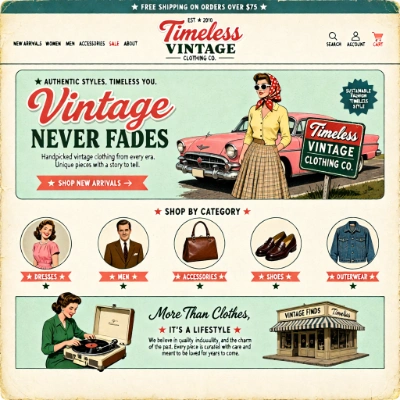
Download Workflow
Download JSON or search “Ming Image 0.1 Design” in Template Library
Steps to run the workflow
- Enter the Text to Image (Ming Image 0.1 Design) subgraph with the Enter subgraph button at the bottom of that node
- Write your prompt in the
promptfield, describing the layout section by section and putting any copy you want rendered inside quotes - Choose the canvas with the
ResolutionSelectornode: 2048 x 2048 gives the best quality, 1024 x 1024 is faster - Leave the prompt enhancer on to let Qwen3.8-27B expand your prompt, or switch
enable_PEoff to send your text exactly as typed - Queue the prompt. The decoded image appears in the
PreviewImagenode - For a transparent background, prepend one RGBA phrase to your prompt, for example
RGBA, 4-channel, transparent background
Model downloads
ming_image_0.1_design_int8_convrot.safetensors
Diffusion model for Ming Image 0.1 Design (loaded by the template).
ming_image_0.1_ling_mini_2.0_int8_convrot.safetensors
Text encoder for Ming Image 0.1 Design (loaded by the template).
qwen3.8_27b_w4a8.safetensors
Prompt-rewriting text encoder used by the prompt enhancer.
ming_image_vae_bf16.safetensors
VAE for Ming Image 0.1 Design.
_layer variants of both the diffusion model and the text encoder.
Prompt guide
- Text-to-image prompt rewriting: the official prompt structure and the rewriter system prompt that this workflow’s enhancer runs
- Transparent-background generation tip: the fixed RGBA phrases to prepend to a prompt
Get started
- Update ComfyUI to the latest version. Ming Image 0.1 support is in the newest ComfyUI builds
- Go to Template Library, search for
Ming Image 0.1 Design
Comfy Desktop and Comfy Cloud follow stable releases, so a model that is only supported in the newest ComfyUI build may not be available there yet.