메인 콘텐츠로 건너뛰기

모델의 기본 개념

ComfyUI에서 모델이란 실제로 워크플로우를 실행하는 가중치 파일을 말합니다. 여기에는 체크포인트, VAE, LoRA, ControlNet, 업스케일러 등이 포함됩니다. 앱 설치 파일은 작으며, 이러한 파일들은 기본적으로 포함되어 있지 않습니다. 보통 웹에서 다운로드한 후 ComfyUI/models/ 아래에 배치하거나(또는 템플릿의 안내를 따르세요) 캔버스에서 오른쪽 로더 노드에서 해당 파일을 선택하면 됩니다(이 노드들은 이름이 Load로 시작하는 경우가 많습니다).

ComfyUI에서 지원하는 모델

  • 내장된 1차 지원 범위는 의도적으로 제한되어 있지만, ComfyUI와 오픈소스 생태계가 발전함에 따라 점차 늘어납니다. 모델이 일급 지원을 받으면 보통 **워크플로우 템플릿 라이브러리**에 새로운 항목이 추가되며, 예상되는 그래프와 모델 조합이 표시됩니다.
  • 모든 체크포인트나 가중치 파일이 바로 사용 가능한 것은 아닙니다. 기본적으로 지원되는 모델과 그에 따른 일반적인 가중치 파일의 경우, ComfyUI를 최신 상태로 유지( /installation/update_comfyui)하고 템플릿 라이브러리( /interface/features/template)에 해당 워크플로우가 있는지 확인한 후에야 파일이 잘못된 위치에 있는 것이 아니라는 것을 확신할 수 있습니다.
  • 다수의 다른 모델은 커뮤니티의 맞춤형 노드를 통해 활성화됩니다. 경로, 로더 노드, 그래프 레이아웃은 이 페이지의 일반적인 ComfyUI/models/ 안내와 다를 수 있으므로 각 프로젝트의 README나 문서를 반드시 따르세요. ComfyUI는 매우 확장성이 뛰어나므로 구현 방식은 저자마다 다릅니다. 설치 및 문제 해결 방법은 맞춤형 노드 설치 방법을 참조하세요.

ComfyUI에서 모델 사용하기

  1. 파일을 올바른 위치에 가져오기Hugging Face, Civitai 또는 GitHub의 프로젝트 페이지와 같은 커뮤니티 사이트에서 다운로드한 후, 해당 유형의 하위 폴더(예: checkpoints, loras, vae)에 ComfyUI/models/ 아래에 넣으세요.
  2. 적합한 로더 노드 추가하기 — 해당 모델 유형(체크포인트, LoRA, VAE 등)에 맞는 로더를 선택하세요. 노드 목록에서 제목은 종종 Load로 시작합니다.
  3. 로더 노드에서 파일 선택하기 — 해당 로더 노드의 드롭다운 메뉴에서 파일을 선택하세요.
  4. 로더 노드를 나머지 그래프에 연결하기 — ComfyUI가 열려 있는 동안 직접 파일을 복사했다면, 앱을 재시작하거나 필요에 따라 새로고침하여 목록이 최신으로 업데이트되도록 하세요.

대용량 다운로드를 예상하세요

단일 생성 모델은 종종 수 기가바이트에 달합니다. 다운로드하거나 동기화할 때 디스크 공간과 시간을 충분히 준비하세요.

메인 체크포인트 외에도

메인 디퓨전 체크포인트는 많은 일을 하지만, 많은 워크플로우에서는 작은 보조 모델을 추가하기도 합니다. 예를 들면:
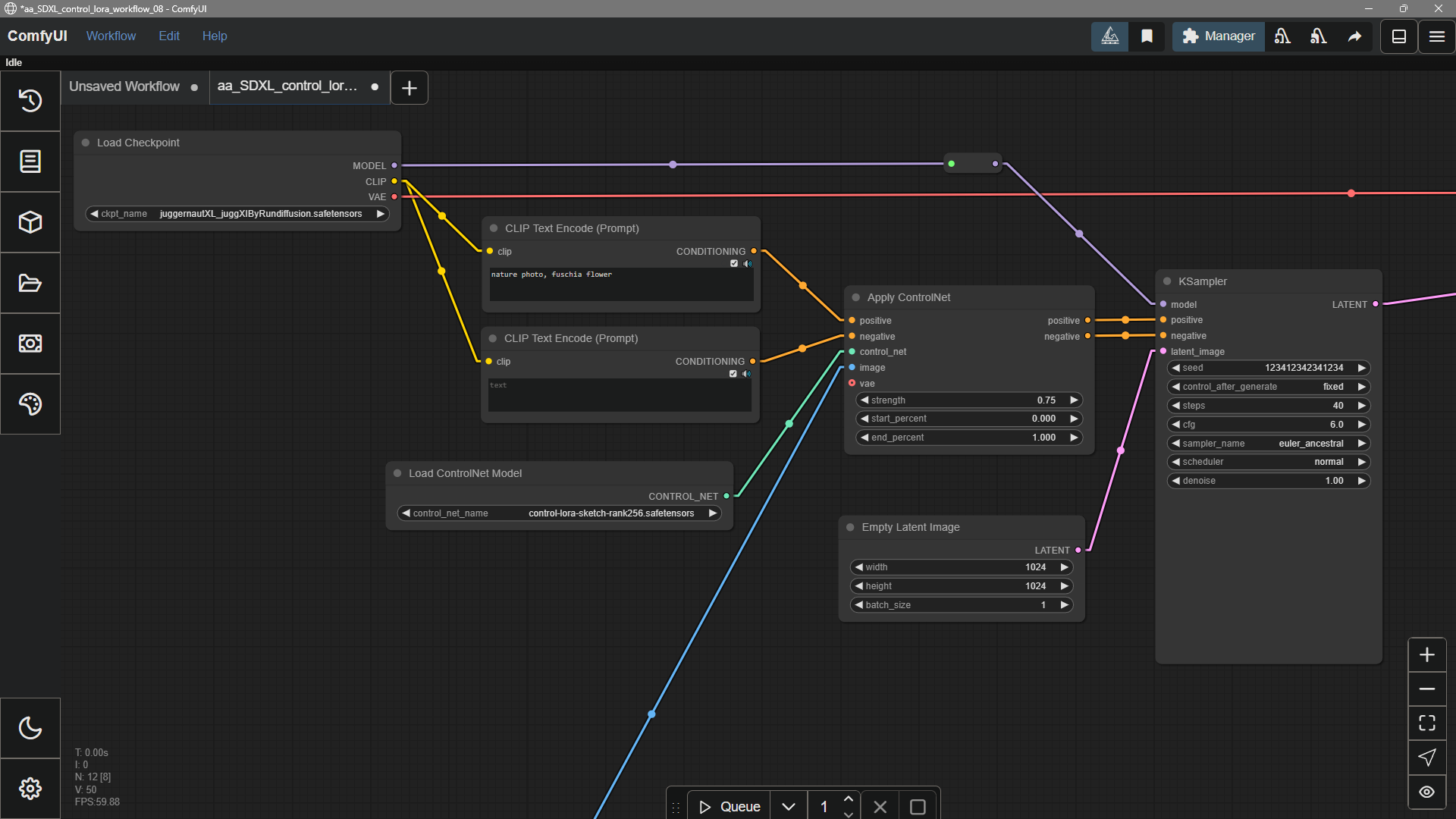
  • LoRA — 스타일, 캐릭터, 또는 컨셉에 맞게 조정된 경량 추가물
  • ControlNet — 에지, 깊이, 자세 등에서 추가적인 안내 제공
  • 인페인팅 — 기존 이미지 내부의 영역을 채우거나 교체
보조 모델

모델 제거하기

현재 UI에는 ‘제거’ 버튼이 없습니다. 모델을 삭제하려면, ComfyUI/models/ 폴더에서 해당 모델이 저장된 파일(또는 여러 파일)을 삭제하세요.

Adding Extra Model Paths

If you want to manage your model files outside of ComfyUI/models, you may have the following reasons:
  • You have multiple ComfyUI instances and want them to share model files to save disk space
  • You have different types of GUI programs (such as WebUI) and want them to use the same model files
  • Model files cannot be recognized or found
We provide a way to add extra model search paths via the extra_model_paths.yaml configuration file

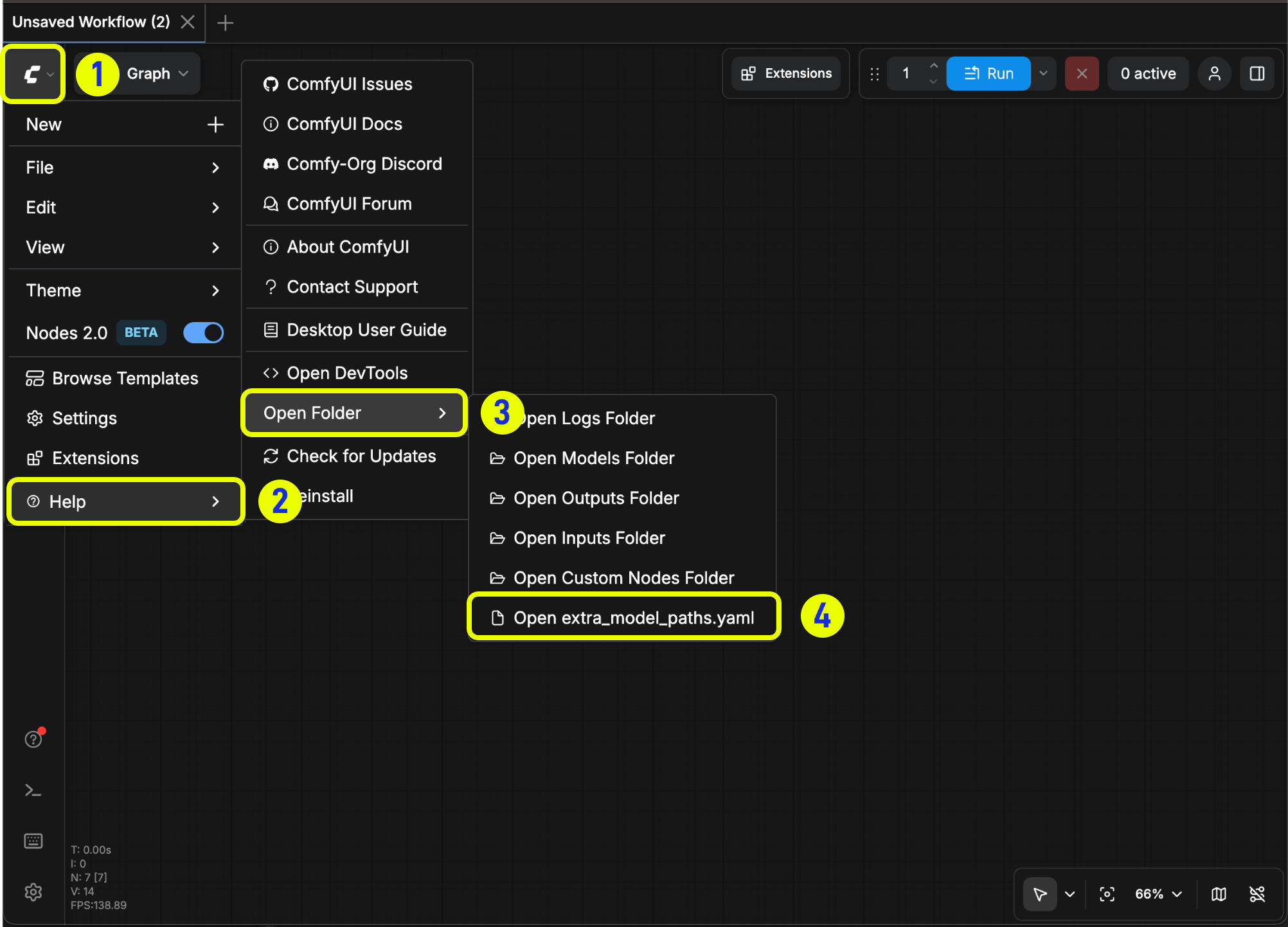
Open Config File

For the ComfyUI version such as portable and manual, you can find an example file named extra_model_paths.yaml.example in the root directory of ComfyUI:
ComfyUI/extra_model_paths.yaml.example
Copy and rename it to extra_model_paths.yaml for use. Keep it in ComfyUI’s root directory at ComfyUI/extra_model_paths.yaml. You can also find the config example file here
If the file does not exist, you can create it yourself with any text editor.

Example Structure

Suppose you want to add the following model paths to ComfyUI:
📁 YOUR_PATH/
  ├── 📁models/
  |   ├── 📁 loras/
  |   │   └── xxxxx.safetensors
  |   ├── 📁 checkpoints/
  |   │   └── xxxxx.safetensors
  |   ├── 📁 vae/
  |   │   └── xxxxx.safetensors
  |   └── 📁 controlnet/
  |       └── xxxxx.safetensors
Then you can configure the extra_model_paths.yaml file like below to let ComfyUI recognize the model paths on your device:
my_custom_config:
    base_path: YOUR_PATH
    loras: models/loras/
    checkpoints: models/checkpoints/
    vae: models/vae/
    controlnet: models/controlnet/
or
my_custom_config:
    base_path: YOUR_PATH/models/
    loras: loras
    checkpoints: checkpoints
    vae: vae
    controlnet: controlnet
For the desktop version, please add the configuration to the existing configuration path without overwriting the path configuration generated during installation. Please back up the corresponding file before modification, so that you can restore it when you make a mistake.
Or you can refer to the default extra_model_paths.yaml.example for more configuration options. After saving, you need to restart ComfyUI for the changes to take effect. Below is the original config example:
#Rename this to extra_model_paths.yaml and ComfyUI will load it


#config for a1111 ui
#all you have to do is change the base_path to where yours is installed
a111:
    base_path: path/to/stable-diffusion-webui/

    checkpoints: models/Stable-diffusion
    configs: models/Stable-diffusion
    vae: models/VAE
    loras: |
         models/Lora
         models/LyCORIS
    upscale_models: |
                  models/ESRGAN
                  models/RealESRGAN
                  models/SwinIR
    embeddings: embeddings
    hypernetworks: models/hypernetworks
    controlnet: models/ControlNet

#config for comfyui
#your base path should be either an existing comfy install or a central folder where you store all of your models, loras, etc.

#comfyui:
#     base_path: path/to/comfyui/
#     # You can use is_default to mark that these folders should be listed first, and used as the default dirs for eg downloads
#     #is_default: true
#     checkpoints: models/checkpoints/
#     clip: models/clip/
#     clip_vision: models/clip_vision/
#     configs: models/configs/
#     controlnet: models/controlnet/
#     diffusion_models: |
#                  models/diffusion_models
#                  models/unet
#     embeddings: models/embeddings/
#     loras: models/loras/
#     upscale_models: models/upscale_models/
#     vae: models/vae/

#other_ui:
#    base_path: path/to/ui
#    checkpoints: models/checkpoints
#    gligen: models/gligen
#    custom_nodes: path/custom_nodes

For example, if your WebUI is located at D:\stable-diffusion-webui\, you can modify the corresponding configuration to
a111:
    base_path: D:\stable-diffusion-webui\
    checkpoints: models/Stable-diffusion
    configs: models/Stable-diffusion
    vae: models/VAE
    loras: |
         models/Lora
         models/LyCORIS
    upscale_models: |
                  models/ESRGAN
                  models/RealESRGAN
                  models/SwinIR
    embeddings: embeddings
    hypernetworks: models/hypernetworks
    controlnet: models/ControlNet

Add Extra Custom Nodes Path

Besides adding external models, you can also add custom nodes paths that are not in the default path of ComfyUI
Please note that this will not change the default installation path of custom nodes, but will add an extra path search when starting ComfyUI. You still need to complete the installation of custom node dependencies in the corresponding environment to ensure the integrity of the running environment.
Below is a simple configuration example (MacOS), please modify it according to your actual situation and add it to the corresponding configuration file, save it and restart ComfyUI for the changes to take effect:
my_custom_nodes:
  custom_nodes: /Users/your_username/Documents/extra_custom_nodes

일반적인 문제

ComfyUI는 기본적으로 GGUF 형식 모델을 지원하지 않습니다. GGUF 모델을 사용하려면 ComfyUI-GGUF와 같은 커뮤니티 맞춤형 노드를 설치해야 합니다.
모델을 설치했는데 ComfyUI에서 찾을 수 없다면 다음 단계를 시도해 보세요:
  • 모델이 올바른 위치에 있는지 확인하세요:
    • ComfyUI 데스크톱: 도움말 메뉴 → 폴더 열기모델 폴더 열기를 클릭해 모델 설치 경로를 확인하세요.
    • 모델 파일이 올바른 하위 폴더(예: checkpoints, loras, vae)에 저장되었는지 확인하세요.
  • r 키를 눌러 노드 정의를 새로 고쳐 ComfyUI가 모델을 인식하도록 하세요.
  • ComfyUI를 재시작하세요.
  • 로더 노드에서 올바른 모델이 선택되었는지 확인하세요.

좀 더 자세한 배경 정보가 필요하신가요?

여기서 모델이란 네트워크가 학습한 내용을 담은 데이터 파일을 말합니다. 입력값(텍스트 및 노이즈 등)을 출력값(이미지 등)으로 변환할 수 있을 정도로 충분한 정보를 포함하고 있습니다. 이미지 워크플로우에서 흔히 사용되는 예는 디퓨전 체크포인트, CLIP와 같은 텍스트/이미지 인코더, 그리고 RealESRGAN과 같은 업스케일러입니다.
연구실과 오픈소스 프로젝트에서 제공하는 큰 기본 모델은 범용적으로 사용됩니다. 커뮤니티에서는 이를 튜닝하거나 새로운 체크포인트와 LoRA로 합쳐 특정 스타일에 더 잘 맞거나, 조금 더 가볍게 작동하거나, 새로운 동작을 추가하기도 합니다. 마치 Civitai나 Hugging Face에서 좋아하는 체크포인트를 고르는 것과 같은 원리입니다.