메인 콘텐츠로 건너뛰기
Ideogram 3.0은 Ideogram이 개발한 강력한 텍스트-to-이미지 모델로, 사실적인 품질과 정확한 텍스트 렌더링, 일관된 스타일 제어로 유명합니다. Ideogram V3 노드는 현재 두 가지 모드를 지원합니다:
  • 텍스트-to-이미지 모드
  • 이미지 편집 모드 (이미지와 마스크 입력이 모두 제공될 경우)
To use the Partner Nodes, you need to ensure that you are logged in properly and using a permitted network environment. Please refer to the Partner Nodes Overview section of the documentation to understand the specific requirements for using the Partner Nodes.
Make sure your ComfyUI is updated.Workflows in this guide can be found in the Workflow Templates. If you can’t find them in the template, your ComfyUI may be outdated. (Desktop version’s update will delay sometime)If nodes are missing when loading a workflow, possible reasons:
  1. You are not using the latest ComfyUI version (Nightly version)
  2. Some nodes failed to import at startup

Ideogram 3.0 노드 문서

다음 문서를 확인하여 노드의 세부적인 매개변수 설정을 살펴보세요:

Ideogram 3.0 파트너 노드 텍스트-to-이미지 모드

Ideogram V3를 이미지 및 마스크 입력 없이 사용할 경우, 노드는 텍스트-to-이미지 모드로 작동합니다.

1. 워크플로우 파일 다운로드

다음 파일을 다운로드하고 ComfyUI로 드래그하여 워크플로우를 로드하세요: Ideogram 3.0 ComfyUI 워크플로우

2. 워크플로우 단계 완료하기

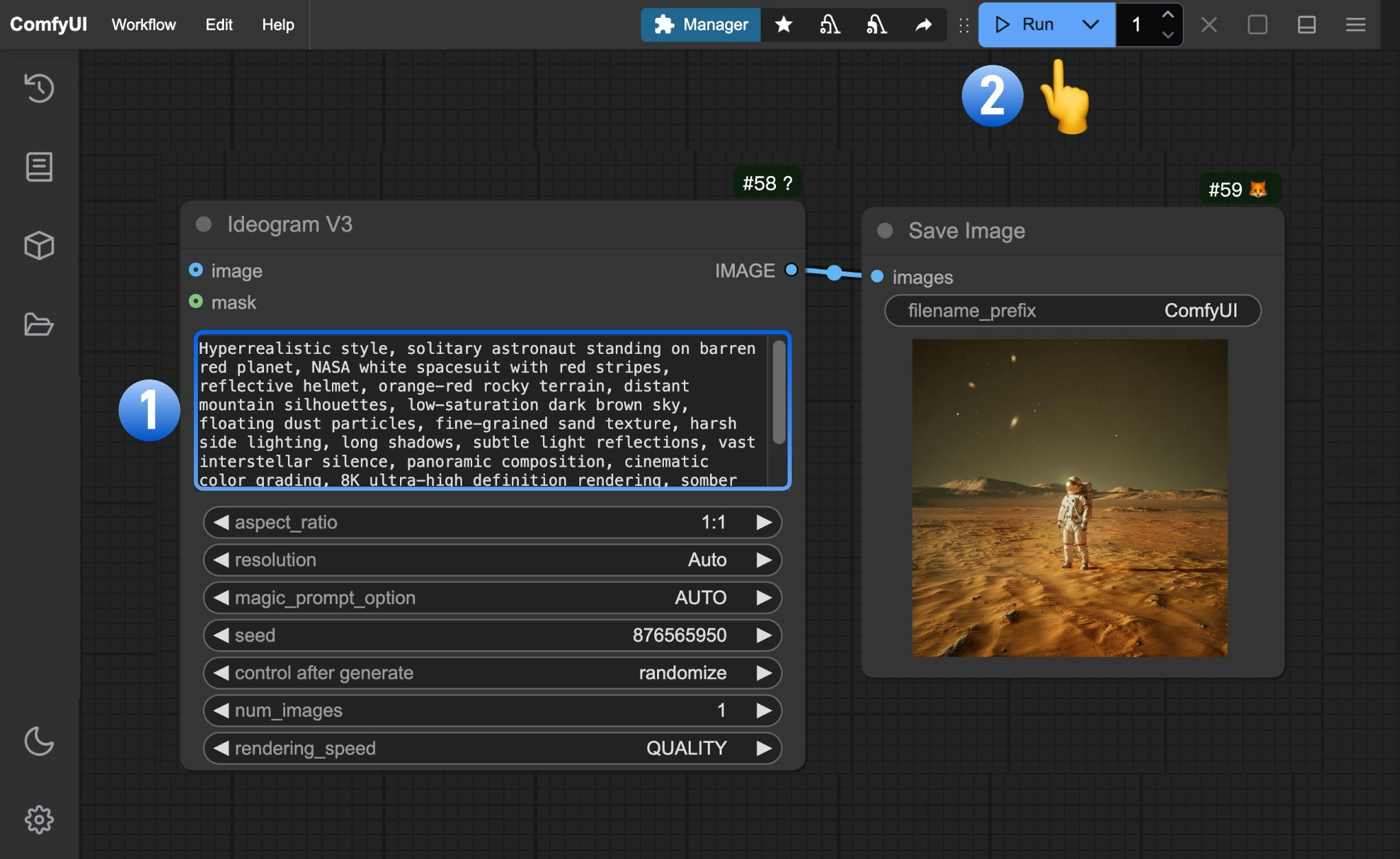
Ideogram 3.0 워크플로우 단계 번호가 표시된 단계를 따라 기본 워크플로우를 완료하세요:
  1. Ideogram V3 노드의 prompt 필드에 이미지 설명을 입력하세요.
  2. Run을 클릭하거나 단축키 Ctrl(cmd) + Enter를 사용해 이미지를 생성하세요.
  3. API가 결과를 반환한 후, Save Image 노드에서 생성된 이미지를 확인하세요. 이미지는 ComfyUI/output/ 디렉터리에 저장됩니다.

Ideogram 3.0 파트너 노드 이미지 편집 모드

[업데이트 예정]