

ComfyUI Depth Anything 3 Introduction
Depth Anything 3 (DA3), from ByteDance Seed, is a vision transformer that recovers spatially consistent geometry from arbitrary visual inputs, with or without known camera poses. A single plain DINO encoder and unified depth-ray representation let one model family cover monocular depth, multi-view depth, camera pose estimation, and 3D reconstruction. Key capabilities:- Unified monocular & multi-view depth: estimate depth from a single image or multiple views
- Camera pose estimation: recover camera positions from unordered image sets
- 3D reconstruction from multi-view inputs
- Video depth estimation: per-frame depth sequences for video inputs
- Multiple model variants: Small, Base, Mono/Metric Large
Model Installation
Download the Depth Anything 3 checkpoint(s) and save them to the corresponding ComfyUI folder:- Small (depth_anything_3_small.safetensors): Lightweight, fast inference
- Base (depth_anything_3_base.safetensors): Balanced performance
- Mono-Large (depth_anything_3_mono_large.safetensors): Best for monocular depth, includes sky detection
- Metric-Large (depth_anything_3_metric_large.safetensors): Metric scale depth in metres, includes sky detection
Example Workflows
Depth Anything 3: Image Depth Estimation
Upload one image and generate a depth map using Depth Anything 3. View a side-by-side comparison of the original image and depth output.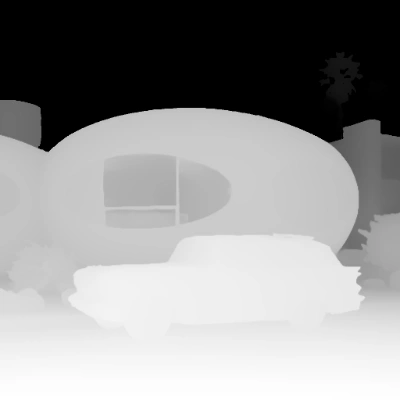
Run on Comfy Cloud
Open in Comfy Cloud
Download Workflow
Download JSON or search “Depth Anything 3: Image Depth Estimation” in Template Library
LoadImage node:
retro_futuristic_home.png
LoadImage node 85 · retro_futuristic_home.png
Steps to Run
- LoadImage: load your input image
- LoadDA3Model: select a Depth Anything 3 variant
- Run: click Queue or use
Cmd+Enter - The workflow outputs a depth map and side-by-side comparison
Learn about Subgraph
This workflow uses Subgraph nodes for modular processing. Check out the Subgraph documentation to learn how to customize and extend the workflow.
Depth Anything 3: Video Depth Estimation
Upload a video to generate a per-frame depth sequence. Inside the subgraph, GetVideoComponents splits the input video into frames, LoadDA3Model loads the model, and SetVideoComponents reassembles the depth frames back into a video output.
Run on Comfy Cloud
Open in Comfy Cloud
Download Workflow
Download JSON or search “Depth Anything 3: Video Depth Estimation” in Template Library
LoadVideo node:
empty_room_assembly.mp4
LoadVideo node 87 · empty_room_assembly.mp4Steps to Run
- LoadVideo: load your input video
- Select Model: choose between Small, Base, Mono-Large, or Metric-Large
- Run: click Queue or use
Cmd+Enter - The workflow outputs a video with per-frame depth maps
Learn about Subgraph
This workflow uses Subgraph nodes for modular processing. Check out the Subgraph documentation to learn how to customize and extend the workflow.
Model Variants
- Small and Base use the
dualdpthead type with confidence estimation and camera decoder support for multi-view applications. - Mono-Large and Metric-Large use the
dpthead type with sky detection. Metric-Large outputs raw depth in metres.
Community Resources
- Depth Anything 3 GitHub (ByteDance-Seed): Research paper and code
- Comfy-Org/Depth-Anything-3: Official ComfyUI model weights