

Model Installation
Each workflow uses four files: the shared base diffusion model, plus a task-specific LoRA, VAE, and conditioning embedding. The three tasks use different LoRA, VAE, and conditioning files, so each workflow section below links the exact files it needs. The base diffusion model is shared across all three workflows:Diffusion Model
qwen_image_edit_2509_int8_convrot.safetensors → ComfyUI/models/diffusion_models/
Depth Estimation
Predict a depth map from a single image. The decoded prediction is normalized so that near surfaces appear bright.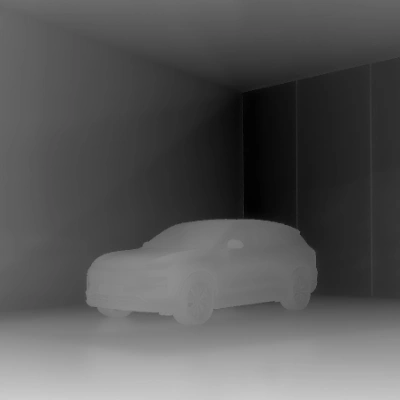
Run on Comfy Cloud
Open in Comfy Cloud
Download Workflow
Download JSON or search “Depth Estimation: Marigold V2” in Template Library
LoadImage node:
ev_suv_gold_desert_pavilion.png
LoadImage node · ev_suv_gold_desert_pavilion.png1. Steps to Run
- Load your input image in the
LoadImagenode - Queue the workflow: the base model runs with the depth LoRA, and the Marigold V2 Post-Process node normalizes the decoded prediction
- Save or preview the resulting depth map
2. Model Downloads
Depth LoRA
marigold_v2_depth_log_stage2.safetensors → ComfyUI/models/loras/
Depth VAE
marigold_v2_depth_log_stage2_vae.safetensors → ComfyUI/models/vae/
Depth conditioning embedding
marigold_v2_depth_conditioning.safetensors → ComfyUI/models/embeddings/
Surface Normal Estimation
Predict per-pixel surface normals from a single image. The output maps each pixel to the direction the surface faces, useful for relighting and geometry analysis.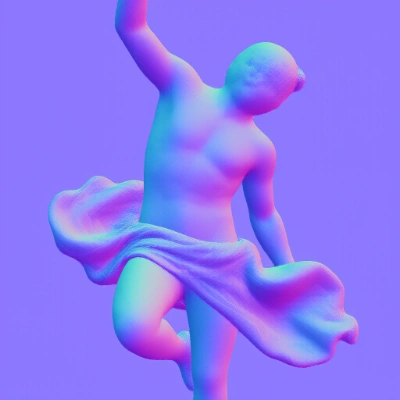
Run on Comfy Cloud
Open in Comfy Cloud
Download Workflow
Download JSON or search “Surface Normal Estimation: Marigold V2” in Template Library
LoadImage node:
greek_statue_orange_cloth.png
LoadImage node · greek_statue_orange_cloth.png1. Steps to Run
- Load your input image in the
LoadImagenode - Queue the workflow with the normals LoRA loaded
- Save or preview the resulting normal map
2. Model Downloads
Normals LoRA
marigold_v2_normals.safetensors → ComfyUI/models/loras/
Normals VAE
marigold_v2_normals_vae.safetensors → ComfyUI/models/vae/
Normals conditioning embedding
marigold_v2_normals_conditioning.safetensors → ComfyUI/models/embeddings/
Albedo Estimation
Predict the albedo (intrinsic color) of a single image, separating material color from lighting and shading. The output is converted to sRGB by the Marigold V2 Post-Process node.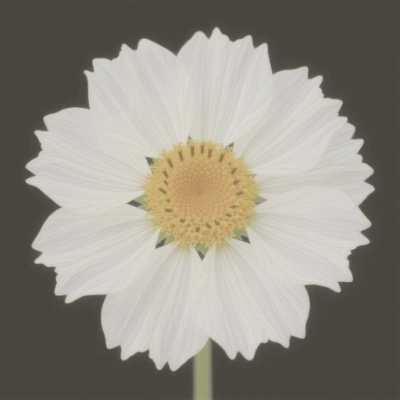
Run on Comfy Cloud
Open in Comfy Cloud
Download Workflow
Download JSON or search “Albedo Estimation: Marigold V2” in Template Library
LoadImage node:
flower_with_texture.png
LoadImage node · flower_with_texture.png1. Steps to Run
- Load your input image in the
LoadImagenode - Queue the workflow with the albedo LoRA loaded
- Save or preview the resulting albedo image
2. Model Downloads
Albedo LoRA
marigold_v2_albedo.safetensors → ComfyUI/models/loras/
Albedo VAE
marigold_v2_albedo_vae.safetensors → ComfyUI/models/vae/
Albedo conditioning embedding
marigold_v2_albedo_conditioning.safetensors → ComfyUI/models/embeddings/
Marigold V2 Post-Process Node
Every workflow ends in the Marigold V2 Post-Process node, which turns the raw decoded prediction into a viewable image. The prediction option must match the task:- depth: normalizes the prediction so near surfaces are bright
- normals: maps raw values to unit surface normals
- albedo: converts the prediction to sRGB