

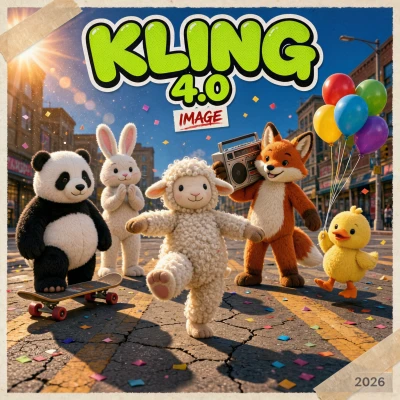
Kling 4.0 Image renders stills up to 8K from a prompt, with up to ten reference images and an optional set of related variations. Kling 4.0 Long Image renders one tall page for a website or a product listing.
Three templates cover the workflows below.
Kling 4.0: Text to Image
Renders one image from a prompt at 2K, 4K, or 8K, in eight aspect ratios orauto to follow the reference images. Connect up to ten reference images and name them in the prompt as @Image1 onward to steer the result. Set series_amount to auto or a number from 2 to 10 to get a set of related images that keep the same characters and style.
Run on Comfy Cloud
Open in Comfy Cloud
Download Workflow
Download JSON or search “Kling 4.0: Text to Image” in Template Library
Kling 4.0: Image Edit
Restyles an image while keeping what must not change. Connect the photo as the first reference image, then describe both the change and what stays: the template keeps the face, the framing, and the backdrop, and changes only the hair, makeup, and outfit. The node is the same as Text to Image, with a reference image connected.
Run on Comfy Cloud
Open in Comfy Cloud
Download Workflow
Download JSON or search “Kling 4.0: Image Edit” in Template Library
kling4_image_edit_portrait.png
Load into the first reference image slot ·
@Image1Kling 4.0: Long Image
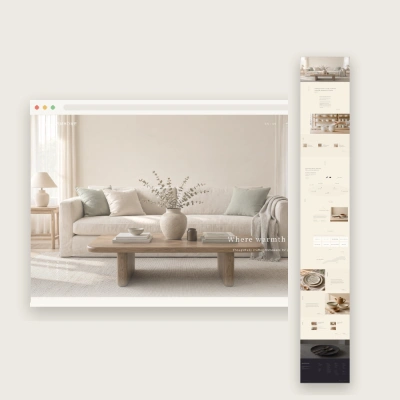
Renders one very tall image in a single pass. Pick the kind of page withskill:
webpage: optional style and subject images, addressed as@Image1and@Image2. Describe the page band by band, and state the language of the visible copy.ecommerce: one to three product images, addressed as@Image1onward, and alengthofshort,medium, orlong.
Run on Comfy Cloud
Open in Comfy Cloud
Download Workflow
Download JSON or search “Kling 4.0: Long Image (Webpage)” in Template Library
Input limits
- Images: at least 300 x 300 px, aspect ratio between 2:5 and 5:2.
Kling 4.0 Imagetakes up to ten reference images, andKling 4.0 Long Imagetakes one to three product images inecommercemode. - In the image nodes, a prompt that names
@ImageNbeyond the number of connected inputs fails the run. In thewebpageskill,@Image1isstyle_imageand@Image2issubject_image, so@Image2still works when only the subject image is connected.