

关于 Wan2.1 Fun Camera
Wan2.1 Fun Camera 是阿里团队推出的视频生成项目,专注于通过摄像机运动来控制视频生成效果。 模型权重下载地址: 代码仓库:VideoX-Fun 目前 ComfyUI 已原生支持了 Wan2.1 Fun Camera 模型。相关模型安装
这些模型你仅需要安装一次,另外在对应的工作流图片中也包含了模型下载信息,你可以选择你喜欢的方式下载模型。 下面的所有模型你可以在 Wan_2.1_ComfyUI_repackaged 找到 Diffusion Models 选择 1.3B 或 14B: 下面的模型,如果你使用过 Wan2.1 的相关模型,那么你应该已经有了下面的模型,如果没有,请下载下面的模型: Text Encoders 选择其中一个: VAE CLIP Vision 文件保存位置:ComfyUI Wan2.1 Fun Camera 1.3B Workflow
Wan 2.1 Fun Camera 1.3B
Generate dynamic videos with cinematic camera movements using Wan 2.1 Fun Camera 1.3B model.
Run on Comfy Cloud
Open in Comfy Cloud
Download Workflow
Download JSON or search “Wan 2.1 Fun Camera 1.3B” in Template Library
If you want to use the 14B version, simply replace the model file with the 14B version, but please be aware of the VRAM requirements.
LoadImage node:
video_wan2.1_fun_camera_v1.1_1.3B_start_image.jpg
LoadImage node 52 · video_wan2.1_fun_camera_v1.1_1.3B_start_image.jpg
3. Complete the Workflow Step by Step
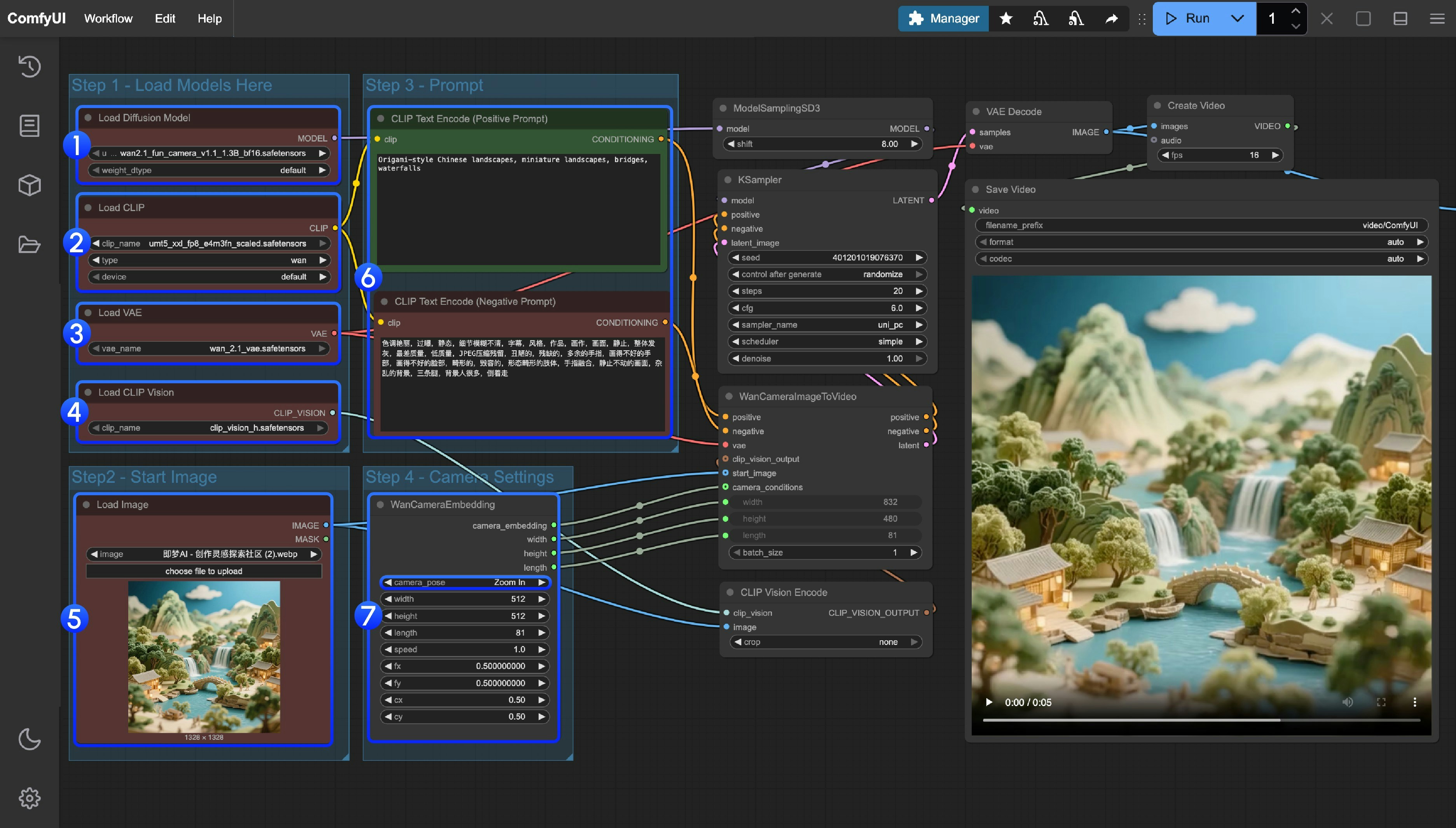
- Ensure the correct version of model file is loaded:
- 1.3B version:
wan2.1_fun_camera_v1.1_1.3B_bf16.safetensors - 14B version:
wan2.1_fun_camera_v1.1_14B_bf16.safetensors
- 1.3B version:
- Ensure the
Load CLIPnode has loadedumt5_xxl_fp8_e4m3fn_scaled.safetensors - Ensure the
Load VAEnode has loadedwan_2.1_vae.safetensors - Ensure the
Load CLIP Visionnode has loadedclip_vision_h.safetensors - Upload the starting frame to the
Load Imagenode - Modify the Prompt if you’re using your own input image
- Set camera motion in the
WanCameraEmbeddingnode - Click the
Runbutton or use the shortcutCtrl(cmd) + Enterto execute generation
ComfyUI Wan2.1 Fun Camera 14B 工作流
Wan 2.1 Fun Camera 14B
使用完整的 14B 模型生成具有高级相机控制的高质量视频。
在 Comfy Cloud 上运行
在 Comfy Cloud 中打开
下载工作流
下载 JSON,或在模板库中搜索 “Wan 2.1 Fun Camera 14B”
LoadImage 节点:
video_wan2.1_fun_camera_v1.1_14B_start_image.jpg
LoadImage 节点 52 · video_wan2.1_fun_camera_v1.1_14B_start_image.jpg
性能参考
1.3B 版本:- 512×512 RTX 4090 生成 81 帧约需 72 秒
- RTX4090 24GB 显存在生成 512×512 分辨率时可能会出现显存不足,在 A100 上运行尺寸过大时也出现过显存不足的情况