

- Inherent Editability: Each layer can be independently manipulated without affecting other content
- High-Fidelity Elementary Operations: Supports resizing, repositioning, and recoloring with physical isolation of semantic components
- Variable-Layer Decomposition: Not limited to a fixed number of layers - decompose into 3, 4, 8, or more layers as needed
- Recursive Decomposition: Any layer can be further decomposed, enabling infinite decomposition depth
Qwen-Image-Layered workflow
Qwen-Image-Layered Decomposition
Decompose an image into editable RGBA layers for recolor, replace, resize, and reposition workflows.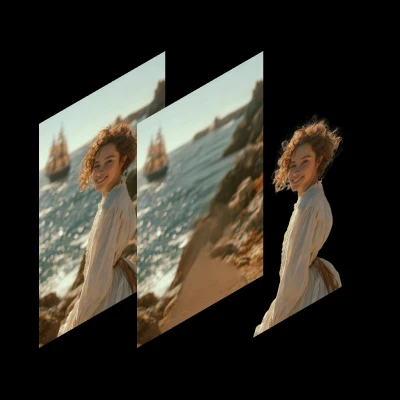
Download Workflow
Download the JSON workflow file
Run on Comfy Cloud
Run ComfyUI online with zero setup
LoadImage node 74:
coastal_smiling_woman.png
LoadImage node 74 · coastal_smiling_woman.png
Model links
text_encoders diffusion_models vae Model Storage LocationFP8 version
By default we are using bf16, which requires high VRAM. For lower VRAM usage, you can use the fp8 version: Then update the Load Diffusion model node inside the Subgraph to use it.Layers and output
The number of layers is set by thelayers widget on the Empty Qwen Image Layered Latent node inside the Subgraph.
This model regenerates the full image as well as the layers, so a generation always decodes to layers + 1 images:
The first image is the full image, not a layer. The image to layers workflow drops it automatically with a
LatentCut node (dim t, index 1) before the batch split, so the template outputs layers images. If you build a custom graph without that node, discard the first image when you only want the layers. layers accepts 0, which gives you that image on its own.
Compositing all of the layers back together recreates the full image. Use it as a check: if stacking the layers does not reproduce the first image, the decomposition did not do what you wanted.
How the layers become separate images
The Empty Qwen Image Layered Latent node allocates a 5D latent shaped[batch_size, 16, layers + 1, height // 8, width // 8]. The layers sit on the third axis, the same temporal axis that video models use for frames. The LatentCutToBatch node with dim set to t moves that axis into the batch dimension, so after VAE Decode each layer is a separate image in the batch. The template inserts a LatentCut node (dim t, index 1) before LatentCutToBatch to drop the full-image entry, so the decoded batch contains only the layers.
A layer’s position in the stack is therefore its index in the batch, counting from the full image at index 0. There is no z-index field and no per-layer metadata carrying that order, so reordering or filtering the batch reorders the layers.
The Qwen-Image-Layered VAE decodes to 4 channels, so the decoded layers carry an alpha channel.